Salesforce Acquisitions in 2026: Building the Agentic Customer Stack

Salesforce Ventures Portfolio and Ecosystem Acquisitions 2026

Salesforce has been busy in 2026. Its acquisitions this year span customer service, voice, engagement, research, and analytics, and together they could help turn Agentforce into a much broader customer platform, one that can understand what a customer wants, decide what to do next, and take action across the business. From our perspective at Navirum (a Salesforce consulting company focused on financial services), the logic is pretty clear. Salesforce is betting that its data, distribution, and workflow footprint can bring a lot of scattered AI capabilities into one platform and create a new stream of usage-based revenue. It is a credible strategy, but the hard part will be integration, customer economics, and earning trust in regulated environments.

Information current as of November 3, 2026.

Salesforce Acquisitions in 2026 and Where They Stand

Here are the biggest deals and where they stand. One important detail: Fin has closed, while several of the other transactions are still subject to closing conditions as of this article’s publication date.

  • Fin (completed): Salesforce completed its approximately $3.6 billion acquisition of Fin, formerly Intercom, on September 10, 2026. Fin adds a packaged customer-service agent, proprietary models, and an installed base of more than 30,000 companies.
  • Cresta (definitive agreement): Salesforce announced an agreement on November 2, 2026 to acquire Cresta, a voice-first customer-experience platform. The reported value is approximately $2.7 billion, and Salesforce expects the transaction to close in the first quarter of its fiscal 2028.
  • Braze (definitive agreement): Salesforce agreed to acquire Braze for approximately $5.66 billion in enterprise value. The transaction would add real-time, cross-channel engagement and AI decisioning to Marketing Cloud and the broader Customer 360 architecture.
  • Listen Labs (definitive agreement): Listen Labs brings AI-assisted customer research, interview synthesis, and human-simulation capabilities. Salesforce expects the transaction to close in the fourth quarter of fiscal 2027. Neither company disclosed a price; Business Insider reported talks at about $2 billion.
  • Loops (definitive agreement): Loops continuously monitors business performance, explains changes in key metrics, and recommends action. Salesforce plans to bring its technology and talent into Tableau after closing.
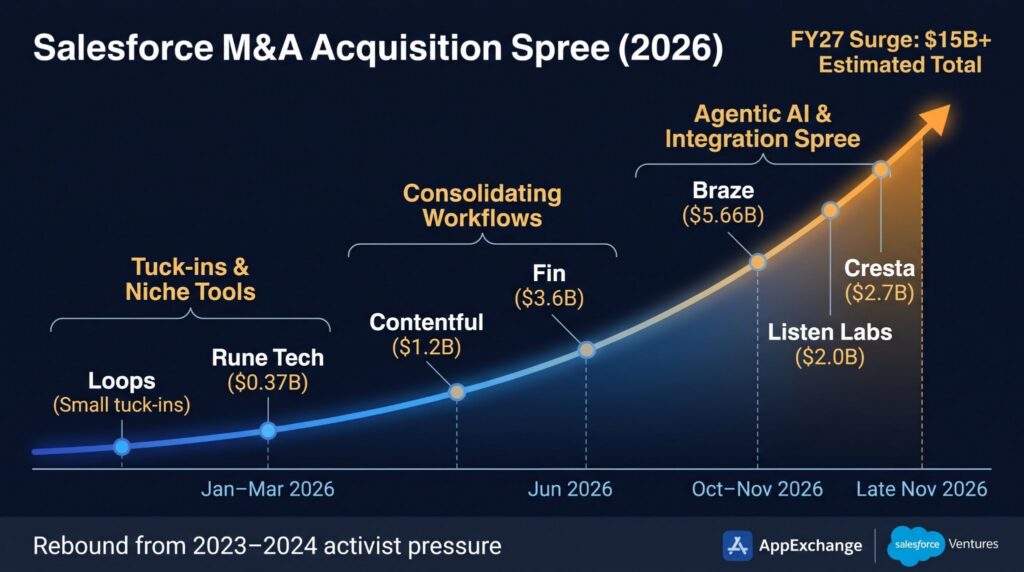
Salesforce M&A Acquisition Spree 2026

Put the deals side by side and a clear pattern emerges. Salesforce wants to own more of the journey from customer signal to insight, decision, and action. This is bigger than adding a few AI features; it is an attempt to make Agentforce the execution layer across service, marketing, analytics, and data.
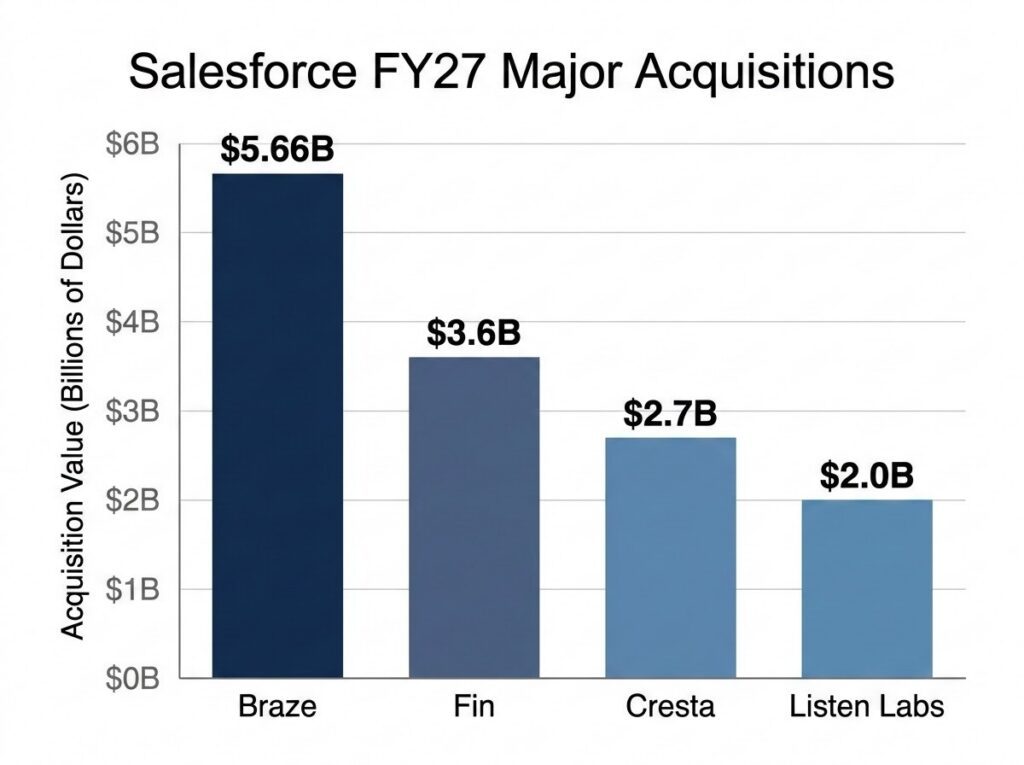
Salesforce FY27 Major Acquisitions Deal Values

What Salesforce Is Building

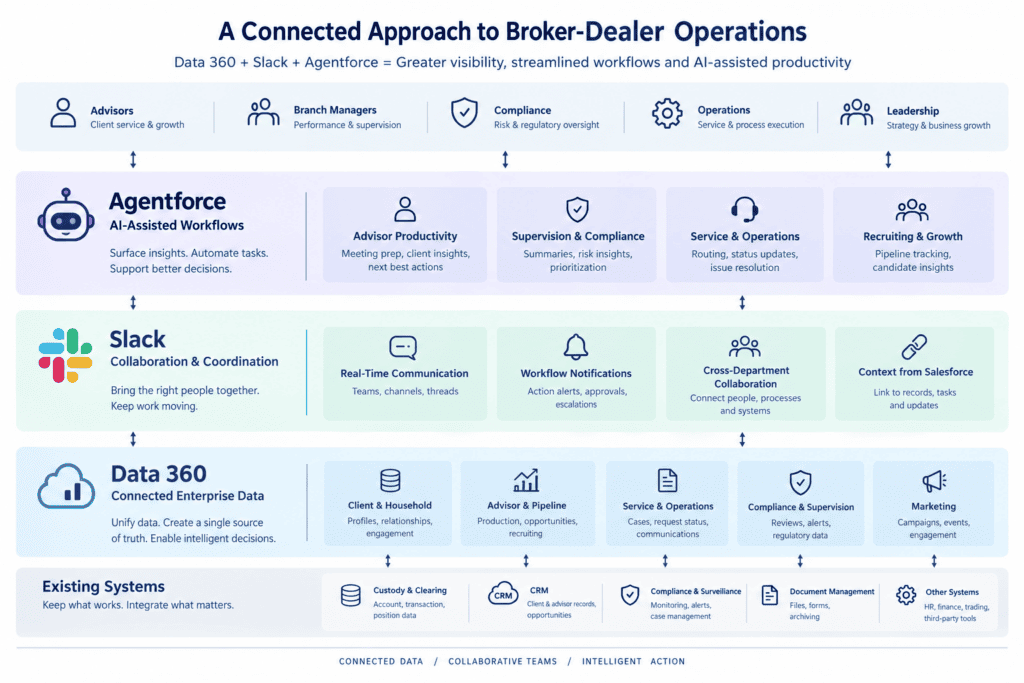
The easiest way to make sense of the strategy is to look at three connected layers. The individual products matter, but the real value will come from whether Salesforce can make them work together as one system.

1. The interaction layer

Fin and Cresta take Salesforce deeper into the actual customer conversation across chat, email, messaging, and voice. That brings Agentforce closer to the moment when someone asks for help, signals an intent, or creates a service risk. It also raises the bar for clean handoffs, reliable records, quality controls, and human escalation.

2. The intelligence layer

Braze, Listen Labs, and Loops bring different kinds of intelligence to the mix: real-time engagement signals, qualitative customer insight, and continuous performance analysis. Paired with Data 360, Tableau, and Informatica, which Salesforce finished acquiring in November 2025 for about $8 billion, they could help Salesforce move beyond storing customer history and get much better at explaining what is happening, as well as what to do next.

3. The execution layer

Agentforce is where all of this is supposed to come together. The idea is that specialized agents can share customer context, call approved workflows, and coordinate actions across clouds instead of relying on one general-purpose chatbot. Salesforce is also beginning to build more of the intelligence itself. Koa, developed with NVIDIA and optimized for CRM reasoning, is designed to handle multi-step enterprise workflows inside Salesforce’s trust boundary. If it performs as promised, it could give Salesforce more control over model quality, cost, and data handling. It is an appealing vision, but it will only work if the orchestration, permissions, monitoring, and cost controls are dependable.
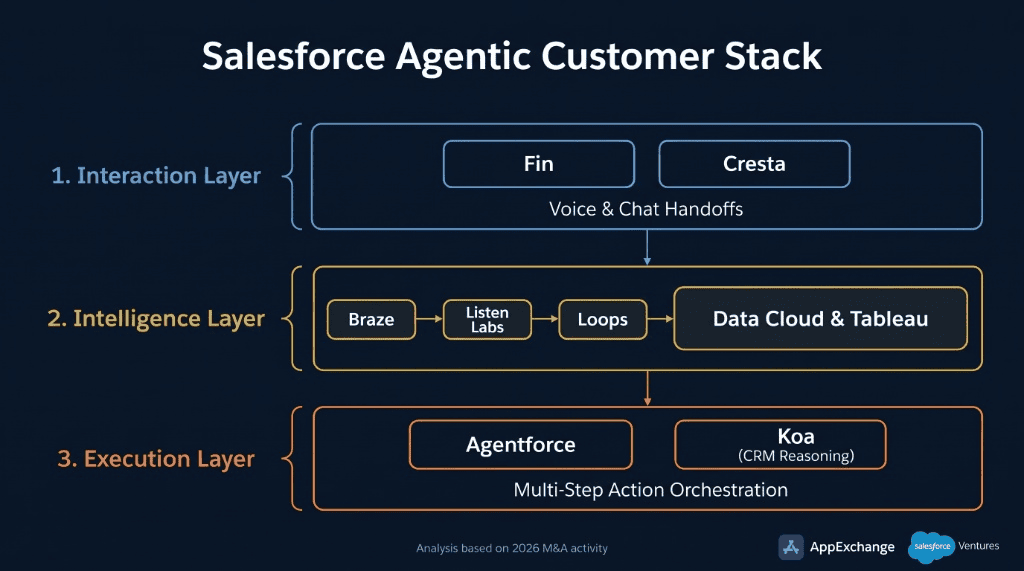
Salesforce FY27 Connected Layers

What This Means for Salesforce Customers

What Changes for Customers

For customers, the direction is pretty clear: Salesforce wants more of the AI value chain to sit inside its own platform. Customers can already connect models from providers such as Anthropic, Google, and OpenAI, but those calls are still subject to Salesforce usage and billing rules. That gives Salesforce a clear incentive to make its platform more useful and cost-effective rather than simply passing through the expense of general-purpose LLMs. The trade-off is complexity. As the platform expands across data, models, agents, service, marketing, analytics, voice, and governance, small and mid-sized businesses may find the growing feature surface harder to understand, configure, and control.

  • More utility from the platform: Salesforce is bringing more data, service, marketing, analytics, and AI capabilities into one stack, which could help customers get more value from the information and workflows they already have.
  • More choice, but not necessarily simpler pricing: Customers can use Salesforce-managed, external, or custom models, but they still have to understand Flex Credits, conversations, licenses, Data 360 usage, and implementation costs.
  • A broader stack can be harder to run: Large enterprises may value the breadth, but smaller businesses risk paying for—or having to govern—capabilities they do not really need. For many customers, getting the most from Salesforce will depend on a clear roadmap and the right implementation or managed-service partner to help configure, govern, optimize, and support the platform.

What to Do Now

None of these deals will change your Salesforce org overnight, but a few decisions are worth making before the integrations land.

  • Time renewals around Salesforce’s fiscal year-end: Salesforce’s fiscal year ends January 31. Before you sign a renewal or expansion, ask how acquired products such as Fin, Braze, and Cresta are likely to be packaged, and keep enough flexibility to adopt them later without renegotiating from scratch.
  • Map where you overlap: List the tools you already pay for in chat, service, voice, marketing engagement, customer research, and analytics. If you use Intercom, Braze, or a voice-AI vendor today, note renewal dates and data dependencies so you can decide whether to consolidate on your own timeline.
  • Put cost controls in place before you scale: Set Flex Credit budgets, track consumption in Digital Wallet, and name an owner who reviews usage every month. Pilot usage rarely predicts production volumes.
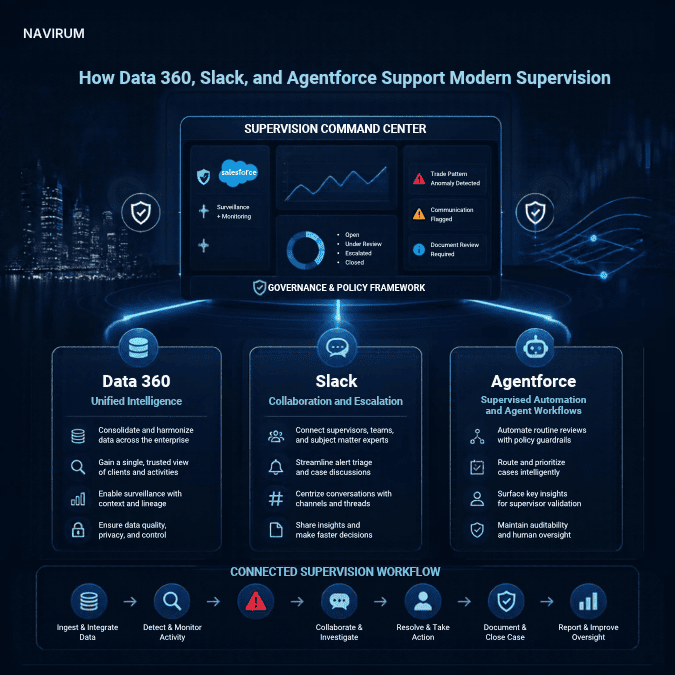
  • Settle governance before agents go live: Decide which data agents can use, what permissions they get, how actions are logged, and when a human steps in. Regulated firms should read the financial services section below for the supervisory and recordkeeping side.
  • Prove one workflow first: Start with a single measurable process, such as service case triage or post-meeting client follow-up, and show the result before adding more agents or clouds.

Why Salesforce May Have an Edge

Salesforce has more going for it than a big balance sheet. AppExchange, Salesforce Ventures, and a large enterprise customer base give it a useful view into emerging technologies and how customers are actually adopting them. A startup that already works well with Salesforce may also be easier to integrate than a product coming from completely outside the ecosystem.

The Ventures portfolio gives Salesforce another window into where enterprise AI is heading. Investments in companies such as Anthropic and Cohere do not mean an acquisition or native integration is inevitable. They are better read as strategic possibilities—and as clues about what Salesforce thinks will matter, including model choice, retrieval, safety, and enterprise deployment.

John Somorjai oversees both strategic transactions and Salesforce Ventures, which should make it easier to connect investment themes with corporate development. That does not mean there is a neat formula in which every venture bet becomes an acquisition; that part remains our interpretation of the broader possibilities.
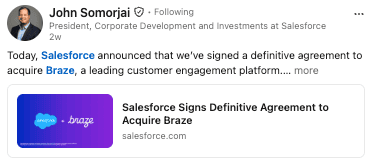
John Somorjai Announcement on Salesforce Acquiring Braze

Why Investors Care

This is where the story gets interesting for investors. Salesforce already has a huge installed base using its data, workflows, identity model, and commercial agreements. If the integrations work, it can bring the acquired capabilities to those customers faster, encourage more cross-cloud adoption, and make agentic workflows easier to deploy.

Pricing is the other piece of the puzzle. Salesforce now sells Agentforce through conversation-based pricing, Flex Credits, and user-based options. That gives revenue a chance to grow with activity rather than employee count alone, but it also means customers have to watch the cost of every agent action, conversation, prompt, translation, and voice workflow.

So the real question is not simply whether Agentforce adoption grows. It is whether customers keep using it, expand their commitments, and see enough value to justify the spend. Digital Wallet visibility and practical cost controls may matter almost as much as the headline price of an individual action.

How Has Salesforce Stock Held Up?

So how has Salesforce stock actually held up during all this dealmaking? Not brilliantly, but the peer comparison makes the picture a bit more interesting. CRM is down roughly 13% over the past 12 months (as of November 2), versus about 51% for HubSpot and 42% for ServiceNow, while Microsoft has been much steadier at around 2% down. Salesforce still closed at $226.18 on November 2, well below its $269.11 52-week high, but about 55% above the $146.32 low it hit in June. So Salesforce has not exactly been a standout, but it has held up much better than some high-growth SaaS peers. The market seems less worried than it was earlier in the year, though it is not fully sold on the acquisition-and-Agentforce story yet; investors still want to see the deals translate into real usage, revenue growth, and healthy margins.
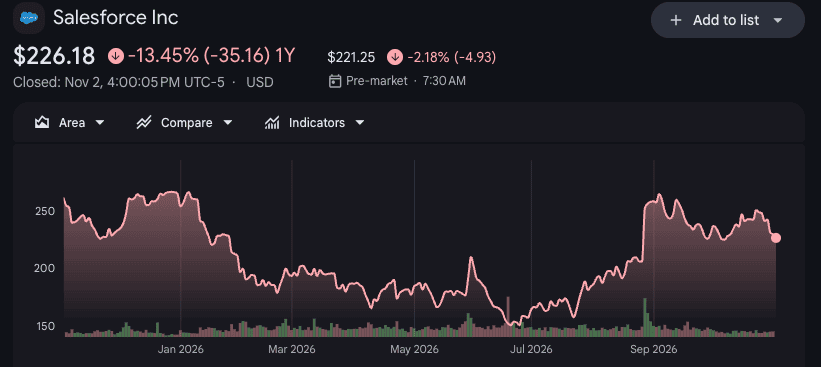
12 month stock price [Google Finance, Nov 2026]

Where This Could Get Messy

Of course, buying companies is easier than integrating them. Salesforce still has to sort through overlapping products, preserve what made the acquired companies useful in the first place, and make the finished experience feel like one platform rather than a collection of parts.

  • Product overlap: Fin, Cresta, Agentforce, Service Cloud, and existing partner products may compete for similar customer-service budgets.
  • Customer economics: Consumption pricing can align cost with value, but high-volume activity can also create forecasting difficulty and resistance.
  • Platform concentration: Consolidation may reduce the number of vendors while increasing dependence on one strategic provider.
  • Execution risk: Large acquisitions can distract management, slow product decisions, or dilute specialist cultures.
  • Regulatory exposure: More autonomous actions increase the consequences of inaccurate outputs, excessive permissions, weak recordkeeping, and failed escalation.

So we would not treat this as an automatic win. Salesforce has the reach and platform assets to build a differentiated agentic stack, but it still has to show that customers get better outcomes, manageable costs, and simpler operations.

What This Means for Financial Services Firms

This is where Navirum’s day-to-day lens really matters. Financial services is not the only market for this strategy, but it is one of the best tests of whether the technology is truly enterprise-ready.

Banks, insurers, asset managers, and wealth firms have demanding requirements for supervision, privacy, recordkeeping, access control, and third-party risk.

Supervision and Recordkeeping

Voice and service agents can produce a huge volume of recommendations and customer communications. In financial services, that activity still has to fit within familiar supervisory expectations. FINRA Rule 3110 and the 2026 Annual Regulatory Oversight Report point to the need for thoughtful testing, monitoring, supervision, and recordkeeping, while the SEC’s fiscal 2027 priorities keep emerging technology and investor protection firmly in view.

Data, Identity, and Model Governance

There probably will not be one model setup that works for every regulated workload. Some firms may use managed external models; others will prefer private retrieval, specific data-residency arrangements, or tightly controlled model access. What they will all need is a strong governance layer around probabilistic systems: approved data, least-privilege permissions, evaluations, human oversight, monitoring, and auditable decisions.

Vendor Rationalization Versus Concentration

Bringing more tools into Salesforce could reduce duplicate integrations and separate third-party assessments. But it does not make third-party risk disappear; it puts more operational dependency in one platform. The amendments to Regulation S-P, including the June 3, 2026 compliance date for smaller entities, make incident response, service-provider oversight, and customer-information safeguards even more important.

That makes financial services a useful scorecard. If Salesforce can deliver agentic workflows that regulated buyers can trust—without making cost or concentration risk unacceptable—the strategy will have credibility well beyond banking and insurance.

What We’ll Be Watching in 2027

  • Deal completion and product integration: Watch whether pending transactions close on schedule and whether acquired capabilities receive clear homes across Service Cloud, Marketing Cloud, Tableau, Data 360, and Agentforce.
  • Agentforce adoption and usage quality: Growth in customers, annual recurring revenue, actions, and conversations matters, but retention, expansion, and business outcomes matter more.
  • Consumption economics: Monitor customer willingness to scale usage, the mix of pricing models, and evidence that Flex Credits create incremental revenue without producing bill shock.
  • Cross-cloud adoption: The strongest validation would be customers using acquired capabilities across multiple Salesforce clouds rather than as isolated products.
  • Regulated deployments: Production use in financial services, healthcare, and the public sector will be a stronger signal than pilot announcements.
  • Product rationalization: Investors should look for evidence that Salesforce is simplifying overlapping offerings rather than accumulating another layer of complexity.

Our Take

Our read is that Salesforce has a real opportunity to turn these acquisitions into a broader customer platform. Fin and Cresta deepen service automation, Braze expands real-time engagement, Listen Labs adds customer understanding, and Loops strengthens agentic analytics. Agentforce is the piece that could connect it all.

That said, integration will take time. Some products may remain distinct, and customers will want proof that autonomous workflows improve results after implementation and governance costs are included. Multi-agent orchestration is a believable direction, but shared context, clear permission boundaries, reliable handoffs, and cost control will decide whether it becomes a useful operating model or just another layer of software complexity.

The strategy makes sense on paper. Now Salesforce has to make it work. The best proof will be better customer outcomes, durable consumption revenue, and trust from the enterprise buyers with the highest standards.

AI READINESS
Not sure your Salesforce org is ready for agentic workflows?

Frequently Asked Questions

How many acquisitions has Salesforce made in 2026?

Salesforce’s five largest deals of 2026 are Fin, which closed on September 10, 2026, and pending agreements for Braze, Cresta, Listen Labs, and Loops. As of November 3, 2026, those four were still subject to closing conditions.

What is Salesforce’s biggest acquisition of 2026?

Braze, at approximately $5.66 billion in enterprise value. Fin, at approximately $3.6 billion, is the only one of the five largest deals that has closed so far.

Did Salesforce acquire Informatica?

Yes. Salesforce completed its acquisition of Informatica in November 2025, in a deal valued at about $8 billion. Informatica’s data integration and governance tools strengthen the data foundation behind Data 360 and Agentforce, which the 2026 deals build on.

What do Salesforce’s acquisitions mean for financial services firms?

More capability in one platform, but also more to govern. Banks, insurers, and wealth firms still need supervision, recordkeeping, least-privilege permissions, and third-party risk oversight around any agentic workflow, and consumption pricing makes cost monitoring part of that work.

Sources and Methodology

Primary company and regulatory sources were used for transaction status, pricing, governance, and compliance claims. Secondary reporting is identified where an official announcement did not disclose a deal value.

Rory Galvin - Founder at Navirum
Rory Galvin · Founder – NAVIRUM

Helping financial services firms lead with CRM, AI, and digital transformation.

Navirum Discover Block

Schedule Your Session

Let’s find a time to chat about your Salesforce strategy and AUM growth.

Continue to Calendar
Navirum Website Footer
Lavinia PicuSalesforce Acquisitions in 2026: Building the Agentic Customer Stack

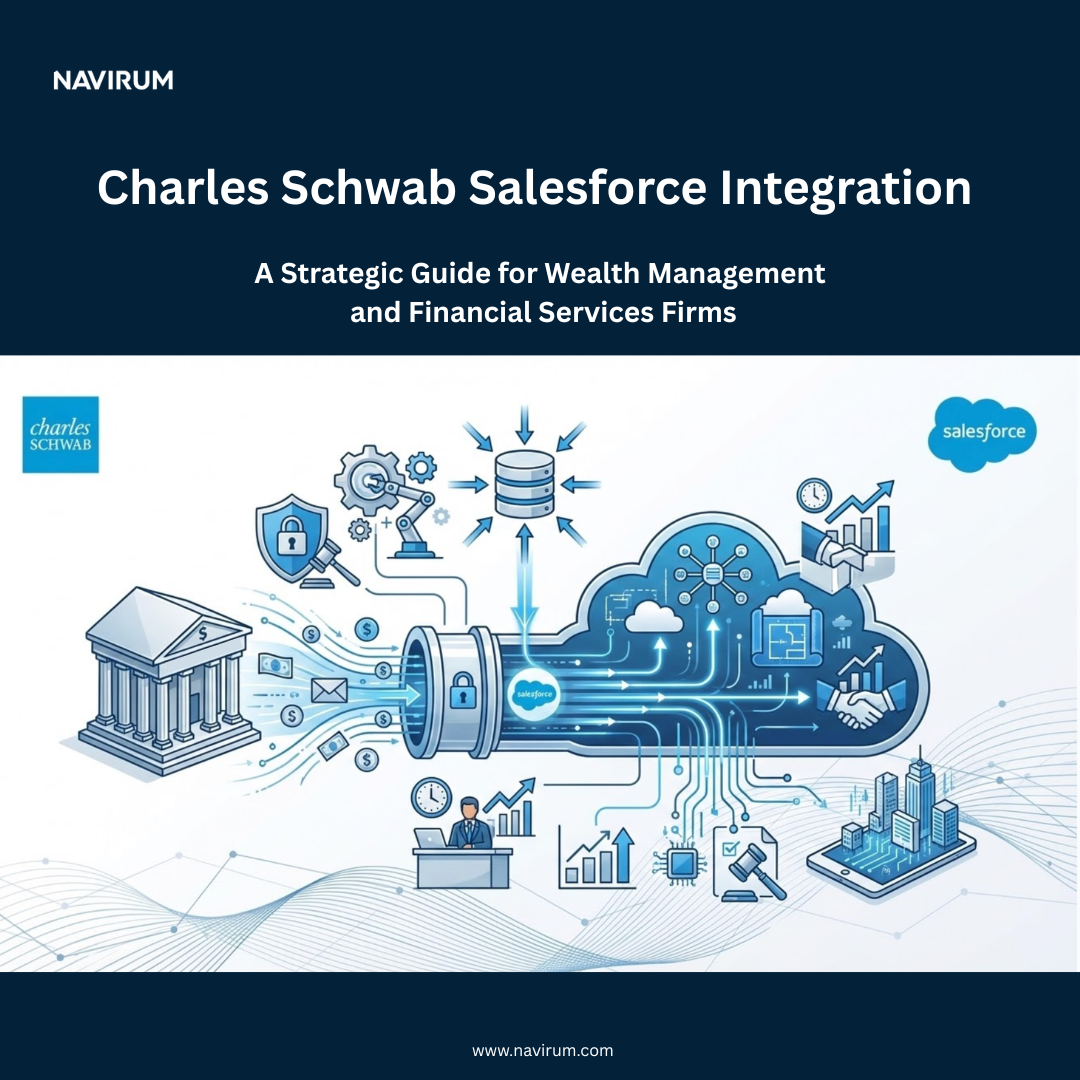
What Are The Institutional Integrations For Salesforce Financial Services Cloud?

Estimated reading time: 13 minutes

Key Takeaways

  • Institutional integrations Salesforce Financial Services Cloud enhance the management of financial data by connecting various systems like custodians and portfolio management platforms.
  • These integrations create a complete client view, reduce manual work, and ensure data consistency across all systems.
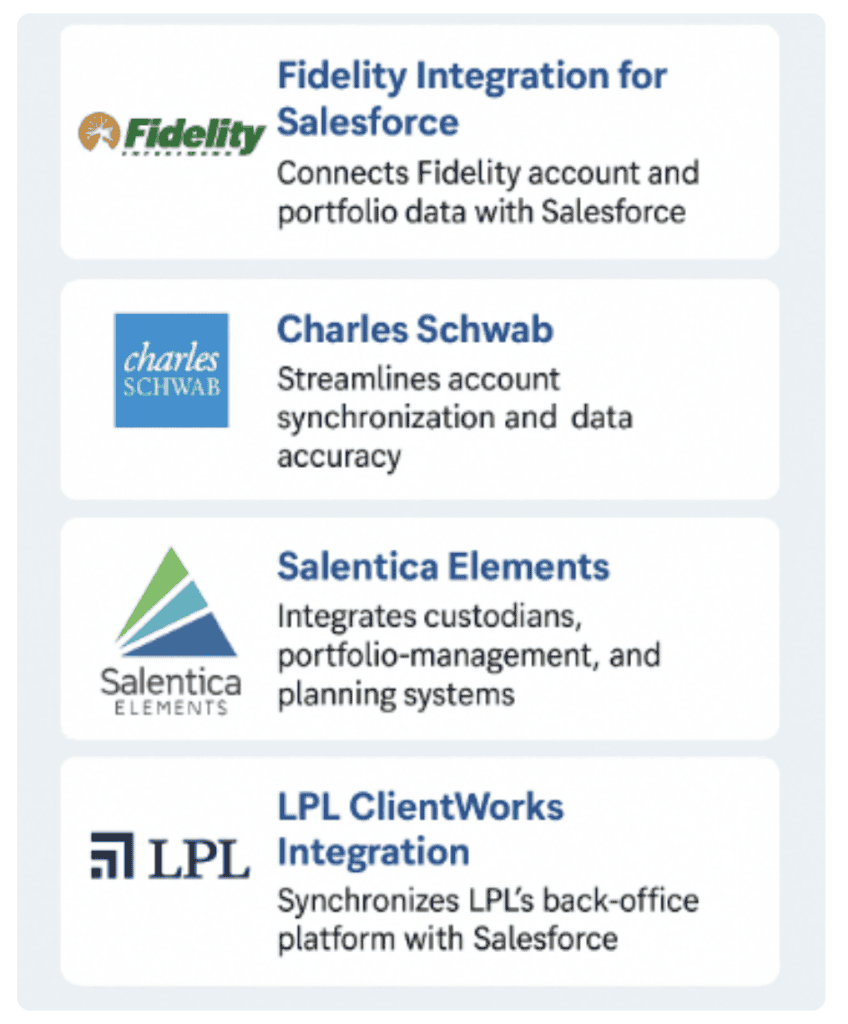
  • Key integration options include Fidelity, Charles Schwab, SS&C Salentica, and LPL Financial, each offering unique benefits for advisors and firms.
  • Multi-custodial integrations streamline data from different sources, providing a holistic view of client relationships and reducing manual reconciliation.
  • Security, data governance, and regulatory compliance are critical considerations in designing effective integrations.

For wealth management firms and financial institutions, Salesforce Financial Services Cloud (FSC) can serve as more than a customer relationship management platform. When connected to custodians, portfolio management systems, financial planning tools, and banking platforms, it can help create a more complete view of client relationships and bring important information into everyday workflows.

The challenge is that financial data rarely lives in one place. Advisors and relationship managers may need to navigate multiple systems to understand a client’s holdings, review account activity, prepare for meetings, or coordinate service requests. Disconnected systems create extra work, introduce opportunities for data inconsistencies, and make it harder to deliver a consistent client experience.

Institutional integrations help address this challenge by connecting Salesforce with the systems that hold and manage financial data. Through prebuilt connectors, integration platforms, and APIs, firms can reduce manual data handling, streamline workflows, and make relevant information more accessible to the people who need it.

Why Institutional Integrations Matter

Salesforce FSC provides financial services-specific capabilities for managing client relationships, financial accounts, and business processes. Its value increases when those capabilities are connected to the systems that support an institution’s day-to-day operations.

Well-designed integrations can help firms:

  • Create a more complete client view. Bring relevant relationship, account, and portfolio information together to support more informed conversations.
  • Reduce manual work. Minimize repetitive data entry and the need to switch between applications.
  • Improve data consistency. Synchronize information between systems and reduce discrepancies caused by manual updates.
  • Streamline advisor workflows. Connect client information to onboarding, service requests, meeting preparation, and follow-up activities.
  • Strengthen operational oversight. Improve the availability and traceability of information used in business processes, subject to appropriate controls.
  • Support more personalized service. Give advisors and relationship managers better context for understanding client needs and identifying opportunities.

The goal is not necessarily to move every piece of financial data into Salesforce. It is to make the right information available in the right workflow, with clear ownership and appropriate security.

Institutional Integrations for Salesforce FSC

Key Institutional Integration Options for Salesforce FSC

The Salesforce ecosystem offers multiple approaches to connecting custodial, portfolio, and banking data. The best option depends on the firm’s technology stack, custodial relationships, data requirements, and operating model.

1. Fidelity Institutional Integration

Fidelity Institutional announced an integration built on Financial Services Cloud to help registered investment advisors (RIAs) and family offices create a more connected digital experience.

The integration illustrates how custodial information can be brought closer to the CRM environment, helping advisors work with client and account context in a more unified way.

Potential benefits include:

  • Better visibility into relevant account and portfolio information.
  • Less manual switching between CRM and custodial systems.
  • More connected client relationship workflows.
  • Improved access to financial context when preparing for client interactions.

Learn more about the Fidelity Institutional Salesforce integration.

Availability and functionality should be confirmed with Fidelity for the firm’s specific environment and requirements.

2. Charles Schwab Integrations

For wealth management firms using Schwab Advisor Services, connecting custodial data to Salesforce can help reduce fragmentation between relationship management and account operations.

Schwab’s technology ecosystem includes the Schwab OpenView Gateway, which supports integrations with third-party platforms. Solutions such as SS&C Salentica Data Broker can use custodial connectivity to bring relevant information into Salesforce-based environments.

Depending on the integration and configuration, firms may be able to improve access to account information, streamline workflows, and reduce the need to maintain the same information manually across multiple systems.

Explore Schwab-related Salesforce solutions on AppExchange.

The specific data available, synchronization frequency, and supported workflows depend on the selected solution and the firm’s access arrangements.

3. SS&C Salentica Elements and Data Broker

SS&C Salentica offers financial services CRM solutions and integration capabilities designed to connect Salesforce environments with custodians, portfolio management systems, and financial planning applications.

Its Data Broker integrations support systems including Fidelity, Schwab, Black Diamond, Addepar, Orion, SS&C Advent, and Envestnet Tamarac.

For firms working with several financial technology platforms, this type of integration layer can help coordinate data flows without requiring every connection to be developed independently.

Potential benefits include:

  • Connecting custodial and portfolio data to client records.
  • Reducing duplicate data entry across systems.
  • Supporting a more consistent view of financial accounts.
  • Simplifying integration management across a firm’s technology stack.

Learn more about Salentica Elements integration options.

The available connectors and capabilities depend on the selected product, licensing, and configuration.

4. LPL Financial ClientWorks Integration

For advisors operating within the LPL Financial ecosystem, connecting ClientWorks with Salesforce can help bridge relationship management and the operational systems advisors use to manage their practices.

A well-designed integration can reduce the need to move manually between platforms, improve the availability of client information, and support more connected workflows.

The implementation approach depends on the specific LPL environment, supported interfaces, and the firm’s requirements. Firms should confirm available connectivity and data permissions before selecting an integration design.

Read more about transforming the advisor experience with LPL ClientWorks and Salesforce.

Multi-Custodial Integrations: Connecting the Broader Financial Picture

Many wealth management firms work with more than one custodian or portfolio management platform. A single connector may address one important data source, but it may not provide the complete view advisors need.

Multi-custodial integration brings information from multiple sources into a coordinated environment. Depending on the architecture, this may involve prebuilt connectors, an integration platform, APIs, or a combination of approaches.

For example, an advisor’s client relationship may involve:

  • Assets held across multiple custodians.
  • Portfolio data managed through a portfolio management system.
  • Financial plans maintained in a planning application.
  • Client interactions and service activities recorded in Salesforce.
  • Banking relationships and account information maintained in separate systems.

Connecting these sources can give advisors a more complete picture of the relationship while helping operations teams reduce manual reconciliation.

However, multi-custodial integration requires careful planning. Different providers may use different identifiers, data structures, update schedules, and definitions for accounts or holdings. Firms must establish how records are matched, which system is authoritative for each data element, how exceptions are handled, and how discrepancies are resolved.

The result can be a more consistent client experience and a stronger operational foundation—but only when the underlying data and integration processes are designed well.

Banking APIs and Institutional Connectivity

The same principles apply beyond wealth management. Banks and financial institutions increasingly use APIs to make selected services and data available to authorized applications and partners.

For example, Goldman Sachs provides developer resources for institutional services and custody-related capabilities, while Morgan Stanley offers an API developer portal for institutional clients and third-party partners. J.P. Morgan also provides secure account-data sharing capabilities for eligible use cases.

These examples demonstrate the broader potential of API-driven financial connectivity. They do not mean that every service is available to every organization or that a direct Salesforce connector exists for every API.

Depending on the institution, commercial arrangement, and permitted access, APIs may support use cases involving:

  • Account and relationship information.
  • Client onboarding and account maintenance.
  • Banking and payment workflows.
  • Investment and portfolio data.
  • Financial analytics and reporting.

For Salesforce FSC, the key question is how to incorporate relevant data and services into business processes without compromising security, data governance, or operational reliability.

A direct integration may be appropriate in some cases. In others, an integration platform such as MuleSoft or a purpose-built connector may provide the necessary orchestration, transformation, and monitoring.

Learn more about Goldman Sachs developer resources, the Morgan Stanley API Developer Portal, and J.P. Morgan’s secure account-data sharing approach.

INTEGRATION ARCHITECTURE

Choosing the Right Integration Architecture

Not every institutional integration needs to be built from scratch. The right approach depends on the complexity of the environment, the data being exchanged, and the level of control the firm needs.

APPROACH 01

Prebuilt Connectors

Useful when a supported integration already exists for the required custodian or platform. They can reduce development effort, although configuration and ongoing administration may still be necessary.

APPROACH 02

Integration Platforms & Middleware

Tools such as MuleSoft can help coordinate data movement across multiple systems, transform data into consistent formats, and manage more complex integration patterns.

APPROACH 03

Direct APIs

Appropriate when an institution provides supported interfaces that meet business and technical requirements. Offers high flexibility but requires development, testing, monitoring, and maintenance.

APPROACH 04

Hybrid Architectures

Many firms combine prebuilt connectors with APIs and middleware to accommodate legacy platforms, specialist applications, and unique business processes.

Salesforce Financial Services Integration Capabilities

Salesforce provides financial services data capabilities and integration approaches for connecting core banking, custodial, financial planning, and portfolio management systems. The appropriate design depends on the required data flows and whether information needs to be synchronized, queried, or made available through a broader data platform.

KEY EVALUATION FACTORS BEFORE SELECTION

Assess total cost of ownership (TCO), data freshness requirements, scalability, vendor dependencies, and support responsibilities.

Security, Data Governance, and Compliance Considerations

Financial data integration requires more than establishing a successful technical connection. Firms must also determine how information is authorized, accessed, transformed, stored, and monitored.

Key considerations include:

  • Data access and permissions: Ensure users and systems can access only the information they are authorized to see.
  • Data ownership: Establish which platform is authoritative for each data element and how updates are managed.
  • Data quality: Validate record matching, field mapping, completeness, and reconciliation processes.
  • Security: Apply appropriate authentication, encryption, secrets management, and monitoring.
  • Auditability: Maintain suitable records of data transfers, access, failures, and material changes.
  • Resilience: Plan for API limits, service interruptions, failed synchronization, and recovery.
  • Regulatory obligations: Assess applicable privacy, retention, recordkeeping, and third-party risk requirements.

These controls are particularly important when integrations support client onboarding, account servicing, financial reporting, or other regulated processes.

A successful integration should make information more useful without creating new blind spots in security or governance.

How Navirum Helps Financial Institutions Connect Salesforce

Connecting Salesforce Financial Services Cloud to custodians, portfolio management systems, and banking platforms requires a clear understanding of both the technology and the business processes it supports.

Navirum Salesforce Ridge Partner

Navirum helps financial services organizations assess their Salesforce environments, plan integration architecture, connect systems, and improve workflows around client relationships.

Our approach begins with the business outcome. We work with organizations to identify where disconnected data creates friction, determine which integrations are appropriate, and develop an implementation plan that accounts for data quality, security, governance, and ongoing support.

Whether your organization is evaluating a single custodial connector, coordinating data from multiple platforms, or modernizing a broader Salesforce architecture, the goal is the same: make trusted information more accessible and useful across the client lifecycle.

Build a More Connected Salesforce Environment

Institutional integrations can help transform Salesforce FSC from a relationship management platform into a more connected operational environment—bringing client context, financial account information, and business workflows closer together.

The best results come from choosing integrations that fit the firm’s technology landscape, establishing clear data governance, and designing workflows around the needs of advisors, operations teams, and clients.

FINANCIAL SERVICES INTEGRATION

Looking to connect Salesforce Financial Services Cloud with your custodians, portfolio systems, or banking platforms?

Book time with Navirum to discuss your integration requirements and identify practical ways to get more value from your Salesforce investment.

Frequently Asked Questions

What is Salesforce Financial Services Cloud integration?

Salesforce Financial Services Cloud integration connects Salesforce with external systems such as custodians, portfolio management platforms, financial planning applications, and banking systems. These connections help financial institutions access relevant client and account information, reduce manual data entry, and streamline advisor and operational workflows.

Which custodians integrate with Salesforce Financial Services Cloud?

Integration options depend on the provider, the firm’s technology environment, and available connectors. Commonly supported ecosystems include Fidelity Institutional, Charles Schwab Advisor Services, and other custodial and portfolio platforms through solutions such as SS&C Salentica. Firms should confirm current product compatibility, licensing, and supported functionality before selecting an integration.

Can Salesforce Financial Services Cloud connect to multiple custodians?

Yes. Salesforce can be connected to multiple custodians using compatible connectors, APIs, middleware, or a combination of integration approaches. Multi-custodial implementations require careful planning for data mapping, client and account matching, reconciliation, security, and system ownership.

How does Salesforce integrate with banking and portfolio management systems?

Integrations can use prebuilt connectors, APIs, or integration platforms such as MuleSoft to exchange data between Salesforce and external systems. The appropriate approach depends on the institution’s available interfaces, data access permissions, security requirements, and desired workflows. Not every banking or portfolio platform offers a ready-made Salesforce connector.

What security considerations apply to Salesforce financial data integrations?

Financial institutions should evaluate authentication, encryption, access controls, data ownership, audit trails, data quality, and failure monitoring. Integration designs should also account for applicable privacy, recordkeeping, regulatory, and third-party risk requirements. Controls should reflect the sensitivity of the information and the workflows being supported.

How can Navirum help with Salesforce Financial Services Cloud integrations?

Navirum helps financial services organizations assess integration requirements, plan Salesforce architecture, connect external systems, and optimize workflows. We help firms evaluate their existing technology landscape and identify practical approaches to improving data accessibility, operational efficiency, and the overall client experience.

ONLINE RESOURCES

Knowledge & Insights

Explore expert guides and strategic architectures for custodian integrations with Salesforce Financial Services Cloud.

Navirum Discover Block

Schedule Your Session

Let’s find a time to chat about your Salesforce strategy and AUM growth.

Continue to Calendar
Navirum Website Footer
Lavinia PicuWhat Are The Institutional Integrations For Salesforce Financial Services Cloud?

Salesforce Fiscal Year-End 2027: 9 Tips To Maximize Your Investment

Key Takeaways

  • Now is a key time to review your Salesforce contracts and prepare for renewal discussions ahead of the Salesforce fiscal year-end.
  • Understanding your licensing needs is crucial in maximizing your investment as you align them with future business goals.
  • Start negotiations early to avoid rushed decisions, review your usage, and evaluate alternatives before the deadline.
  • Leverage key commercial factors to secure the best terms, including payment flexibility and contract duration.
  • Partnering with Navirum can help optimize your Salesforce environment and align licensing with business strategies.

Maximizing Your Salesforce Investment at Fiscal Year-End: 9 Tips from Navirum

With Salesforce’s fiscal year ending January 31, 2027, now is a good time to review your licensing agreements, assess upcoming requirements, and prepare for renewal or expansion discussions. Whether you’re renewing existing licenses, expanding your Salesforce environment, or considering new capabilities, preparing early can help you negotiate more informed terms and align your investment with your business roadmap.

For existing Salesforce customers, this period can be a useful time to reassess licensing needs, explore renewal options, and plan future investments. While Salesforce’s fiscal year-end may create opportunities for commercial negotiations, discounts and incentives vary depending on the products, contract structure, and individual agreement.

At Navirum, we help financial services organizations get more from Salesforce through strategic advisory, implementation, and optimization. Drawing on our team’s experience with the Salesforce ecosystem, here are nine ways to approach fiscal year-end negotiations with a focus on long-term value.

INFOGRAPHIC

Maximizing Your Salesforce Investment at Fiscal Year-End

A balanced 9-part strategic framework to optimize licensing, leverage commercial timing, and maximize long-term ROI before January 31st.

SALESFORCE FYE 9 TIPS FOR MAX INVESTMENT 1 Align Licensing & Roadmap 2 Coordinate With Implementation 3 Start Early Negotiations 4 Key Commercial Factors 5 Payment Terms & Flexibility 6 Work With AE & Account Team 7 Value Beyond Discounts 8 Evaluate AI Opportunities 9 Partner With NAVIRUM

1. Understand Your Salesforce Licensing and Align It With Your Roadmap at Salesforce fiscal year-end

Salesforce offers a range of products, editions, and licensing options to support different business requirements. Before negotiating a renewal or purchasing additional licenses, assess your current environment and future plans.

Review your existing licenses, usage levels, and available features. Identify which capabilities are actively used, which are underutilized, and where your organization may need additional functionality.

Consider the following questions:

  • Are you paying for licenses that are no longer needed?
  • Do your current licenses support your upcoming business initiatives?
  • Could existing features meet your requirements without purchasing additional products?
  • Are planned expansions aligned with your implementation and adoption roadmap?

The objective is to invest in the right capabilities at the right time, without overcommitting to products or licenses your organization may not need.

2. Coordinate Licensing With Implementation Services

Purchasing Salesforce licenses is only one part of the equation. Implementation, integration, and user adoption are essential to realizing the value of your investment.

Before expanding your Salesforce environment, coordinate licensing decisions with your implementation plan. Confirm when new users will need access, which workflows must be configured, and what training or change management will be required.

Where possible, align license activation with deployment milestones and clarify the commercial implications of any phased rollout.

For financial services organizations, this planning is particularly important when implementing Financial Services Cloud (FSC), integrating portfolio management systems, or introducing new client onboarding and compliance workflows.

The goal is to pay for the capabilities you need when you’re ready to use them and accelerate the time it takes to realize value.

3. Start Negotiations Early

Don’t wait until the final days of a Salesforce quarter or fiscal year to begin negotiations.

Salesforce’s fiscal year ends on January 31, and its fourth quarter can be a relevant time to explore commercial opportunities. However, the terms available depend on your specific agreement, products, and circumstances.

Starting early gives your organization time to:

  • Review current usage and identify opportunities to optimize licensing.
  • Compare proposed renewal terms with your existing agreement.
  • Establish a budget and obtain internal approvals.
  • Evaluate alternatives and clarify your negotiating priorities.
  • Coordinate licensing decisions with implementation and deployment plans.

Early preparation also helps avoid rushed decisions driven by renewal deadlines. Review your contract’s renewal provisions and notice requirements well in advance.

4. Leverage Key Commercial Factors

Salesforce pricing depends on several variables, including the products purchased, license quantities, contract duration, and negotiated terms.

When evaluating a proposal, consider the following factors:

  • Contract length: Multi-year commitments may offer pricing advantages, but weigh any savings against the risk of locking in requirements that could change.
  • License volume: Additional seats or products may create opportunities for better pricing, but only expand when there is a clear business need.
  • Total investment: Consider the overall contract value and the relationship between licensing costs and the benefits your organization expects to realize.
  • Product mix: Evaluate whether bundles provide meaningful value compared with purchasing individual products.
  • Renewal pricing: Compare your current rates with the proposed renewal and clarify any changes to pricing, quantities, or entitlements.

Look beyond the headline discount. A lower unit price may not represent the best deal if it requires unnecessary licenses, a longer commitment, or additional products your organization will not use.

5. Negotiate Payment Terms and Contract Flexibility

Price is only one part of a Salesforce agreement. Payment schedules, contract duration, renewal provisions, and flexibility can also have a significant impact on your budget and cash flow.

Depending on your agreement and available options, consider asking about:

  • Alternative payment schedules or billing frequencies.
  • Phased license purchases aligned with planned adoption.
  • Clear terms governing renewals and future price increases.
  • Flexibility to accommodate organizational changes.
  • The conditions attached to promotional pricing or incentives.

Review the complete order form and applicable contract terms before signing. Confirm the duration of any discounts, future pricing commitments, and the notice period required to make changes or opt out of renewal.

The objective is to secure terms that support your organization’s financial planning while preserving flexibility as your business evolves.

6. Work With Your Salesforce Account Executive and Wider Account Team

Your Salesforce Account Executive (AE) can help clarify available products, pricing options, and commercial programs. Use that relationship to understand your options and ensure your proposal reflects your priorities.

Come prepared with your usage data, budget, growth plans, and a clear list of questions. Where appropriate, involve the wider account team, including renewal specialists and technical or product representatives.

It is also important to document commercial commitments in the final agreement rather than relying on verbal assurances.

Your AE represents Salesforce, so an experienced implementation partner can provide an additional perspective by evaluating how the proposed agreement aligns with your technical requirements, delivery plans, and business objectives.

7. Look for Added Value Beyond Discounts

A strong commercial agreement may include benefits beyond a lower license price. Depending on your circumstances and Salesforce’s approval, you may be able to explore additional value through:

  • Additional licenses: Determine whether extra seats or temporary access provisions are available and appropriate for your needs.
  • Phased purchases: Align license acquisition with your rollout schedule and expected adoption.
  • Product bundles: Evaluate whether bundled products offer a genuine advantage over purchasing individual capabilities.
  • Support and enablement: Assess whether additional support or training options could improve implementation outcomes.
  • Commercial flexibility: Explore arrangements that better accommodate your planned growth or deployment timeline.

Availability varies, so confirm the eligibility requirements and precise terms of any offer.

Before accepting an incentive, calculate its value over the full contract term. An additional product is only beneficial if your organization has a clear use case, the resources to implement it, and a realistic plan to adopt it.

8. Evaluate AI Opportunities to Enhance Your Salesforce Investment

AI is expanding the capabilities available across the Salesforce ecosystem. Solutions such as Agentforce and Data 360 (formerly Data Cloud) may create opportunities to improve productivity, connect data, and automate workflows.

However, purchasing AI capabilities should follow a clear business case rather than simply the availability of a year-end offer.

Before adding AI products or usage commitments, consider:

  • Business value: Which workflows could benefit from AI, and how will you measure the results?
  • Data readiness: Is your data sufficiently accurate, accessible, and well governed to support reliable AI outcomes?
  • Security and compliance: Are access controls, data boundaries, auditability, and oversight appropriate for your organization?
  • Total cost: What are the licensing, consumption, integration, implementation, and ongoing operating costs?
  • Implementation readiness: Does your team have the technical capacity and governance processes to deploy and maintain the solution?

For banks, wealth management firms, insurers, and fintech companies, the right approach is to connect AI investments to measurable operational outcomes while maintaining appropriate controls.

A focused pilot or readiness assessment can help validate the opportunity before committing to a broader rollout.

Book Your FREE Salesforce Health Check Now! Complimentary

Uncover security risks, license inefficiencies, technical debt, and immediate workflow bottlenecks. Use this free Salesforce Health Check to see how your platform can become a greater engine for business value.

9. Partner With Navirum to Maximize Long-Term Value

Salesforce licensing negotiations can be complex, and it is not always easy to determine whether a proposed agreement aligns with your organization’s long-term needs.

Navirum helps financial services organizations make informed Salesforce investment decisions. Our team brings experience across the Salesforce ecosystem, including financial services implementations, platform optimization, integrations, and emerging AI capabilities.

Navirum Salesforce Ridge Partner

We can help you:

  • Assess your Salesforce environment and identify underutilized capabilities.
  • Align licensing decisions with your business and implementation roadmap.
  • Evaluate proposed products and technical requirements.
  • Identify opportunities to simplify workflows and improve user adoption.
  • Plan Salesforce FSC, Agentforce, and data initiatives around measurable business outcomes.

Our role is to help you evaluate the technical and operational implications of your decisions, so your Salesforce investment supports your broader business strategy.

Make Your Salesforce Fiscal Year-End Count

Salesforce fiscal year-end can be a useful opportunity to review your agreement, reassess your requirements, and explore potential commercial advantages. But the most valuable outcome is not necessarily the largest discount. It is a commercial and implementation plan that gives your organization the right capabilities, at the right time, with a clear path to value.

STRATEGIC ADVISORY

Planning a Salesforce Renewal, Expansion, or AI Initiative?

Book time with Navirum to discuss your Salesforce roadmap, licensing considerations, and opportunities to maximize the value of your investment.

Navirum Discover Block


Salesforce, AI, and Financial Services Resources


Explore Navirum insights, webinars, events, and practical guidance for wealth, banking, insurance, and private capital teams modernizing Salesforce.

Schedule Your Session

Let’s find a time to chat about your Salesforce strategy and AUM growth.

Continue to Calendar
Navirum Website Footer

Lavinia PicuSalesforce Fiscal Year-End 2027: 9 Tips To Maximize Your Investment

Redtail vs. Salesforce Financial Services Cloud

Estimated reading time: 24 minutes

Redtail vs. Salesforce Financial Services Cloud: What Wealth Management Firms Should Evaluate

  • Salesforce Financial Services Cloud offers a flexible platform that integrates client relationship management with operational workflows, unlike Redtail.
  • When choosing between Salesforce and Redtail, evaluate usability, configurability, integration, governance, and total costs.
  • Firms should focus on improving workflows, reporting, and activity management to better meet their operational needs.
  • Salesforce’s tools, like Flow and Action Plans, help automate processes like client onboarding and tracking service requests.
  • Before transitioning, assess your firm’s unique processes and integration requirements to maximize the benefits of the new CRM.

For wealth management firms, a CRM is more than a place to store client information. It supports the daily work that keeps an advisory practice running: scheduling meetings, managing prospects, coordinating client onboarding, documenting interactions, completing annual reviews, and maintaining oversight of business activities.

As advisory firms grow, the limitations of their existing systems can become more apparent. Workflows may be difficult to maintain, client notes can become cluttered, reporting may require manual effort, and important follow-ups can fall through the cracks.

For firms using Redtail CRM, Salesforce Financial Services Cloud (FSC) offers another approach: a configurable platform that can connect client relationship management with operational workflows, reporting, marketing, and other business systems.

But is Salesforce the right fit for every advisory firm? And what should firms evaluate before making a change?

The answer depends on how your team works, which processes you want to improve, and how much flexibility you need from your technology.

1. Calendar and Client Activity Management

Advisors and support staff need a reliable way to manage appointments, coordinate follow-ups, and understand their upcoming client commitments.

When evaluating Salesforce against Redtail, calendar functionality should be assessed in the context of the firm’s existing scheduling practices.

Key considerations include:

  • Calendar integration: How does Salesforce connect with Microsoft Outlook or Google Calendar? Which events synchronize, and in which direction?
  • Ease of use: Can advisors quickly review upcoming meetings and access relevant client information?
  • Client context: Can users connect meetings to the appropriate client, household, prospect, or opportunity?
  • Team coordination: Can administrative staff help coordinate appointments and manage follow-up activities?
  • Activity visibility: Can users see relevant meetings, emails, and tasks alongside the associated client record?
FUNCTIONALITY ASSESSMENT

Salesforce vs. Redtail: Calendar & Activity Management

Calendar functionality should be assessed in the context of the firm’s existing scheduling practices. Evaluate how each platform handles sync patterns, client history linkage, and multi-advisor coordination.

SALESFORCE FINANCIAL SERVICES CLOUD Bi-Directional Outlook / M365 & Google Sync Automated Briefs & Activity Summaries (Agentforce) Enterprise Sharing Rules & Cross-Team Views VS REDTAIL CRM Built-In Native Calendar Interface Standard Office 365 Connector Integration Basic Category & Type Activity Tagging
EVALUATION AREA 01

Calendar Integration

Salesforce FSC Deep, native bi-directional sync with Outlook/M365 & Gmail. Captures emails, meetings, and updates automatically in background.
Redtail Relies on Redtail’s Retriever tool or O365 sync connector. Effective for basic entry, but prone to sync delay or token breaks at scale.
EVALUATION AREA 02

Ease of Use

Salesforce FSC Highly customizable UI per role. Modern side panels in Outlook allow one-click log, task creation, and meeting prep from inbox.
Redtail Fixed, simple calendar interface with low training requirement. Ideal for smaller teams without custom workflow requirements.
EVALUATION AREA 03

Client Context

Salesforce FSC Links activities directly to Households, Financial Accounts, and Opportunities. Agentforce provides AI meeting prep automatically.
Redtail Links calendar events directly to Contact cards. Limited automated context aggregation across broader household structures.
EVALUATION AREA 04

Team Coordination

Salesforce FSC Multi-user scheduling, resource booking, and automated Slack notifications for collaborative meeting handoffs across teams.
Redtail Multi-advisor overlay views. Good basic scheduling, but lacks advanced workflow routing and instant team notification layers.
EVALUATION AREA 05

Activity Visibility

Salesforce FSC Granular security sharing rules, executive activity dashboards, and full compliance audit trails for internal oversight and regulatory reviews.
Redtail Standard activity reports and basic filters. Roles and permissions are flat, making complex multi-office security segmentation difficult.

Salesforce supports Outlook integration and calendar synchronization through its available integration tools. Depending on the configuration, users can also access Salesforce records and manage activities from within Outlook.

The important question is not simply whether a calendar looks cleaner than Redtail’s. It is whether the interface and integration make everyday scheduling easier for the people who use it.

For a meaningful comparison, firms should test common scenarios, including scheduling a client review, updating an appointment, assigning a follow-up task, and ensuring the relevant activity appears on the correct record.

2. Reporting and Business Visibility

Reporting is particularly important for firms that want to understand how their advisors spend their time, how consistently they engage clients, and where opportunities may be getting overlooked.

Salesforce provides configurable reports and dashboards that can help firms monitor client relationships, prospect activity, workflow progress, and operational performance.

Depending on the data model and configuration, reports can be organized around criteria such as:

  • Client tier or household segment
  • Advisor or relationship manager
  • Client age or date of birth
  • Upcoming birthdays and review dates
  • Prospect stage and opportunity status
  • Meeting type and activity date
  • Client category, tags, or custom fields
  • Completed and overdue follow-up activities

For example, a wealth management firm might want a dashboard showing the number of annual reviews completed each quarter, broken down by advisor and client tier.

BUSINESS INTELLIGENCE ASSESSMENT

Reporting & Business Visibility: Salesforce FSC vs. Redtail

Evaluating reporting capabilities is critical for growing wealth management firms. Compare how Salesforce Financial Services Cloud and Redtail handle executive dashboards, cross-system data unification, custom report building, and automated compliance analytics.

SALESFORCE FSC ANALYTICS ENGINE Dynamic Executive Dashboards & CRM Analytics Multi-System Data Unification (Data Cloud & APIs) Role-Based Granular Visibility & Field Security VS REDTAIL CRM REPORTING Pre-Built Standard Operational Reports Basic Field Filtering & CSV/Excel Exports Static Single-Database Contact Reporting
EVALUATION PILLAR 01

Customization & Report Flexibility

Salesforce FSC Drag-and-drop report builders with custom formula fields, cross-object joins, bucket fields, and historical trend tracking.
Redtail Fixed pre-configured reports with basic field filtering. Advanced custom reporting often requires exporting data to Excel.
EVALUATION PILLAR 02

Cross-System Unification

Salesforce FSC Combines CRM data with portfolio metrics (Orion/Schwab), billing, marketing, and custodial feeds into unified dashboards.
Redtail Reports strictly on CRM activity and native contact records. Cross-platform analytics require third-party BI tools.
EVALUATION PILLAR 03

Executive & Pipeline Dashboards

Salesforce FSC Real-time visual dashboards per role (Executive, Advisor, Ops) with automated drill-down capabilities and threshold alerts.
Redtail Standard homepage widgets displaying immediate task lists, workflow status, and recent activity lists.
EVALUATION PILLAR 04

Data Security & Compliance Audit

Salesforce FSC Granular role hierarchies, field-level security, and audit logs ensure users only report on authorized records.
Redtail Flat security permissions across standard database objects. Harder to segment reporting across multi-office teams.

Another report might identify prospects who have completed a discovery meeting but have not progressed to the next stage of the pipeline.

These views can help management understand whether the firm’s service model aligns with its business priorities.

However, report quality depends on data quality. If meeting types are recorded inconsistently or client tiers are missing, reports will not provide a reliable picture of the business.

The goal is to turn CRM data into actionable operational insight, rather than simply generate more reports.

3. Workflows

For many advisory firms, workflow management is one of the most important factors when evaluating a CRM.

Processes vary considerably across departments. Advisors may follow a structured financial planning process, while operations staff coordinate onboarding, compliance documentation, account updates, and recurring client service requests.

Salesforce offers several tools that can support these activities, including Flow, Cases, and Action Plans.

OPERATIONAL COMPARISON

Workflows: From Client Onboarding to Everyday Requests

Compare how Salesforce Financial Services Cloud (FSC) and Redtail handle end-to-end wealth management servicing—from complex client onboarding and custodian setup to day-to-day service ticket routing.

WORKFLOW STAGE 01

Client Onboarding & Intake

Salesforce FSC Automated, multi-branch Flow orchestration. Direct API connections trigger custodian e-signatures, document intake, and KYC validation automatically.
Redtail Static Workflow Templates requiring manual step-by-step task checking by staff. Lacks direct automated triggering for external custodian forms.
WORKFLOW STAGE 02

Account Opening & Custodian Sync

Salesforce FSC Real-time field authority sync with Orion and major custodians. Automatically links new financial accounts to parent Households.
Redtail Manual account linking or overnight batch feed syncs. Household relationships often require manual cross-referencing.
WORKFLOW STAGE 03

Everyday Servicing & Requests

Salesforce FSC Omni-channel Service Cloud ticketing with automatic queue routing, SLA timers, and instant team swarming via integrated Slack channels.
Redtail Basic Activity and Task assignments assigned directly to individual users. Lacks formal case management, SLA tracking, and team messaging.
WORKFLOW STAGE 04

Reviews & Compliance Audit

Salesforce FSC Agentforce pre-meeting briefs aggregate all recent interactions, holdings, and compliance logs into an immutable, audit-ready dashboard.
Redtail Standard Activity History listing. Preparing annual review briefs requires advisors to manually pull records from multiple tabs and reports.
ARCHITECTURAL VERDICT

While Redtail offers straightforward checklist-style tasks for smaller firms, Salesforce Financial Services Cloud provides automated, enterprise-grade process orchestration that scales seamlessly across complex wealth operations.

Salesforce Flow

Flow is Salesforce’s automation tool for managing business processes. It can guide users through defined steps, update records, assign work, send notifications, and automate actions based on specified conditions.

Examples include:

  • Initiating a client onboarding process when a new relationship is created
  • Assigning tasks when a prospect reaches a particular stage
  • Notifying staff when client information needs to be updated
  • Triggering reminders for upcoming annual reviews
  • Routing service requests to the appropriate team

Flows can be designed around a firm’s requirements, although complex automation should be planned, tested, and maintained carefully.

Cases

Cases can provide a structured way to manage client service requests or internal operational issues.

A firm might use Cases to track requests such as an address change, beneficiary update, document request, or account maintenance issue.

Depending on the configuration, each case can have an owner, status, priority, related client record, and associated activities.

This provides greater visibility into who is responsible for a request, where it stands, and whether additional action is required.

Action Plans

Action Plans are particularly relevant when a process involves a repeatable sequence of tasks.

For example, a firm could create an Action Plan template for an annual financial review that includes:

  1. Schedule the client meeting.
  2. Request and collect updated financial information.
  3. Review the client’s current situation.
  4. Prepare meeting materials.
  5. Conduct and document the review.
  6. Assign follow-up actions.
  7. Confirm completion of outstanding items.

The same approach can be applied to onboarding, prospect discovery, account opening, and other recurring processes.

Salesforce’s Action Plans documentation explains how templates can standardize repeatable tasks, assign responsibilities, establish deadlines, and support reporting.

The key distinction is that not every process needs the same tool. Action Plans are useful for repeatable task sequences, Flow supports automation and guided processes, and Cases can organize service requests. The right design depends on the work being managed.

For firms frustrated by rigid workflows in their current CRM, the opportunity is to build processes that reflect how the business actually operates, rather than forcing every department into the same template.

4. Tasks, Activities, and Accountability

Tasks and activities help teams manage the work that happens between client meetings.

When comparing CRM platforms, firms should look beyond the ability to create a task. They should evaluate how easily users can update activities, reassign responsibilities, record progress, and identify outstanding work.

Important considerations include:

  • Assigning tasks to individuals or teams
  • Relating activities to clients, households, prospects, and opportunities
  • Tracking due dates, priorities, and completion status
  • Viewing overdue and upcoming tasks
  • Recording outcomes and follow-up notes
  • Reporting on activity volume and completion rates

Salesforce can support these requirements through its task management capabilities, configurable record pages, automation, and reporting.

OPERATIONAL GOVERNANCE

Tasks, Activities, and Accountability: Salesforce vs. Redtail

Holding operational teams and advisors accountable requires clear task delegation, automated escalation paths, and comprehensive activity logging. Evaluate how Salesforce FSC and Redtail structure daily execution and audit compliance.

SALESFORCE FSC ACCOUNTABILITY ENGINE Automated Omni-Channel Task & Case Queues Dynamic SLA Timers & Automated Escalations Agentforce Task Summaries & Audit Trail VS REDTAIL CRM TASK MANAGEMENT User-Assigned Static To-Do Checklists Manual Task Reassignment & Reminders Standard Completed Activity History Logs
EVALUATION PILLAR 01

Task Assignment & Routing

Salesforce FSC Automated queue routing based on skill, workload, or client tier. Round-robin assignments ensure requests never stall in an inbox.
Redtail Manual assignment to individual staff members or pre-assigned static roles. Lacks dynamic load balancing across teams.
EVALUATION PILLAR 02

SLA & Escalation Management

Salesforce FSC Built-in Service Level Agreement (SLA) countdown timers. Overdue tasks automatically escalate to management via Slack or email.
Redtail Relies on manual oversight and standard due-date filters. No automated escalation workflows when task deadlines pass.
EVALUATION PILLAR 03

Cross-Team Activity Tracking

Salesforce FSC 360-degree timeline combining emails, calls, Slack discussions, and automated system milestones under the Household record.
Redtail Linear Activity History log tied to individual contacts. Harder to track collaborative task handoffs across multi-role teams.
EVALUATION PILLAR 04

Operational Governance & Audit

Salesforce FSC Field history tracking, immutable change logs, and real-time manager dashboards for complete regulatory compliance oversight.
Redtail Basic activity completion reports. Audit details are limited to standard field edits and user timestamp logs.
EXECUTIVE SUMMARY

While Redtail effectively manages simple task lists for single-advisor practices, Salesforce Financial Services Cloud equips growing wealth firms with SLA-driven routing, automated escalations, and total operational accountability.

However, an important distinction concerns historical records.

If a firm wants to keep a task open indefinitely while editing its details over time, it should determine which changes need to be retained for compliance purposes. Standard task functionality should not automatically be assumed to provide a complete, immutable history of every edit, deletion, or change to a task.

Depending on the requirement, Salesforce field history tracking, custom audit records, automation, or an external compliant recordkeeping solution may be necessary.

The design should specify which changes must be captured, who can modify records, how long information must be retained, and whether the history must be tamper-resistant.

For regulated firms, this is a governance requirement, not simply a user-interface preference.

5. Client Notes and Communication History

A client’s record can accumulate information from many sources: meeting notes, emails, phone calls, text messages, service requests, and internal discussions.

Without a clear structure, important details can become difficult to locate.

Salesforce allows firms to organize client information through related records, activity timelines, notes, custom fields, and configurable record pages.

A firm might distinguish between:

  • Annual review and financial planning notes
  • General client meeting notes
  • Internal service and operations notes
  • Prospect discovery notes
  • Email and calendar activities
  • Client service requests
  • Documents and compliance records

Access permissions and page layouts can also be designed to make relevant information easier to find for each user group.

However, organizing information in Salesforce is not the same as establishing a compliant archive. The firm must separately evaluate how emails, texts, attachments, and other communications are captured, retained, searched, and produced for regulatory review.

CLIENT RECORD ARCHITECTURE

Client Notes & Communication History: Salesforce vs. Redtail

Maintaining an accurate, searchable, and compliant timeline of client notes and interactions is fundamental to wealth management operations. Evaluate how Salesforce Financial Services Cloud and Redtail handle note capture, household rollup visibility, note privacy permissions, and AI interaction summaries.

SALESFORCE FSC INTERACTION TIMELINE 360° Household & Financial Account Rollups Granular Privacy, Field-Level & Role-Based Security Agentforce AI Note Summaries & Action Extraction VS REDTAIL CONTACT NOTES Linear Contact Note Feed & Basic Category Tags Contact-Level Note Logging & Family Member Linking Standard Category Permissions & Audit Trail
EVALUATION PILLAR 01

Timeline & Record Rollups

Salesforce FSC Unified 360° activity timeline automatically rolls up notes, calls, and emails across Contacts, Accounts, Opportunities, and Household views.
Redtail Chronological note feed attached to individual Contact records. Family rollup views require switching tabs or checking linked accounts.
EVALUATION PILLAR 02

Note Security & Privacy

Salesforce FSC Granular Private Notes, field-level encryption, role-based visibility, and complete field audit history for sensitive client communications.
Redtail Permissions set by Note Category or Team assignment. Lacks field-level encryption or object-level private note record lock-down.
EVALUATION PILLAR 03

AI Summaries & Searchability

Salesforce FSC Agentforce automatically digests long meeting notes, extracts follow-up action items, and generates instant executive meeting briefs.
Redtail Standard keyword search across note text and category filters. Requires advisors to manually read through past notes for history.
EVALUATION PILLAR 04

Categorization & Integration

Salesforce FSC Custom Interaction Summaries, rich text note formatting, file attachments, and automated Flow triggers based on note type.
Redtail Pre-defined Note Categories and Types with standard text formatting. Easy to use for rapid, straightforward note logging.
EXECUTIVE SUMMARY

While Redtail provides a simple and familiar note feed for individual contacts, Salesforce Financial Services Cloud delivers an enterprise interaction framework featuring multi-level household rollups, role-based privacy controls, and Agentforce AI note summarization.

A well-designed CRM should help users find the information they need without creating an unnecessarily cluttered client record.

6. Marketing and Client Communications

Many wealth management firms already use specialized marketing platforms, such as FMG Suite, for newsletters, drip campaigns, event invitations, and other client communications.

Salesforce can support marketing activities through its campaign management capabilities and, depending on the products selected, additional marketing automation tools.

Potential use cases include:

  • Tracking prospects who have registered for an event
  • Segmenting clients by tier, relationship type, or other criteria
  • Coordinating event invitations and follow-ups
  • Monitoring campaign membership and responses
  • Creating targeted communication journeys
  • Connecting marketing engagement with prospect and client records

The appropriate setup depends on the firm’s marketing requirements and existing technology stack.

For some firms, Salesforce Campaigns combined with an integration to an existing marketing platform may be sufficient. Others may benefit from a dedicated Salesforce marketing automation product.

MARKETING & CLIENT COMMUNICATIONS

Marketing & Client Communications: Salesforce vs. Redtail

Delivering personalized, compliant client communications at scale requires dynamic audience segmentation, automated journey orchestration, and AI-driven content generation. Evaluate how Salesforce FSC and Redtail support marketing operations and client engagement.

SALESFORCE MARKETING & ENGAGEMENT Dynamic Multi-Touch Journeys (Account Engagement) Agentforce-Powered Personalization & Email Drafts Omni-Channel Sync (Email, SMS, Portal, Slack) VS REDTAIL BROADCAST & MAIL MERGE Static Mass Email Broadcasts & Tag Groups Basic Contact Field Mail Merge (Word / PDF) External Integrations (Mailchimp, FNS, Catchlight)
EVALUATION PILLAR 01

Audience Segmentation & Targeting

Salesforce FSC Dynamic segmentation based on AUM, financial goals, life events, engagement history, and custom data points across households.
Redtail Static Tag Groups, Contact Categories, and Saved Searches. List updates require manual list management or re-querying.
EVALUATION PILLAR 02

Campaign Automation & Nurturing

Salesforce FSC Automated drip campaigns and multi-channel journeys triggered by client behavior, onboarding milestones, or annual review dates.
Redtail One-off broadcast emails or export to external platforms (e.g., Mailchimp). Lacks automated multi-step trigger campaigns natively.
EVALUATION PILLAR 03

AI Personalization & Generation

Salesforce FSC Agentforce generates tailored outreach emails, meeting follow-ups, and market commentaries using grounded, compliant CRM data.
Redtail Standard merge fields (e.g., First Name, Advisor Name). Personalization relies on manual template adjustments by staff.
EVALUATION PILLAR 04

Engagement Tracking & Compliance

Salesforce FSC Real-time trackable engagement scoring (opens, clicks, form submits) tied directly to client records with automatic compliance archiving.
Redtail Basic broadcast open/click summary metrics. Granular individual engagement scoring requires third-party email marketing plugins.
EXECUTIVE SUMMARY

While Redtail handles basic bulk messaging and tag-based emails well for smaller firms, Salesforce Financial Services Cloud paired with Marketing Cloud and Agentforce unlocks automated, highly targeted, and compliant multi-channel client journeys.

Before replacing an existing tool, firms should determine which system will manage audience preferences, consent, unsubscribes, campaign execution, and communication history.

The objective is not necessarily to move every marketing function into the CRM. It is to ensure marketing activity and relationship management work together without unnecessary duplication.

7. Prospect and Opportunity Management

A consistent prospect management process helps advisory firms maintain visibility into potential new relationships and identify where follow-up is needed.

Salesforce supports lead and opportunity management, allowing firms to define pipeline stages, assign ownership, record interactions, and track progress toward a business outcome.

For example, a firm might establish stages such as:

  1. New prospect
  2. Initial contact
  3. Discovery meeting scheduled
  4. Discovery completed
  5. Proposal or financial plan in progress
  6. Decision pending
  7. Converted or closed

These stages should reflect the firm’s actual acquisition process rather than a generic sales pipeline.

Additional automation can help prompt follow-ups, identify opportunities that have not progressed, and notify team members when important actions are overdue.

Reporting can then reveal how many prospects are in each stage, how long they remain there, and which activities contribute to successful conversion.

For advisory firms with multiple advisors, client tiers, and different acquisition processes, the benefit is a more consistent view of the pipeline and clearer accountability for next steps.

8. Email, Text Messaging, and Compliance Archiving

For financial services firms, communication capture deserves separate consideration from ordinary CRM functionality.

Email and text message retention may be subject to regulatory requirements, firm policies, and supervisory obligations. A CRM integration alone does not establish that these requirements have been met.

Can Salesforce capture Outlook emails?

Salesforce supports Outlook integration and Einstein Activity Capture, which can connect email and calendar activity with relevant Salesforce records.

Depending on the product, configuration, and licensing, messages and events can be synchronized or captured and associated with records such as contacts, leads, accounts, and opportunities.

Some configurations also support storing captured email messages as Salesforce records that can be accessed by reports and automation. Other configurations may handle captured activity differently.

See Salesforce’s Einstein Activity Capture documentation for details.

The important distinction is that email integration, CRM activity capture, and compliant email archiving are not interchangeable.

Before implementation, a firm should confirm whether the proposed configuration captures all required inbound and outbound communications, how messages and attachments are stored, which records are reportable, and how retention and retrieval requirements are met.

What about text messages and other communications?

Text messaging may require a separate integration or specialized archiving platform. The same is true of communications originating in other applications.

Firms evaluating a move from Redtail should document their current archiving requirements before selecting a replacement solution.

Questions to consider include:

  • Which communication channels must be captured?
  • Must messages be captured automatically, without user intervention?
  • How are messages linked to the correct client or household?
  • Can authorized personnel search and retrieve communications for supervision or an audit?
  • What retention, deletion, legal hold, and export requirements apply?
  • How are changes to records and access permissions audited?

The appropriate solution depends on the firm’s regulatory obligations and technology environment. Firms should validate their proposed architecture with their compliance team and the relevant archiving provider before implementation.

9. Measuring Client Engagement and Advisor Activity

CRM data can also help firms understand how their teams allocate time across different client segments and service activities.

Consider a firm that wants to measure:

  • The number of annual reviews completed each quarter
  • Discovery meetings held with prospective clients
  • Meetings completed by advisor
  • Engagement levels across client tiers
  • Outstanding client follow-ups
  • The percentage of clients receiving their planned annual review

Salesforce reports and dashboards can support these measurements when the underlying activities are recorded consistently.

For example, the firm could establish standardized activity types for annual reviews, discovery meetings, financial planning sessions, and client service interactions.

Each activity could then be related to the appropriate client or prospect record and include relevant information such as the assigned advisor, date, outcome, and client tier.

A dashboard could display the number of discovery meetings completed by advisor during a selected period, alongside the number of annual reviews completed for each client segment.

Additional automation could flag overdue reviews or identify clients who have not received the expected level of engagement.

The key is to define the metrics before building the dashboard. Firms should decide what counts as a completed meeting, which client segments matter, and how activities will be recorded so that the resulting reports are meaningful.

This turns CRM reporting into a practical tool for capacity planning, service consistency, and business development.

What Should Wealth Management Firms Evaluate Before Moving from Redtail?

Salesforce and Redtail should be compared against the firm’s actual requirements, not simply against a list of available features.

A structured evaluation should consider five areas.

Usability: Can advisors and administrative staff complete their everyday tasks efficiently? Is the interface intuitive for each role?

Configurability: Can the firm adapt workflows, client records, reports, and dashboards as its processes evolve?

Integration: Can the CRM work with the firm’s existing calendar, email, financial planning, custodial, marketing, and compliance systems?

Governance: Can the firm meet its requirements for communication archiving, access controls, record retention, and auditability?

Total cost and ongoing maintenance: What licenses, implementation services, integrations, data migration, training, and administration will be required?

Salesforce offers extensive configuration options, but flexibility also introduces implementation and maintenance responsibilities. A well-designed solution should balance customization with simplicity and avoid creating unnecessary complexity.

For firms evaluating a transition, the most useful next step is to identify the processes that create the greatest operational friction and test how those processes would work in the proposed environment.

Download Your Free RedTail – Salesforce Migration Checklist

Download Your FREE RedTail to Salesforce Migration Checklist

Name
Name
First
Last

Build a CRM Around the Way Your Advisory Firm Works

Moving from Redtail to Salesforce Financial Services Cloud is not simply a matter of transferring contacts and activities. It is an opportunity to evaluate how client information, workflows, communications, and reporting come together across the firm.

The best approach starts with the people and processes that rely on the CRM every day. By identifying operational bottlenecks, defining reporting requirements, and validating integration and compliance needs, advisory firms can make a more informed decision about their future CRM environment.

STRATEGIC ADVISORY & IMPLEMENTATION

Considering a Move from Redtail to Salesforce?

Navirum helps financial services organizations evaluate, implement, and optimize Salesforce solutions around their business processes, data, integrations, and operational goals.

Book time with Navirum to discuss your firm’s requirements and identify the capabilities, integrations, and workflows that deserve the most attention.

BOOK TIME WITH NAVIRUM → Salesforce Ridge Partner · Financial Services Cloud & Agentforce Specialists

Frequently Asked Questions

Is Salesforce Financial Services Cloud easier to use than Redtail CRM?

Ease of use depends on the firm’s configuration, users, and day-to-day processes. Salesforce can be tailored to different roles, but a poorly designed implementation can introduce unnecessary complexity. Firms should evaluate common tasks with representative users before deciding which platform is easier to use.

Can Salesforce synchronize with Outlook and other calendars?

Salesforce supports integrations with Microsoft Outlook and Google, including calendar synchronization through supported tools. The available behavior depends on the configuration, licensing, and integration requirements. Firms should test event synchronization, record association, and any requirements involving shared or delegated calendars.

Can Salesforce automate client onboarding and annual reviews?

Yes. Salesforce Flow, Action Plans, and Cases can support different aspects of these processes. Action Plans are useful for repeatable task sequences, Flow supports automation and guided processes, and Cases can track service requests. The appropriate solution depends on the workflow and the firm’s Salesforce configuration.

Can Salesforce create reports by client tier, age, birthdays, or meeting type?

Yes, provided the relevant information is available in structured fields and the required relationships are configured. Reports and dashboards can summarize activity by advisor, date, client segment, or other criteria. Some requirements may need custom fields, automation, or additional report configuration.

Can Salesforce keep a complete history of task changes for compliance?

Not every change should be assumed to be captured automatically by standard task functionality. Firms with specific audit requirements should define which changes must be recorded and determine whether field history tracking, custom audit logging, or a specialized recordkeeping solution is required.

Does Salesforce automatically archive all Outlook emails and client text messages?

Not necessarily. Salesforce supports email and calendar integrations, including Einstein Activity Capture, but capture behavior and storage depend on the setup. Text messages may require separate integrations. Firms should verify that the proposed architecture meets their communication retention, supervision, and retrieval requirements.

Can Salesforce replace an existing marketing platform such as FMG Suite?

Salesforce offers campaign management and additional marketing capabilities through its product ecosystem. Whether it should replace an existing platform depends on the firm’s requirements for newsletters, automated journeys, event communications, consent management, and reporting. An integration may be preferable to a complete replacement.

Can Salesforce track annual reviews and prospect discovery meetings?

Yes. With standardized activity types, appropriate record relationships, and consistent data entry, Salesforce reports and dashboards can measure meetings by advisor, period, and client segment. Automation can also support reminders and follow-up tracking.

ONLINE RESOURCES

Knowledge & Insights

Explore strategic guides on Redtail vs. Salesforce, wealth management CRM migrations, and practice growth.

Wealth Management Salesforce Success Stories CTA Banner | Navirum Navirum Discover Block Navirum Website Footer

Schedule Your Session

Let’s find a time to chat about your Salesforce strategy and AUM growth.

Continue to Calendar
Lavinia PicuRedtail vs. Salesforce Financial Services Cloud

Salesforce for Broker-Dealers: Data 360 & Agentforce

Estimated reading time: 17 minutes

Key takeaways:

Broker-dealers can connect Salesforce Data 360, Slack, and Agentforce to improve operational visibility, coordinate workflows, and support responsible AI adoption while retaining their existing systems.

  • Connect enterprise data: Bring relevant client, advisor, operational, and supervisory information together from supported systems.
  • Improve collaboration: Use Slack to coordinate teams, notifications, and workflow handoffs.
  • Support AI-assisted supervision: Use Agentforce to summarize information, flag items for review, and assist with defined tasks.
  • Streamline operations: Automate appropriate onboarding, service, and administrative workflows.
  • Maintain governance: Establish data access controls, human oversight, auditability, and measurable performance objectives.

Transforming Broker-Dealer Operations: How Data 360, Slack, and Agentforce Support Modern Supervision

The Next Evolution of Broker-Dealer Technology

Broker-dealers operate across complex technology environments that include CRM platforms, clearing and custody systems, compliance and surveillance tools, advisor workstations, document management applications, and digital communication channels.

Although these systems serve essential purposes, information often remains fragmented across platforms and departments. Supervisors may need to consult multiple sources to understand advisor activity. Operations teams coordinate requests through email and manual follow-ups. Advisors navigate disconnected systems to manage client relationships, opportunities, and service needs.

These challenges create friction across the organization. They can make it harder to obtain a consistent view of business activity, identify issues requiring attention, and coordinate timely action.

Artificial intelligence offers opportunities to improve how broker-dealers access information and manage operational processes. But AI alone does not resolve fragmented data, inconsistent workflows, or unclear accountability.

To realize meaningful value, firms need an approach that connects trusted data, collaboration, and automation while preserving the controls required in a regulated environment.

Salesforce Data Cloud, now branded Salesforce Data 360, Slack, and Agentforce can contribute to this approach. Together, they can support connected workflows, contextual insights, and AI-assisted operations when the appropriate integrations, permissions, and governance are in place.

The opportunity is not to replace every system a broker-dealer already uses. It is to help existing systems work together more effectively.

How Data 360, Slack, and Agentforce Support Modern Supervision_Navirum

The Broker-Dealer Challenge: Fragmented Data and Disconnected Workflows

Broker-dealers rely on multiple systems to manage client relationships, advisor performance, account servicing, recruiting, compliance, and supervision.

The challenge is that information available in one system may not be readily accessible to the team responsible for the next step.

Consider a few common scenarios:

  • Branch supervision: A branch manager needs to review advisor activity, production trends, outstanding tasks, and other relevant information drawn from different systems.
  • Compliance operations: A reviewer must gather records and supporting information before completing a supervisory review.
  • Advisor onboarding: Operations, compliance, technology, and branch personnel coordinate account setup, documentation, approvals, and training.
  • Client servicing: A request moves between an advisor and several internal teams, with progress tracked through separate emails or applications.
  • Recruiting and growth: Leadership wants to understand recruiting pipeline activity, candidate progression, and potential branch expansion opportunities.

Each process can involve several handoffs, multiple sources of information, and manual coordination.

The result may be duplicated work, inconsistent records, delayed decisions, and limited visibility into outstanding responsibilities.

Adding AI to this environment without addressing the underlying process can simply introduce another interface or information source.

A more effective strategy starts by identifying where better data access, clearer workflows, and targeted automation can solve a specific business problem.

Salesforce Data 360: Connecting Data Across the Enterprise

Data 360 Salesforce

Salesforce Data 360, formerly Salesforce Data Cloud, provides capabilities for connecting, ingesting, harmonizing, and unifying data from supported sources. Depending on the architecture, firms can use batch or streaming ingestion, integrations, and zero-copy data federation to make information available for supported use cases.

BROKER-DEALER DATA ARCHITECTURE

Salesforce Data 360

For broker-dealers, the potential value lies in connecting relevant information without assuming that every source system must be replaced.

Potential Data Sources

  • Client, household, and advisor records
  • Account and custody information
  • Advisor production and pipeline metrics
  • Recruiting and onboarding records
  • Client service interactions
  • Operational workflow status
  • Selected compliance and supervisory data
  • Marketing and engagement activity

* Note: Availability and freshness depend on source systems, integration methods, permissions, and update frequencies.

What a Connected Data Foundation Can Enable

A More Complete View of Advisor Activity

Leadership can bring together relevant production, pipeline, and operational indicators to support business reviews and capacity planning.

Better Access to Client Context

Authorized users and supported AI applications can access relevant information from connected sources, subject to permissions and architecture.

More Informed Operational Decisions

Teams can identify patterns, monitor workflow status, and prioritize actions using data from multiple systems rather than relying on manual reports.

A Foundation for AI-Assisted Workflows

Agentforce and other supported Salesforce capabilities can use appropriately configured data and business context to support defined tasks.

GOVERNANCE & ARCHITECTURE CONSIDERATIONS

Establishing Control Beyond Technology

A unified data layer does not automatically create a complete or real-time supervisory record. Firms must establish which sources are authoritative, how records are matched, how data quality is monitored, and which users and applications are permitted to access the information. For broker-dealers, these decisions are as important as the technology itself.

Slack: Connecting Teams to the Work That Needs Attention

Email remains important in broker-dealer operations, but it is not always the most effective way to coordinate time-sensitive work across departments.

COLLABORATIVE WORKSPACE INTEGRATION

Slack

Slack can provide a collaborative workspace connected to Salesforce records and supported workflows. With appropriate integrations and configuration, teams can receive notifications, discuss operational issues, and coordinate next steps without relying entirely on lengthy email exchanges.

Potential Use Cases

  • New account onboarding and outstanding documentation
  • Operational service requests and escalations
  • Recruiting coordination
  • Internal approvals and handoffs
  • Branch performance discussions
  • Follow-up actions arising from business reviews

Workflow Collaboration in Practice

PRACTICAL EXAMPLE

When an onboarding workflow reaches a stage requiring an operations review, an integration can automatically notify the responsible team in Slack. Team members coordinate the next steps in real time while the underlying request status and assigned responsibilities remain tracked in Salesforce.

Crucial Distinction: Slack facilitates collaboration, but a conversation in Slack should not automatically be treated as the official record of an approval, supervisory review, or regulated communication.

COMPLIANCE & ARCHITECTURE POLICY

Designing Collaboration Around Governance

Broker-dealers should establish clear policies for which information can be shared in Slack, who can access relevant channels, and how decisions and approvals are documented. Where a process requires a formal record, the workflow should capture the required outcome in the designated system of record. Regulated communications may also require approved retention and archiving arrangements.

The Goal: Reduce coordination friction without creating another uncontrolled source of important business records.

Agentforce: Applying AI to Defined Broker-Dealer Workflows

Agentforce enables organizations to build AI agents that can use configured instructions, actions, data, and business logic to assist with or perform defined tasks.

In broker-dealer environments, useful starting points are often workflows that involve repeated information gathering, summarization, routing, and follow-up.

AI WORKFLOW AUTOMATION

Agentforce

The scope of each agent should be clearly defined, with appropriate access permissions, testing, monitoring, and human oversight.

WORKFLOW 01

Advisor Productivity

Advisors and support teams spend substantial time preparing for meetings and gathering data. AI-assisted workflows help streamline routine preparation:

  • Summarize relevant client and account information
  • Prepare meeting briefs for advisor review
  • Draft follow-up communications for approval
  • Identify incomplete records or outstanding tasks
  • Surface relevant information from connected sources
Control Note: Outputs must be validated. Recommendations and client communications must follow approved firm controls.
WORKFLOW 02

Supervisory Support

Assists supervisors carrying out reviews by organizing authorized records for branch manager review:

  • Summarize authorized records for branch managers
  • Organize information and document review materials
  • Identify missing documentation across accounts
  • Prioritize review items by firm-defined criteria
Supervisory Rule: AI supports established procedures and human review—it does not replace required surveillance or compliance determinations.
WORKFLOW 03

Service & Operations

Operational requests span multiple departments and approvals. Agentforce streamlines multi-step case execution:

  • Categorize and route incoming service requests
  • Summarize case history for operations specialists
  • Identify missing information on submissions
  • Draft status updates and flag overdue tasks
  • Initiate approved workflow actions
Governance Rule: Processes must explicitly specify independent agent actions versus steps requiring human approval.
WORKFLOW 04

Recruiting & Branch Growth

Branch development involves repetitive coordination and candidate tracking across growth pipelines:

  • Summarize recruiting pipeline activity
  • Prepare candidate briefs for leadership
  • Highlight stalled opportunities and pending tasks
  • Coordinate outreach and follow-up schedules
Advisory Rule: AI capabilities support human decision-making rather than making assumptions on candidate suitability.
HUMAN-IN-THE-LOOP ARCHITECTURE

Defined Scope & Accountable Oversight

Deploying AI in regulated financial environments requires maintaining clear boundaries. Every Agentforce agent must operate under well-defined permission sets, continuous output validation, and human accountability to align with firm policies and regulatory obligations.

Connected Broker-Dealer Operations Architecture_Navirum

How Data 360, Slack, and Agentforce Can Work Together

The greatest opportunity comes from connecting data, collaboration, and AI within a clearly defined business process.

PRACTICAL SCENARIO

Hypothetical Broker-Dealer Branch Review Workflow

Consider a hypothetical broker-dealer preparing for a weekly branch performance review. Below is an end-to-end illustration of how integrated data, AI assistance, collaborative workspaces, and automated system-of-record updates connect across the process.

STEP 01

Connect the Relevant Information

Data 360 makes selected information from supported systems available for the configured use case. This might include advisor pipeline activity, production indicators, open service requests, and task status.

STEP 02

Prepare an AI-Assisted Summary

An appropriately configured Agentforce agent uses authorized data and defined instructions to prepare a summary of key changes, outstanding actions, and areas requiring further review.

STEP 03

Coordinate the Next Steps

Slack can notify the relevant stakeholders and provide a space for discussion. Access controls determine who can see the information, and the firm’s policies govern what may be shared.

STEP 04

Record Decisions and Actions

Following the review, assigned tasks and approved outcomes are recorded in the appropriate system of record. Workflow automation can help route actions, send reminders, and monitor completion.

STEP 05

Measure the Results

The firm evaluates whether the process has reduced preparation effort, improved follow-up completion, or increased visibility into outstanding work.

This example illustrates a potential architecture, not an automatic out-of-the-box capability. Its feasibility depends on the data sources, Salesforce products, integrations, agent configuration, permissions, and controls selected.

The objective is to make relevant information easier to act on while retaining clear ownership of decisions and records.

Business Outcomes: What Broker-Dealers Should Measure

The value of this approach should be assessed through operational outcomes rather than technology adoption alone.

Advisor productivity

Measure time spent preparing for meetings, gathering information, updating records, and completing administrative tasks.

Supervisory workflow efficiency

Track review preparation time, review completion rates, overdue items, and the effort required to gather supporting documentation. Efficiency metrics should not come at the expense of review quality or required controls.

Service delivery

Monitor request resolution times, handoff delays, outstanding service cases, and completion rates.

Recruiting and growth

Evaluate pipeline progression, time between recruiting stages, follow-up completion, and the quality of information available to leadership.

Data quality and governance

Track missing or inconsistent records, data freshness, access exceptions, and the completion of required control activities.

AI reliability and adoption

Measure the accuracy of outputs, frequency of human corrections, exception rates, usage by intended users, and the business impact of the workflow.

Baseline measurements are important. Firms should compare performance before and after implementation, accounting for changes in workload and other relevant factors. Benefits should be demonstrated rather than assumed.

A Practical Approach to Modernizing Broker-Dealer Operations

A successful transformation does not require a broker-dealer to implement every available AI capability at once.

A phased approach allows firms to establish the right foundations, test assumptions, and learn from a focused use case before expanding.

IMPLEMENTATION METHODOLOGY

A Practical Framework for Execution

To ensure successful deployment, broker-dealers and financial institutions should follow a disciplined phased approach that aligns business requirements, technology controls, and governance.

01

Identify the Operational Problem

Start with a specific challenge, such as onboarding delays, manual preparation for business reviews, fragmented service requests, or repetitive information gathering. Document the current process, stakeholders, handoffs, and measurable pain points.

02

Map the Data and Systems

Identify the systems that contain the required information, which sources are authoritative, how often data changes, and what integrations are available. Assess data quality, access permissions, retention requirements, and any restrictions on using information with AI.

03

Define the Workflow and Controls

Determine which tasks can be automated, which actions require human approval, how exceptions will be handled, and where the official record must be maintained. Involve operations, compliance, technology, and business stakeholders before deployment.

04

Pilot a Focused Use Case

Select a workflow with a clear business objective and manageable scope. Test it with representative users and realistic scenarios, including incomplete data, unexpected inputs, and exceptions. Establish appropriate testing, monitoring, and rollback procedures.

05

Measure, Refine, and Scale

Compare results against the baseline. Evaluate operational efficiency, output quality, user adoption, and control effectiveness. Expand the solution only when the results justify doing so and the firm has the governance and operational capacity to support it.

RISK MITIGATION VALUE

This structured approach reduces the risk of investing in technology before the underlying business problem has been clearly defined.

Navirum’s Perspective: Start with Operational Friction, Not Technology

For broker-dealers, digital transformation should begin with the challenges that matter most to advisors, supervisors, operations teams, and firm leadership.

In some organizations, the priority may be connecting fragmented client and advisor information. In others, it may be simplifying onboarding, improving service coordination, or reducing the manual effort involved in preparing business reviews.

Salesforce Ridge Partner_ Navirum

Navirum helps financial services organizations design and optimize Salesforce solutions, connect business systems, and evaluate opportunities for intelligent automation and AI.

The starting point is understanding the firm’s operating model, data environment, existing technology, and governance requirements. From there, organizations can identify where Salesforce, Data 360, Slack, and Agentforce may fit—and where existing specialist systems should remain in place.

The objective is not to deploy AI everywhere. It is to apply technology where it can solve a defined problem, improve a measurable outcome, and operate within the firm’s control framework.

Final Takeaway

Broker-dealers face growing pressure to improve advisor productivity, coordinate operations, support effective supervision, and deliver consistent client experiences.

Disconnected systems and manual processes can make these goals more difficult to achieve. Yet adding new technology without addressing data quality, workflow design, and governance can introduce further complexity.

Salesforce Data 360, Slack, and Agentforce offer complementary capabilities for connecting data, coordinating work, and supporting AI-assisted processes.

The value comes from how these capabilities are designed and implemented: with trusted data, clearly defined workflows, appropriate permissions, human oversight, and measurable business objectives.

For broker-dealers considering their next stage of digital transformation, the most effective starting point is a specific operational challenge—and a clear plan for solving it.

FINANCIAL SERVICES ADVISORY

Explore how Navirum helps financial services organizations connect Salesforce, data, and intelligent automation to improve operational performance.

Book time with Navirum to discuss your firm’s priorities and identify potential opportunities for improvement.

Frequently Asked Questions

How can broker-dealers use AI without increasing regulatory risk?

Broker-dealers should establish clear governance, access controls, testing, monitoring, and human oversight before deploying AI in regulated workflows. AI can assist with information gathering, summarization, task routing, and review prioritization, but firms must ensure that their use of AI aligns with applicable obligations and established supervisory procedures.

What broker-dealer functions are good candidates for AI automation?

Potential starting points include advisor meeting preparation, onboarding coordination, service request routing, documentation checks, workflow summaries, and administrative follow-ups. The best candidates are processes with a clear business problem, suitable data, measurable outcomes, and manageable risks.

What is Salesforce Data 360, and how does it relate to Data Cloud?

Salesforce Data 360 is the current name for Salesforce Data Cloud, following the rebranding announced in October 2025. It provides capabilities for connecting, ingesting, harmonizing, and unifying data from supported sources. Its suitability for a broker-dealer depends on the firm’s data architecture, integrations, requirements, and licensing.

How can a connected data strategy improve branch operations?

Connecting relevant data from supported systems can give branch managers and leadership a more consistent view of advisor activity, pipeline indicators, service requests, and workflow status. The usefulness of that view depends on data quality, integration coverage, freshness, and appropriate access controls.

What role does Slack play in broker-dealer operations?

Slack can help teams coordinate work, discuss operational issues, and receive workflow notifications when connected to Salesforce and other supported systems. Firms should define which information may be shared in Slack and ensure that required approvals, official records, and regulated communications are managed according to their policies.

Can Agentforce automate supervisory reviews?

Agentforce may assist with tasks such as summarizing authorized information, identifying missing documentation, and prioritizing items for review. The extent of automation depends on the configuration and risk controls. Firms must determine which activities require human review and ensure that AI does not bypass required supervisory procedures.

Can Salesforce Data 360 connect to existing custody and compliance systems?

Data 360 supports different approaches to connecting data, including available connectors, integrations, and zero-copy data federation. Whether a specific custodian or compliance platform can be connected depends on its APIs, available connectors, data access arrangements, technical architecture, and applicable permissions.

How should broker-dealers measure the success of AI initiatives?

Firms should establish baseline metrics and measure outcomes such as time saved, workflow completion rates, service resolution times, data quality, output accuracy, user adoption, and exception rates. Supervisory and compliance-related metrics should also reflect the quality and effectiveness of required controls, not just processing speed.

Should broker-dealers replace their existing systems to adopt AI?

Not necessarily. A firm’s existing CRM, custody, surveillance, compliance, and document management platforms may remain essential systems of record. Integration and targeted workflow improvements may provide value without requiring wholesale replacement. The appropriate architecture depends on business requirements, system capabilities, and governance constraints.

What is the best way to begin an AI transformation?

Start by identifying a specific operational challenge, documenting the current process, assessing the relevant data and systems, and defining measurable success criteria. Pilot a focused use case with appropriate controls, evaluate the results, and scale only when the benefits and risks are understood.

How can broker-dealers prepare for the future of AI-assisted supervision?

Firms can prepare by improving data quality, documenting supervisory workflows, clarifying accountability, strengthening access controls, and establishing policies for AI testing and monitoring. These foundations make it easier to evaluate new capabilities without compromising established governance and supervisory responsibilities.

ONLINE RESOURCES

Knowledge & Insights

Explore expert guides on AI, Data Cloud, Slack, and Agentforce transformations for financial services.

Main Navigation CTA Showcase | Navirum Navirum Website Footer

Schedule Your Session

Let’s find a time to chat about your Salesforce strategy and AUM growth.

Continue to Calendar
Lavinia PicuSalesforce for Broker-Dealers: Data 360 & Agentforce

HubSpot to Salesforce Migration Readiness Assessment Checklist

INTERACTIVE MIGRATION TOOL

HubSpot-to-Salesforce Migration Readiness Assessment Checklist

Is your organization ready to migrate from HubSpot to Salesforce? Migrating your CRM is an opportunity to improve data quality, streamline business processes, strengthen reporting, and prepare your organization for future growth.

Use this checklist to evaluate your organization’s readiness across data, processes, integrations, reporting, technology, and user adoption.

How to use this checklist
  • Ready (2 pts): Requirements are defined, documented, and validated.
  • In progress (1 pt): Work has started, but gaps remain.
  • Not started (0 pts): The requirement has not yet been addressed.
  • N/A (Excluded): The requirement does not apply to your organization.
Migration Readiness Score 0% (0 / 0 pts)
Select items below to calculate

1. Business Objectives and Migration Scope

Before migrating data, establish why your organization is moving to Salesforce and what the new CRM needs to accomplish.

Assessment Item Ready In Progress Not Started N/A
We have documented the business objectives driving the migration.
We have identified the business processes Salesforce must support.
Key stakeholders have agreed on the migration scope.
We have identified the teams, departments, and users affected by the migration.
We have defined measurable migration success criteria.
We have established a project timeline, budget, and resource plan.
We have assigned ownership for key migration decisions and approvals.
Key question: Can your organization clearly explain what Salesforce needs to improve and how success will be measured?

2. Data Quality and Migration Readiness

Data quality is one of the most important factors in a successful CRM migration. Inconsistent fields, duplicate records, missing information, and poorly documented relationships can create significant challenges after go-live.

Assessment Item Ready In Progress Not Started N/A
We have inventoried the data stored in HubSpot.
We have identified which records must be migrated and which can be archived or excluded.
We have identified duplicate, incomplete, outdated, or inconsistent records.
We have established data cleansing and deduplication rules.
We have documented custom properties and their intended Salesforce equivalents.
We have identified required historical activities, notes, emails, and engagement records.
We understand how contacts, companies, deals, and associated records will map to Salesforce objects.
We have defined how record ownership, unique identifiers, and associations will be preserved.
We have confirmed data retention, privacy, consent, and access requirements.
We have a backup and data reconciliation plan.
Key question: Do you know what data you have, what needs to be migrated, and how its accuracy will be validated?

3. CRM Architecture and Salesforce Configuration

Salesforce should be designed around your business requirements rather than simply reproducing your existing HubSpot setup.

Assessment Item Ready In Progress Not Started N/A
We have identified the appropriate Salesforce edition and licensing requirements.
We have mapped HubSpot records to Salesforce standard or custom objects.
We have documented required Salesforce fields, relationships, and validation rules.
We have defined sales stages, pipelines, and lifecycle processes.
We have reviewed user roles, profiles, permission sets, and data access requirements.
We have identified custom functionality or development requirements.
We have assessed Salesforce storage, data volume, and performance considerations.
We have documented the target architecture and obtained stakeholder approval.
Key question: Is your Salesforce environment designed to support your future business needs, not just your current processes?

4. Workflows, Automation, and Business Processes

HubSpot workflows cannot always be transferred directly into Salesforce. Each automation should be evaluated to determine whether it should be recreated, redesigned, replaced, or retired.

Assessment Item Ready In Progress Not Started N/A
We have inventoried active HubSpot workflows and automation rules.
We have documented workflow triggers, conditions, dependencies, and outcomes.
We have identified redundant or outdated automation that can be retired.
We have determined which processes should be rebuilt using Salesforce Flow or other appropriate tools.
We have identified workflows that depend on external applications.
We have assessed automation execution order, error handling, and potential conflicts.
We have defined testing scenarios for critical business processes.
Business owners have approved the redesigned processes.
Key question: Have you evaluated whether your existing automation should be improved before rebuilding it in Salesforce?

5. Integrations and Connected Systems

Your CRM may connect to marketing platforms, email systems, customer service tools, finance applications, data providers, and other business-critical systems. Each dependency must be reviewed before the migration.

Assessment Item Ready In Progress Not Started N/A
We have documented all applications and services integrated with HubSpot.
We understand what data each integration sends and receives.
We have identified Salesforce-compatible connectors, APIs, or middleware solutions.
We have confirmed authentication, access, and security requirements.
We have assessed API limits, synchronization frequency, and expected data volumes.
We have defined how duplicates, synchronization conflicts, and failed transactions will be handled.
We have documented integration owners and support responsibilities.
We have planned end-to-end integration testing before go-live.
Key question: Can your critical business systems continue exchanging accurate data after HubSpot is replaced?

6. Reporting, Analytics, and Business Intelligence

Reports and dashboards often influence daily decisions across sales, marketing, and leadership. Their requirements should be documented before migration begins.

Assessment Item Ready In Progress Not Started N/A
We have inventoried business-critical HubSpot reports and dashboards.
We have documented key performance indicators and their calculation rules.
We have mapped the source data required for each important report.
We have identified reporting requirements that need new Salesforce configurations.
We have defined reporting access and visibility requirements.
We have established a process for comparing Salesforce reports against trusted source data.
Stakeholders have approved the reports required for go-live.
Key question: Will decision-makers have the information they need on day one in Salesforce?

7. Marketing, Sales, and Customer Data Continuity

When both marketing and sales rely on CRM data, migration planning must address how lead management, campaign attribution, consent, and customer engagement will work in the new environment.

Assessment Item Ready In Progress Not Started N/A
We have documented lead capture, qualification, assignment, and conversion processes.
We have mapped campaign records and the marketing attribution data we need to preserve.
We have assessed email marketing and marketing automation requirements.
We have identified the contact and engagement history sales teams need to access.
We have documented consent, subscription preferences, and suppression requirements.
We have defined how Salesforce will connect with the chosen marketing platform.
Sales and marketing have agreed on lifecycle definitions and handoff processes.
Key question: Will sales and marketing retain the customer context and coordination they need after the migration?

8. Security, Privacy, and Compliance

CRM migrations can introduce risks when sensitive information is transferred, permissions change, or integrations are reconfigured. Security and privacy requirements should be addressed before any production data is moved.

Assessment Item Ready In Progress Not Started N/A
We have classified the data being migrated by sensitivity and business risk.
We have reviewed applicable privacy, consent, and data retention obligations.
We have defined user access and least-privilege requirements.
We have reviewed authentication, integration credentials, and service accounts.
We have established secure data transfer, backup, and recovery procedures.
We have defined how migration logs, errors, and exceptions will be handled.
Relevant security, privacy, and compliance stakeholders have reviewed the plan.
Key question: Can you demonstrate that customer data will remain appropriately protected throughout the migration?

9. Testing, Cutover, and Business Continuity

Testing helps identify data discrepancies and operational issues before they affect users. A clearly defined cutover plan also reduces the risk of downtime or lost updates.

Assessment Item Ready In Progress Not Started N/A
We have defined a migration testing strategy and acceptance criteria.
We have tested representative data in a sandbox or controlled environment.
We have validated record counts, field values, relationships, and ownership.
We have tested critical workflows, integrations, permissions, and reports.
We have assigned responsibility for resolving and retesting defects.
We have defined the final data migration window and cutover sequence.
We have documented rollback, recovery, and contingency procedures.
We have established formal go-live approval criteria.
Key question: Can you switch to Salesforce with confidence that the data and critical business processes will work as expected?

10. User Adoption, Training, and Post-Migration Support

A migration is only successful when people can use the new CRM effectively. Training, communication, and ongoing support should be included in the project plan.

Assessment Item Ready In Progress Not Started N/A
We have identified user groups and their Salesforce requirements.
We have communicated why the organization is migrating and what will change.
We have developed role-specific training and user documentation.
We have identified internal champions or superusers.
We have planned user acceptance testing and feedback collection.
We have established a support process for post-launch questions and issues.
We have defined adoption metrics and a process for monitoring usage.
We have assigned ongoing ownership for Salesforce administration and optimization.
Key question: Are your people, processes, and support resources ready for the transition?

Interpreting Your Migration Results

Your score reflects internal planning readiness across all applicable assessment criteria:

80–100%: Strong Preparation

Your organization has addressed many foundational requirements. Validate remaining gaps, confirm approvals, and finalize cutover plans.

60–79%: Preparation in Progress

Migration plans are taking shape. Prioritize data mapping, integration dependencies, and automation testing before committing to go-live.

40–59%: Significant Gaps Remain

Several core requirements are incomplete. Consider a structured migration assessment to clarify scope and reduce launch risk.

Below 40%: Early-Stage Readiness

Focus on discovery, business goals, data cleanup, and target architecture before attempting execution.

Important: This score is an internal planning indicator. Any unresolved security, compliance, or data integrity issue should be addressed prior to go-live regardless of overall score.

Your Migration Readiness Action Plan

Turn your readiness evaluation into an actionable remediation roadmap:

Priority Action Item Suggested Owner
Critical Resolve security, privacy, data integrity, and recovery gaps. IT / Security / Project Lead
High Complete data mapping, cleansing, and relationship validation. Data Lead / CRM Lead
High Finalize Salesforce architecture and workflow requirements. Salesforce Lead / Business Owners
High Confirm integration dependencies and testing requirements. IT / Integration Lead
Medium Rebuild and validate reporting and dashboards. Sales Ops / Marketing Ops
Medium Finalize user training and change management. Project Lead / Dept Managers
Ongoing Monitor adoption, data quality, and automation post go-live. Salesforce Admin / Operations
NEED HELP ASSESSING YOUR READINESS?

Ready to Plan Your Migration with Navirum?

Moving from HubSpot to Salesforce is an opportunity to build a stronger CRM foundation. Navirum helps organizations assess Salesforce needs, design CRM architecture, improve data and workflows, and connect business systems safely.

BOOK TIME WITH NAVIRUM →
HubSpot-to-Salesforce Migration Readiness Scorecard

Download The HubSpot-to-Salesforce Migration Readiness Scorecard!

 
Name
Name
First Name
Last Name

Lavinia PicuHubSpot to Salesforce Migration Readiness Assessment Checklist

Modernizing Client Onboarding and Compliance with Salesforce

How BloombergSen Investment Partners Streamlined Wealth Management Operations with Navirum

For wealth management firms, efficient client onboarding, reliable compliance tracking, and secure transactions are essential to delivering a high-quality client experience. Yet manual processes, outdated CRM configurations, and fragmented workflows can create unnecessary administrative work and make it harder to maintain operational visibility.

BloombergSen Investment Partners, a Canadian investment management firm serving private wealth and institutional clients, partnered with Navirum to modernize its Salesforce environment and improve the processes supporting client onboarding, Know Your Customer (KYC) tracking, and client verification.

Through Salesforce optimization, workflow automation, and SMS-based One-Time Password (OTP) verification, Navirum helped BloombergSen create a more structured, user-friendly, and maintainable operating environment. Ongoing support through Navirum’s Orbit Managed Services further supports the firm’s evolving technology and operational needs.

Building a More Efficient Salesforce Foundation

Salesforce provided BloombergSen with a foundation for managing client information and investment-related activities. However, as operational requirements evolved, the firm needed a platform better aligned with its day-to-day workflows.

Manual onboarding and KYC administration created additional work for employees, while outdated page layouts, unused fields, and complex interfaces made routine tasks less intuitive. The firm also needed a practical way to verify clients during onboarding and fund transfers.

The opportunity was to move beyond basic CRM functionality and create a more effective operating environment—one that simplified administrative work, improved visibility into compliance activities, and supported secure client interactions.

The Solution: Optimizing Salesforce Around Business Needs

Navirum worked with BloombergSen to improve the firm’s Salesforce configuration, digitize administrative workflows, and introduce additional client verification capabilities.

Simplifying Salesforce and Improving Visibility

Navirum refined Salesforce Lightning interfaces, streamlined field structures, and improved dashboards and reports to make information easier to access and routine activities easier to manage.

Event tracking was also redesigned to better support client meeting preparation and annual compliance reviews. These enhancements helped align Salesforce more closely with employees’ everyday responsibilities.

Automating Client Onboarding and KYC Workflows

To reduce reliance on manual administrative processes, Navirum helped digitize client onboarding through web forms, automated workflows, and supporting applications, including Titan and PDF Butler.

KYC-related processes were also improved to help the team track review requirements, identify outstanding activities, and maintain client documentation more consistently.

The result was a more structured approach to collecting client information and managing ongoing administrative requirements.

Introducing SMS-Based Client Verification

BloombergSen needed a practical way to verify clients during onboarding and fund transfers.

Navirum evaluated several SMS integration options before implementing a custom solution that automated the delivery of One-Time Passwords (OTPs) for client verification.

The engagement also included configuring role-based user profiles, data-sharing rules, and security assignments to support appropriate access to Salesforce information.

Extending Salesforce Value Through Orbit Managed Services

Beyond implementation, Navirum provided ongoing technical and administrative assistance through Orbit Managed Services.

The support model included Salesforce administration, technical assistance, daily program coordination, service-level response commitments, and monthly status reporting.

This ongoing partnership gives BloombergSen a structured framework for maintaining its Salesforce environment, addressing technical needs, and pursuing further improvements as business priorities evolve.

Impact at a Glance

  • Salesforce optimization: Simplified interfaces and improved reporting made information and routine tasks more accessible.
  • Streamlined onboarding: Digitized forms and automated workflows helped reduce reliance on manual administrative steps.
  • Improved compliance visibility: Enhanced dashboards and KYC tracking made outstanding reviews and follow-up requirements easier to identify.
  • Integrated client verification: SMS-based OTP authentication added a verification step to onboarding and fund transfer workflows.
  • Ongoing operational support: Orbit Managed Services provides continued technical and administrative assistance beyond implementation.

By combining Salesforce optimization, workflow automation, client verification, and ongoing support, BloombergSen established a more user-friendly and maintainable Salesforce environment designed to support its wealth management operations.


Client Overview

  • Client: BloombergSen Investment Partners
  • Industry: Wealth and Investment Management
  • Location: Toronto, Ontario, Canada
  • Platform: Salesforce
  • Solutions: Salesforce optimization, onboarding automation, KYC tracking, SMS-based OTP verification
  • Managed Services: Navirum Orbit Managed Services
  • Implementation Partner: Navirum Inc.

The Challenges

⚠️ Manual client onboarding created administrative bottlenecks.

⚠️ KYC tracking and periodic compliance reviews required ongoing manual attention.

⚠️ Outdated page layouts and unused fields made Salesforce less intuitive.

⚠️ Client verification was needed during onboarding and fund transfers.

⚠️ The firm required continued technical and administrative support as operational needs evolved. KYC tracking and periodic compliance reviews required ongoing manual attention.

The Solutions

🛠️ Salesforce optimization: Simplified Lightning pages, refined field structures, and improved dashboards, reports, and event tracking.

🛠️ Onboarding and KYC automation: Digitized information collection and improved workflow management using web forms, automated processes, Titan, and PDF Butler.

🛠️ SMS-based OTP verification: Implemented automated verification codes and configured role-based access and data-sharing controls.

🛠️ Orbit Managed Services: Established ongoing Salesforce administration, technical support, program coordination, and monthly reporting.

The Results

✅ More structured client onboarding: Digitized forms and automated workflows supported a more consistent approach to information collection.

Better compliance visibility: Enhanced reporting and KYC tracking improved visibility into outstanding reviews and follow-up activities.

✅ A more accessible Salesforce experience: Simplified interfaces aligned the platform more closely with employees’ daily workflows.

✅ Integrated client verification: OTP authentication added a verification step to key client-facing processes.

✅ A foundation for continuous improvement: Orbit Managed Services provides ongoing support to maintain and evolve the Salesforce environment.

Download the Full Customer Success Story

Want to learn more about how BloombergSen Investment Partners modernized its Salesforce environment?

Download the full BloombergSen customer success story as a PDF to explore the challenges, solutions, and implementation approach in greater detail, including how Navirum’s Orbit Managed Services supports continued platform improvement.

Fill out the contact form below to access the full customer success story.

BloombergSen Investment Partners — Customer Success Story

BloombergSen Success Story


Download The Salesforce Success Story!

Name
Name
First Name
Last Name
SALESFORCE OPTIMIZATION & ADVISORY

Ready to Get More from Your Salesforce Investment?

Manual onboarding, fragmented workflows, and limited visibility into compliance activities can create unnecessary challenges for wealth management firms. Navirum helps financial services organizations optimize Salesforce, streamline client onboarding, improve operational visibility, and build technology environments that support their business objectives.

Platform Modernization

Modernize existing Salesforce Financial Services Cloud implementations for scale.

Streamlined Onboarding

Optimize client verification, KYC, and document collection workflows.

Operational Visibility

Gain clear management insight into compliance, pipeline, and client servicing.

Ongoing Support

Access dedicated expert advisory to continuously align tech with firm objectives.

Let’s discuss how Navirum can help your firm
work smarter and deliver a better client experience.

Lavinia PicuModernizing Client Onboarding and Compliance with Salesforce

Salesforce Managed Services for Financial Services Firms: How to Create Long Term Value After Go Live

Stay Ahead of What Is Changing
Want more insights like this?

Join the Navirum newsletter for bi-weekly Salesforce FSC, Agentforce, and AI security insights — plus the Post-Go-Live Value Checklist.

Join the Newsletter →
FSC Deep DiveUpdated October 2026• 12 min read

What Are Salesforce Managed Services? A Guide for Financial Services Firms

Keep your platform secure, compliant, and optimized for strategic business goals.

In briefSalesforce managed services provide financial-services firms with ongoing administration, development, security, release management, integration, data, and AI expertise after go-live. Navirum Orbit is a flexible, long-term partnership that helps regulated firms keep Salesforce secure, useful, and closely aligned with changing technology.
Navirum Operating System

Orbit Lifecycle Ecosystem

NAVIRUMORBITPlatform Lifecycle
🛡️ Security
⚡ Integrations
🤖 AI Ready
📈 Roadmap
Continuous post-go-live evolution for regulated environments

Salesforce managed services are the ongoing administration, development, security, release management, integration, data, and AI work that keeps a Salesforce platform running well after go-live — covering day-to-day admin support, seasonal release testing, data quality, third-party integrations, licensing guidance, and increasingly AI governance, delivered as an outsourced or co-sourced service rather than a one-time project.

Chapter 01

Why ongoing management matters

Salesforce go-live is only the starting line. Without continuous care, a highly customized environment inevitably drifts from how the active business operates.

Navirum is a Salesforce Ridge Partner with a 5.0 rating on the Salesforce AppExchange, 1,000+ Salesforce projects, 400+ clients and 40+ Salesforce certifications, and has hosted the FinSight Series since 2021.

Let's be honest: Salesforce is hard. Whether you are an executive whose firm has scaled past its current setup with no dedicated technical lead, or an in-house administrator sinking under a mountain of backlog demands, managing this powerful operating system without institutional support is a recipe for system friction.

Salesforce is one of the most powerful technology investments a financial services firm can make, improving client relationships, advisor productivity, and reporting accuracy. However, after going live, the system's footprint naturally expands as team structures, custodians, and API parameters change over time.

⚠️

Platform Drift

Salesforce gradually stops matching how advisors and operations teams operate, resulting in manual workarounds.

👥

Capacity & Knowledge Gaps

Crucial system ownership becomes concentrated within a single point of failure, leaving you vulnerable during talent transitions.

🤖

Change, Security & AI

Frequent releases, complex integrations, and new AI initiatives demand rigorous testing and sandbox governance.

Diagnostics

Common Warning Signs

If your organization flags two or more of these signals, your Salesforce investment is bleeding value daily.

  • ✕ Reports and pipelines are not trusted
  • ✕ High-value workflows remain manual
  • ✕ Integrations require manual syncing
  • ✕ Seasonal releases are ignored
  • ✕ Advisors return to spreadsheets
  • ✕ AI plans are blocked by messy data
Chapter 02

What is a Salesforce Org Health Check?

Evaluate if your Salesforce instance is configured optimally to safely scale operations, secure client trust, and embrace CRM automation.

Interactive Diagnosis

60-Second Salesforce Platform Check

Which best describes your firm?

What is your primary platform challenge?

How are you currently supporting Salesforce?

📋 FSC Strategy Recommendation

FSC Hybrid Co-Delivery Model Assessment

Your combination of sector requirements and platform challenges highlights critical system friction that standard point-and-click teams miss.

Priority Phase 01
Establish Sandbox Regression Cycles

Configure locked sandboxes with representative dummy records to validate seasonal API releases.

Priority Phase 02
Unify Relationship Matrix Hierarchies

Standardize household mapping structures to prevent fragmented reporting views.

Priority Phase 03
Formalize Role-Based Access Controls

Enforce strict custom profiles ensuring only verified compliance users modify critical field parameters.

SF

“Navirum Orbit resolved our recurring syncing errors. Our advisors finally trust the dashboards.”

— Operations Lead, Cuddy Financial Services
Stay Ahead of What Is Changing

Join the Navirum Newsletter

Get practical, bi-weekly insights covering Salesforce FSC upgrades, AI security protocols, and operational workflows built for modern financial services. Get our Post-Go-Live Value Checklist delivered straight to your inbox.

  • ✓ Agentforce guidelines
  • ✓ Real integration stories
  • ✓ Sandbox testing tips
  • ✓ FinTech development news

Two useful emails per month. Unsubscribe anytime.

Chapter 03

What Is Orbit Services & How Do Managed Services Work?

Managed services must go beyond reactive ticket management. The right model delivers ongoing, programmatic platform improvements month-over-month.

On the Orbit page this layer is called the Salesforce managed services underneath: the five stages below are how that work runs month to month. Orbit comes in three plans, Standard, Flex and Enterprise, from $200 per month; see current plans and pricing.

The Orbit Five-Stage Operating Model

User Assistance & Daily Administration

Our FSC certified experts take over user provisioning, troubleshooting, minor configuration tweaks, report setup, and access reviews so internal IT resources stay ahead of backlog.

Capabilities Included
  • • User licensing & access control
  • • Custom profiles and permission sets
  • • Page layout adjustments

CRM Storage Cost Optimization & Adoption

We audit page speeds, database schemas, and workflows to eliminate data bloat, keeping ongoing Salesforce licensing costs in check while supporting long-term data retention needs.

Capabilities Included
  • • Runaway file storage audits
  • • Retention-aligned log archiving
  • • Flow automation cleanups

Controlled Release Management

Seasonal upgrades are evaluated in isolated sandboxes before deployment, reducing the risk of impact on active production features.

Capabilities Included
  • • Sandbox regression testing
  • • Change impact mapping
  • • Deployment validation checks

Access, Security & Compliance Governance

We maintain clear data parameters to protect consumer privacy, restrict layouts based on department roles, and track audit paths.

Capabilities Included
  • • Field-level access checks
  • • Multi-factor authentication setups
  • • Access audit tracking logs

Technical & Licensing Roadmaps

Ongoing strategy reviews align software costs and licensing agreements with long-term technological goals.

Capabilities Included
  • • Agentforce planning and architecture design
  • • License usage optimization audits
  • • Specialized developer capacity scaling
Safe Change Sequences

Controlled Seasonal Release Management

01
Review
02
Assess
03
Test
04
Validate
05
Deploy
06
Notify
07
Log
08
Monitor
1Review platform changes.
2Assess security, access, and workflow implications.
3Test configurations within clean sandbox parameters.
4Validate layouts alongside end users.
5Deploy live during safe scheduled windows.
6Notify platform updates directly to advisors.
7Log architecture updates and data logs.
8Monitor adoption patterns to identify user gaps.

What drives the cost of Salesforce managed services?

Pricing for managed services is not one number — it moves with four variables: how many hours of hands-on work your org needs each month, how many Salesforce clouds and third-party integrations are in scope, how fast you need response and resolution (your SLA), and how much proactive work (release testing, security reviews, roadmap planning) you want built in versus billed separately.

⏱️

Hours of monthly capacity

A small firm with a stable org may need under two hours a month; a firm mid-migration or running multiple integrations can need 20+.

☁️

Cloud and integration footprint

Each additional Salesforce cloud or custodian/portfolio integration adds ongoing maintenance surface.

🚦

Response and resolution SLA

Faster, committed response times and dedicated capacity cost more than best-effort, queue-based support.

🧭

Proactive vs. reactive scope

Release testing, security audits and a quarterly roadmap are cheaper built into a retainer than purchased as one-off projects after something breaks.

Orbit’s three plans (Standard, Flex and Enterprise, from $200/month) are built around exactly these variables — see current plans and pricing for the full breakdown by tier.

What a managed-services engagement actually looks like month to month

Most firms evaluating managed services want to know what the relationship looks like in practice, not just what is included on paper. A typical Orbit engagement runs in four recurring phases:

  1. Onboarding (first 90 days). Access to the Orbit portal and knowledge base from day one; an initial ticket-volume and scope review around day 30; alignment with your business roadmap and a check on whether your tier still fits around day 60; and a full outcomes review — SLA performance, completed work, budget and recommendations — at day 90.
  2. Monthly cadence. Ticket-based support against the agreed SLA, a monthly status report, and a priorities check-in.
  3. Seasonal releases (three times a year, Flex and above). Each Salesforce release is reviewed, tested in sandbox, and validated before it reaches production.
  4. Quarterly roadmap (Enterprise). Enterprise engagements add a dedicated quarterly roadmap session; Standard and Flex engagements review priorities monthly instead.

Capacity scales up or down inside this same structure — firms move between Orbit plans as their Salesforce footprint changes, without re-signing a new type of contract.

Chapter 04

Why financial-services firms choose Orbit

Financial firms require certified Salesforce competence mapped specifically to regulated business scenarios, compliance guidelines, and complex third-party tools.

🏆

Financial-services expertise

Deep knowledge of FSC, wealth advisor pipelines, broker networks, and regulated custodian integrations.

🔒

Secure, controlled change

Release management, sandbox staging, and access management, built to keep upgrades from disrupting active production flows.

👥

Long-term continuity

A dedicated, structured support team that retains business logic knowledge, reducing key-person dependency risk.

🎯

Strategic licensing guidance

Platform audits, commercial planning, licensing cost controls, and AI readiness assessments — including a fiscal year-end licensing and negotiation checklist to catch renewal and contract-term risk.

Certified Salesforce Specializations

Financial Services Cloud
Agentforce
Data Cloud
Sales & Service Cloud
Verified Client Success Outcomes

Signet Financial

Florida • Wealth Management

Challenge: Fragmented pipeline management and slow advisor support responses.
Result: Boosted platform adoption and streamlined compliance logs.

Cuddy Financial

FSC & Envestnet Integration

Challenge: Broken Envestnet portfolio syncs disrupting operations.
Result: Unified household data views with no routine page-switching.

Berry Wealth

LPL Migration Partner

Challenge: Migrating legacy data stores off client terminals without system downtime.
Result: Successful migration with no business interruption during cutover.

West Coast Wealth Firm

iA Private Wealth Advisor

Challenge: Fragmented systems and an existing Salesforce org not customized for wealth management workflows.
Result: Streamlined advisor tools and a scalable architecture built for future growth.

Armada Capital Partners

Multifamily & Commercial Real Estate

Challenge: Complex workflows spanning asset management, accounting, and investor relations.
Result: A scalable, efficient system driving growth across the portfolio.

Often the strongest model is both: an internal platform owner supported by an external engineering backup squad.
Operating AreaInternal AdministratorOrbit Managed Services
Daily ownershipImmediate daily responseAdds massive technical capacity
Business knowledgeDeep, organic understandingDocumented and systematically retained
Specialist expertiseLimited to general administrationArchitectural and development depth
Releases & securityResource-constrained setupsStructured, regression-tested deployments
Continuity & capacitySingle point of failure riskBackup coverage; depth depends on the selected plan
Data and AIVaries by individual experienceCertified FSC and Data Cloud experts
Daily ownership
AdminImmediate response
OrbitAdded capacity
Business knowledge
AdminOrganic
OrbitSystematically retained
Specialist expertise
AdminGeneral scope
OrbitArchitect depth
Releases & security
AdminConstrained
OrbitRegression-tested
Continuity
AdminSingle point of failure
OrbitMulti-person backup
Data and AI
AdminVaries
OrbitCertified specialists

The business value Orbit delivers

Each stage of the model exists to move a number your firm already watches:

💰

Predictable run cost

A monthly plan from $200 can replace ad hoc consulting invoices, and licensing guidance at every renewal keeps the Salesforce bill honest.

🙌

Advisor hours back

AI is pointed at the work where the hours actually go: meeting prep, client follow-ups and service requests inside Salesforce.

🛡️

Fewer surprises

Three Salesforce releases a year land tested, and monitored custodian and portfolio integrations catch breaks before advisors do.

📉

AI spend under control

Agentforce and Data Cloud are billed by usage; Orbit tracks what drives the spend and cuts waste before it compounds.

📋

Compliance support that holds up

Permissions, Einstein Trust Layer settings and an audit trail, reviewed after every release and change — evidence for your compliance programme, not a substitute for it.

✅

Proof, not promises

The outcomes behind these claims are published as verified client success stories.

What Orbit’s SLA actually covers

A managed-services SLA is only useful if it names real numbers. Orbit’s published service levels are:

🟢

Access issues (Standard plan)

1 business day response.

⚡

Orbit Flex

Accelerated response times above the Standard baseline, with managed release testing included for three major Salesforce updates a year.

🏛️

Orbit Enterprise

Extended-hours, weekend and holiday coverage on top of Flex.

Hours used, tickets closed and SLA performance are reported monthly through the Orbit Portal, not reconstructed after the fact.

How to evaluate a Salesforce managed-services provider

Whether or not you choose Orbit, these are the questions worth asking any managed-services provider before signing:

  • ☑️Do they name actual response and review times in writing, or only describe support as responsive?
  • ☑️Do they have certified depth in your specific Salesforce cloud rather than general Salesforce administration only?
  • ☑️Is there a named point of contact, or do requests go into an anonymous queue?
  • ☑️How is institutional knowledge retained if your account manager or their engineer leaves?
  • ☑️Do they test releases in a sandbox before deploying to production, with a documented process?
  • ☑️Can they show audit trails and permission reviews for AI tools already in production, not just roadmap slides?

What financial-services firms specifically need from a provider

Regulated firms carry requirements general Salesforce administrators rarely meet day to day: audit trails on client-record changes that support FINRA/SEC recordkeeping obligations, custodian and portfolio-platform integrations built to minimize silent failures, and documentation your compliance function can review for any AI feature that touches client data. Orbit’s financial-services specialization means release testing and access reviews are built around these constraints by default, rather than bolted on after an incident — the compliance determination itself stays with your firm’s own compliance programme, not Orbit.

Do you need managed services, an in-house hire, or both?

There is no universally right answer, but the trade-offs are consistent:

  • In-house only gives you immediate, organic business knowledge, but concentrates risk in one person and rarely covers specialist development, release engineering, or AI governance depth.
  • Managed services only gives you broad, documented expertise and continuity, but can be slower on same-day, in-the-room requests than someone sitting beside the business.
  • Both together is the most common pattern among established Orbit clients: an internal admin owns daily relationships and immediate response, while Orbit carries architecture, releases, security and overflow capacity.

The right mix usually comes down to firm size, how customized your org is, and how much of your team’s time is currently going to Salesforce firefighting versus the business itself.

Chapter 05

What do AI managed services cover after go-live?

AI does not reduce the importance of your CRM foundation. It exponentially increases it. To deploy systems like Agentforce safely, you require governed client data.

On the Orbit page these are the five AI managed services jobs: putting AI into daily work, piloting it safely, cost management, governance with the Einstein Trust Layer, and change management. The tiers below are what make those jobs safe to run, and the governance discipline is the same one we put on stage in the FinSight session on AI compliance and trust. Partners such as CloudFiles keep document storage costs off the Salesforce bill; see how that works, or browse the full Navirum partner ecosystem.

The Salesforce AI Trust Stack
Tier 5 Details
AI Outcomes & Agentforce

The pinnacle of active ROI: safe automated client scheduling, summarization, and real-time support insights designed to respect your compliance programme’s boundaries. Rolling out Agentforce reliably requires this baseline.

Tier 4 Details
Governed Processes

Standardized service paths designed so AI modules do not execute unreviewed updates without correct logging, user overrides, or supervisor authorization.

Tier 3 Details
Secure Permissions & FSC Relationship Maps

Field-level permissions and sharing configurations that prevent automated systems from revealing sensitive client records to unauthorized users.

Tier 2 Details
Trusted Connected Data

Harmonized client records fed from active custodian sync points, eliminating duplication so AI engines don't reference outdated addresses or balances.

Tier 1 Details
Well-Managed CRM Foundation

The critical baseline: clean database schemas, documented relationship matrices, and active sandbox workflows managed directly by Orbit certified experts.

Before Navirum Orbit

Fragmented data architectures, security gaps, and frequent sandbox regression errors.

With Navirum Orbit

Continuous roadmapping, secure permissions, clean datasets, and controls that support your compliance programme.

This matters even more under the EU AI Act, whose high-risk AI requirements (transparency, human oversight, and auditability for systems like credit scoring and fraud detection) become enforceable on August 2, 2026. Firms will need to show not just that an AI-driven decision was compliant, but why. A Trust Stack built directly into your Salesforce data model, rather than bolted on as a separate audit layer, is what makes that explanation available on demand instead of reconstructed after the fact.

Governance defines the controls on paper. AI assurance is the ongoing check that those controls still work in practice, verifying real outputs and audit trails whenever models, prompts, data, permissions or integrations change.

Chapter 06

Frequently Asked Questions

Explore answers regarding Salesforce Financial Services Cloud support, third-party custody integrations, onboarding, and compliance.

Salesforce managed services provide ongoing platform support, active optimization, secure release management, and (on Enterprise engagements) a quarterly technology roadmap — bridging critical functional architecture with day-to-day business change for regulated environments.
No. While we deploy custom setups directly, we also inherit and standardize platforms initially implemented by other vendors, running security and configuration audits during the transition.
Yes. Orbit is built to extend internal teams, not replace them. Your in-house admin retains core system ownership while routing complex development, custodian integrations, and compliance-related work to Navirum's specialized team.
Yes. We monitor and maintain third-party data connections with common wealth-management tools and custodians as part of ongoing managed services.
Orbit audits system schemas, clears database bloat, and helps architect a data retention approach aligned with your compliance obligations — aimed at avoiding unnecessary storage spend as your org grows. Read more: How to Cut Salesforce Storage Costs by Up to 90% with AWS.
Orbit Standard commits to a 1-business-day response on access issues and a 3–5-business-day review on enhancement requests; Orbit Flex adds accelerated response times, and Orbit Enterprise adds extended-hours and weekend coverage. SLA performance is reported monthly through the Orbit Portal.
Orbit runs on three plans from $200/month — Standard, Flex and Enterprise — sized by monthly support hours, SLA tier, and how many Salesforce clouds and integrations are in scope. See current plans and pricing on the Orbit page for the full breakdown.
RorySalesforce Managed Services for Financial Services Firms: How to Create Long Term Value After Go Live

What Is The Navirum Agentic Advisor Framework?

What Is The Navirum Agentic Framework?

The Navirum Framework is an implementation framework for helping wealth management firms move from AI strategy and experimentation to secure, measurable Agentic AI deployment. It centers on five pillars—Advisor, Data, Architecture, Agents, and Governance, and follows an eight-stage implementation process: Discover, Prioritize, Prepare, Architect, Build, Pilot, Measure, and Scale.

Suggested Key Takeaways

  • Start with the advisor, not the technology. Identify a specific workflow where AI can remove meaningful friction.
  • Choose one high-value use case. Prioritize workflows based on business impact, frequency, data readiness, risk, and measurability.
  • Build trusted data before deploying agents. Define systems of record, data requirements, permissions, and data quality.
  • Architect for integration. Connect Salesforce, Data 360, Agentforce, and existing wealth-management systems without trying to replace every platform.
  • Introduce autonomy gradually. Move from read and summarize to recommend, prepare, and eventually execute as trust and controls mature.
  • Keep humans in the loop. Advisors remain accountable for judgment and higher-risk decisions.
  • Pilot with real advisors. Test AI alongside existing processes and measure time savings, quality, accuracy, adoption, and trust.
  • Govern AI throughout its lifecycle. Governance should be part of design, deployment, monitoring, and continuous improvement—not a final checkpoint.
  • Scale based on evidence. Expand only after the first use case demonstrates measurable value and operational reliability.
  • Start small, architect for scale. The objective is not one impressive AI demo, but a repeatable foundation for an agentic advisor operating model.
STRATEGIC OPERATING MODEL

How Wealth Management Firms Move from AI Experimentation to Scale

Agentic AI is changing the conversation around technology in wealth management. The opportunity is no longer limited to using generative AI to answer questions or summarize information.

Expanding Capability & The Production Challenge

AI agents can increasingly retrieve information, reason across business context, prepare work, recommend next steps, and—within carefully defined boundaries—execute actions. This creates a compelling possibility: an advisor experience in which technology handles information processing and administrative work while the advisor remains focused on judgment, trust, and the client relationship.

Five Core Questions for Production Deployment:

›

Where should AI be applied?

›

What information should it access?

›

How should it interact with existing systems?

›

What execution authority should it hold?

›

How will the firm know if it creates value?

The Navirum Agentic Advisor Framework

5 Interconnected Disciplines
Advisor → Data → Architecture → Agents → Governance
🎯

Sixth Core Outcome: Measurable Value. Sequence matters. A firm should never begin with the agent and work backward toward the business problem.

The Disciplined Path to Production Scale

Begin with the advisor, understand the workflow, establish the data foundation, design the architecture, define autonomy, and embed governance before scaling:

Business Problem → Data Foundation → Architecture → Governance → Agent Design → Controlled Pilot → Measurement → Enterprise Scale
Strategic Roadmap

Operational Discipline Bridges Experimentation to Value

Adopting a structured framework ensures that wealth management firms move safely from isolated AI pilots into a trusted, measurable, advisor-centered operating model that scales across the enterprise.

A framework only pays off if someone runs it after go-live. How the managed layer runs month to month is covered in the Navirum Orbit guide.

STRATEGIC NECESSITY

Why an Implementation Framework Matters

The business case for agentic AI is clear: reducing administrative friction, automating meeting prep, accelerating retrieval, and surfacing high-priority client insights. However, identifying an attractive use case is only the beginning.

Connecting Capabilities to Outcomes

A successful production implementation requires far more than selecting an AI model or an agent platform. It demands an integrated connection across seven critical operational dimensions:

› Business Processes
› Data Foundations
› Enterprise Architecture
› Security Boundaries
› Active Governance
› User Adoption

The Challenge: Fragmented Data vs. Human Judgment

10 Disconnected Data Sources

In wealth management, an advisor’s work sits at the intersection of complex, fragmented information systems. A single client household relationship routinely spans:

CRM & Household Records
Portfolio & Performance Data
Custodian Records
Financial Planning Context
Service Ticket History
Client Document Vaults
Omnichannel Communications
Tasks & Open Activities
Marketing Engagements
Internal Knowledge & Policies
⚙️
Salesforce Ecosystem Alignment

Agentforce & Data 360 Contextual Grounding

Salesforce’s modern architecture positions Agentforce directly around business data, metadata, workflows, and governed actions, while Data 360 connects and contextualizes information across disparate sources to create trusted advisor context.

The Core Implementation Question

How do you turn fragmented enterprise information into a secure, useful, measurable agentic experience for advisors?

Answering this question requires moving beyond simple model availability to establish a disciplined, end-to-end framework that guarantees fiduciary control, data grounding, and sustainable ROI.

CORE DISCIPLINARY ARCHITECTURE

The Navirum Agentic Advisor Framework

To bridge the gap between AI experimentation and a production-grade operating model, wealth management firms must balance five core disciplines to deliver measurable enterprise value.

Pillar 01

Advisor

Workflow-First Design

Start with the actual workflow. Before selecting technology, understand what advisors are trying to accomplish, where they lose time, which systems they use, and where professional judgment is genuinely required.
Pillar 02

Data

Trusted Client Context

Create trusted client context. Identify the information the selected workflow requires, where it lives, which system is authoritative, how current it is, and what the agent is actually permitted to access.
Pillar 03

Architecture

System Integration

Connect Salesforce and enterprise systems. Design the Salesforce, Data 360, Agentforce, integration, workflow, and external-system architecture around the specific business problem.
Pillar 04

Agents

Appropriate Autonomy

Automate appropriate tasks. Define what the agent should retrieve, summarize, recommend, prepare, or execute—and establish explicit boundaries around its role.
Pillar 05

Governance

Active Risk Controls

Control risk, access, actions, and outcomes. Build security, permissions, human approval, monitoring, accountability, testing, and review into the implementation rather than adding them after deployment.
🎯
Pillar 6 Outcome

Measurable Value

The objective is not to deploy the most sophisticated agent—it is to create a meaningful, proven improvement in the advisor experience and demonstrate that improvement with evidence.

Strategic Imperative

Balanced Pillars Drive Enterprise Scale

Aligning workflow design, data context, system architecture, bounded autonomy, and risk governance ensures that wealth management firms transform AI experimentation into a sustainable operating model.

FRAMEWORK PILLAR 01

Pillar One: Start With the Advisor

The first step in an agentic AI initiative should not be selecting an agent—it should be understanding the advisor’s day. Executive process maps rarely reveal where information friction, duplicate entry, and administrative delays actually consume valuable relationship time.

Technology-First Approach

The Flawed “AI Idea”

“Could we build an AI assistant for our advisors?”

Begins with technology capabilities looking for a purpose. Leads to vague requirements, low advisor adoption, and difficult ROI measurement.

Workflow-First Approach

The True “AI Opportunity”

“Advisors spend 30 minutes preparing for every meeting because data is split across six systems.”

Begins with an explicit business problem and measurable time-loss. Provides a concrete workflow that can be designed, tested, and systematically improved.

Advisor Workflow Assessment Discovery Questions

Discovery Framework
› What is the target outcome?
› What data is required?
› Where does that data live?
› How many systems are accessed?
› What decisions are made?
› What repetitive steps follow?
› Where do delays occur?
› Where do errors occur?
› What can safely be automated?

Observing the Advisor Through a Day

Mapping points where skilled professionals spend time on work below their highest-value expertise:

Morning

Prioritization & Review

How does the advisor determine which client households, alerts, and service cases require immediate attention?

Pre-Meeting

Meeting Preparation

Which systems must be opened, and how much information is manually retrieved and assembled across platforms?

During Meeting

Client Interaction

How is client context referenced in real time, and how are new requests, action items, and financial notes captured?

Post-Meeting

Documentation & Staging

How are interaction notes, follow-up letters, task assignments, and CRM record updates processed?

Between Meetings

Service Requests

How are ad-hoc client inquiries, custodial status checks, and operational follow-ups researched and resolved?

End of Day

Remaining Backlog

How much administrative friction remains incomplete, creating spillover into evening or morning preparation?

Strategic Imperative

Target High-Loss Administrative Points to Create Leverage

Anchoring AI deployment directly to the advisor’s daily operational reality ensures technology absorbs administrative friction while empowering advisors to spend more time building client relationships and applying fiduciary judgment.

FRAMEWORK PILLAR 02

Pillar Two: Choose the Right First Use Case

Not every AI opportunity should become the first production agent. High-impact starting points prioritize frequent, administrative tasks with manageable risk profiles—allowing the organization to validate advisor adoption before granting higher execution privileges.

Anatomy of an Ideal First Use Case

Initial production candidates must possess eight core operational characteristics:

› Defined Business Problem
› Meaningful Task Frequency
› Significant Time Consumption
› Reliable or Remediable Data
› Manageable Risk Profile
› Measurable Outcome
› Strong Advisor Relevance
› Realistic Implementation Scope

The 1–5 Use Case Prioritization Scoring Matrix

Prioritization Model
Criterion Key Prioritization Question
1. Advisor Impact Does the workflow meaningfully improve the day-to-day advisor experience?
2. Task Frequency How often does the target task occur across advisory teams?
3. Time Consumption How much administrative time does the task currently consume?
4. Data Readiness Is the required underlying information accessible, clean, and trustworthy?
5. Risk Profile How manageable and contained are the consequences of potential agent error?
6. Measurability Can baseline metrics and capacity gains be cleanly demonstrated?
7. Scalability Can the core workflow architecture eventually expand to support secondary use cases?

Define the Agent’s Job Before Building It

Avoid vague directives like “Build an AI assistant.” Instead, define a precise job: “Prepare a concise, source-grounded briefing for an advisor before a scheduled meeting.”

Explicit Responsibilities

What the Agent DOES:

› Identify correct client & household records
› Retrieve authorized portfolio & CRM data
› Review recent interactions & service tickets
› Surface open tasks & highlight missing data
› Draft pre-meeting briefing for advisor review
Explicit Boundaries

What the Agent NEVER DOES:

× Make discretionary investment decisions
× Modify client portfolio allocations
× Authorize or execute money movement
× Send unapproved external communications
× Alter master client records without approval

The Production Agent Charter

Lifecycle Governance
1. Purpose

Why does the agent exist?

2. Authorized Users

Who can access & invoke it?

3. Data Entitlements

What information can it retrieve?

4. Allowed Actions

What tasks can it perform?

5. Hard Restrictions

What can it never execute?

6. Human Escalation

When must it route to a human?

7. Business Owner

Who is accountable for output?

8. Performance KPIs

How is success measured?

9. Audit Cadence

How frequently is it reviewed?

Strategic Imperative

Scope Precision Guarantees Operational Control

Defining a precise job, enforcing strict scope boundaries, and establishing an Agent Charter ensures that initial AI deployments deliver immediate advisor value while maintaining audit-ready fiduciary safety.

FRAMEWORK PILLAR 03

Pillar Three: Build the Data Foundation Before the Experience

An agent cannot create trustworthy context from unreliable or poorly understood information. Before building the user interface or prompt interactions, wealth management firms must map the minimum trusted data required for the workflow.

High-Risk Strategy

The “Connect Everything” Trap

“Let’s connect all of our enterprise data sources to the agent.”

Flooding the agent with excessive irrelevant data makes reasoning harder, increases latency, heightens security exposure, and creates unmanageable governance requirements.

Purpose-Driven Access

Minimum Trusted Context

“Connect only the data required to answer the business question reliably.”

Maximizes output relevance while minimizing integration complexity. Expand the data footprint only when a use case proves additional context is genuinely required.

System of Record Architecture Definition

Authority Mapping
Information Domain Authoritative System of Record
Client Relationship & Profile Salesforce Financial Services Cloud
Household Structure & Entitlements Salesforce Financial Services Cloud
Advisor Activity & Tasks Salesforce Financial Services Cloud
Service History & Cases Salesforce Financial Services Cloud
Portfolio Positions, Allocations & Performance Portfolio Accounting Platform
Account Balances & Transactions Custodial Data Feeds
Financial Plan Goals & Assumptions Financial Planning Platform
Signed Client Agreements & Reports Document Management Platform

Minimum Trusted Context for Meeting Prep

Example data domains required for pre-meeting briefing generation:

Salesforce FSC CRM
› Household structure
› Advisor relationships
› Recent activities & notes
› Open service tickets
Portfolio Platform PAM
› Current holdings & cash
› Asset allocation summary
› YTD portfolio performance
› Major position changes
Custodian & Planning EXT
› Account status & balances
› Planning assumptions
› Signed client agreements
› Approved correspondence

3 Strategic Advantages of Purpose-Driven Data Access

1. Superior Agent Accuracy

Focusing strictly on relevant context eliminates noise and prevents hallucination during reasoning.

2. Heightened Security

The agent receives only authorized data, minimizing accidental exposure of sensitive enterprise records.

3. Reduced TCO & Latency

Fewer integrations and streamlined data movement accelerate execution speed while lowering costs.

Strategic Imperative

Sufficient, Trusted Context Outperforms Maximum Data Access

Establishing explicit systems of record and limiting agents to purpose-driven data context ensures AI output is accurate, secure, and fully aligned with fiduciary governance standards.


FRAMEWORK PILLAR 04

Pillar Four: Design the Architecture Around the Workflow

The agentic advisor is not a standalone application—it is an orchestrated experience across your existing enterprise landscape. The goal is to coordinate the systems advisors rely on daily through a unified, secure architecture.

The Enterprise Orchestration Layer

Salesforce Ecosystem

Bringing together platform capabilities around the specific advisor workflow:

› Salesforce FSC

Serves as the core CRM foundation for household structures, activities, and client relationships.

› Data 360

Connects data and business context across disparate enterprise systems to ground AI workflows.

› Agentforce

Provides the reasoning engine to build, test, and deploy autonomous AI agents.

› Salesforce Flow

Executes structured deterministic actions, approvals, and workflow updates safely.

› Integration Layer

Connects custodial feeds, portfolio systems, and document vaults in real time.

› Existing Wealth Tech

Coordinates financial planning and portfolio accounting platforms seamlessly.

Integrations Are AI Reliability Questions

In wealth management, integration quality directly dictates agent reliability. For every connected system, architecture teams must determine:

› What data is exchanged?
› How frequently is it updated?
› One-way or bidirectional sync?
› Which system owns the data?
› What happens when sync fails?
› How are sync errors detected?
› How are duplicates handled?
› How are record deletes handled?
› Can agent verify last-update time?

Security Design Before Deployment

Core Security Principle

“An agent should inherit the appropriate security and permission boundaries of the business process it supports.”

Before deploying an agent, security teams must resolve six explicit access controls:

› Who can access & invoke the agent?
› What data can each user role retrieve?
› Which specific fields are restricted?
› Which external systems can it query?
› Which actions require human approval?
› What information must never be exposed?
Strategic Governance

Orchestration and Security Build Operational Trust

Designing enterprise architecture around advisor workflows ensures that agentic interactions remain grounded in real-time data, bounded by strict security policies, and fully compliant with wealth management standards.

FRAMEWORK PILLAR 05

Pillar Five: Introduce Autonomy Gradually

A production agent does not need to be fully autonomous on day one—and in wealth management, it frequently should not be. Advancing through a structured autonomy progression ensures each stage is supported by empirical proof before granting higher execution privileges.

The 6-Level Autonomy Progression Model

Controlled Progression
Level 01

Read

Agent retrieves authorized records across systems.

Level 02

Summarize

Organizes, synthesizes, and explains client context.

Level 03

Recommend

Identifies potential next steps and highlights anomalies.

Level 04

Prepare

Creates staged drafts, pre-meeting briefs, or task updates.

Level 05

Execute

Performs approved actions within bounded guardrails.

Level 06

Optimize

Continuously evaluates feedback & refines performance.

🛡️ Human-in-the-Loop Design

Human oversight is not a temporary patch until technology improves—it is a core fiduciary design principle. The strategic goal is not eliminating humans, but focusing human judgment where it creates the highest value.

👁️ Shadow Mode Validation

Higher-risk workflows run initially in shadow mode. Proposed agent outputs are generated silently and compared against human decisions to catch edge cases prior to release:

• False Positives
• False Negatives
• Data Gaps
• Permission Errors

Pilot With Advisors & Run Parallel Process Testing

Technical testing determines if code functions; advisor testing determines if it is useful. During pilots, run the AI-assisted process directly alongside traditional manual workflows to measure real-world performance:

Baseline Workflow

Traditional Manual Process

Advisor logs into 6 applications, manually searches, copy-pastes context, and manually constructs meeting notes and follow-up tasks.

Experimental Workflow

AI-Assisted Agentic Process

Advisor reviews single-prompt pre-meeting briefing staged by Agentforce, validates source links, and approves automated CRM follow-ups.

Empirical Evidence Measurement Matrix

Never scale based on an impressive demonstration alone. Establish a baseline before implementation and measure post-pilot change:

Target Workflow Metric Baseline (Pre-Pilot) Post-Pilot Result
Meeting Preparation Time 35 Minutes / Meeting 15 Minutes / Meeting
Systems Accessed per Prep 6 Fragmented Apps 2 Unified Workspaces
Manual Data Searching High Swivel-Chair Friction Low / Automated Consolidation
Follow-Up Task Creation 100% Manual Entry Agent-Staged / Advisor Approved
First-Pass Acceptance Rate Not Measured > 85% Accuracy Threshold

Go / No-Go Decision Gate Categories

Six mandatory thresholds required before approving enterprise expansion:

1. Productivity

Preparation time decreases by defined threshold.

2. Output Quality

Accuracy rate is high enough for consistent reliance.

3. Advisor Adoption

Advisors actively use workflow without reversion.

4. Risk & Security

Zero control violations or unauthorized data leaks.

5. User Experience

Advisors rate the tool as highly valuable.

6. Reliability

Consistent speed & uptime across scenarios.

10-Stage Production Agent Lifecycle

Enforcing governance across the full lifecycle prevents unmanaged AI sprawl:

1. Idea → 2. Assessment → 3. Design → 4. Build → 5. Test → 6. Pilot → 7. Production → 8. Monitor → 9. Improve → 10. Retire

Central Agent Registry Standard: Document name, purpose, business/technical owners, authorized user roles, data sources, permissions, risk classification, and review cadence in a central governance registry.

Scaling to an Agentic Workforce

Expand sequentially into adjacent specialized workflows sharing common governance standards:

Meeting Concierge

Prepares pre-meeting client briefs.

Follow-Up Agent

Creates post-meeting CRM actions.

Service Agent

Assists with service requests.

Knowledge Agent

Retrieves policy & process data.

Operations Agent

Automates admin workflows.

Prospecting Agent

Prioritizes pipeline opportunities.

Strategic Imperative

Evidence-Based Autonomy Preserves Enterprise Value

Gradually releasing agent autonomy based on empirical pilot evidence ensures wealth management firms scale AI safely—maximizing advisor capacity gains while maintaining total fiduciary control.

EXECUTIVE EXECUTION PLAN

A Practical 12-Month Agentic AI Roadmap

Translating the Agentic Advisor Framework into an actionable first-year implementation schedule ensures wealth management firms systematically progress from discovery to a fully governed enterprise operating model.

The 12-Month Agentic AI Implementation Schedule

First-Year Timeline
Months 1–3

Discover & Pilot

Core Focus Areas:
› Advisor Interviews
› Workflow Assessment
› Use-Case Prioritization
› Data Readiness
› Architecture
› Governance
› First Agent
› Controlled Pilot
Objective: Prove Value
Months 4–6

Optimize

Core Focus Areas:
› Advisor Feedback
› Data-Quality Improvements
› Integration Refinement
› Agent Performance
› Workflow Optimization
› Broader Adoption
Objective: Prove Repeatability
Months 7–9

Expand

Introduce Additional Use Cases:
› Follow-Up
› Service
› Knowledge
› Operations
› Prospecting
Objective: Build Agent Portfolio
Months 10–12

Scale & Govern

Core Focus Areas:
› Enterprise Rollout
› Agent Registry
› Central Monitoring
› Governance Processes
› ROI Measurement
› Additional Autonomy Where Justified
Objective: Establish Operating Model
Strategic Roadmap

Structured Execution Turns Innovation into Operating Assets

A disciplined 12-month roadmap ensures wealth management firms transition AI from an experimental pilot capability into a safe, high-value, enterprise-wide operating model.

PRODUCTION READINESS FRAMEWORK

The Wealth Management AI Readiness Checklist

Before moving an AI agent into production, leadership should be able to answer “Yes” to each of the following foundational criteria across business, technical, operational, and fiduciary risk domains.

Production Readiness Verification Criteria

8 Core Domains

Verify every item across all eight categories before releasing an agentic capability to wealth advisors:

1. Business

✓ Is the problem clearly defined?
✓ Does it matter to advisors or clients?
✓ Is the expected value measurable?

2. Data

✓ Is the required data available?
✓ Is it sufficiently accurate?
✓ Are relationships correctly modeled?
✓ Are systems of record defined?
✓ Is data freshness appropriate?

3. Security

✓ Are permissions defined?
✓ Is sensitive information protected?
✓ Is access limited to what the agent requires?

4. Agent

✓ Is the agent’s role clearly defined?
✓ Are instructions explicit?
✓ Are prohibited actions documented?
✓ Does the agent know when to escalate?

5. Autonomy

✓ Is the autonomy level appropriate?
✓ Are high-risk actions controlled?
✓ Are approval workflows defined?

6. Operations

✓ Is there a business owner?
✓ Is there a technical owner?
✓ Is monitoring in place?
✓ Is there an escalation process?

7. Adoption

✓ Have advisors tested the workflow?
✓ Has training been provided?
✓ Is feedback being captured?

8. Measurement

✓ Is there a baseline?
✓ Are KPIs defined?
✓ Can ROI be demonstrated?
💡

Checklist Guidance: A “No” answer does not necessarily mean the use case should be abandoned. It simply signals that the organization needs to address a specific foundational gap—such as data accuracy, explicit guardrails, or ownership—before moving forward into production.

Strategic Governance

Disciplined Readiness Verification Ensures Value

Systematically reviewing candidates against this checklist guarantees that every agentic deployment is grounded in trustworthy context, bounded by strict security, and capable of generating proven ROI.

Is Your Wealth Management Firm Ready for the Agentic Advisor?
Interactive Executive Assessment

Is Your Firm Ready for The Agentic Advisor?

Benchmark your organization across 20 core requirements spanning Data 360 quality, Salesforce CRM adoption, AI governance, and executive alignment.

STRATEGIC ARCHITECTURE PRINCIPLE

Start Small, But Architect for Scale

The first agent does not need to solve every advisor problem. By establishing reusable data, integration, and security patterns from day one, your initial investment turns a single AI project into a scalable enterprise platform.

From an AI Project to an AI Platform

Pattern Reuse

A meeting-preparation agent establishes core architectural patterns that scale across adjacent workflows:

Client Identity + Household Context + Salesforce Data + External Portfolio Data + Advisor Workflow + Human Review

Drives Reusable Expansion Across:

Follow-Up
Service
Client Outreach
Opportunity ID
Operations

7 Core Reusable Platform Foundations:

1. Identity

Who is the client?

2. Relationship

Who is connected?

3. Data

What info exists?

4. Permissions

Who can access?

5. Context

How interpreted?

6. Actions

What can it do?

7. Governance

What controls apply?

The Long-Term Vision: An AI-Enabled Advisor Desktop

Unified Workspace

Imagine an advisor beginning the day in Salesforce—where an intelligent workspace automatically surfaces priorities, exceptions, and context while technology handles information processing:

• Clients Requiring Attention
• Upcoming Meeting Prep
• Recent Portfolio Changes
• Open Service Issues
• Outstanding Follow-Ups
• Potential Client Opportunities
• Critical System Alerts
• Staged Administrative Tasks

Transformation Happens One Workflow at a Time

Cumulative Progress

The future is ambitious, but execution remains focused and step-by-step:

1. Meeting Prep → 2. Complete Follow-Up → 3. Resolve Routine Requests → 4. Identify Attention Clients

The Competitive Advantage Is Not the Agent

Execution Excellence

Having an AI model is no longer a differentiator. Long-term competitive advantage belongs to firms that execute better across eight core operational dimensions:

Better Data
Better Workflows
Better Integration
Better Governance
Better Adoption
Better Client Context
Better Execution
Proven ROI

Build for Trust From Day One

Fiduciary Foundation

Trust is the most valuable asset in wealth management. Trust cannot be added after deployment—it must be designed directly into the system across six pillars:

Trusted Data
Transparent Workflows
Appropriate Permissions
Human Oversight
Clear Accountability
Measurable Outcomes
Strategic Imperative

A Disciplined Path from Experimentation to Production

Starting small while architecting for scale ensures wealth management firms build reusable platform foundations—transforming individual AI projects into an enterprise-wide agentic operating model.

FRAMEWORK SYNTHESIS

The Navirum Framework: The Complete Picture

The Agentic Advisor framework brings together six connected ideas into a cohesive strategy. Redesigning how advisors access information, prepare for client conversations, and execute follow-up requires aligning technology to the human relationship.

Six Connected Disciplines & Strategic Order

Framework Pillars

1. Advisor

Start with the work advisors actually do every day.

2. Data

Create trusted, permissioned client context.

3. Architecture

Connect Salesforce, Data 360, Agentforce & enterprise systems.

4. Agents

Automate the work that can safely be automated.

5. Governance

Control data, access, actions, risk, & accountability.

6. Measurable Value

Prove that the new workflow is better than the old one.

The Strategic Sequence Principles:

Business Problem = StrategyThe technology is not the strategy.
Data = FoundationGrounded context powers reasoning.
Architecture = EnablerOrchestrates enterprise systems.
Governance = ControlEnforces permissions & limits.
Advisor = Decision-MakerPreserves human judgment.
Outcomes = Proof of ValueDemonstrates measurable ROI.

From AI Ambition to a Production-Ready Operating Model

Enterprise Readiness

The opportunity is no longer simply adding AI to Salesforce—it is building a production-grade operating environment across seven critical foundational layers:

• Data Foundation
• Salesforce Architecture
• System Integrations
• Active Governance
• Optimized Workflows
• Advisor Experience
• Measurement Framework
• Sustainable ROI

Partnering with Navirum

Navirum helps wealth management organizations connect these pieces. The focus is not AI for its own sake—it is identifying where agentic AI removes meaningful friction from the advisor experience and building the technical and governance foundation required to make that improvement sustainable.

Start With One Workflow: Initial Execution Questions

Practical Starting Point

A firm’s agentic journey does not need to begin with a massive transformation. Start with one workflow, one advisor problem, and one measurable outcome by addressing seven practical discovery questions:

› Where are advisors losing the most time?
› Which workflows are ideal candidates for AI?
› Is the Salesforce and data foundation ready?
› What information would an agent need?
› Where should human approval remain mandatory?
› What should the first pilot accomplish?
› How will success be measured & scaled?
The Future of the Advisor Experience

Automate the Right Work to Build Sustainable Value

The firms that gain the most from agentic AI will be the ones that automate the right work—starting with the advisor, building around trusted data, designing resilient architecture, introducing autonomy deliberately, and proving value before scaling.

TAKE THE NEXT STEP

Ready to Move from AI Experimentation to Scaled Operating Value?

Transitioning your firm to an agentic operating model requires a disciplined roadmap, grounded data architecture, and advisor-centered workflow design built for Salesforce Financial Services Cloud and Agentforce.

1. Evaluate Workflow

Identify high-friction advisor touchpoints and measure baseline preparation time.

2. Pilot Safely

Deploy a bounded 90-day pilot with shadow mode validation and advisor feedback loops.

3. Scale Discipline

Establish reusable security, data governance, and an Agent Registry across the enterprise.

Implementing Agentforce in Wealth Management?
Partner with Navirum’s Advisory Team.


The Agentic Advisor: Architecting Salesforce and Data Cloud for Safe AI Deployment in Wealth Management
EXECUTIVE WHITE PAPER • Navirum Thought Leadership

The Agentic Advisor: Architecting Salesforce and Data Cloud for Safe AI Deployment in Wealth Management

Download the white paper on building a unified data foundation, calibrating autonomy, and establishing risk-governed AI workflows.

The Agentic Advisor Implementation Strategy for Wealth Management
WHITE PAPER | PART 7 – IMPLEMENTATION STRATEGY • Navirum Thought Leadership

The Agentic Advisor Implementation Strategy for Wealth Management

Read Part 7 on building a practical roadmap, establishing data foundations, and scaling agentic AI across wealth management firms.

The Agentic AI ROI in Wealth Management
WHITE PAPER | PART 6 – THE BUSINESS CASE • AI ROI

From AI Experiment to Business Value: Measuring and Scaling Agentic AI in Wealth Management

Part 6 – The Ageetic AI ROI

The Agentic Advisor: Governing AI Autonomy in Wealth Management
WHITE PAPER | PART 5 AI Governance & Risk

The Agentic Advisor: Governing AI Autonomy in Wealth Management

Part 5 — AI Governance, Autonomy & Risk Controls

Read White Paper →
The Agentic Advisor – Data Foundation and Quality
WHITE PAPER | PART 4 Data Foundation & Quality

The Agentic Advisor: Data Foundation and Quality in Wealth Management

Part 4 — Data Foundation & Quality

Read White Paper →
The Five Layer Agentic Advisor Architecture in Wealth Management
WHITE PAPER | PART 3 Salesforce & Data Cloud Architecture

The Agentic Advisor: Architecting Salesforce and Data Cloud for Safe AI Deployment in Wealth Management

Part 3 — The Agentic Advisor Architecture

Read White Paper →
Main Challenges Faced By Advisors in Wealth Management
WHITE PAPER | PART 2 Salesforce & Data Cloud Architecture

The Agentic Advisor: Architecting Salesforce and Data Cloud for Safe AI Deployment in Wealth Management

Part 2 — Main Challenges Faced By Advisors in Wealth Management

Read White Paper →
The Agentic Advisor: Architecting Salesforce and Data Cloud for Safe AI Deployment in Wealth Management
WHITE PAPER | PART 1 Salesforce & Data Cloud Architecture

The Agentic Advisor: Architecting Salesforce and Data Cloud for Safe AI Deployment in Wealth Management

Part 1 — The Agentic Advisor Is Coming to Wealth Management

Read White Paper →
Navirum Website Footer
Lavinia PicuWhat Is The Navirum Agentic Advisor Framework?

The Agentic Advisor: Implementation Strategy for Wealth Management

AI Summary

This article outlines a practical roadmap for wealth management firms to move from AI experimentation to production-ready agentic AI. Key topics include:

  • Assess AI maturity: Evaluate data quality, system integrations, workflow readiness, security, and governance before introducing greater AI autonomy.
  • Follow a 90-day implementation roadmap: Assess readiness and define use cases in days 1–30, build and test in days 31–60, and pilot and measure results in days 61–90.
  • Choose the right implementation strategy: Determine whether to configure Salesforce and Agentforce, customize existing capabilities, buy a standalone application, or build a custom solution.
  • Keep advisors in control: Use AI to consolidate information, prepare meeting briefings, and recommend actions while preserving human judgment and fiduciary oversight.
  • Scale based on evidence: Measure advisor time saved, adoption, output quality, operational risk, and business impact before expanding deployment.
  • Optimize continuously: Use advisor feedback and performance data to improve agent reliability, workflows, and long-term business value.

Key Takeaways

  • Build the right foundations first: Trusted data, reliable integrations, clear permissions, and effective governance are prerequisites for successful agentic AI.
  • Start with a focused use case: Prioritize high-value workflows, such as meeting preparation, client summaries, information retrieval, and follow-up tasks.
  • Prove value within 90 days: Establish baseline metrics, test realistic scenarios, and use measurable outcomes to decide whether to scale, improve, redesign, or stop.
  • Match technology to business needs: Choose the simplest architecture that meets requirements for functionality, security, integration, and total cost of ownership.
  • Empower advisors, don’t replace them: Let AI reduce administrative work while advisors retain responsibility for client relationships and professional decisions.
  • Scale gradually and responsibly: Expand from a small pilot to teams and business units only when performance, adoption, governance, and costs remain under control.
  • Treat AI as an ongoing operating capability: Continuous monitoring, feedback, and optimization are essential to maintaining reliability and delivering sustainable business value.
EXECUTION STRATEGY & ROADMAP

The Path to Production Readiness

For wealth management firms, the core challenge with agentic AI is no longer simply understanding capability—it is bridging the gap between isolated experimentation and enterprise scale.

🎯
The Core Implementation Question

How do we move from an AI experiment to a production-ready capability that advisors can trust and the business can scale?

An effective strategy requires more than selecting a platform or building a demonstration. Firms need to understand their maturity level, establish a realistic implementation roadmap, and make deliberate decisions about what to configure, customize, buy, or build.

Unifying Wealth Management System Complexity

Advisors operate across heavily fragmented tech stacks daily. Agentic AI acts as the connective fabric:

›

CRM Systems

›

Portfolio Management

›

Financial Planning

›

Custodial Platforms

›

Document Vaults

›

Service Desk

›

Client Portals

›

Communication Channels

🛡️

Foundational Prerequisite: AI connects this multi-system complexity effectively only when underlying data grounding, integrations, workflows, permissions, and governance frameworks are fully prepared.

The Three Strategic Implementation Questions

Execution Framework
STAGE 01

1. Where are we today?

Rigorously assess current organizational maturity, data quality, integration readiness, and existing workflow friction.

STAGE 02

2. What can we realistically implement in 90 days?

Define tightly scoped, high-impact initial workflows that deliver quick advisor wins without overwhelming risk controls.

STAGE 03

3. Configure, customize, buy, or build?

Make deliberate architectural decisions on technology sourcing to accelerate time-to-value while preserving enterprise control.

Strategic Imperative

A Practical Path to the Agentic Advisor

Answering these three core questions transforms abstract AI ambitions into a structured, executable roadmap—enabling wealth management firms to deploy trusted digital employees that advisors embrace and the business can scale.

STRATEGIC MATURITY FRAMEWORK

Start With the Agentic Advisor Maturity Model

Not every wealth management firm is ready for the same level of AI autonomy. The Agentic Advisor Maturity Model provides a structured framework to evaluate current readiness and chart a safe, progressive path toward scaled agentic execution.

Underlying Capability Progression

Technical Foundation
Step 01

Store

Clean, structured CRM data

Step 02

Integrate

Unified multi-system context

Step 03

Predict

Intelligent insights & prompts

Step 04

Reason & Execute

Controlled agentic action

Stage 01

Fragmented

Foundational Preparation

Data and workflows exist across disconnected systems (CRM, custodial, planning, email). The priority is not deploying autonomous agents, but establishing core operational foundations.

› Data Quality & Ownership
› Systems of Record Rules
› Integration Architecture
› Permissions & Security
Stage 02

Connected

Unified Client Context

Core systems work together with clear systems of record. Relevant CRM information connects seamlessly with portfolio, planning, service, and document platforms so advisors no longer assemble data manually.

Stage 03

Intelligent

Advisor Assistance & Insight

AI actively assists advisors by retrieving information, surfacing client insights, summarizing meeting briefs, and recommending next actions. The advisor retains full responsibility for all decisions.

› Client Summaries
› Meeting Briefings
› Trend Detection
› Next-Best-Action Prompts
Stage 04

Agentic

Controlled Autonomy

AI moves beyond insight to perform defined actions—preparing outputs, staging tasks, and executing specific workflows within strict boundaries (Read, Recommend, Prepare, Execute).

Stage 05

Orchestrated

Enterprise Operating Model

Multiple agents and workflows operate across the enterprise under a common governance model. AI becomes an integral part of the operating model rather than a series of isolated pilots.

› Capacity & Adoption Telemetry
› Risk & Exception Oversight
› Responsiveness Tracking
› Enterprise ROI Alignment
⚠️

Resist the Temptation to Jump to Autonomous AI: Agentic reasoning is only as reliable as the data, integrations, and permission architecture beneath it. Attempting stage 4 execution on stage 1 data foundations creates unacceptable fiduciary risk.

Strategic Roadmap

A Disciplined Maturity Journey to Scale

By assessing current maturity accurately and advancing systematically through each stage, wealth management leadership builds the technical grounding and institutional trust required to operate a fully orchestrated agentic firm.

EXECUTION FRAMEWORK

The 90-Day Agentic Advisor Roadmap

Once maturity is evaluated, moving from strategy to execution requires a structured pilot cadence. A 90-day implementation plan validates advisor value, safety, and operational fit before committing to enterprise-wide rollout.

🎯

The Strategic Objective: A 90-day pilot is not simply an exercise in building an agent—it is designed to conclusively prove whether the agent solves a meaningful advisor workflow problem reliably, safely, and measurably.

Days 1–30: Assess & Establish Foundation

Phase 01

› Define High-Value Use Case

Target high-impact starting points combining data readiness and business value: meeting prep, CRM summaries, info retrieval, task staging, onboarding, or follow-ups.

› Document Current Workflow

Map systems accessed, manual handoffs, friction points, and time required today to build an accurate baseline before deploying AI.

› Map Data & Systems of Record

Identify data owners, critical elements, permission boundaries, and integration points to confirm what information the agent can reliably access.

› Assess Risk & Establish Baselines

Define failure modes (missing data, conflicts, escalations) and baseline metrics (prep time, systems opened, CRM completion) to quantify future ROI.

📋
Phase 1 Key Deliverable

AI Readiness & Opportunity Assessment Report

Days 31–60: Build, Integrate & Test

Phase 02

› Configure Agent & Permissions

Set instructions, data feeds, tools, and human escalation gates. Optimize for appropriate autonomy rather than maximum autonomy.

› Integrate into Salesforce FSC

Embed the agent directly into existing advisor UI (e.g., FSC) so “Prepare me for tomorrow’s client meeting” executes behind a single interface.

› Establish Autonomy Guardrails

Enforce explicit progression rules (Retrieve → Summarize → Recommend → Prepare → Execute) with mandatory approval gates on higher-risk steps.

› Stress-Test Real Scenarios

Evaluate performance under imperfect conditions: missing records, conflicting custodial feeds, ambiguous prompts, and unauthorized requests.

⚙️
Phase 2 Key Deliverable

Functional Agent Prototype (Integrated & Stress-Tested)

Days 61–90: Pilot, Measure & Refine

Phase 03

› Controlled Cohort Pilot

Deploy the agent to a focused pilot group (e.g., 10 advisors) to evaluate real-world utility and gather immediate feedback in daily practice.

› Track Value & Litmus Signals

Measure time saved, first-pass acceptance rate, corrections, and user feedback. Ask advisors: “If we turned this off tomorrow, would you want it back?”

4 Executive Governance Decisions at 90 Days:

1. Scale

Proved value; expand to firm.

2. Improve

Refine data or prompts.

3. Redesign

Adjust underlying architecture.

4. Stop

Value does not justify cost.

📊
Phase 3 Key Deliverable

Capacity Reclamation & Executive Pilot Report

Strategic Governance

Evidence-Based Scaling Prevents Capital Waste

Executing a disciplined 90-day pilot ensures that wealth management firms invest capital only in agentic workflows with verified advisor adoption, grounded data quality, and measurable business impact.

ARCHITECTURAL SOURCING STRATEGY

Build vs. Configure vs. Buy

Once a firm identifies high-value agentic use cases, leadership faces a critical architectural choice: Should we configure existing capabilities, customize Agentforce, buy a standalone application, or build a custom platform?

Option 01 • Lowest Disruption

Configure Salesforce & Agentforce

Extend existing workflows within your mature Salesforce environment without introducing another technology layer.

› Salesforce already supports the core workflow
› Data is accessible within existing architecture
› Standardized automation & minimal user friction
💡 Key Advantage: Strongest alignment with CRM processes; minimal technical complexity.
Option 02 • Tailored Capabilities

Extend & Customize Agentforce

Develop tailored agent actions and complex integrations for proprietary wealth management processes.

› Unique advisory workflows & specialized rules
› Multi-system custodial & planning integrations
› Sophisticated autonomous agent actions
⚠️ Governance Note: Requires deliberate testing, monitoring, and ongoing maintenance controls.
Option 03 • Point Solutions

Buy a Standalone AI Application

Acquire specialized third-party software for narrowly defined, highly specific functional problems.

› Rapid deployment for niche capability
› Out-of-the-box vendor functionality
› Risk: Potential data silos & vendor overhead
⚠️ Architectural Risk: Solves one problem while potentially adding integration & security fragmentation.
Option 04 • Internal Engineering

Build a Custom AI Platform

Develop proprietary AI infrastructure for highly specialized requirements and deep internal engineering teams.

› Maximum architectural & model control
› Complete custom workflow ownership
› High TCO: Dev, infrastructure, & security burden
⚠️ Core Question: Does building create enough strategic value to justify long-term maintenance TCO?

The 8-Factor Decision Matrix

Evaluation Framework
Consideration Factor Key Executive Question
1. Salesforce Investment Can the existing environment already support the intended use case?
2. Data Architecture Where does the required information live, and is it accessible?
3. Integration Complexity How complex are the required connections across custodial and planning systems?
4. Security & Permissions What access control, entitlement, and audit requirements exist?
5. Use Case Specificity Is the workflow standard across wealth management or highly proprietary?
6. Internal Capabilities Does the firm have the technical expertise to build, maintain, and govern it long term?
7. Governance & Telemetry Can the solution be effectively monitored, audited, and controlled?
8. Total Cost of Ownership What will it cost to implement, operate, maintain, and scale over time?
Strategic Governance

Match Complexity to Business Impact

The objective of AI architecture sourcing is not to select the most complex technology. It is to choose the option that solves the business problem reliably with an appropriate level of technical complexity and long-term operating cost.

ADVISOR-CENTRIC IMPLEMENTATION

Keep the Advisor at the Center

Regardless of whether a firm configures, customizes, buys, or builds, implementation must remain anchored to the advisor’s actual workflow. Technology should absorb administrative friction while keeping the human advisor firmly in control of client relationships.

Traditional Meeting Prep

High Friction
01 Open Salesforce & search for household
02 Review activity notes & recent CRM tasks
03 Open portfolio platform & check balances
04 Open planning system & locate current plan
05 Search email for recent client correspondence
06 Check open custodian/service cases & status
07 Search document vault for signed agreements
08 Manually draft agenda & log prep notes
09 Update CRM records & set follow-up tasks

Agentic Meeting Prep

Consolidated
Single Advisor Prompt:

“Prepare me for tomorrow’s Smith household meeting.”

Automated Background Consolidation:

› Retrieves approved records across CRM, portfolio & planning
› Connects recent email threads & custodian service cases
› Highlights key portfolio changes & outstanding action items
› Generates structured meeting briefing & draft agenda
› Recommends follow-up actions for advisor sign-off
The Technology Role

Absorbs Administrative Complexity

The agent connects systems behind the scenes, aggregates fragmented context, highlights anomalies, and stages prepared drafts—eliminating manual multi-app swivel-chair friction.

The Advisor Role

Owns Fiduciary Judgment & Relationships

The advisor reviews synthesized briefings, applies professional judgment, approves staged actions, and delivers empathetic, high-touch guidance directly to the client.

Strategic Imperative

Empower Advisors, Don’t Replace Them

Keeping the advisor at the center ensures AI deployment elevates relationship capacity without compromising fiduciary oversight. Every architectural decision must reinforce this core boundary: technology handles complexity, while advisors own the relationship.

ENTERPRISE ROLLOUT CADENCE

From Pilot to Production

A successful pilot should not automatically trigger an immediate enterprise-wide rollout. Expansion must be deliberate, measured, and systematically gated to maintain fiduciary control at every stage.

Deliberate Expansion Pipeline

Controlled Rollout
Stage 01

10 Advisors

Stage 02

One Advisory Team

Stage 03

One Business Unit

Stage 04

Multiple Business Units

Stage 05

Enterprise Rollout

Stage-Gate Verification Framework

Mandatory Criteria

At every transition stage, leadership must explicitly verify that all core metrics hold firm:

›

Data Quality Remains Consistent

›

Agent Performance Remains Stable

›

Adoption & Usage Remain High

›

Governance Scales Appropriately

›

Operating Costs Remain Predictable

›

User Experience & Speed Remain Strong

›

Operational & Fiduciary Risk Remains Strictly Controlled

⚠️

The Multiplier Effect of Scale: Scaling AI does not simply multiply the number of active users—it exponentially multiplies the consequences of both success and failure. Unchecked scaling on unverified foundations magnifies risk across the entire firm.

Strategic Imperative

Disciplined Progression Builds Enterprise Resilience

Enforcing strict stage gates ensures that agentic AI expanding across the enterprise preserves client trust, satisfies regulatory standards, and delivers sustainable, high-margin capacity growth.

LONG-TERM STRATEGIC EVOLUTION

Implementation Is the Beginning of the Operating Model

The initial 90-day roadmap establishes whether a use case works, but it is not the end of the journey. Once agentic AI moves into production, it transitions from a technical deployment into an enduring component of the firm’s core operating model.

🚀

Beyond the Initial Pilot: A successful pilot proves technical feasibility, but true enterprise scale requires embedding agentic workflows directly into organizational governance, daily operations, and long-term business strategy.

The 10 Pillars of Enterprise AI Integration

Operating Architecture

To achieve sustainable value, agentic AI must be fully incorporated across ten core business dimensions:

›

Technology Strategy

›

Data Strategy

›

Advisor Experience

›

Operations

›

Risk Management

›

Compliance

›

Security & Permissions

›

Change Management

›

Vendor Management

›

Business Planning

💼

Business Ownership Standard: AI should not be owned exclusively by IT. While the underlying technology platform may sit within Salesforce, the business outcomes, capacity gains, and client experiences belong directly to business leadership.

Strategic Imperative

Transform AI into an Enterprise Operating Asset

Integrating agentic capabilities across the full operating model ensures that technology investments deliver sustainable capacity growth, heightened advisor productivity, and long-term institutional value.

CONTINUOUS OPTIMIZATION

The Continuous Improvement Loop

Production deployment should not mark the end of development—it creates an ongoing, virtuous cycle of refinement. Capturing advisor feedback in real time allows the firm to continuously optimize agent behavior based on actual field usage rather than static assumptions.

The Closed-Loop Feedback Cadence

Iterative Refinement
Step 01

Advisor Uses Agent

Step 02

Agent Produces Result

Step 03

Accepts, Corrects, or Rejects

Step 04

Feedback Is Captured

Step 05

Data / Workflow Issue Identified

Step 06

Agent or Process Improved

Step 07

Performance Measured Again

Real-World Telemetry Over Assumptions

By capturing advisor edits, rejections, and manual overrides at the moment of interaction, the organization uncovers hidden data quality gaps, missing prompt context, and workflow bottlenecks that could never be anticipated in a sandbox environment.

Version 1.0 Is Never the Final Product

An agentic workflow is an evolving asset. Treating initial release as a starting baseline ensures that each iteration grows progressively more accurate, reliable, and aligned with fiduciary standards as advisor usage expands.

Strategic Imperative

Turn Field Usage into System Intelligence

Operationalizing the continuous improvement loop ensures that every advisor interaction contributes directly to firm-wide capability—refining ground data, sharpening guardrails, and multiplying long-term capacity.

ENTERPRISE EXPANSION CRITERIA

How to Know When You Are Ready to Scale

Scaling agentic AI across a wealth management firm requires an evidence-based trigger. Capital expansion should follow verified operational impact rather than synthetic demonstrations or pilot enthusiasm.

📈

The True Scaling Signal: The strongest signal for enterprise deployment is not the number of successful internal demonstrations. It is tangible, repeatable, and measurable improvement in day-to-day business operations.

10 Empirical Evidence Signals

Verification Metrics

Before scaling, a firm should demonstrate a combination of these operational outcomes:

›

Advisor Time Reclaimed

›

Reduced Administrative Burden

›

Faster Meeting Preparation

›

Improved Information Retrieval

›

Higher Workflow Completion Rates

›

Strong, Sustained Advisor Adoption

›

Improved Client Responsiveness

›

Reliable & Consistent Output Quality

›

Controlled Fiduciary & Operational Risk

›

Predictable & Sustainable Operating Costs

🎯
The Executive Litmus Question

“Did the agent measurably improve the way advisors work?”

If the answer is positive, measurable, and repeatable across pilot cohorts, leadership has the empirical justification required to expand deployment enterprise-wide.

Strategic Imperative

Evidence-Based Scaling Capitalizes Value

Anchoring scaling decisions to concrete business improvements guarantees that capital investment translates directly into expanded advisory capacity, heightened client responsiveness, and durable enterprise ROI.

EXECUTIVE SUMMARY FRAMEWORK

The Implementation Strategy in One Framework

Moving from isolated AI experimentation to a sustainable, agentic operating model requires aligning maturity, execution speed, and architectural sourcing into a single unified framework.

1. Understand Your Maturity

Phase 01 • Readiness
Fragmented → Connected → Intelligent → Agentic → Orchestrated

Establish the foundational data quality, systems-of-record integration, advisor workflows, permission boundaries, and governance controls required before advancing to higher levels of AI autonomy.

2. Prove Value in 90 Days

Phase 02 • Execution
Assess (Days 1–30) → Build (Days 31–60) → Pilot (Days 61–90)

Start with a tightly defined advisor problem, establish baseline operational metrics, build within controlled boundaries, stress-test realistic scenarios, measure empirical outcomes, and make a clear scale-or-stop decision.

3. Choose the Right Architecture

Phase 03 • Sourcing
Configure → Customize → Buy → Build

Select the simplest architecture capable of solving the core business problem while satisfying enterprise requirements for multi-system integration, security, audit governance, scalability, and operating cost.

Strategic Roadmap

A Practical Path from Experimentation to Production

Aligning these three core decisions transforms abstract AI ambitions into a managed, enterprise-grade operating model—unlocking measurable advisor capacity while preserving fiduciary control.

STRATEGIC HORIZON

The Future of the Agentic Advisor

The future of wealth management will not be defined simply by how many AI agents a firm deploys. It will be defined by whether those agents are grounded in trust, embedded in real advisor workflows, and disciplined by clear business outcomes.

Essential Benchmarks of Enterprise Readiness

Success Criteria
›

Built on Trusted Data

›

Embedded in Real Advisor Workflows

›

Governed Appropriately

›

Designed with the Right Level of Autonomy

›

Measured Against Business Outcomes

›

Continuously Improved

The Real Implementation Opportunity

The most valuable agent is rarely the one performing the most flashy demonstration. It is the one that quietly eliminates hundreds of small, friction-filled administrative tasks every day:

›

Finding the Record

›

Reading the History

›

Checking the Status

›

Preparing the Meeting

›

Creating the Task

›

Drafting the Note

›

Remembering Follow-Up

›

Connecting the Dots

🎯
The Core Purpose

Create a More Capable Advisor

The goal is not to replace the advisor—it is to create a more capable advisor who spends less time searching for information and more time advising clients, building relationships, and applying professional fiduciary judgment.

The Path to an Operating Model

Assess Maturity → Build Foundation → Pilot Deliberately → Choose Architecture → Measure Outcome → Improve Continuously → Scale What Works
Strategic Paradigm

From AI Experiment to Enterprise Operating Model

Implementation discipline transforms agentic AI from an isolated technology pilot into a permanent, high-value operating capability—empowering advisors, safeguarding fiduciary integrity, and driving sustained competitive advantage across the firm.

EXECUTIVE SUMMARY & NEXT STEPS

Implementing the Agentic Advisor: A Practical Roadmap for Wealth Management Firms

Transitioning your firm to an agentic operating model requires more than deploying technology. It demands a disciplined roadmap, grounded data architecture, and advisor-centric workflow design built for Financial Services Cloud.

1. Assess Maturity

Establish data quality, integration readiness, and permission boundaries before scaling autonomy.

2. Pilot Deliberately

Execute a controlled 90-day pilot with clear First-Pass Acceptance and capacity recovery baselines.

3. Scale Discipline

Deploy a central AI Control Tower to manage autonomy permissions, compliance, and enterprise TCO.


The Agentic AI ROI in Wealth Management
WHITE PAPER | PART 6 – THE BUSINESS CASE • AI ROI

From AI Experiment to Business Value: Measuring and Scaling Agentic AI in Wealth Management

Part 6 – The Ageetic AI ROI

The Agentic Advisor: Governing AI Autonomy in Wealth Management
WHITE PAPER | PART 5 AI Governance & Risk

The Agentic Advisor: Governing AI Autonomy in Wealth Management

Part 5 — AI Governance, Autonomy & Risk Controls

Read White Paper →
The Agentic Advisor – Data Foundation and Quality
WHITE PAPER | PART 4 Data Foundation & Quality

The Agentic Advisor: Data Foundation and Quality in Wealth Management

Part 4 — Data Foundation & Quality

Read White Paper →
The Five Layer Agentic Advisor Architecture in Wealth Management
WHITE PAPER | PART 3 Salesforce & Data Cloud Architecture

The Agentic Advisor: Architecting Salesforce and Data Cloud for Safe AI Deployment in Wealth Management

Part 3 — The Agentic Advisor Architecture

Read White Paper →
Main Challenges Faced By Advisors in Wealth Management
WHITE PAPER | PART 2 Salesforce & Data Cloud Architecture

The Agentic Advisor: Architecting Salesforce and Data Cloud for Safe AI Deployment in Wealth Management

Part 2 — Main Challenges Faced By Advisors in Wealth Management

Read White Paper →
The Agentic Advisor: Architecting Salesforce and Data Cloud for Safe AI Deployment in Wealth Management
WHITE PAPER | PART 1 Salesforce & Data Cloud Architecture

The Agentic Advisor: Architecting Salesforce and Data Cloud for Safe AI Deployment in Wealth Management

Part 1 — The Agentic Advisor Is Coming to Wealth Management

Read White Paper →
The Agentic Advisor: Architecting Salesforce and Data Cloud for Safe AI Deployment in Wealth Management
EXECUTIVE WHITE PAPER • Navirum Thought Leadership

The Agentic Advisor: Architecting Salesforce and Data Cloud for Safe AI Deployment in Wealth Management

Download the white paper on building a unified data foundation, calibrating autonomy, and establishing risk-governed AI workflows.

Navirum Website Footer
Lavinia PicuThe Agentic Advisor: Implementation Strategy for Wealth Management