
Looking for tips for Salesforce CRM to Financial Services Cloud migration? You’re not alone. Many financial institutions are making the move to better serve clients, enhance compliance, and boost productivity. But a successful migration requires planning, precision, and the right partner.
In this blog post, we’ll share actionable tips to help your organization navigate the transition smoothly – based on real-world experience from our Salesforce consulting team.
Why Consider Migrating to Financial Services Cloud?
Financial Services Cloud is purpose-built for the financial sector – whether you’re in wealth management, retail banking, commercial banking, insurance, or mortgage services. Unlike the general Salesforce Sales Cloud or Service Cloud, FSC offers:
- Pre-built financial data models
- Household and relationship management
- Client-centric dashboards and analytics
- Industry-specific workflows and automation
- Tools to enhance compliance and data visibility
🔍 Bottom line: FSC enables your advisors, bankers, and agents to deliver highly personalized service while staying compliant and scalable.
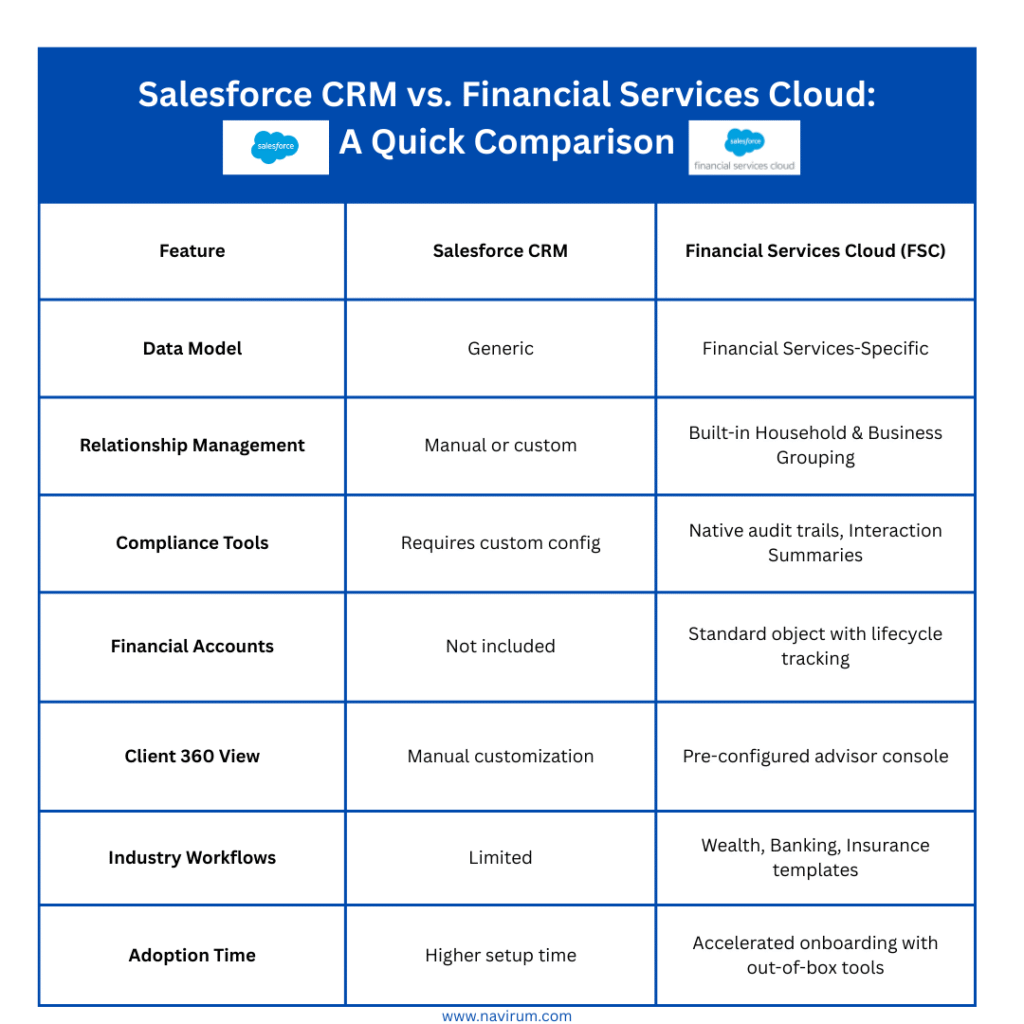
Salesforce CRM vs. Financial Services Cloud A Quick Comparison
Go In-depth on Salesforce FSC Wealth Management, Banking, and Insurance?
Check out these posts:
Key Tips for a Successful Migration from Salesforce CRM to FSC
Evaluate Your Current Salesforce Architecture
Start by assessing your current Salesforce environment:
- What standard/custom objects are used?
- How is your automation configured?
- What’s your current data quality level?
🛠 Pro Tip: A full gap analysis will help uncover what’s reusable, what’s redundant, and where FSC can streamline operations.
Map Your Data to FSC’s Financial Data Model
FSC includes unique objects like:
- Financial Accounts
- Assets & Liabilities
- Goals
- Person Accounts
- Relationships & Affiliations
📊 Best Practice: Test your data mappings in a sandbox before executing a full migration. Use tools like Data Loader, MuleSoft, or third-party ETL solutions.
Optimize Household and Client Management
FSC provides native tools to manage:
- Client Households
- Related Business Groups
- Referrals and Partners
💡 Migration is the ideal time to clean and consolidate duplicate client records for a stronger “single source of truth.”
Plan for Security, Compliance, and Auditing Enhancements
FSC includes:
- Interaction Summaries
- Field Audit Trail
- Shield Platform Encryption (optional)
Train and Support Your Teams for Success
Transitioning to FSC introduces new page layouts, objects, and dashboards. Your users need training that’s role-specific:
- Advisors
- Operations staff
- IT/Admins
👥 Change Management Tip: Identify internal champions, offer sandbox access early, and host regular training touchpoints to reinforce adoption.
FSC Migration Roadmap: A Proven 5-Phase Approach
- Discovery & Assessment : Review current org, data, business needs.
- Data Mapping & Architecture Design: Align data models with FSC’s schema
- Sandbox Build & Testing: Migrate a sample dataset and configure FSC features.
- Training & Change Management: Educate users and admins.
- Production Launch & Post-Go-Live Support: Go live with minimal disruption and continuous monitoring.
📌 Pro Tip: Don’t skip UAT (User Acceptance Testing) and back-up protocols.
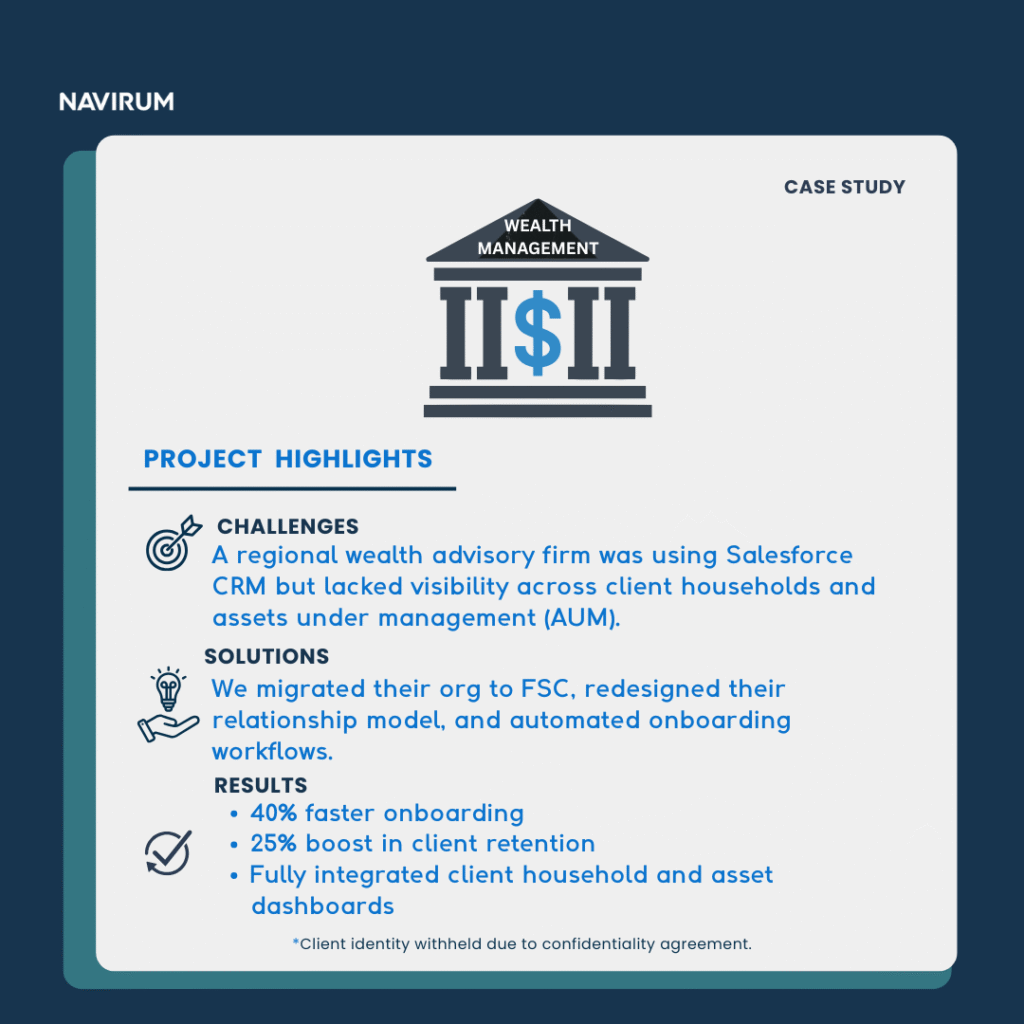
📥 Book Consultation Below 📥
Migrating to Salesforce Financial Services Cloud is more than a tech upgrade – it’s a strategic leap forward for how you serve clients and grow revenue.
FSC Migration FAQs
Will I lose any data during migration?
No, not if the data is properly mapped and migrated using sandbox testing and back-ups.
Can we roll out FSC in phases?
Absolutely. Many clients start with one business unit or advisory team and scale.
What’s the licensing difference between CRM and FSC?
FSC licenses are industry-specific and include additional objects and features. We’ll help assess your cost-benefit.
Do we need to build from scratch?
No. FSC comes with pre-configured templates, but we customize based on your business model.
How long does a typical FSC migration take?
Timelines vary based on data complexity, integrations, and customization needs. On average, migrations take 8–12 weeks from discovery to go-live, including testing and user training.
Will our existing Salesforce integrations still work after migrating to FSC?
In most cases, yes. Existing integrations can be maintained or optimized during migration. Our team reviews your connected apps and APIs to ensure compatibility and minimize disruption.