SideDrawer streamlines document management for financial services, offering secure storage, collaboration, and compliance features. Advisors and wealth managers can enhance efficiency, protect sensitive data, and deliver a better client experience with a centralized, digital-first platform.
Streamlining Document Management for Financial Professionals
In the fast-paced world of financial services, where security, efficiency, and client confidentiality are paramount, innovative solutions like those proposed by our partner, SideDrawer, are transforming how professionals manage and safeguard critical information. This blog explores the multifaceted benefits of SideDrawer for wealth managers and other financial services professionals, highlighting its role in enhancing productivity, collaboration, and data security.
1. Enhanced Organization and Accessibility:
Challenge: Managing a myriad of documents and client records efficiently is a common hurdle for financial professionals.
Solution: SideDrawer provides a centralized platform for organizing, categorizing, and accessing documents securely from any device.
Benefit: Wealth managers can streamline workflows, reduce administrative overhead, and retrieve information swiftly during client interactions and audits.
2. Secure Document Sharing and Collaboration:
Challenge: Ensuring confidential information remains protected while collaborating with clients and stakeholders.
Solution: SideDrawer employs robust encryption and permission-based access controls, safeguarding sensitive data from unauthorized access.
Benefit: Financial professionals can collaborate seamlessly with clients, legal teams, and other stakeholders, fostering trust and compliance with data protection regulations.
3. Compliance and Regulatory Alignment:
Challenge: Navigating complex regulatory requirements and ensuring adherence to data privacy laws.
Solution: SideDrawer offers compliance features such as audit trails, document versioning, and secure archiving.
Benefit: Professionals in financial services can demonstrate regulatory compliance, mitigate risks, and maintain client trust through transparent and accountable document management practices.
4. Client-Centric Service Delivery:
Challenge: Delivering personalized and responsive client service amidst increasing expectations for convenience and transparency.
Solution: SideDrawer enhances client interactions by providing a user-friendly portal for document sharing, signing, and collaboration.
Benefit: Financial professionals can elevate client satisfaction by offering seamless access to financial reports, contracts, and updates in real-time, thereby strengthening client relationships and loyalty.
SideDrawer: Empowering Financial Professionals Across the Board
SideDrawer stands out as a versatile solution that caters to the diverse needs of professionals in financial services:
1. Integrated Workflow Management:
SideDrawer integrates seamlessly with existing CRM and document management systems, optimizing workflow efficiency and data synchronization.
This integration enables professionals to streamline processes, reduce duplication of efforts, and enhance productivity.
2. Advanced Security and Confidentiality:
SideDrawer employs bank-grade encryption and secure data storage protocols, ensuring the highest levels of data security and confidentiality.
Professionals can confidently manage sensitive financial information while complying with industry standards and regulatory mandates.
3. Scalable and Customizable Solutions:
SideDrawer offers scalable solutions tailored to the specific needs of wealth managers, financial advisors, legal teams, and compliance officers.
This flexibility allows professionals to adapt and expand their document management capabilities as their business grows and evolves.
4. Enhanced Efficiency and Cost Savings:
By reducing reliance on paper-based processes and manual document handling, SideDrawer helps financial professionals optimize operational costs and resource allocation.
Professionals can allocate more time and resources to strategic initiatives, client relationship management, and business development activities.
Embracing Innovation for Future Success
In conclusion, SideDrawer redefines document management in financial services by providing a secure, efficient, and compliant platform for professionals to collaborate, manage, and safeguard critical information. Whether enhancing client service delivery, ensuring regulatory compliance, or optimizing operational efficiency, SideDrawer empowers financial professionals to thrive in a digital-first environment.
For financial services professionals seeking to elevate their document management strategies and uphold the highest standards of security and efficiency, SideDrawer offers a transformative solution. Embrace innovation, streamline workflows, and elevate client trust with SideDrawer.
To discover how SideDrawer can revolutionize your document management practices, contact them today at hello@sidedrawer.com.
This blog post highlights the transformative benefits of SideDrawer for professionals in financial services, emphasizing its role in enhancing efficiency, security, compliance, and client satisfaction. It underscores the advantages of streamlined document management and secure collaboration, positioning SideDrawer as a pivotal tool for modernizing operations and fostering growth in the financial sector.
Navirum Recommendations: Maximize Efficiency and Security with SideDrawer
At Navirum, we specialize in helping financial services firms adopt and optimize technology solutions that enhance efficiency, security, and client service. With deep expertise in Salesforce, document management, and workflow automation, we guide organizations in leveraging SideDrawer to its fullest potential.
Our approach includes:
Ongoing Optimization & Support: Beyond implementation, our team monitors performance, recommends improvements, and provides guidance to ensure SideDrawer continues to deliver secure, efficient, and compliant document management as your firm grows.
Strategic Implementation: We assess your current workflows, regulatory requirements, and operational goals to design a SideDrawer setup that aligns with your business needs.
Seamless Integration: Navirum ensures SideDrawer integrates smoothly with your existing CRM and document management systems, reducing duplication, streamlining processes, and boosting productivity.
Customized Workflows: We tailor document categorization, permissions, and collaboration tools to meet the unique needs of wealth managers, advisors, and compliance teams.
By partnering with Navirum, financial services firms gain more than a technology solution—they gain a trusted advisor with proven experience in driving operational efficiency, maintaining regulatory compliance, and enhancing client satisfaction through secure and modern workflows.
FAQs – SideDrawer
What is SideDrawer, and why is it useful for financial professionals?
SideDrawer is a secure, cloud-based document management and collaboration platform designed for wealth managers, advisors, and financial services teams. It centralizes documents, streamlines workflows, and ensures confidentiality, helping professionals work efficiently while maintaining compliance.
How does SideDrawer improve document organization?
SideDrawer provides a centralized, user-friendly platform to categorize, store, and retrieve documents quickly. Professionals can access client files from any device, reducing time spent searching for information and minimizing administrative overhead.
Is SideDrawer secure for sensitive financial information?
Yes. SideDrawer uses bank-grade encryption, secure data storage, and permission-based access controls to protect client data from unauthorized access while ensuring confidentiality and regulatory compliance.
Can SideDrawer help with compliance and audits?
Absolutely. SideDrawer features audit trails, document versioning, and secure archiving, allowing financial professionals to demonstrate regulatory compliance, maintain accountability, and mitigate operational risk.
How does SideDrawer support client collaboration?
The platform enables secure document sharing, real-time collaboration, and e-signature functionality. Advisors can seamlessly interact with clients, legal teams, and stakeholders while maintaining strict data privacy standards.
Does SideDrawer integrate with existing CRM or document management systems?
Yes. SideDrawer integrates with many CRM platforms and existing document management systems, ensuring smooth workflows, synchronized data, and reduced duplication of effort across teams.
Can SideDrawer scale with a growing financial services firm?
Yes. SideDrawer is customizable and scalable, supporting the needs of individual advisors, wealth management teams, and large financial institutions as they grow and expand operations.
How does SideDrawer enhance operational efficiency?
By digitizing and centralizing documents, automating version control, and streamlining workflows, SideDrawer reduces reliance on manual, paper-based processes. This frees up time for client service, strategic initiatives, and business development.
Can SideDrawer improve client satisfaction?
Yes. By providing secure, real-time access to reports, contracts, and updates, SideDrawer enables faster, more transparent, and personalized interactions, strengthening client trust and loyalty.
What types of financial services professionals benefit most from SideDrawer?
Wealth managers, financial advisors, legal teams, compliance officers, and operational staff all benefit from SideDrawer’s secure, efficient, and compliant document management capabilities.
Looking for new ways of leveraging Salesforce for Financial insight? Business Intelligence Integration is the answer! In today’s data-driven business environment, financial institutions rely on accurate insights to make informed decisions, manage risks, and drive growth. Salesforce, renowned for its robust CRM capabilities, offers a powerful platform to integrate business intelligence (BI) tools and enhance financial insights. This article explores the benefits, strategies, and best practices for leveraging Salesforce for business intelligence integration in financial institutions.
The Importance of Business Intelligence Integration in Financial Institutions
Financial institutions manage vast amounts of data, including client information, transaction records, market trends, and regulatory data. Integrating Salesforce with BI tools enables these institutions to:
Gain Comprehensive Insights: Consolidate data from various sources into Salesforce to create a unified view of clients, financial performance, and market trends.
Improve Decision-Making: Empower decision-makers with real-time analytics, predictive modeling, and forecasting capabilities to identify opportunities and mitigate risks proactively.
Enhance Operational Efficiency: Automate data analysis, reporting, and dashboard creation to streamline operations and reduce manual effort.
Ensure Regulatory Compliance: Utilize BI tools integrated with Salesforce to monitor compliance, analyze regulatory impacts, and maintain transparency.
Key Benefits of Salesforce Business Intelligence Integration
1. Unified Data Platform
360-Degree View of Clients: Integrate Salesforce with BI tools to consolidate client data, interactions, and financial portfolios in one centralized platform. This unified view enables personalized client interactions and targeted marketing strategies.
Holistic Financial Insights: Combine financial performance metrics, market trends, and customer behavior analytics to gain a comprehensive understanding of business performance and market opportunities.
2. Advanced Analytics and Reporting
Real-Time Analytics: Leverage BI tools integrated with Salesforce to perform real-time data analysis, visualize trends, and generate actionable insights for executives, advisors, and operations teams.
Custom Dashboards and Reports: Create custom dashboards and reports within Salesforce to monitor key performance indicators (KPIs), track financial metrics, and measure business outcomes effectively.
3. Predictive Modeling and Forecasting
Predictive Analytics: Utilize Salesforce Einstein Analytics or integrate third-party BI tools for predictive modeling, forecasting future trends, and identifying potential risks and opportunities in the market.
Scenario Planning: Simulate scenarios and evaluate the impact of strategic decisions on financial performance, client retention, and business growth using integrated BI capabilities.
4. Operational Efficiency and Automation
Automated Insights: Implement automated data workflows and alerts within Salesforce to notify stakeholders of critical changes, anomalies, or opportunities based on predefined criteria.
Efficient Resource Allocation: Optimize resource allocation, budgeting, and strategic planning processes by analyzing historical data and performance metrics through integrated BI tools.
Strategies for Successful Salesforce Business Intelligence Integration
1. Assess Integration Needs and Objectives
Needs Assessment: Conduct a thorough analysis of business requirements, data sources, and integration challenges to define clear objectives for BI integration with Salesforce.
Goal Setting: Establish measurable goals such as improving data accuracy, enhancing decision-making capabilities, or reducing reporting cycles through BI integration.
2. Select the Right BI Tools and Salesforce Edition
BI Tool Selection: Choose BI tools that align with your financial institution’s needs, scalability requirements, and compatibility with Salesforce APIs.
Salesforce Edition: Consider Salesforce editions such as Financial Services Cloud or Einstein Analytics to leverage industry-specific features and compliance capabilities.
3. Data Integration and Architecture Design
Data Mapping and Integration: Develop a data integration strategy to map and synchronize data between Salesforce and BI platforms while ensuring data integrity and security.
Integration Architecture: Design a scalable and robust integration architecture that supports real-time data updates, seamless data flows, and efficient query performance for analytics.
4. User Training and Adoption
Training Programs: Provide comprehensive training to users on navigating Salesforce, interpreting BI dashboards, and utilizing integrated tools for data-driven decision-making.
Change Management: Implement a change management strategy to foster adoption, address user resistance, and promote a culture of data-driven insights across the organization.
Request Your Salesforce Readiness Assessment | Navirum
Integration Assessment
Request Your Salesforce Readiness Assessment
Not sure if your tech stack is integration-ready? We’ll assess your current setup in one conversation. Designed exclusively for financial services firms.
Integrating Salesforce with business intelligence tools empowers financial institutions to harness data effectively, gain actionable insights, and drive strategic initiatives with confidence. By consolidating data, leveraging advanced analytics, and automating reporting processes, organizations can enhance operational efficiency, improve client satisfaction, and achieve sustainable growth in a competitive market landscape.
As you embark on the journey to integrate business intelligence with Salesforce, consider partnering with experienced Salesforce consulting professionals. They can provide expertise in customization, integration, and training to maximize the value of Salesforce for your financial institution.
Ready to unlock the power of Salesforce for business intelligence integration? Contact our Salesforce consulting team today to explore how we can support your organization in leveraging financial insights to accelerate business success and innovation.
Main Navigation CTA Showcase | Navirum
Next Steps & Impact
Explore Navirum Success, Culture & Team
Discover real-world outcomes, learn about our collaborative company culture, and meet the financial technology specialists leading your digital transformation.
Proven Results & Impact
Explore Our Success Stories
See how we help financial institutions, wealth managers, and fintechs turn Salesforce and AI into measurable business outcomes and operational growth.
Whether you are getting to know our team, evaluating our Salesforce and AI offerings, or ready to discuss your firm's growth goals, we are here to guide your journey.
About Navirum
Discover our story, mission, and the experienced financial technology specialists guiding your digital transformation.
PitchBook Salesforce integration connects private-market intelligence with Salesforce CRM, helping financial services firms enrich accounts, improve prospecting, streamline deal sourcing and fundraising, and strengthen relationship management. The integration is particularly valuable for investment banks, private equity and venture capital firms, asset managers, and wealth management organizations. Best results come from a clear data strategy, careful field mapping, duplicate management, security controls, and workflows designed around business needs.
PitchBook Salesforce Integration: Enhancing Financial Services with Market Intelligence and CRM Workflows
Estimated reading time: 37 minutes
PitchBook Salesforce Integration: Benefits, Use Cases & Best Practices for Financial Services
Financial services firms depend on timely market intelligence to identify opportunities, build relationships, and make better decisions. However, access to high-quality data is only part of the equation. Teams also need that intelligence to be available within the systems they use to manage relationships, opportunities, and workflows.
For organizations using Salesforce, integrating PitchBook with the CRM can help bridge that gap.
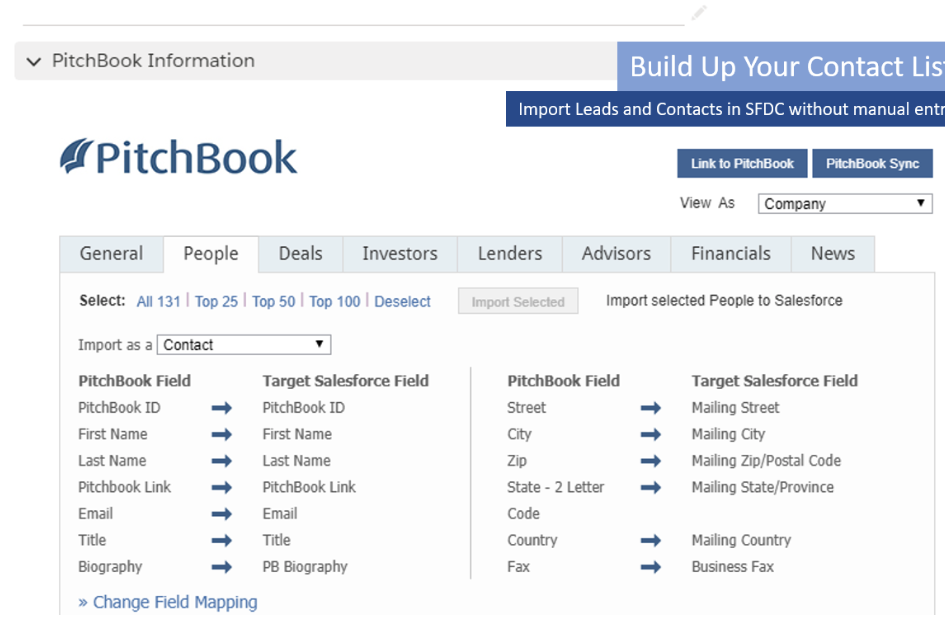
PitchBook provides private capital market intelligence covering companies, investors, professionals, deals, funds, and other market information. Its Salesforce CRM Plugin allows organizations to view and import PitchBook information directly into Salesforce, link Salesforce records to PitchBook profiles, map fields, and synchronize selected data.
However, the real value of a PitchBook Salesforce integration is not simply putting more data into Salesforce.
The opportunity is to connect external market intelligence with CRM relationships, business processes, automation, analytics, and—where appropriate—AI.
For financial services firms, that can support deal sourcing, investment banking origination, fundraising, prospecting, relationship management, and business development.
This article explores what the PitchBook Salesforce integration is, who it is for, what data can be connected, the benefits and financial-services use cases, best practices for implementation, and how Navirum recommends approaching the integration.
Does PitchBook integrate with Salesforce?
PitchBook has developed an integration for Salesforce users that allows them to view and import PitchBook information into Salesforce.
Integrating PitchBook with Salesforce offers financial professionals a comprehensive solution that combines powerful market insights with efficient customer relationship management. While Preqin, CB Insights, FactSet, S&P Capital IQ, and With Intelligence are all popular choices, the marriage of Salesforce and Pitchbook data remains one of the most popular!
Pitchbook and Salesforce combined is a great solution for ventures capital, private equity, and investment banks for host of use cases from deals, to fund raising, compliance and marketing. By integrating these platforms, professionals can seamlessly access PitchBook’s extensive database of financial data, industry trends, and company analyses directly within Salesforce. At Navirum, we’re pros at this .
Once PitchBook and Salesforce are connected, keeping that integration healthy as both platforms release updates is an ongoing job. That is the kind of work covered by post-go-live Salesforce support rather than a one time setup project.
What Is the PitchBook Salesforce Integration?
The PitchBook Salesforce integration connects PitchBook’s private-market intelligence with Salesforce CRM.
PitchBook offers a Salesforce-specific CRM Plugin that allows users to view and import PitchBook information directly within their Salesforce environment. According to PitchBook, users can import information about contacts, investors, companies, advisory firms, limited partners, and other entities.
PitchBook & Salesforce Integration | Navirum
Market Intelligence & CRM Sync
PitchBook & Salesforce Integration
Incorporate external private market intelligence directly into your Salesforce FSC workspace—bridging what is happening across global markets with your internal deal execution workflows.
Connecting External Intelligence to Internal Execution
The integration provides far more than a simple data export by linking two essential perspectives:
PitchBook Intelligence
“What is happening in the market?”
Real-time market signals, valuations, financing rounds, M&A activity, LP commitments, AUM, and investor dry powder across global private markets.
Automatically populate existing Salesforce Accounts and Contacts with verified PitchBook market intelligence. Replace incomplete CRM records with complete financial, valuation, and executive contact profiles.
✓
Complete corporate profiles with revenue, valuation & EBITDA
Identify high-conviction companies or investors in PitchBook and import them straight into Salesforce as new Leads or Accounts in a single click, skipping manual copy-pasting.
✓
One-click import for targeted companies & executive contacts
✓
Preserves source attribution & search criteria
✓
Automatically routes leads to appropriate territory owners
💡 Strategic Impact: Accelerates prospect sourcing while ensuring new records meet clean CRM standards.
Sync & Field Mapping
3. Link Salesforce Records with PitchBook Profiles
Establish a 1:1 persistent digital link between Salesforce Accounts, Contacts, and Opportunities and their corresponding profiles in PitchBook’s global intelligence database.
✓
Eliminates duplicate account creation across deal teams
✓
Connects internal deal history to live market events
✓
Enables instant cross-referencing between both platforms
💡 Strategic Impact: Ensures every team member views identical, verified market data for linked accounts.
Sync & Field Mapping
4. Map PitchBook Fields to Salesforce Fields
Configure standard and custom field mappings to align PitchBook attributes (AUM, dry powder, revenue, valuation, deal size) directly with your firm’s Salesforce FSC schema.
✓
Maps company attributes (Revenue, EBITDA, Year Founded, Investors)
💡 Strategic Impact: Transforms passive market research into proactive, automated deal execution.
Standard Field Mappings: Company vs. Investor Data
PitchBook provides standard mappings for Salesforce Leads, Contacts, and Accounts across two distinct entity types:
Company Status
Ownership Status
Primary Industry & Sector
Employee Count
Year Founded
Financing History & Rounds
Active Investors & Board
Latest Valuation
Revenue & EBITDA
Headquarter Location
Assets Under Management (AUM)
Dry Powder Available
Recent Investment Activity
Preferred Deal Size
Target Industries & Verticals
Target Geographies
Investment Types (Buyout, VC, Debt)
Active Fund Series
Real-World Scenario Walkthrough
How an Investment Bank Leverages the Integration
A practical step-by-step example of moving from market signal to relationship execution:
Step 1: SignalMarket Event in PitchBook
An investment bank identifies a high-growth tech company in PitchBook that recently completed a Series B financing round.
Step 2: SyncSalesforce Relationship Check
Salesforce instantly cross-references the company profile to determine if the firm has an existing account or historical contacts.
Step 3: QualifyCoverage & Opportunity Audit
The CRM identifies the account owner, checks for active deal pipelines, and verifies previous meeting notes from senior bankers.
Step 4: ExecuteAutomated Follow-Up Trigger
Salesforce automatically assigns a high-priority outreach task and Slack alert to the designated coverage banker to initiate contact.
The Paradigm Shift: From Manual Research to Automated Execution
How integrating PitchBook with Salesforce FSC modernizes daily banker and deal team operations:
❌ Old Disconnected Process
1. Search PitchBook manually →
2. Export company data to CSV spreadsheet →
3. Cross-reference spreadsheet against CRM →
4. Manually copy/paste fields into Salesforce →
5. Email team to ask who owns the relationship (High Drag)
✅ Integrated PitchBook + Salesforce Flow
1. Live PitchBook Market Intelligence →
2. Automatic Salesforce Account Matching →
3. Automated Opportunity Qualification →
4. Instant Workflow & Task Assignment →
5. Context-Rich Relationship Execution & Deal Close
How Does the PitchBook Salesforce Plugin Work?
The exact implementation depends on the organization’s PitchBook subscription, Salesforce configuration, data requirements, and business processes.
At a high level, the process involves four main components.
Connecting & Structuring PitchBook Intelligence in Salesforce | Navirum
Integration Roadmap & Data Strategy
Connecting & Structuring PitchBook Intelligence in Salesforce
Connecting PitchBook to Salesforce Financial Services Cloud requires aligning business priorities with CRM data architecture. Follow the 4-step framework to transition external market signals into operational workflow results.
Step 1: Stakeholder Alignment & Setup
1. Connect PitchBook and Salesforce
PitchBook’s current documentation indicates that organizations begin the Salesforce integration process through their PitchBook account manager or support team. Once the PitchBook-side setup is completed, the organization can proceed with the Salesforce installation and configuration.
Dual-Stakeholder Responsibilities:
✓
Business Stakeholders: Define required deal metrics, LP attributes & research priorities.
💡 Core Principle: Successful integration requires active collaboration between business teams (who know what data is needed) and Salesforce admins (who know how data fits the CRM).
Step 2: Schema & Process Mapping
2. Map PitchBook Data to Salesforce
Field mapping determines where PitchBook information should appear in Salesforce. While PitchBook currently documents access to 86 fields for mapping companies and contacts within its Salesforce Plugin, having access to a large number of fields does not mean a firm should synchronize all of them.
✓
Map company industry data to dedicated Salesforce industry fields
✓
Map financing history, valuations & round data to Opportunity or Account fields
✓
Avoid CRM clutter by selectively mapping only process-relevant data
💡 The Right Question: “Which PitchBook data directly supports our firm’s daily business processes?”
Step 3: Entity Matching & Connectivity
3. Link Salesforce Records to PitchBook Profiles
The integration matches Salesforce records to corresponding PitchBook entities. PitchBook’s Salesforce documentation describes automatic matching where possible, while users can also manually link a Salesforce account to a PitchBook profile.
✓
Automatic Matching: Links accounts automatically based on domain & company name.
✓
Manual Linking: Allows deal teams to link complex or niche entities in one click.
✓
Operational Bridge: Connects internal deal notes directly to live market events.
💡 Strategic Impact: The CRM record becomes persistently connected to external intelligence, turning static data into operational action.
Step 4: Data Freshness & Governance
4. Synchronize Selected Data
Once records are linked and fields are mapped, PitchBook intelligence synchronizes into Salesforce. PitchBook states that its CRM integration supports thousands of data points across company, deal, investor, and public financial profiles.
On-Demand Sync: Users can manually synchronize specific linked accounts on demand.
✓
Governance Guardrails: Protects custom internal banker notes from accidental overwrites.
💡 Reality Check: Organizations should not incorrectly describe the integration as real-time. Instead, understand it as providing PitchBook intelligence with scheduled & on-demand sync rules.
Step 1 Deep-Dive: Aligning Business & Technical Stakeholders
A successful integration requires connecting two distinct perspectives before launching setup:
Business Stakeholders (Dealmakers & IR)
Core Focus: Understands what market intelligence deal teams, LPs, and bankers need to qualify prospects, evaluate valuations, and close transactions faster.
Technical Stakeholders (Salesforce Admins)
Core Focus: Understands how PitchBook data fits into Salesforce object schema, custom fields, permission sets, and downstream reporting workflows.
Step 2 Deep-Dive: Selective Mapping Explorer (86 Fields Available)
Selecting only the data points that directly support your firm’s operational processes:
Primary Industry & Vertical
Company Operating Status
Financing Status
Most Recent Financing Round
Total Money Raised to Date
Latest Post-Money Valuation
Active Investors & Board Seats
Institutional Investor Type
Assets Under Management (AUM)
Recent Investment Activity
Preferred Investment Asset Classes
Target Geographic Mandates
Target Industry Verticals
Step 3 Deep-Dive: How Linking Turns Data into Execution
The operational progression when a Salesforce Account is linked to a PitchBook Profile:
Stage 1: RecordSalesforce Account
Target company record (e.g., ABC Technologies) exists inside Salesforce FSC workspace.
Stage 2: LinkPitchBook Profile
Automatic or manual 1:1 match connects the CRM account to PitchBook’s global profile.
Stage 3: EnrichPitchBook Intelligence
Industry data, financing activity, investors, and valuations populate linked account fields.
Stage 4: ExecuteSalesforce Workflow
Account owner, relationship notes, pipeline opportunities, and outreach tasks execute.
Step 4 Deep-Dive: Synchronization Frequency & Expectations
Setting accurate expectations around PitchBook data synchronization behavior in Salesforce:
📅 Weekly Scheduled Batch Updates
PitchBook’s Salesforce Plugin provides weekly scheduled updates for linked account data. Data refreshes systematically in background batches to maintain system health.
⚡ On-Demand Manual Refresh
When dealmakers need real-time data prior to an IC meeting or LP call, users can manually synchronize an account profile in a single click inside Salesforce.
📌 Executive Takeaway: Understand the integration as providing PitchBook intelligence within Salesforce—with synchronization governed by configured weekly schedules and on-demand refresh triggers rather than continuous real-time streaming.
What Data Can PitchBook Bring Into Salesforce?
A key consideration when implementing a PitchBook Salesforce integration is deciding which PitchBook data should be available in Salesforce and how that information will support business workflows.
PitchBook’s Salesforce integration can work with Salesforce Leads, Contacts, and Accounts, allowing financial services firms to bring relevant private-market intelligence into their CRM. The specific fields and data available depend on the PitchBook integration and the organization’s configuration.
The types of PitchBook information that may be relevant include company data, contact data, and investor data.
Company Data
PitchBook company information can help financial services professionals understand organizations and identify potential business or investment opportunities. Depending on the available mapping and use case, relevant company information can include:
Company name and website
Industry and industry sector
Company status and ownership status
Financing status
Number of employees
Year founded
Geographic location
Recent financing activity
Total capital raised
Valuation
Revenue
EBITDA
Investors
For example, an investment banking firm could use company and financing information to identify potential M&A or capital-raising opportunities. A private equity firm could use similar information to identify companies that match its investment criteria.
Contact Data
Contact information helps teams connect market intelligence with the people involved in a business or investment relationship. Relevant contact information can include:
Contact name
Job title
Company
Email address
Phone number
Biography
PitchBook profile link
Bringing relevant contact information into Salesforce can help investment bankers, investors, and business development teams manage relationships and track engagement from a central CRM.
Investor Data
For asset managers, private equity firms, venture capital firms, and other investment organizations, investor information can be particularly valuable. Depending on the available data and configuration, relevant investor attributes may include:
Assets under management (AUM)
Dry powder
Investment activity
Preferred investment types
Preferred industries
Preferred geographies
Preferred deal size
Investment horizon
Recent investment activity
This information can help teams identify and prioritize potential investors, limited partners, and other organizations that fit specific fundraising or business development criteria.
Which PitchBook Data Should You Sync With Salesforce?
Having access to a large amount of PitchBook data does not mean that all of it should be stored in Salesforce.
The goal of a PitchBook Salesforce integration should be to make relevant intelligence available where it supports specific business processes.
Before configuring field mappings, organizations should determine:
Which PitchBook data users actually need
Which Salesforce objects should contain that information
Which system is the source of truth for each field
Which data should be synchronized
How frequently the data should be updated
Who should have access to the information
How the data will be used in Salesforce workflows, reports, and automation
For example, a private equity firm focused on deal sourcing may prioritize company industry, financing activity, valuation, and investors. An asset manager focused on institutional fundraising may place greater emphasis on investor type, AUM, investment preferences, geography, and recent investment activity.
The best integration is not the one that brings the most data into Salesforce. It is the one that brings the right data into Salesforce and makes that data actionable.
Who Is PitchBook Salesforce Integration For? | Navirum
Target Financial Segments
Who Is PitchBook Salesforce Integration For?
Connecting PitchBook market intelligence with Salesforce Financial Services Cloud delivers tailored deal sourcing, LP relationship management, and market intelligence workflows across key capital markets sectors.
Capital Markets & M&A
Investment Banking
Investment banks use PitchBook intelligence to connect external deal activity and financing rounds with existing Salesforce advisor relationships.
Core Integration Applications
Deal Origination
M&A Prospecting
Capital Raising
Private Placements
Company Research
Executive Mapping
Business Development
Relationship Management
💡 Real-World Banker Workflow: Before reaching out to a company that recently completed a financing round in PitchBook, the banker checks Salesforce to see existing relationship history, account ownership, previous meeting notes, and active opportunities.
Buyout & Growth Capital
Private Equity
Private equity firms apply PitchBook and Salesforce together to streamline target company sourcing while managing LP relationship lifecycles.
Core Integration Applications
Deal Sourcing
Target-Company Research
Executive Networking
Deal Pipeline Management
Fund Sourcing & Raising
LP Relationship Mgmt
Portfolio Monitoring
Valuation Tracking
💡 Sourcing & Execution Synergy: PitchBook surfaces high-growth target companies matching investment criteria, while Salesforce manages deal pipeline stages, due diligence tasks, and LP co-investment relationships.
Early-Stage & Growth
Venture Capital
VC firms leverage connected market intelligence to track emerging startups, founder relationships, and sector themes in a unified platform.
Core Integration Applications
Startup Sourcing
Founder Relationships
Investment Pipeline
Venture Fundraising
Market & Thesis Mapping
Portfolio Ecosystem
💡 Thesis Alignment: PitchBook identifies startups aligned with specific investment theses, allowing dealmakers to import qualified leads directly into Salesforce for founder outreach.
Institutional Distribution
Asset Management
Asset managers combine PitchBook investor intelligence with Salesforce FSC to drive institutional prospecting and distribution strategies.
Core Integration Applications
Institutional Prospecting
Strategy Fundraising
Institutional Research
Business Development
Consultant Coverage
Competitive Intelligence
💡 Institutional Targeted Campaigns: Teams isolate institutional investors matching mandate criteria in PitchBook and manage active fundraising pipeline stages in Salesforce.
Private Wealth & Alternatives
Wealth Management & Private Wealth
Wealth management organizations with alternative investment or private market strategies leverage PitchBook data for high-net-worth and family office solutions.
Core Integration Applications
Private-Market Research
Alternative Investments
Family Office Prospecting
Investment Partners
Wealth Growth Workflows
⚠️ Data Governance Note: Wealth management firms must be deliberate about field scoping when bringing external intelligence into Salesforce orgs that store sensitive household and personal wealth records.
Investment Banking
Private Equity
Venture Capital
Asset Management
Wealth Management
Key Benefits of PitchBook Salesforce Integration | Navirum
CRM & Market Intelligence
Key Benefits of PitchBook Salesforce Integration
Discover how combining PitchBook private-market intelligence with Salesforce Financial Services Cloud optimizes data quality, streamlines deal sourcing, and strengthens relationship context.
Data Efficiency
1. Reduce Manual Data Entry
Without integration, users research companies in PitchBook, copy data into spreadsheets, and manually build Salesforce records. The PitchBook Salesforce Plugin allows teams to view and import live intelligence directly into CRM workflows.
Less Repetitive Work Fewer Transcription Errors Faster Prospect Creation Consistent CRM Records
💡 Operational Value: Replaces manual copy-pasting with direct 1-click import, freeing dealmakers to focus on outreach.
Data Efficiency
2. Enrich Salesforce Records
Salesforce records capture internal relationships and communication histories. PitchBook adds essential external market context to create a complete 360-degree account view.
Industry & Sectors Financing Activity Active Investors Key Executive Contacts
💡 Operational Value: Merges internal history (“what we did”) with live market intelligence (“what is happening”).
Sourcing & Prospecting
3. Improve Prospecting
PitchBook helps firms identify target companies, institutional investors, and executives matching specific deal criteria, transforming static research lists into an active operational sales pipeline.
💡 Operational Value: Moves seamlessly from market research to structured CRM account assignment and tracking.
Sourcing & Prospecting
4. Improve Relationship Intelligence
Financial services is fundamentally relationship-driven. Connecting PitchBook intelligence with Salesforce activity provides relationship managers with deep context for client meetings and deal discussions.
💡 Operational Value: Equips deal teams with relevant background data to lead more strategic client conversations.
Prioritization & Dashboards
5. Support Better Account Prioritization
Not every prospect deserves equal time. Combining PitchBook market indicators with Salesforce engagement signals turns your CRM into an active decision-support engine.
Target Market Fit Recent Financing Events Recent CRM Engagement Open Deal Pipeline
💡 Operational Value: Focuses banker and advisor capacity on high-probability opportunities showing real market signals.
Prioritization & Dashboards
6. Improve Reporting
Synchronized PitchBook data enhances native Salesforce reports and dashboards, allowing leaders to segment and analyze deal activity across crucial market dimensions.
Industry & Size Investor Type & Strategy Deal Characteristics Relationship Stage
💡 Operational Value: Gives executives clear pipeline visibility by blending internal metrics with external market attributes.
1
Reduce Manual Entry
Eliminates copy-pasting & transcription errors.
2
Enrich CRM Records
Combines internal history with live market context.
3
Improve Prospecting
Connects target research to active CRM pipelines.
4
Relationship Intelligence
Equips teams with background data for meetings.
5
Account Prioritization
Prioritizes accounts using external deal signals.
6
Improve Reporting
Powers executive dashboards with market metrics.
PitchBook Salesforce Integration Use Cases in Financial Services | Navirum
Operational Integration
PitchBook Salesforce Integration Use Cases in Financial Services
Explore real-world workflows demonstrating how combining PitchBook market intelligence with Salesforce FSC drives actionable deal sourcing, origination, fundraising, mapping, and prioritization.
Deal Sourcing & M&A
Use Case 1: Private Equity Deal Sourcing
Imagine a PE firm focused on healthcare technology. The investment team identifies companies in PitchBook matching criteria (industry, geography, size, revenue, ownership), then seamlessly brings qualified targets into Salesforce.
💡 Strategic Impact: Integration embeds market research into the core sourcing process rather than treating data as an isolated static export.
Deal Sourcing & M&A
Use Case 2: Investment Banking Origination
An investment bank uses PitchBook to identify companies representing future M&A, financing, or advisory opportunities. Before outreach, bankers query Salesforce to connect external events with internal intelligence.
💡 Strategic Impact: External market intelligence links directly to internal relationship history, avoiding duplicate or uncoordinated outreach.
Fundraising & Mapping
Use Case 3: Institutional Fundraising
An asset manager launching a new fund uses investor intelligence to pinpoint institutional organizations fitting the strategy, moving beyond broad email lists to structured relationship management.
💡 Strategic Impact: Enables capital raising teams to execute disciplined account-based fundraising campaigns with clear stage tracking.
Fundraising & Mapping
Use Case 4: Executive & Relationship Mapping
People drive financial services relationships. PitchBook identifies key decision-makers and career histories, while Salesforce maintains your firm’s interaction logs with those executives.
Decision-Maker Identification Multi-Team Interaction Logs Executive Career Movement Complete Interaction Context
💡 Strategic Impact: Invaluable when multiple partners or deal teams touch the same target institution or executive network.
BD & Prioritization
Use Case 5: Business Development Prioritization
Combine external PitchBook characteristics with Salesforce relationship signals to build an automated, high-precision prospect prioritization model.
High Market Fit+Recent Transaction+Existing Relationship+No Recent Outreach=HIGH-PRIORITY ACCOUNT
Identify targets in PitchBook & manage pipeline in FSC.
2
IB Origination
Connect market events with existing advisor history.
3
Fundraising
Execute structured account-based LP engagement.
4
Executive Mapping
Track key people & multi-team relationship history.
5
BD Prioritization
Automate account scoring & task notifications.
PitchBook Salesforce Integration vs. Custom Integration | Navirum
Architecture Comparison
PitchBook Salesforce Integration vs. Custom Integration
Evaluate the strategic trade-offs between standard CRM plugins, dedicated APIs, enterprise data feeds, and custom Salesforce architectures to determine the optimal integration model for your firm.
Key Strategic Reality: A common misconception is that every PitchBook Salesforce project requires a custom-built connector. It does not. PitchBook provides a dedicated Salesforce CRM Plugin, and its standard functionality may be sufficient for many organizations. Choose based on actual business requirements—not the assumption that higher complexity is automatically better.
Out-of-the-Box
PitchBook Salesforce Plugin
PitchBook’s standard pre-built integration component designed for rapid deployment and native record enrichment across Salesforce Accounts, Contacts, and Leads.
Best ForOrganizations needing standard CRM integration
Key ConsiderationFastest path to connecting PitchBook and Salesforce
💡 Strategic Insight: Ideal for most financial services firms seeking out-of-the-box profile views, account enrichment, and manual prospect imports without custom engineering.
On-Demand API
PitchBook API
PitchBook describes its API as a separate offering that provides specific data to internal systems on demand, particularly when data requirements change frequently or near-instant population is required.
Best ForSpecialized or on-demand data retrieval
Key ConsiderationGreater flexibility accompanied by higher technical complexity
💡 Strategic Insight: Gives developers programmatic control to query exact data points dynamically when native weekly sync schedules fall short.
Enterprise Data Warehouse
Data Feed / Enterprise Architecture
Bulk data ingestion feeding central data lakes (e.g., Snowflake) or internal data warehouses, which then syndicate enriched records downstream into Salesforce.
Best ForLarge-scale data requirements
Key ConsiderationBetter suited to comprehensive enterprise data strategies
💡 Strategic Insight: Powerful for large institutions managing multi-departmental data pipelines beyond CRM users.
Hybrid Solution
Custom Architecture around Plugin/API
Tailored Salesforce configurations that build custom Apex triggers, Flow automations, or custom objects around the standard Plugin or API data layers.
Best ForFirms with complex workflows & specialized FSC needs
Key ConsiderationRequires careful Salesforce and integration architecture design
💡 Strategic Insight: Combines the stability of PitchBook’s native connector with custom Salesforce automation tailored to proprietary deal stages.
Integration Approach Matrix Summary
Approach
Best For
Key Consideration
PitchBook Salesforce Plugin
Standard
Organizations needing standard CRM integration
Fastest path to connecting PitchBook and Salesforce
PitchBook API
On-Demand
Organizations requiring specialized or on-demand data retrieval
Greater flexibility and technical complexity
Data Feed / broader data architecture
Enterprise
Organizations with large-scale data requirements
Better suited to enterprise data strategies
Custom Salesforce architecture around Plugin/API
Hybrid
Firms with complex workflows and financial-services requirements
Requires careful Salesforce and integration design
1
Salesforce Plugin
Fastest path for standard CRM account enrichment.
2
PitchBook API
On-demand real-time programmatic queries.
3
Data Feed
Large-scale enterprise data warehousing.
4
Custom FSC Architecture
Tailored Apex & Flow automation layer.
What a PitchBook Salesforce Integration Does Not Automatically Solve?
Connecting PitchBook and Salesforce is an important technical step, but it does not solve every CRM or data problem.
The integration does not automatically:
Clean existing Salesforce data
Eliminate duplicates
Define account ownership
Create an effective sales process
Determine which prospects deserve attention
Establish data governance
Build useful dashboards
Create AI-ready data
Fix an inefficient Salesforce data model
Determine what information users actually need
This is why integration projects should begin with business processes and data architecture, rather than installation alone.
A technically successful integration can still produce limited business value if users receive too much irrelevant information or if the data does not fit the Salesforce operating model.
Best Practices for PitchBook Salesforce Integration | Navirum
Implementation Framework
Best Practices for PitchBook Salesforce Integration
Follow these 9 strategic principles to ensure your PitchBook and Salesforce FSC integration enhances deal productivity, safeguards data quality, and drives sustained user adoption.
Strategy & Data Model
1. Start With the Business Process
Don’t ask “How do we connect PitchBook to Salesforce?”. Ask “What business process are we trying to improve?”. Design the integration layer to directly serve specific revenue or deal flows.
💡 Strategic Impact: Aligns technical setup with business outcomes so users see immediate value in their day-to-day workflow.
Strategy & Data Model
2. Define the Salesforce System of Record
Establish explicit data ownership rules between Salesforce internal context and PitchBook external market intelligence to prevent conflicting data.
Data Type
Primary System of Record
CRM Relationship, Activities & Stages
Salesforce
Account Ownership & Internal History
Salesforce
Private-Market Intelligence & Dry Powder
PitchBook
PitchBook Identifiers & Mapped Attributes
Salesforce (Reference)
💡 Strategic Impact: Prevents overwrite conflicts and clarifies which system holds the source of truth.
Strategy & Data Model
3. Don’t Sync Everything
PitchBook provides vast quantities of information. Data availability does not equal data necessity. Prioritize fields supporting active business workflows.
Avoid Screen Clutter Control Storage Costs Eliminate Duplicate Data Boost User Adoption
💡 Strategic Impact: Keeps CRM record views clean and actionable for bankers and dealmakers.
Strategy & Data Model
4. Create a Field-Mapping Strategy
Document exact field specifications prior to technical execution to create a single source of truth for admins, business stakeholders, and integration engineers.
PitchBook Field vs. Salesforce Field Data Types & Sync Direction Update Frequency & Behavior Business Owner & Security Level
💡 Strategic Impact: Eliminates guesswork during rollout and ensures long-term field governance.
Testing & Security
5. Establish Duplicate Rules
Automated data enrichment can spawn duplicate Accounts and Contacts if matching rules aren’t carefully configured to match your firm’s data quality policy.
Company Name & Domain PitchBook Unique ID Contact Email & Phone Name + Company Compound Matching
💡 Strategic Impact: Protects CRM relationship history from fragmentation caused by rogue record duplication.
Testing & Security
6. Test in a Salesforce Sandbox
Thoroughly validate configurations in a dedicated Full or Developer Sandbox environment with key business users before deploying to Production.
Field Mappings & Sync Schedules Record Matching & Duplication Page Layouts & User Experience Flow Automation & Reporting
💡 Strategic Impact: Ensures business stakeholders endorse the user experience prior to go-live.
UX & Governance
7. Design for User Experience
Integration should simplify everyday tasks. Bankers and deal professionals should not have to navigate multiple screens or manually rekey data.
💡 Strategic Impact: Delivers the right data to authorized users for specific business purposes without exposing sensitive information.
UX & Governance
9. Monitor Data Quality
Integration is an ongoing operational commitment. Maintain administrative dashboards to monitor health metrics and address data issues early.
Match & Duplicate Rates Failed Sync Logs Stale Records & Mappings User Adoption Analytics
💡 Strategic Impact: Keeps the integration layer healthy, accurate, and aligned with evolving business needs over time.
1
Business Process First
Focus on process improvement, not just connectivity.
2
System of Record
Define clear data ownership between CRM and PB.
3
Don’t Sync Everything
Prioritize fields supporting active workflows.
4
Field-Mapping Strategy
Document field types, sync direction, and owners.
5
Duplicate Rules
Configure matching rules using domains & PB IDs.
6
Sandbox Testing
Validate mappings, layouts, and flow automations.
7
User Experience
Embed intelligence directly in standard layouts.
8
Protect FS Data
Enforce security, FLS, and compliance controls.
9
Monitor Data Quality
Track match rates, failed syncs, and user adoption.
Salesforce Pitchbook UI
PitchBook + Salesforce Financial Services Cloud
For organizations using Salesforce Financial Services Cloud, PitchBook should be considered part of the broader Salesforce architecture.
Financial Services Cloud can provide industry-specific structures for managing clients, households, relationships, accounts, and financial-services workflows.
PitchBook can add external private-market intelligence.
Together, they can help connect:
Market intelligence + CRM relationships + financial-services data + workflows + analytics + AI
For example, an asset manager could combine investor intelligence with Salesforce relationship data and fundraising activity.
An investment bank could connect company intelligence with account coverage, contacts, opportunities, and banker activity.
A PE firm could connect target-company intelligence with sourcing activity, deal teams, and pipeline management.
The key is to prevent PitchBook from becoming another disconnected data silo.
It should fit into the firm’s overall Salesforce data model.
The integration is considered a “game-changer” for those who rely on both deep financial market data and robust relationship management.
In summary, integrating Salesforce with PitchBook offers advantages such as unified data management, enhanced prospect targeting, and improved client engagement, empowering organizations to drive sales growth and deliver exceptional customer experiences in the financial services industry.
PitchBook + Salesforce as a Foundation for AI
The next stage of CRM integration is not simply bringing more data into Salesforce.
It is making that data actionable.
Once relevant PitchBook intelligence and Salesforce relationship data are connected, organizations can begin exploring AI-enabled workflows.
For example, users could eventually ask questions such as:
“Which companies in my coverage universe have had significant financing activity recently?”
“Which prospects match our current investment thesis?”
“Which investor prospects have strong fit but haven’t been contacted recently?”
“Summarize this account before my meeting.”
“Which opportunities should I prioritize this week?”
These types of use cases require context from multiple sources.
Salesforce provides relationship and workflow context.
PitchBook provides external market intelligence.
AI can potentially bring those sources together to support research, summarization, prioritization, and recommended actions.
However, AI should come after data architecture—not before it.
Before implementing AI, firms should establish:
Trusted data sources
Data ownership
Data quality standards
Access controls
AI governance
Human-review requirements
Auditability
Appropriate-use policies
AI readiness starts with data readiness.
Request Your Salesforce Readiness Assessment | Navirum
Integration Assessment
Request Your Salesforce Readiness Assessment
Not sure if your tech stack is integration-ready? We’ll assess your current setup in one conversation. Designed exclusively for financial services firms.
Treating the integration as an installation project
Installing the Plugin is only one part of the implementation.
The bigger question is how PitchBook fits into the organization’s Salesforce architecture and business processes.
Syncing too much information
More data does not necessarily mean more intelligence.
Users need relevant information, not every available field.
Ignoring data ownership
Without clear ownership rules, information can become inconsistent.
Failing to address duplicates
Large-scale enrichment can quickly create CRM data-quality problems.
Designing without users
The people who actually use Salesforce should help define the workflow.
Ignoring downstream Salesforce impacts
New fields can affect:
Reports
Flows
Integrations
Storage
Security
AI
User experience
The integration therefore needs to be considered as part of the complete Salesforce ecosystem.
Navirum’s Recommended Approach to PitchBook Salesforce Integration
Implementation Roadmap
Navirum’s Recommended Approach to PitchBook Salesforce Integration
A structured 4-stage methodology designed to transform private-market intelligence into an operational CRM asset across your business processes, data architecture, and user workflows.
At Navirum, we recommend treating PitchBook Salesforce integration as a business process, data architecture, and CRM optimization initiative, rather than simply connecting two systems.
Phase 1 • Analysis
Stage 1: Assess
Understand the current state thoroughly before designing the future state. We examine how PitchBook is utilized, how Salesforce is structured, and how teams execute prospecting workflows.
Current PitchBook Usage Salesforce FSC Structure Cross-Team Platform Mapping Sourcing & Relationship Workflows Data Quality Challenges Existing CRM Automation Strategic Business Objectives Future AI Requirements
🎯 Stage Objective: Build an accurate blueprint of current operational friction and technical gaps to guide architectural decisions.
Phase 2 • Architecture
Stage 2: Design
Define the target architecture and evaluate integration paths. Firms determine whether PitchBook’s standard plugin suffices or if custom API / data feed mechanisms are required.
Salesforce Data Model PitchBook Field Mapping System of Record Ownership Matching & Duplicate Strategy Security & Permissions User Experience & Layouts Flow Automation Rules Reporting & Data Governance
🎯 Stage Objective: Establish explicit field specifications, duplicate rules, and security controls before writing code or configuring components.
Phase 3 • Execution
Stage 3: Implement
Configure components, map fields, build page layouts, and enable users. The goal extends beyond basic functionality to ensure true operational utility.
Salesforce Plugin Config Field Mapping Execution Account & Contact Layouts Security & Sharing Rules Flow & Task Automation Executive Dashboards Data-Quality Guardrails User Training & Sandbox Testing
🎯 Stage Objective: Deliver a seamlessly integrated Salesforce environment that deal professionals find intuitive and productive.
Phase 4 • Growth & Scale
Stage 4: Optimize
Track post-launch performance metrics, validate business outcomes, and identify advanced opportunities for CRM analytics, decision automation, and AI.
CRM Data Completeness Duplicate Reduction Rates Prospect Creation Velocity User Adoption Analytics Sourcing & Fundraising Activity Deal Pipeline Conversion RM Productivity Metrics Time Saved on Manual Entry
🎯 Stage Objective: Continually refine integration performance and lay the foundation for Einstein AI and advanced analytics.
1
1. Assess
Analyze current workflows, usage, and CRM structure.
2
2. Design
Establish data models, mapping, and security rules.
Measure KPIs and expand into analytics, automation & AI.
Final Thoughts
A PitchBook Salesforce integration can help financial services organizations connect private-market intelligence with the CRM workflows they already use to manage relationships and opportunities.
For private equity and venture capital firms, that can mean more structured deal sourcing and relationship management.
For investment banks, it can support origination and business development.
For asset managers, it can strengthen institutional prospecting and fundraising.
For wealth and private wealth organizations, it can provide additional context around private-market opportunities and relationships.
But the value does not come simply from connecting PitchBook to Salesforce.
The value comes from connecting intelligence to action.
PitchBook can provide external market intelligence. Salesforce can provide relationship management, workflow, automation, reporting, and the foundation for AI-enabled processes.
When those capabilities are thoughtfully connected, firms can move from:
Data → Intelligence → Workflow → Action → Measurable business outcomes
The strongest implementations therefore begin with business processes, not technology.
They define data ownership, carefully select which information enters Salesforce, establish matching and duplicate rules, protect sensitive financial-services information, design the user experience around real workflows, and measure business outcomes after deployment.
For firms evaluating the integration, the first question should not be:
“How do we connect PitchBook to Salesforce?”
It should be:
“How can PitchBook intelligence improve the way our teams identify, prioritize, and manage opportunities?”
That is where the integration can create lasting business value.
Before implementing the integration, financial services organizations should evaluate their business processes, data ownership, security controls, and reporting strategy.
Complete this 17-point checklist to calculate your firm’s readiness score and receive tailored architectural recommendations from Navirum.
0 / 17
Initial Stage (0%)
Select the checklist items your organization has resolved.
0 items resolved
|
Process & Scope1. What business process are we improving?
Process & Scope2. Which teams will use the integration?
Data & Mapping3. Which PitchBook data do they actually need?
Data & Mapping4. Which system owns each data element?
Data & Mapping5. Which Salesforce objects will contain PitchBook information?
Data & Mapping6. How will accounts and contacts be matched?
Data & Mapping7. How will duplicates be handled?
Data & Mapping8. Which fields should automatically synchronize?
Testing & Security9. What permissions are required?
Testing & Security10. How will sensitive information be protected?
Testing & Security11. Has the integration been tested in a sandbox?
Testing & Security12. Have business users validated the workflow?
Reporting & AI13. What reports and dashboards will measure success?
Reporting & AI14. How will data quality be monitored?
Reporting & AI15. Is the standard PitchBook Salesforce Plugin sufficient?
Reporting & AI16. Are API or broader data capabilities required?
Reporting & AI17. How could the resulting data support future AI use cases?
Navirum Implementation Recommendations
Tailored next steps based on your current readiness score.
Recommendation 1
Define Process & System Ownership
Before installing the integration, establish clear data ownership. Identify whether Salesforce or PitchBook acts as the primary master record for company status, dry powder, and relationship history.
Recommendation 2
Design Selective Field Mapping
Avoid syncing all available fields. Choose a targeted subset of PitchBook attributes that directly support banker workflows, deal sourcing, and portfolio management to maintain CRM record usability.
Recommendation 3
Sandbox Testing & User Validation
Test account matching rules, duplicate filters, and security permissions in a dedicated Salesforce Sandbox. Ensure key dealmakers validate page layouts before production deployment.
How Navirum Can Help | Final CTA
Salesforce Financial Services Partner
How Navirum Can Help
Navirum helps financial services organizations design and optimize Salesforce environments that connect data, workflows, and AI.
If you're evaluating a PitchBook Salesforce integration, Navirum can help you assess your current Salesforce architecture, define the right data strategy, configure the integration, build supporting workflows, and prepare your CRM for future analytics and AI initiatives.
Connect PitchBook intelligence with a Salesforce strategy built for financial services.
The ROI of a PitchBook Salesforce integration should be measured by its impact on business processes rather than by the number of records synchronized. Financial services firms can establish a baseline before implementation and then track improvements in areas such as prospect research time, CRM adoption, opportunity creation, relationship-manager productivity, and pipeline conversion.
For example, an investment bank could measure how long it takes bankers to identify and qualify potential prospects before and after integration. A private equity firm could track the number of qualified targets entering its sourcing pipeline and the percentage that progress to meaningful conversations. An asset manager could measure whether better investor intelligence improves fundraising prospect coverage and engagement.
Other useful metrics include the percentage of Salesforce records enriched with relevant external data, time saved on manual research, user adoption, opportunities influenced by PitchBook intelligence, and conversion rates across different prospect segments.
The most meaningful ROI analysis connects the integration to a measurable business outcome—for example, less research time, more qualified opportunities, faster pipeline progression, or higher relationship-team productivity.
Before implementing PitchBook, firms should review their existing Salesforce architecture to determine where external market intelligence will fit without disrupting established CRM processes. This includes reviewing the Salesforce data model, Account and Contact structures, custom objects, record types, automation, reporting, integrations, and existing data-quality rules.
A particularly important consideration is whether PitchBook information should be stored directly on standard Salesforce objects or whether certain information requires a dedicated custom object or related data structure. The answer depends on how the organization intends to use and report on the information.
Firms should also consider the downstream impact of adding new fields and data. New PitchBook attributes may affect Salesforce flows, validation rules, reports, integrations, storage, permissions, and future AI applications.
A pre-integration architecture review can therefore help prevent a common problem: successfully connecting PitchBook to Salesforce but creating a CRM environment that becomes increasingly difficult to maintain.
External market intelligence can change over time, so firms should establish a process for distinguishing current CRM information from externally sourced intelligence. Salesforce fields populated from PitchBook should be clearly identifiable as externally sourced where appropriate, particularly when users could otherwise interpret the information as an internally verified fact.
Organizations should also define how updates are handled when Salesforce users modify a record after PitchBook information has been imported. For example, if a Salesforce user changes a company attribute manually, the organization should know whether that value can subsequently be overwritten by an external synchronization.
Data governance should address:
Source attribution
Update frequency
Field ownership
Manual overrides
Historical values
Data freshness
Exception handling
This is particularly important when market information is used to support investment, business development, or client-facing decisions. Users should understand the context and provenance of important data rather than treating every Salesforce field as equally authoritative.
Adding external market intelligence to Salesforce can increase the volume of CRM data, particularly when organizations enrich large numbers of Accounts, Contacts, Leads, or other records. The impact depends on the amount and type of information being stored and how the organization configures the integration.
Before implementation, firms should estimate expected record volumes and determine which data genuinely needs to reside in Salesforce. Not every piece of external intelligence necessarily needs to be stored permanently in the CRM.
A thoughtful storage strategy can help organizations balance accessibility with Salesforce performance, cost, usability, and long-term data management. Firms should also establish retention and archival policies for information that no longer supports an active business process.
This is particularly relevant for large financial services organizations where Salesforce already contains substantial volumes of CRM, client, activity, document, and operational data.
PitchBook should not necessarily be viewed as a standalone Salesforce integration. For larger financial services organizations, its value may increase when relevant market intelligence can be connected with other systems that contain complementary information.
For example, a firm's Salesforce environment may also connect with:
Portfolio management systems
Investment research platforms
Enterprise data warehouses
Marketing automation tools
Business intelligence platforms
Document management systems
Custodian or portfolio data
Internal data platforms
The strategic question is whether Salesforce should serve as the primary operational layer through which users access relevant intelligence, while other platforms remain the systems of record for specialized data.
Organizations with complex technology environments should therefore evaluate the PitchBook integration as part of their broader enterprise data architecture, rather than designing it in isolation. The objective is to create a connected flow of trusted information across systems while avoiding unnecessary duplication and disconnected data silos.
Key Takeaways – Salesforce Integration with Microsoft Teams
Connect collaboration to CRM workflows: Bring Salesforce records, updates, and business context into Teams where employees already collaborate.
Protect sensitive information: Design the integration around Salesforce permissions, Microsoft 365 controls, and the firm’s data governance requirements.
Reduce unnecessary application switching: Give advisors, relationship managers, service teams, and operations professionals access to relevant CRM information within Teams.
Automate only meaningful notifications: Use Salesforce events and workflow automation to surface information that requires attention rather than creating notification overload.
Design around financial-services processes: Client reviews, opportunity management, service requests, approvals, compliance workflows, and internal collaboration can all benefit from a connected experience.
Govern Teams alongside Salesforce: Integration does not eliminate the need for policies governing what information employees can share, where it can be shared, and who can access it.
Measure adoption: A successful integration is one that improves how employees work, not simply one that technically connects two platforms.
Salesforce Integration with Microsoft Teams for Financial Services: 7 Strategies for Secure, Connected Collaboration
Financial services professionals rarely work in a single application. An advisor may use Salesforce to manage a client relationship, Microsoft Teams to communicate with colleagues, a portfolio management platform to review investments, and multiple systems for compliance, documents, and operations.
The challenge is not simply having access to all these tools. It is making sure employees can collaborate without constantly switching between applications, duplicating information, or sharing sensitive client data through uncontrolled channels.
Integrating Salesforce with Microsoft Teams can help financial services organizations bring CRM context into everyday collaboration while maintaining appropriate security, governance, and workflow controls.
Why Salesforce and Microsoft Teams Integration Matters for Financial Services
Financial services organizations increasingly depend on collaboration across advisors, relationship managers, operations, service teams, compliance professionals, and leadership.
However, collaboration often happens outside the CRM.
An advisor might discuss a client issue in Teams while the relevant client information remains in Salesforce. A service team might resolve a request through Teams while the case record is updated later. A relationship manager might discuss an opportunity with colleagues without the latest Salesforce information being immediately available to everyone involved.
This creates a familiar problem: the conversation and the business record become separated.
A Salesforce and Microsoft Teams integration can help bridge that gap by bringing relevant Salesforce information into the collaboration environment.
Instead of asking employees to choose between CRM and collaboration, firms can connect the two experiences.
For financial services organizations, however, the objective should not be to expose all Salesforce data inside Teams. The integration should be designed around specific business processes, user roles, permissions, and information-sharing requirements.
7 Strategies for Better Salesforce Teams integration
1. Design the Integration Around Business Workflows
The first mistake firms make is starting with technology instead of workflow.
The question should not be:
How do we connect Salesforce to Microsoft Teams?
Instead, ask:
Where does collaboration currently slow down a business process?
For a wealth management organization, this could include:
Preparing for client meetings
Coordinating service requests
Discussing investment opportunities
Escalating client issues
Managing account-opening activities
Coordinating approvals
Collaborating on opportunities
Sharing internal client-service updates
Managing operational exceptions
Once these workflows are identified, Salesforce and Teams can be configured to support them.
For example, a client-service team could receive a Teams notification when a high-priority Salesforce case is escalated. Team members could then collaborate while retaining the Salesforce case as the formal system of record.
This approach prevents Teams from becoming another disconnected information silo.
2. Bring CRM Context Into Teams
One of the most valuable benefits of Salesforce Teams integration is the ability to make collaboration more contextual.
Rather than discussing a client, opportunity, or case without CRM information, employees can access relevant Salesforce records while collaborating.
Potential use cases include:
Sharing a Salesforce account with colleagues
Viewing relevant CRM information from Teams
Linking opportunities to internal discussions
Referencing service cases during escalation discussions
Sharing Salesforce reports or dashboards
Connecting Teams conversations to specific business processes
For wealth management firms, this could mean that an advisor discussing a household with an operations team does not need to repeatedly switch applications to retrieve basic relationship information.
The goal is not to turn Teams into Salesforce.
The goal is to make Salesforce information available at the point where collaboration occurs.
3. Treat Security and Governance as Design Requirements
For financial services organizations, integration design cannot stop at functionality.
Client information may include personally identifiable information, financial information, investment information, account details, and other sensitive data. Consequently, firms need to understand what information is being surfaced in Teams and how users can access, share, and retain it.
The integration should therefore be evaluated alongside the organization’s existing:
Salesforce sharing rules
Profiles and permission sets
Microsoft 365 identity controls
Data-loss prevention policies
Retention requirements
Access-management policies
Internal information-classification policies
Compliance and recordkeeping requirements
The objective is to ensure that connecting Salesforce and Teams does not unintentionally create a new path for sensitive information to be copied or shared outside the firm’s intended controls.
For regulated firms, security should be part of the architecture—not a post-implementation checklist.
4. Automate Notifications Without Creating Alert Fatigue
Integration makes it possible to send Salesforce events and updates into Teams.
That does not mean every Salesforce update should generate a notification.
Financial services professionals already manage large volumes of information. Poorly designed automation can quickly create notification fatigue, causing users to ignore the alerts that actually matter.
Instead, prioritize events that require awareness or action.
Examples include:
High-value opportunity stage changes
Critical service-case escalations
Approval requests
Compliance-related tasks
Important client-service events
Operational exceptions
Changes requiring cross-functional coordination
For example, instead of notifying an entire Teams channel whenever an opportunity is updated, a firm could trigger a notification when an opportunity reaches a specific stage and requires input from another team.
The principle is simple: automate decisions and actions, not noise.
5. Connect Teams to the Client Lifecycle
The Salesforce-Teams integration becomes more valuable when it supports the entire client lifecycle rather than a single department.
Consider a wealth management firm.
During prospecting, relationship managers could collaborate around opportunities.
During onboarding, operations and advisors could coordinate outstanding activities.
During ongoing servicing, teams could collaborate around cases, client requests, and follow-up activities.
During reviews, advisors could use Salesforce information while coordinating internally through Teams.
The same principle can apply to banks, insurers, asset managers, and other financial services organizations, although the specific workflows and data requirements will differ.
6. Keep Salesforce as the System of Record
An integration should clarify where business information belongs rather than creating another place where employees maintain it.
For many Salesforce workflows, Salesforce should remain the authoritative system for customer and relationship information.
Teams, meanwhile, serves primarily as the collaboration layer.
That distinction is important.
For example, a Teams conversation might contain important context about a client request. However, the resulting business action, task, case update, or customer interaction may still need to be captured in Salesforce.
Otherwise, critical information can become trapped in chat history and unavailable to employees who were not part of the original conversation.
A well-designed architecture therefore distinguishes between:
Collaboration: Microsoft Teams
CRM and relationship record: Salesforce
Specialized financial data: Portfolio, planning, policy, banking, or other systems of record
The integration connects these experiences without unnecessarily turning one platform into another.
7. Build for the Future of AI-Powered Collaboration
The Salesforce and Teams integration also creates an important foundation for AI-enabled workflows.
Financial services organizations are increasingly exploring AI for activities such as:
Client and meeting preparation
Summarizing internal discussions
Identifying follow-up actions
Surfacing relevant CRM information
Assisting service teams
Prioritizing opportunities
Supporting employee research
However, AI is only as useful as the data and governance behind it.
If important customer information is fragmented between Salesforce, Teams, email, spreadsheets, and other applications, AI may struggle to produce reliable context.
A better approach is to establish clear ownership and governance for business data first, then determine where AI can safely operate.
For Salesforce customers exploring Agentforce, this becomes particularly relevant. A governed CRM foundation can provide AI agents with structured business context while Salesforce security and access controls help determine what information users and agents can access.
Integration first. AI second.
Salesforce + Microsoft Teams Integration Architecture | Navirum
Cross-Functional Collaboration
Salesforce + Microsoft Teams Use Cases in Financial Services
The specific value of integrating Salesforce with Microsoft Teams depends on your organization’s business model and workflow maturity.
Connecting real-time communication channels with central CRM records eliminates operational silos across Wealth Management, Banking, Insurance, and Asset Management verticals.
Financial Sub-Sector • Wealth
Wealth Management
Wealth firms utilize Salesforce FSC and Microsoft Teams to streamline advisor collaboration across high-net-worth household accounts, client onboarding, and portfolio reviews.
💡 Strategic Impact: Keeps advisors, client service associates (CSAs), and estate planners aligned on every household lifecycle milestone.
Financial Sub-Sector • Banking
Commercial & Retail Banking
Banks connect relationship managers, credit risk analysts, and operations teams to accelerate commercial loan approvals and customer servicing workflows.
Commercial Opportunity Management Relationship Manager Collaboration Urgent Service Case Escalation Credit & Underwriting Coordination Multi-Level Approval Processes Cross-Functional Support Channels
💡 Strategic Impact: Speeds up commercial lending turnaround times by discussing credit memos directly within linked Teams channels.
Financial Sub-Sector • Insurance
Insurance & Underwriting
Insurance organizations unite agents, independent brokers, service reps, and underwriting or claims adjusters around active policy records.
Policy Servicing Coordination Producer & Opportunity Collaboration Complex Claims Case Escalation Underwriting Review Workflows External Broker / Agent Communication Customer Service Task Tracking
💡 Strategic Impact: Streamlines risk assessment communications between field agents and internal underwriting teams.
Financial Sub-Sector • Asset Mgmt
Asset Management
Asset managers link institutional sales, investor relations, product specialists, and RFP teams to win and retain mandate capital.
Institutional Investor Collaboration LP Relationship Management RFP / DDQ Response Coordination Institutional Pitch Preparation Client Inquiry Escalation Fund Mandate Communication
💡 Strategic Impact: Accelerates RFP completion and institutional deal closure by uniting subject matter experts around CRM mandates.
1
Wealth Management
Household teaming, onboarding & meeting prep.
2
Commercial Banking
Loan approvals, credit review & case escalation.
3
Insurance
Underwriting sync, claims & broker channels.
4
Asset Management
Institutional RFPs, LP relations & deal swarms.
What a Successful Salesforce Teams Integration Looks Like
A successful integration should not simply make Salesforce available inside Teams.
It should make the right information available to the right people at the right point in a workflow.
For example:
Before integration
Salesforce → switch to Teams → ask colleague a question → switch back to Salesforce → find record → return to Teams → manually communicate information → update Salesforce later.
After integration
Salesforce context → Teams collaboration → relevant notification or action → Salesforce record updated as part of the workflow.
The second model reduces unnecessary context switching while keeping the CRM central to the underlying business process.
Common Salesforce Microsoft Teams Integration Mistakes
Financial services firms should watch for several common implementation problems.
Connecting everything
Not every Salesforce object, field, or event needs to appear in Teams.
Start with specific workflows and expand based on measurable value.
Ignoring permissions
A technically successful integration can still create governance problems if access controls are not carefully reviewed.
Creating too many notifications
More automation does not necessarily mean more productivity.
Treating Teams as a CRM
Teams should facilitate collaboration. It should not become an alternative location for maintaining the authoritative customer record.
Failing to define ownership
Employees need to understand where information should be entered and maintained.
Launching without adoption planning
Even technically strong integrations can fail if users do not understand when and how to use them.
How to Approach a Salesforce Microsoft Teams Integration
A practical implementation typically begins with an assessment of the organization’s existing Salesforce architecture, Teams environment, business processes, security requirements, and integration objectives.
The implementation team can then:
Identify high-value collaboration workflows.
Determine which Salesforce records and events need to be surfaced in Teams.
Review Salesforce and Microsoft 365 permissions.
Define data-sharing and governance requirements.
Design notifications and automation.
Configure and test the integration.
Pilot the workflows with representative users.
Measure adoption and refine the experience.
This process is particularly important in financial services because the objective is not simply technical connectivity. The integration needs to fit within the firm’s broader CRM, data, security, compliance, and operating model.
Navirum Recommendations: Maximizing Salesforce and Microsoft Teams Integration
Integrating Salesforce with Microsoft Teams can dramatically improve collaboration, productivity, and decision-making—but success requires more than simply connecting the two platforms. Based on our experience implementing this integration for financial services firms, here are strategic recommendations:
Align Collaboration with Business Workflows
Enable Context-Rich Communication
Automate Notifications and Alerts
Empower Mobile and Remote Teams
Monitor Adoption and Continuous Improvement
1. Align Collaboration with Business Workflows Ensure Teams channels and Salesforce records are structured around real business processes—such as client accounts, opportunities, or cases. Map Salesforce objects to Teams channels for easy access to relevant discussions, documents, and updates.
Create dedicated channels for high-value accounts or projects
Link Salesforce records to Teams tabs for instant reference
Use Teams notifications to alert users about important CRM events
2. Enable Context-Rich Communication Teams should complement Salesforce workflows, not create duplication. Encourage users to share Salesforce record insights, reports, or dashboards directly in Teams chats.
Pin Salesforce dashboards to relevant Teams channels
Use @mentions to notify teams about critical updates in accounts or opportunities
Leverage Teams meetings for client reviews or internal opportunity discussions linked to Salesforce records
3. Automate Notifications and Alerts Avoid information overload by selectively automating alerts from Salesforce to Teams. Prioritize notifications that directly impact decisions or actions.
Set triggers for opportunity stage changes, contract approvals, or case escalations
Use adaptive cards in Teams for concise, actionable summaries
Integrate approval workflows so decisions can be executed within Teams
4. Empower Mobile and Remote Teams Teams + Salesforce integration should support users wherever they work. Ensure remote and field staff can access relevant Salesforce data and collaborate in real time.
Enable mobile Teams access to Salesforce records for on-the-go updates
Provide quick links from Teams to Salesforce for fast client or case review
Use Teams chat for immediate collaboration with advisors or account managers
5. Monitor Adoption and Continuous Improvement Integration is only effective if teams actually use it. Track usage patterns, gather feedback, and continuously optimize workflows to improve productivity.
Monitor Teams activity around Salesforce-linked channels
Conduct regular user training and share best practices
Iterate on channel structures, notification settings, and automation rules
By following these recommendations, firms can unlock the full value of Salesforce + Microsoft Teams integration—improving internal collaboration, accelerating decision-making, and enhancing client outcomes.
Navirum Client Success Stories in Financial Services
Salesforce Microsoft Teams Integration FAQ
What is Salesforce Microsoft Teams integration?
Salesforce Microsoft Teams integration connects Salesforce CRM workflows with Microsoft Teams collaboration capabilities. Depending on the implementation, users can access or share Salesforce information in Teams, receive relevant CRM notifications, and collaborate around Salesforce records without constantly switching between applications.
How can Salesforce and Teams integration benefit financial services organizations?
Financial services firms can use the integration to improve collaboration among advisors, relationship managers, service teams, operations, compliance, and other stakeholders. Common use cases include client-service escalation, opportunity collaboration, onboarding coordination, approvals, and meeting preparation.
Is Salesforce Microsoft Teams integration secure?
Security depends on the specific architecture, configuration, permissions, and organizational policies applied to both platforms. Financial services firms should evaluate Salesforce permissions, Microsoft 365 identity and access controls, data-sharing policies, retention requirements, and information-classification rules as part of the integration design.
Can Salesforce data be accessed from Microsoft Teams?
Yes, Salesforce information can be surfaced and shared through Teams depending on the available Salesforce and Microsoft integration capabilities and how the organization configures them. Firms should determine which records and information should be accessible based on business requirements and user permissions.
Should Salesforce remain the system of record?
In many Salesforce-centric workflows, yes. Teams is primarily the collaboration environment, while Salesforce remains the CRM and relationship system of record. Maintaining this distinction helps prevent important customer information from becoming fragmented across chats and CRM records.
How can financial services firms prevent Teams notification overload?
Start with business events that require awareness or action rather than sending notifications for every CRM update. Firms should prioritize high-value events such as escalations, approvals, significant opportunity changes, or tasks requiring cross-functional collaboration.
Can Salesforce Teams integration support AI initiatives?
Yes. A connected Salesforce and Teams environment can contribute to AI-enabled collaboration and workflow automation. However, firms should establish data quality, access controls, governance, and clear system-of-record boundaries before deploying AI against the resulting data environment.
What are the main features of the integration?
Key features include: * Pinned Salesforce records to channels and chats * Real-time collaboration on records * Record previews and details within Teams * Notifications for Salesforce updates in Teams * Ability to search and share Salesforce records directly in Teams conversations
Do I need special licenses for the integration?
Yes. You need: * A valid Salesforce license (Enterprise edition or higher is typically required) * A Microsoft 365 license that includes access to Microsoft Teams Additional permissions may be required to install and authorize the integration on both platforms.
Is the integration secure and compliant with data policies?
Yes. The integration uses industry-standard authentication (OAuth 2.0) and adheres to Microsoft and Salesforce’s security protocols. Data shared through the integration is subject to your organization’s security and compliance settings in both platforms.
Is the integration available on mobile devices?
Yes. The Salesforce app in Microsoft Teams is available on the Teams mobile app as well. You can view and interact with pinned Salesforce records, receive notifications, and collaborate on the go.
Book Strategy Session
Schedule Your Session
Let’s find a time to chat about your Salesforce strategy and AUM growth.
At Navirum, our people are at the center of everything we do.
The knowledge, creativity, and experience our team brings to every engagement allow us to deliver meaningful outcomes for our clients. From strategic guidance to complex Salesforce implementations and AI-powered innovation, our experts turn ideas into solutions that create lasting business value.
Whether you are getting to know our team, evaluating our Salesforce and AI offerings, or ready to discuss your firm's growth goals, we are here to guide your journey.
About Navirum
Discover our story, mission, and the experienced financial technology specialists guiding your digital transformation.
How Salesforce and DocuSign Integration Improves Financial Services Workflows?
Estimated reading time: 17 minutes
Key Takeaways
Salesforce and DocuSign integration streamlines financial services workflows by reducing administrative burdens and improving client interactions.
A connected workflow allows for better visibility into client actions, thus enhancing follow-ups and reducing process bottlenecks.
By organizing document processes around client relationships, firms can improve coordination and create a smoother experience for clients and advisors.
Firms should start by identifying workflows with the most friction and map out existing processes for improvement opportunities.
The ultimate goal is to enhance operational efficiency while maintaining the personal relationships crucial to financial services.
Financial services firms depend on efficient workflows to deliver a smooth client experience. Enhancing workflows can be achieved through the power of Salesforce integration with DocuSign, yet many everyday processes still involve unnecessary administrative work.
Advisors and operations teams may spend time preparing documents, checking whether clients have completed required paperwork, following up on outstanding forms, and moving information between systems.
These tasks may seem small individually. However, across hundreds or thousands of client interactions, they can create significant operational friction.
Integrating Salesforce and DocuSign can help financial services organizations create more connected workflows around the moments when documents and signatures are required.
The value is not simply in replacing a handwritten signature with an electronic one. The bigger opportunity is to reduce the gaps between client relationships, internal processes, and document-related activities.
Below are several financial services workflows where Salesforce and DocuSign can help reduce friction and improve the experience for advisors, operations teams, and clients.
How Salesforce and DocuSign Can Improve Financial Services Workflows
Workflow Improvement Framework
How Salesforce and DocuSign Can Improve Financial Services Workflows
Integrating e-signatures directly into Salesforce transforms document management from a disconnected administrative task into a structured operational advantage.
Explore these 10 core capability pillars to see how connected workflows reduce friction, enhance team coordination, elevate advisor productivity, and deliver modern client experiences.
Improvement 1 • Client Experience
1. Create a Smoother New Client Experience
Eliminate friction during onboarding by delivering intuitive, digital signature packages to any client device without requiring printing, scanning, or physical mail.
Mobile-Friendly Signing Pre-Filled Form Data Modern First Impression
💡 Strategic Impact: Gives new clients a modern, professional onboarding experience from day one.
Improvement 2 • Advisor Efficiency
2. Reduce Advisor Administrative Work
Auto-populate client details directly from Salesforce FSC into DocuSign templates, freeing advisors and client associates from tedious double data entry.
Zero Manual Rekeying Automated Field Mapping More Time for Clients
💡 Strategic Impact: Shifts advisor focus from administrative paperwork back to relationship building and wealth planning.
Improvement 3 • Action Tracking
3. Make Outstanding Client Actions Easier to Identify
Track document status—sent, opened, completed, or declined—directly inside the client’s Salesforce record in real time with clear visual indicators.
Real-Time Envelope Status Outstanding Action Alerts Single Source of Truth
💡 Strategic Impact: Ensures teams instantly spot missing signatures before onboarding stalls.
Improvement 4 • Team Alignment
4. Improve Coordination Between Advisors and Operations Teams
Bridge the gap between frontline advisors and back-office ops teams with automated Salesforce task assignments and status write-backs upon signature completion.
💡 Strategic Impact: Enhances human relationships by using automation to handle mechanics while advisors focus on trust.
1
Smoother Client Experience
Digital signing on any device.
2
Reduce Admin Work
Auto-fill client details from CRM.
3
Track Client Actions
Spot missing signatures in real time.
4
Advisor & Ops Coordination
Automate tasks & ops hand-offs.
5
Consistent Workflows
Enforce approved firm templates.
6
Improve Follow-Up
Automated prompts for pending docs.
7
Complex Relationships
Support trusts, joint & multi-signers.
8
Reduce Bottlenecks
Accelerate account opening speed.
9
Manager Visibility
Executive dashboards on cycle times.
10
Preserve Human Touch
Free advisors for strategic conversations.
1. Create a Smoother New Client Experience
First impressions matter, particularly when a prospective client has decided to begin a relationship with a financial advisor or wealth management firm.
Unfortunately, onboarding can sometimes become one of the most frustrating parts of the client journey.
Clients may receive multiple emails, be asked to complete different forms at different times, or need to contact their advisor repeatedly to understand what is still required.
A more connected workflow can help firms organize the process around the client journey.
For example, Salesforce can provide a central view of the client relationship and onboarding progress, while DocuSign supports the document-signing experience.
This allows advisors and operations teams to focus less on answering:
“Did the client send that document back?”
and more on understanding:
“What does this client need to do next?”
The difference may appear subtle, but it changes the workflow from document chasing to client journey management.
2. Reduce Advisor Administrative Work
Financial advisors should ideally spend more of their time on client relationships, planning, and advice rather than administrative coordination.
However, document-heavy processes can create a surprising amount of administrative work.
An advisor may need to:
Remember which paperwork is required.
Check whether documents have been completed.
Follow up with clients.
Ask operations for updates.
Search for completed documentation.
Confirm whether the next step can begin.
A connected Salesforce and DocuSign workflow can help reduce this administrative burden.
Instead of relying entirely on memory, email, and manual follow-up, firms can create more structured processes around client activities.
This can be particularly valuable for growing RIAs and wealth management firms where a small operations team supports an increasing number of advisors and households.
3. Make Outstanding Client Actions Easier to Identify
One of the biggest challenges in financial services operations is not necessarily completing work. It is identifying what still needs to be completed.
Consider a team managing dozens of clients at different stages of a process.
Some clients may have completed everything required. Others may be waiting for an internal review. Another group may have an outstanding action that requires follow-up.
Without a clear workflow, employees can spend time searching for answers.
A connected approach can help teams create clearer visibility into outstanding client actions.
For example, an operations team might organize work around categories such as:
Action required from client
Action required internally
Waiting for review
Ready for the next stage
Process completed
This can help teams prioritize work based on exceptions rather than manually checking every client.
That shift becomes increasingly valuable as the organization grows.
4. Improve Coordination Between Advisors and Operations Teams
Client workflows often involve more than one employee.
An advisor may own the client relationship, while an operations professional manages paperwork and another team handles compliance or approvals.
When communication happens primarily through email, the team can lose visibility into who is responsible for the next action.
This can lead to familiar problems:
Duplicate follow-ups
Delayed responses
Confusion about ownership
Clients receiving inconsistent information
Tasks falling between teams
Salesforce can provide a shared view of the client relationship and related activities.
When document workflows are connected to that environment, teams can have better context around the client’s progress.
The goal is to reduce the number of internal messages asking:
“Has this been completed yet?”
and create clearer ownership of what needs to happen next.
5. Create More Consistent Advisor Workflows
As financial services firms grow, processes can become inconsistent.
One advisor may follow up with clients immediately. Another may wait several days. One team member may use a particular process for handling documents, while another uses a completely different approach.
This inconsistency can affect both operational efficiency and the client experience.
Connecting document-related activities to Salesforce can support more standardized workflows.
For example, firms can define the expected stages of a client process and create clearer handoffs between employees.
This does not mean every client interaction should become completely automated.
Financial services is still a relationship-driven industry.
Instead, automation and structured workflows can handle repetitive administrative activities while allowing advisors and employees to focus on situations that require judgment or a personal touch.
6. Improve Follow-Up With Clients
Following up with clients is a necessary but time-consuming activity.
An advisor or operations professional may need to remember:
Who still needs to take action
When they were last contacted
Whether another follow-up is appropriate
Who should contact the client
Whether another issue is preventing progress
A structured workflow can make follow-up more systematic.
Instead of relying entirely on employees to remember outstanding actions, firms can create processes that make exceptions and incomplete activities more visible.
This can help ensure clients do not fall through the cracks simply because an employee was busy, on vacation, or managing too many competing priorities.
It can also reduce unnecessary follow-up with clients who have already completed the required action.
7. Support More Complex Client Relationships
Financial services relationships are rarely as simple as one customer and one employee.
A household may include multiple individuals. Trusts, businesses, and other entities may also be involved.
The people participating in a client process may therefore differ depending on the relationship.
For example, one workflow might involve:
An individual client
A spouse
A financial advisor
Another might involve:
Multiple household members
A trustee
An advisor
An internal reviewer
The workflow needs to reflect the actual client relationship.
This is where Salesforce can provide valuable context. A firm’s client and relationship data can help teams understand who is involved and what actions may be required.
For financial services organizations, the document process should therefore be designed around the relationship model, rather than treating every client interaction as a simple one-to-one transaction.
8. Reduce Process Bottlenecks
A bottleneck is not always caused by a major technology problem.
Sometimes it is caused by a small manual step repeated hundreds of times.
For example:
Someone needs to notify another employee.
A team member needs to check whether an action has been completed.
An advisor needs to remember to follow up.
An operations employee needs to determine whether a client can move forward.
These small delays can accumulate.
By connecting activities and creating clearer workflows, firms can identify where processes regularly slow down.
This gives leadership and operations teams an opportunity to ask more strategic questions:
Where do clients spend the most time waiting?
Which activities require the most manual follow-up?
Where are employees repeatedly transferring information?
Which processes depend too heavily on individual employees?
Which exceptions occur most frequently?
The answers can help firms improve processes beyond document management alone.
9. Give Managers Better Operational Visibility
Disconnected workflows make it difficult for managers to understand operational performance.
If client activity is distributed across emails, spreadsheets, and multiple applications, answering basic questions can require significant manual effort.
For example:
How many clients are currently in onboarding?
Which processes have been delayed?
Where are the biggest bottlenecks?
How many client actions are outstanding?
Which team has the largest workload?
When workflow activities are more closely connected to Salesforce, organizations can create a clearer picture of operational activity.
This can help managers move from anecdotal observations to more structured process management.
For growing financial services firms, this visibility can become increasingly important as teams expand and client volume increases.
10. Support a Better Experience Without Removing the Human Element
Digital transformation does not mean removing people from every client interaction.
In wealth management and financial advice, clients often value personal relationships.
The goal of improving workflows should therefore not be to automate every interaction.
Instead, firms can use technology to reduce the administrative work surrounding those interactions.
For example, an advisor should spend less time asking:
“Did you receive the form?”
and more time discussing the client’s financial goals.
Operations teams should spend less time searching for information and more time resolving genuine client issues.
Automation can handle repetitive activities while people focus on situations requiring expertise, judgment, and empathy.
This is one of the most important opportunities for financial services organizations adopting connected workflow technology.
Where Should Financial Services Firms Start?
Firms do not need to transform every process at once.
A better approach is often to identify one or two workflows where document-related friction is creating measurable operational problems.
Good candidates may include processes where:
Employees perform repetitive administrative work.
Clients frequently need follow-up.
Multiple teams are involved.
Processes are difficult to track.
Work depends heavily on individual employees.
Delays affect the client experience.
Start by mapping the current process.
Ask:
Where does the process begin?
What event starts the workflow?
Who is involved?
Which employees, clients, and other stakeholders participate?
Where does work slow down?
Identify the steps that create the most delays or manual effort.
What information do employees need?
Determine whether employees already have the information they need in Salesforce.
What should happen when a client completes an action?
Define the next step instead of treating each completed task as an isolated event.
This type of process mapping can help firms identify opportunities to improve workflows before introducing additional automation.
The Bigger Opportunity: Connected Financial Services Workflows | Navirum
Strategic Operating Vision
The Bigger Opportunity: Connected Financial Services Workflows
The real opportunity with Salesforce and DocuSign is not simply faster document completion.
It is the ability to think about client processes as connected journeys rather than a series of disconnected tasks across advisors, operations, compliance, and custodial technology platforms.
Disconnected Tasks
Manual Process Coordination
When each activity operates independently, employees spend valuable time coordinating paperwork, chasing signers, manually updating systems, and managing handoffs across teams.
Connected Journeys
Structured Workflow Automation
When systems and workflows are seamlessly connected, the CRM itself provides the operational structure—guiding documents, approvals, and data automatically across the firm.
Strategic Advantages for Financial Services Organizations
Consistent Client Experiences
Deliver a modern, frictionless onboarding and agreement flow across every touchpoint.
Reduced Administrative Work
Eliminate double data entry, physical paper scanning, and manual status chasing.
Better Internal Coordination
Align advisors, operations teams, and compliance leads in one central system.
Greater Operational Visibility
Gain real-time oversight into outstanding signatures and pipeline bottlenecks.
Scalable Firm Operations
Expand client capacity and AUM without requiring linear back-office headcount growth.
Clear Ownership of Next Steps
Automate task assignments and notifications as soon as signatures are completed.
As firms continue to look for ways to improve productivity without sacrificing the personal relationships that define financial services, connected workflows will become increasingly important.
This article focuses on how financial services firms can use Salesforce and DocuSign to improve client and operational workflows.
For a more comprehensive overview of the integration itself, including implementation considerations, setup, costs, timelines, technical capabilities, and the differences between DocuSign eSignature and DocuSign CLM, read our complete guide to DocuSign Salesforce integration.
How Navirum Helps Financial Services Firms Improve Salesforce Workflows
Salesforce Process Optimization
How Navirum Helps Financial Services Firms Improve Salesforce Workflows
Navirum helps financial services organizations improve the way their teams use Salesforce across the entire client lifecycle.
Our work goes beyond connecting applications. We help firms evaluate the processes surrounding those applications and identify opportunities to reduce manual work, improve visibility, and create workflows that support advisors, operations teams, and clients.
Streamline Client Onboarding
Accelerate account setup by automating document generation, e-signatures, and data collection directly within Salesforce Financial Services Cloud.
Reduce Administrative Tasks
Eliminate double data entry, manual paper chasing, and disconnected spreadsheets through intelligent Salesforce Flow automation and integration.
Connect End-to-End Workflows
Unify CRM data, custodial platforms, and operational tools to give advisors and back-office teams complete real-time pipeline visibility.
Looking to improve your financial services workflows with Salesforce?
Contact Navirum to discuss your current processes and integration requirements with our financial services specialists.
Whether you are getting to know our team, evaluating our Salesforce and AI offerings, or ready to discuss your firm's growth goals, we are here to guide your journey.
About Navirum
Discover our story, mission, and the experienced financial technology specialists guiding your digital transformation.
Are you afraid your Salesforce implementation is headed for disaster? Learn how to recognize the 5 warning signs ! Embarking on a Salesforce implementation journey can be an exciting endeavor for any organization. However, without careful planning and execution, the dream of a successful deployment can quickly turn into a nightmare. Here are five warning signs that indicate your Salesforce implementation may be doomed to failure and how to course-correct before it’s too late.
Lack of Internal Lead. Every successful Salesforce implementation requires a dedicated internal lead to champion the project. This individual serves as the driving force behind the initiative, ensuring alignment with business objectives, managing stakeholder expectations, and facilitating communication between all parties involved. Without a clear internal lead, the project is likely to lack direction and cohesion, increasing the risk of failure. Assign this role from the outset and communicate it effectively to all stakeholders to set the project up for success.
Lack of Salesforce Understanding. Effective Salesforce implementation requires buy-in and understanding from all stakeholders. From executives to end-users, everyone involved in the project must have a basic understanding of Salesforce, to articulate their requirements effectively, test the system, and engage in the project successfully. Utilize resources like Trailhead, Salesforce’s free online learning platform, to empower stakeholders with the knowledge they need to contribute meaningfully to the implementation process.
Not Using Certified Salesforce Consultants. Choosing the right partner for your Salesforce implementation is crucial to its success. While it may be tempting to cut costs by hiring non-certified consultants, this decision can ultimately cost you more in the long run. Certified Salesforce consultants possess the expertise and experience needed to navigate complex implementation projects effectively. They understand best practices, industry standards, and have access to the latest tools and resources to ensure a successful deployment. Invest in certified consultants to mitigate the risk of failure and maximize the return on your Salesforce investment.
Starting Too Complex. One of the most common pitfalls in Salesforce implementation is starting too complex. Instead of attempting to tackle multiple requirements simultaneously, start simple. Begin with a single phase and a few key requirements, such as adding custom fields to the lead object. Allow your consultant to test the solution thoroughly, before moving on to additional phases. By starting small and building momentum gradually, you can minimize the risk of overwhelm, and ensure a more manageable implementation process.
Lack of Change Management Process. Implementing Salesforce is not a one-and-done endeavor; it requires ongoing management and support to drive user adoption and maximize ROI. Without a robust change management process in place, your organization may struggle to capture new requirements, address bugs, and provide adequate training for users. This can result in demoralized staff, low adoption rates, and ultimately, a failed implementation. Establish a change management process early on to manage Salesforce effectively post-launch and sustain long-term success.
Recognizing and addressing these warning signs early on can help steer your Salesforce implementation away from the path of failure. By appointing an internal lead, fostering Salesforce understanding among stakeholders, partnering with certified consultants, starting simple, and implementing a change management process, you can increase the likelihood of a successful deployment and unlock the full potential of Salesforce for your organization.
Take proactive steps today, to ensure a successful deployment that drives tangible results for your organization. Whether you need assistance with project leadership, stakeholder education, consultant selection, implementation strategy, or change management, our team of experienced Salesforce consultants is here to help.
Contact us today to schedule a consultation and take the first step towards maximizing the potential of Salesforce for your business. Don’t wait until it’s too late – let’s embark on this journey together towards Salesforce success!
Lavinia Picu5 Warning Signs Your Salesforce Implementation is Headed for Disaster
How to unlock a seamless integration with Salesforce Addepar?
Integrating Salesforce with Addepar unifies CRM data and portfolio insights in a single system, giving advisors a complete view of client relationships and assets. It automates workflows, reduces manual data entry, supports multi-custodian and complex household structures, and enhances decision-making, client service, and scalable growth.
Revolutionize Your Financial Services
In today’s fast-paced financial services landscape, where clients demand exceptional service and advisors are tasked with navigating complex portfolios and ever-evolving regulatory environments, efficiency and insight are paramount. To meet these demands, wealth managers, family offices, and asset managers must leverage technology to streamline operations, enhance client relationships, and drive growth. One of the most effective ways to achieve these goals is by integrating Addepar, a leading wealth management platform, with Salesforce, the world’s #1 customer relationship management (CRM) tool..
Addepar Salesforce can be integrated in a 2 ways. Using the Salesforce adapter available on the Salesforce AppExchange here and via the bi-directional sync available here. The first option being the most straight forward. The bi-directional will require expert help as well as support from Addepar itself
Integrating Salesforce with Addepar is more than just a technological upgrade; it’s a strategic game-changer for financial services professionals. This seamless integration enables financial institutions to access comprehensive client insights, automate key workflows, and scale operations to support sustainable business growth. But what does this integration really mean for your organization? Let’s explore the powerful benefits and how it can transform your financial services practice.
Banner CTA – LPL Guide to Integrating Advisory Tools in Salesforce
Featured Wealth Management Guide
Discover The LPL Guide to Integrating Advisory Tools in Salesforce
Comprehensive Client Insights: A Complete View of Client Portfolios
The foundation of effective wealth management lies in the ability to truly understand your clients. With the integration of Addepar and Salesforce, financial services professionals can consolidate their wealth management data into one unified system. This comprehensive view of client portfolios provides a deeper, more nuanced understanding of their financial situation, goals, and preferences. By connecting client data in Salesforce with Addepar’s advanced reporting and analytics capabilities, wealth managers can track performance across multiple asset classes, custodians, and tax considerations—all in one place.
This single, integrated view of client portfolios enables financial advisors to offer more personalized guidance. With accurate, real-time data, advisors can anticipate client needs, recommend tailored investment strategies, and adjust plans as circumstances change. Whether you are managing multi-custodial accounts or navigating complex tax strategies, this integration helps streamline and simplify these processes, allowing you to spend more time building meaningful relationships with clients.
How this benefits your firm:
Improved Client Retention: By offering tailored advice based on a complete, up-to-date view of client holdings, you can better meet their financial goals and increase client satisfaction. The ability to respond to client queries quickly and accurately also fosters trust and loyalty.
Data-Driven Decision Making: With robust analytics at your fingertips, you can make more informed decisions about portfolio allocations, risk management, and tax planning, improving overall investment performance.
Operational efficiency is a key concern for any financial services firm, especially as businesses grow and client demands increase. One of the primary advantages of integrating Addepar with Salesforce is the ability to automate manual tasks and streamline workflows. Many firms still rely on cumbersome manual processes to manage client data, track performance, and handle account updates. These inefficiencies are time-consuming and prone to human error, ultimately hindering productivity and service quality.
The Salesforce-Addepar integration simplifies data synchronization across multiple systems, reducing the need for manual data entry. With automated workflows, key information – such as portfolio updates, performance reports, and transaction histories – are automatically updated in both Addepar and Salesforce in real time. This not only saves time but also ensures that all team members have access to the most up-to-date information, improving collaboration and reducing the risk of errors.
Salesforce Addepar Integration
How this benefits your firm:
Increased Productivity: By automating routine tasks like data entry, portfolio tracking, and reporting, your team can focus on more strategic activities, such as client outreach and portfolio optimization.
Improved Data Accuracy: Automated data synchronization ensures that both Addepar and Salesforce are always in sync, reducing the risk of errors and discrepancies that can arise from manual data entry.
Enhanced Client Experience: With streamlined workflows, your firm can provide faster, more accurate responses to client inquiries and requests, improving the overall client experience.
Ready to harness the transformative potential of this integration? Contact us today to schedule a consultation and unlock new opportunities for success in the digital age.
Banner CTA – Charles Schwab Salesforce Integration
Custodian Integration Guide
What is the Charles Schwab Salesforce Integration?
Scalable Business Growth & Customization: Build a Foundation for the Future
As financial services firms grow and evolve, their technology needs become more complex. The Salesforce-Addepar integration is designed to scale with your business, offering flexibility and customization options that can evolve as your firm’s needs change. Whether you’re expanding into new markets, launching new products, or adopting new regulatory standards, this integration provides a solid foundation for sustainable growth.
Salesforce’s flexible ecosystem allows financial services firms to customize their CRM tools to suit their specific requirements. This can include creating tailored dashboards, automating client communications, and integrating third-party solutions that further enhance the advisor experience. Furthermore, Addepar’s robust data management capabilities allow you to track performance across a variety of asset classes and custodians, making it easier to manage complex portfolios as your client base grows.
How this benefits your firm:
Scalable Solutions: As your firm grows, the Salesforce-Addepar integration can easily scale to meet the increased demands of a larger client base, helping you maintain high levels of service without sacrificing efficiency.
Customization Options: Whether you need basic reporting or advanced analytics, Salesforce’s flexible platform and Addepar’s rich data model allow you to tailor your tools and workflows to meet the unique needs of your business.
Support for Innovation: As you expand into new markets or launch new services, the integration allows you to quickly adapt, ensuring your firm remains agile and competitive in the ever-changing financial services landscape.
Expert Support Every Step of the Way: Smooth Implementation & Ongoing Optimization
Implementing a new technology solution can be a daunting task, especially in the highly regulated and client-sensitive world of financial services. However, when you integrate Addepar with Salesforce, you gain access to a team of experts who can guide you through the entire process – from initial setup to ongoing optimization.
Navirum, a trusted partner in financial services technology solutions, provides comprehensive support throughout the integration process. We work with you to design your data model, streamline your workflows, and enhance the advisor experience. Our team of experts ensures that your integration is completed on time, on budget, and with minimal disruption to your daily operations.
Moreover, as your firm continues to grow and evolve, Navirum’s ongoing support ensures that your integration remains aligned with your business objectives. We monitor performance, optimize processes, and provide insights to help you get the most out of your Salesforce Addepar integration.
How this benefits your firm:
Seamless Implementation: With expert support from Navirum, you can rest assured that your integration will be executed smoothly and efficiently, with minimal disruption to your business.
Ongoing Optimization: As your business evolves, our team continues to provide guidance and optimization services to ensure that your integration evolves with your needs.
Confidence in Compliance: With financial services firms facing a complex regulatory environment, our team helps ensure that your integration meets all relevant compliance standards, protecting your firm from potential risks.
Unlock New Opportunities for Success in the Digital Age
In an increasingly digital world, the ability to integrate your financial services technology stack is crucial to staying competitive. The Salesforce Addepar integration offers a strategic advantage that enables wealth managers, family offices, and asset managers to deliver unparalleled service, optimize operations, and scale for future growth.
Ready to explore how this integration can help your firm succeed in the digital age? Contact us today to schedule a consultation and learn how you can unlock new opportunities for success in the fast-evolving financial services landscape.
Navirum Recommendations: Leverage Our Expertise for a Seamless Integration
At Navirum, we specialize in helping wealth managers, family offices, and asset managers unlock the full potential of their technology stack. With deep expertise in both Salesforce Financial Services Cloud and Addepar, we guide firms through every step of the integration process—from planning and implementation to ongoing optimization.
Our approach ensures:
Strategic Planning: We assess your current systems, workflows, and business goals to design an integration that maximizes efficiency and ROI.
Seamless Implementation: Leveraging our proven methodology, we handle complex bi-directional integrations, data mapping, and workflow automation while minimizing disruption to your operations.
Customized Solutions: We tailor Salesforce dashboards, reports, and automation to your firm’s unique needs, ensuring advisors can access actionable insights at their fingertips.
Ongoing Support & Optimization: Our team continues to monitor and enhance your integration, keeping it aligned with evolving business requirements and regulatory standards.
By partnering with Navirum, firms gain not just a technical connection between Salesforce and Addepar, but a trusted advisor with deep industry knowledge, ensuring the integration drives real business impact, improves client experiences, and scales as your firm grows.
Addepar Salesforce Integration – FAQs
How long will the integration take?
Implementation timelines depend on the integration method. The standard Salesforce AppExchange adapter can typically be configured within 1–2 days. A fully customized bi-directional integration, however, may take 2–3 months depending on complexity, data mapping requirements, and internal resources. A discovery phase helps define scope and timeline accurately.
How common is the Salesforce Addepar integration?
Very common among firms using both platforms. In our experience, organizations that operate on both Salesforce and Addepar quickly recognize the operational inefficiencies of keeping systems disconnected. Integration becomes a natural next step to improve visibility, efficiency, and advisor productivity.
Does Addepar provide support through the process?
Yes. Addepar is highly collaborative and provides technical documentation and support throughout the integration process. For more complex implementations—especially bi-directional sync—coordination between Addepar, your Salesforce team, and an experienced consulting partner is essential to ensure a smooth deployment.
Which Salesforce editions are compatible with Addepar integration?
Addepar can integrate with multiple Salesforce environments, including Salesforce Platform, Sales Cloud, Service Cloud, and Financial Services Cloud. Enterprise Edition (or higher) is required to support the necessary API access and customization capabilities for integration.
What other portfolio management systems are commonly integrated with Salesforce?
Beyond Addepar, wealth management firms frequently integrate Salesforce with platforms such as Orion, LPL ClientWorks, Black Diamond, eMoney, MoneyGuidePro, D1G1T, and Croesus. Each integration varies in complexity and architecture, but the objective remains the same: creating a unified technology ecosystem that enhances advisor efficiency and client experience.
Is the Salesforce Addepar integration secure and compliant with financial industry standards?
Absolutely. Both platforms are built with enterprise-grade security frameworks. Salesforce provides robust role-based access controls, encryption options, audit trails, and compliance tooling. Addepar maintains strict data governance standards. When implemented correctly—with proper field-level security, user permissions, and governance policies—the integration supports compliance with regulatory requirements common in wealth management.
Can we customize which data fields sync between Salesforce and Addepar?
Yes. Field-level mapping can be customized depending on the integration method used. The AppExchange adapter provides predefined mappings, while a bi-directional integration allows for more advanced customization. Firms can determine which portfolio metrics, performance data, account details, and client attributes sync between systems to align with internal workflows and reporting needs.
Will this integration improve advisor productivity?
Significantly. Advisors no longer need to toggle between systems or manually reconcile portfolio and CRM data. With client profiles enriched by portfolio performance data directly inside Salesforce, advisors can prepare for meetings faster, respond to inquiries with greater accuracy, and automate follow-ups based on portfolio events. This reduces administrative burden and increases client-facing time.
Does the integration support real-time data updates?
Yes — depending on the integration architecture. The standard AppExchange adapter typically syncs data on scheduled intervals, while a custom bi-directional integration can be configured for near real-time updates using APIs. Firms that require immediate portfolio visibility for trading, rebalancing, or high-touch client service often opt for a more advanced integration model.
Can Salesforce automation be triggered by Addepar portfolio data?
Absolutely. Once portfolio data is available inside Salesforce, you can use Flow, Process Builder, or Apex to trigger automated actions. For example, advisors can receive alerts when portfolio allocations drift beyond thresholds, generate proactive client outreach tasks after major performance events, or automatically schedule review meetings. This turns static reporting into actionable intelligence.
How does the integration impact reporting and client communications?
The integration enhances reporting capabilities by combining CRM insights (client goals, lifecycle stage, preferences) with portfolio performance data. Firms can build dynamic dashboards for advisors and management, as well as personalize client communications. Marketing Cloud or automated email workflows can leverage portfolio data to deliver targeted updates and engagement campaigns.
What internal teams should be involved in the integration project?
A successful implementation typically involves: Operations (data validation and workflow design) Compliance (data governance and regulatory alignment) IT or Salesforce administrators (technical configuration) Advisory leadership (business requirements and adoption strategy) Cross-functional collaboration ensures the integration supports both front-office advisors and back-office operations.
What ROI can firms expect from integrating Salesforce and Addepar?
While ROI varies by firm size and maturity, most organizations see measurable gains in advisor efficiency, reduced manual reconciliation time, improved client responsiveness, and stronger retention. Over time, enhanced data visibility supports better decision-making, more personalized advice, and scalable growth — all of which contribute to increased revenue per advisor and improved client lifetime value. Sustaining those gains is an ongoing effort — see how firms build long-term value after go-live.
Book Strategy Session
Schedule Your Session
Let’s find a time to chat about your Salesforce strategy and AUM growth.
Discover real-world outcomes, learn about our collaborative company culture, and meet the financial technology specialists leading your digital transformation.
Proven Results & Impact
Explore Our Success Stories
See how we help financial institutions, wealth managers, and fintechs turn Salesforce and AI into measurable business outcomes and operational growth.
Learn how to use Dakota Marketplace Salesforce integration for business growth
Businesses across industries are constantly seeking smarter ways to drive growth, streamline operations, strengthen customer relationships, and make better use of their data. As customer expectations continue to evolve, organizations need more than disconnected systems—they need technology that brings data, teams, and workflows together. Integrating powerful platforms can help businesses reduce manual processes, improve visibility, and give teams the information they need to make faster, more informed decisions.
Combining the capabilities of Dakota, a leading customer engagement and relationship intelligence platform, with Salesforce, the world’s #1 CRM, creates a powerful foundation for achieving these objectives. By connecting Dakota’s data and insights with Salesforce, organizations can create a more complete view of prospects and customers, streamline relationship management, improve sales processes, and uncover new opportunities for growth.
Dakota Marketplace integrates Dakota and Salesforce to help businesses bring valuable data and relationship intelligence directly into their Salesforce environment. This connected approach can improve productivity, reduce manual data entry, enhance collaboration, and give teams greater visibility into the relationships and opportunities that matter most. The result is more than simply connecting two platforms. Dakota and Salesforce integration can help organizations turn data into actionable insights, strengthen customer engagement, optimize sales processes, and build a more scalable foundation for business growth. In the sections that follow, we’ll explore the key benefits of the integration and how businesses can use it to maximize the value of both platforms. of success.
Salesforce Dakota Integration is a game changer!
Understanding Dakota Marketplace and Salesforce Integration:
Dakota is renowned for its robust suite of customer engagement and relationship intelligence tools, helping organizations manage interactions, identify opportunities, automate workflows, and deliver more personalized experiences at scale. On the other hand, Salesforce provides a comprehensive CRM platform that centralizes customer data, streamlines sales and service processes, and delivers actionable insights across the organization.
By integrating Dakota with Salesforce, businesses can connect valuable Dakota data and intelligence directly with their Salesforce environment, creating a more complete and connected view of prospects, clients, and business relationships. The integration helps teams reduce manual data entry, improve data consistency, and access relevant information within the workflows they already use. By seamlessly syncing data and aligning processes across both platforms, organizations can improve productivity, strengthen customer relationships, identify new opportunities, and make more informed, data-driven decisions.
For financial services organizations in particular, connecting Dakota and Salesforce can provide relationship managers and sales teams with the information they need to better understand prospects and clients, prioritize opportunities, and build stronger relationships—all while maximizing the value of their Salesforce investment.
Key Benefits of Dakota Marketplace & Salesforce Integration
Explore how connecting Dakota Marketplace market intelligence with Salesforce FSC empowers institutional sales, relationship management, and operations teams to scale revenue.
Relationship Intelligence
1. Unified Customer View
Integration enables a unified view of customer data, bringing together information from Dakota and Salesforce into a single, comprehensive view. This 360-degree perspective empowers sales, marketing, and service teams to better understand customer needs, preferences, relationships, and behaviors, facilitating more personalized interactions and stronger client relationships.
💡 Strategic Impact: Eliminates data silos and gives every team member a complete 360° perspective before every client call.
Pipeline & Workflows
2. Streamlined Workflows
Integration streamlines workflows by automating data synchronization and eliminating manual data entry tasks. This not only saves time and reduces errors but also enables teams to focus on high-value activities, such as engaging with customers, nurturing leads, managing relationships, and closing opportunities.
💡 Strategic Impact: Automates data entry between Dakota and Salesforce so producers focus on closing deals.
Data & Analytics
3. Enhanced Reporting and Analytics
Integration unlocks powerful reporting and analytics capabilities by combining data from Dakota and Salesforce. Organizations can gain deeper insights into sales performance, customer engagement, prospect activity, relationship development, and campaign effectiveness, enabling data-driven decision-making and continuous optimization.
Integration fosters seamless collaboration across departments by providing a centralized platform for sharing information and coordinating activities. Sales, marketing, relationship management, and service teams can work from consistent, up-to-date information, helping deliver a cohesive and consistent customer experience across touchpoints.
💡 Strategic Impact: Aligns sales, marketing, and relationship managers around identical, live prospect datasets.
Relationship Intelligence
5. Better Prospect & Relationship Intelligence
By bringing Dakota’s market and relationship intelligence into Salesforce, teams can access relevant prospect and company information within their existing workflows. This can help relationship managers identify potential opportunities, understand organizational relationships, and prioritize prospects more effectively.
💡 Strategic Impact: Embeds institutional market research directly into everyday Salesforce advisor workspaces.
Pipeline & Workflows
6. Efficient Lead & Opportunity Management
Dakota data can enrich Salesforce records and support more informed lead and opportunity management. Teams can spend less time researching prospects manually and more time identifying qualified opportunities, developing relationships, and moving prospects through the sales pipeline.
💡 Strategic Impact: Enriches opportunity records automatically so sales teams move qualified leads through the pipeline faster.
Relationship Intelligence
7. Personalized Client Engagement
With richer data available within Salesforce, teams can develop a deeper understanding of prospects and clients and tailor outreach accordingly. More relevant communications and relationship strategies can improve engagement and help strengthen long-term client relationships.
💡 Strategic Impact: Powers hyper-personalized communication strategies grounded in accurate investor preferences.
Pipeline & Workflows
8. Increased Productivity
Reducing the need to switch between multiple platforms and manually transfer information allows users to spend more time on revenue-generating and client-facing activities. Employees can access relevant information within Salesforce and work from a more efficient, connected workflow.
💡 Strategic Impact: Eliminates system-switching drag and frees up advisor capacity for high-value client time.
Data & Analytics
9. Improved Data Accuracy and Consistency
Automated data synchronization helps reduce duplicate records, manual input errors, and outdated information. Maintaining more consistent data across systems also improves the reliability of reports, dashboards, workflows, and downstream business processes.
💡 Strategic Impact: Cleanses CRM records automatically and guarantees high data integrity across all reporting.
Data & Analytics
10. Faster Decision-Making
When relevant market, prospect, and customer information is accessible directly within Salesforce, teams can make decisions faster and with greater confidence. Users can spend less time gathering information from disparate sources and more time acting on actionable insights.
💡 Strategic Impact: Provides instant access to key market intelligence so leaders act on deal signals immediately.
Pipeline & Workflows
11. Greater Visibility Across the Sales Pipeline
Combining Dakota intelligence with Salesforce opportunity data can provide sales leaders with greater visibility into prospects, accounts, relationships, and pipeline activity. This supports more effective pipeline management, forecasting, coaching, and prioritization.
💡 Strategic Impact: Delivers complete executive visibility into active deals, stage velocity, and team forecasts.
Platform Value & AI
12. Scalability and Flexibility
Integration offers scalability and flexibility to accommodate evolving business needs and growth objectives. As your organization expands, Dakota and Salesforce integration can scale with you, adapting to changes in processes, workflows, users, and customer requirements.
💡 Strategic Impact: Adapts seamlessly to expanding deal volumes, new user teams, and evolving business strategies.
Platform Value & AI
13. Stronger Foundation for Automation & AI
Connecting external data sources with Salesforce can create a richer and more complete data foundation for automation and AI initiatives. More complete and trusted data can help organizations build smarter workflows, improve recommendations, and support future Salesforce AI and Agentforce use cases.
💡 Strategic Impact: Establishes the clean data layer required to power autonomous Agentforce AI workflows.
Platform Value & AI
14. Greater Return on Salesforce Investment
By extending Salesforce with relevant external data and intelligence, organizations can get more value from their existing Salesforce investment. Instead of using Salesforce solely as a CRM, teams can leverage it as a more connected platform for relationship management, sales execution, analytics, automation, and growth.
💡 Strategic Impact: Transforms Salesforce from an administrative CRM into an active revenue engine.
Relationship Intelligence
15. Enhanced Client Experience
Ultimately, the integration helps organizations deliver a more connected client experience. When teams have access to the right information at the right time, they can respond faster, provide more relevant interactions, and build stronger relationships throughout the customer lifecycle.
💡 Strategic Impact: Delivers a frictionless, responsive investor journey that deepens client loyalty.
Ready to Connect Dakota Marketplace with Salesforce?
Contact Navirum to design an integrated Salesforce ecosystem that connects your Dakota market intelligence, client data, and advisor workflows.
Businesses need cohesive systems to drive growth and enhance customer relationships.
Dakota Marketplace integrates Dakota’s insights with Salesforce, improving data visibility and reducing manual tasks.
Integration of Dakota with Salesforce helps teams make informed decisions and streamline sales processes.
Financial services benefit significantly from this integration by enhancing relationship management and opportunity identification.
Navirum specializes in Dakota Salesforce integration, ensuring a seamless solution tailored to business needs.
At Navirum, we help financial services organizations unlock the full value of Dakota and Salesforce integration. Our certified Salesforce experts combine deep financial services expertise with hands-on integration experience to connect Dakota’s data and intelligence with Salesforce in a way that supports your business processes and growth objectives. From integration strategy and data mapping to implementation, automation, and optimization, we ensure a seamless, scalable solution that delivers measurable value while maximizing your Salesforce investment.
FAQ
What Dakota Marketplace data can be connected to Salesforce?
The specific data available through a Dakota Marketplace Salesforce integration depends on the integration configuration and Dakota’s available data. Relevant investor and institutional relationship information can be connected to Salesforce to help teams maintain more complete records and support fundraising workflows.
Can Dakota Marketplace data automatically update Salesforce?
Yes, an integration can be configured to synchronize relevant data between Dakota Marketplace and Salesforce, reducing the need for teams to manually enter or update information. The exact synchronization frequency and fields depend on the integration architecture and business requirements.
Can Dakota Marketplace and Salesforce automate investor workflows?
Yes. Once Dakota Marketplace data is available in Salesforce, teams can use Salesforce automation to support activities such as lead and prospect management, follow-ups, task creation, notifications, and other fundraising workflows. This can help reduce administrative work and create more consistent processes.
Is Dakota Marketplace Salesforce integration suitable for private equity and alternative investment firms?
Yes. The integration can be particularly valuable for private equity, venture capital, private credit, real estate, and other alternative investment firms that rely on institutional investor relationships. Connecting Dakota intelligence with Salesforce can provide fundraising teams with a more centralized view of prospects and relationship activity.
What should firms consider before implementing a Dakota Marketplace Salesforce integration?
Before implementing the integration, firms should define which Dakota data needs to flow into Salesforce, how records should be mapped, what synchronization rules are required, and which workflows should be automated. Data quality, Salesforce architecture, security, permissions, and user adoption should also be considered to ensure the integration delivers long-term value.
Discover real-world outcomes, learn about our collaborative company culture, and meet the financial technology specialists leading your digital transformation.
Proven Results & Impact
Explore Our Success Stories
See how we help financial institutions, wealth managers, and fintechs turn Salesforce and AI into measurable business outcomes and operational growth.
In today’s competitive financial landscape, building strong client relationships is paramount to success. At Navirum, we understand the significance of harnessing data-driven insights to enhance client experiences and drive business growth. One critical aspect of achieving this is integrating Salesforce with investment data, enabling financial advisors to gain a comprehensive understanding of their clients and deliver personalized services tailored to their unique needs and preferences.
360 Degree View of the Client: Integrating Salesforce with investment data provides financial advisors with a holistic view of their clients’ financial profiles, including investment portfolios, asset allocation, and performance metrics. This 360-degree view enables advisors to better understand their clients’ financial goals, risk tolerance, and investment preferences, empowering them to provide more personalized and targeted advice.
Improved Reporting and Insights: By consolidating investment data within Salesforce, advisors can generate customized reports and analytics to track portfolio performance, identify trends, and assess client progress towards their financial objectives. These insights not only facilitate more informed decision-making but also enable advisors to proactively anticipate and address their clients’ evolving needs and goals.
AI-Powered Recommendations: Integrating investment data with Salesforce opens the door to leveraging artificial intelligence (AI) algorithms to analyze client data and generate personalized recommendations. AI-driven insights can help advisors identify opportunities for portfolio optimization, risk mitigation, and investment strategy refinement, ultimately enhancing client outcomes and satisfaction.
Streamlined Productivity with Salesforce Flows: Integrating investment data into Salesforce flows enables advisors to streamline their workflows and boost productivity. For example, advisors can set up automated processes to receive alerts when a client’s portfolio experiences significant changes or drops in value, prompting them to take proactive action such as reallocating assets or scheduling a client review. Additionally, advisors can use Salesforce flows to seamlessly transition clients to a new tier in their service model based on predefined criteria such as portfolio size or investment performance.
Ready to unlock the full potential of Salesforce integration with investment data? Our team of experts is here to help you streamline your operations, enhance client experiences, and drive business growth. Contact us today to learn more about how we can tailor Salesforce solutions to meet your specific needs and objectives. Let’s work together to elevate your client relationships to new heights!
Lavinia PicuWhy integrating Salesforce with investment data is essential?
We are happy to announce that Navirum has been selected as a preferred implementation partner for LPL ClientWorks Integration with Salesforce. Read on for details, a free consultation for those interested, and FAQs about the integration.
ClientWorks is a comprehensive advisor platform designed and continually refined to help financial advisors run their businesses more efficiently. Integrating LPL ClientWorks with Salesforceoffers a single location (360 Degree Client View) to access all financial data, processes, and account types. ClientWorks also includes tools for account opening, client management, trading, and more.
‘Since becoming a preferred Salesforce partner for LPL Advisors, our partnership has only grown stronger. Navirum now has a deep, practical understanding of advisor workflows – and how to turn Salesforce and AI into real outcomes’ Rory Galvin, Navirum CEO
1) What is the LPL ClientWorks ↔ Salesforce integration?
It connects LPL ClientWorks with Salesforce so advisors can see key client/account data and launch core workflows from one place.
2) Why Navirum? What does “preferred implementation partner” mean?
LPL has selected Navirum as a preferred partner to deliver these integrations. Practically, that means we’re vetted to implement, configure, and support ClientWorks-to-Salesforce projects for LPL-aligned firms. Learn more about Navirum here.
3) Who is it for?
LPL-affiliated advisors, teams, OSJs, and home offices that want a single pane of glass for client data, servicing, and growth activities – without reinventing their stack.
Core client and account context in Salesforce, plus access to ClientWorks tools for account opening, client management, service, and trading. Scope depends on your entitlements and requirements. Explore Salesforce Financial Services Cloud here.
6) Can we trade or open accounts inside Salesforce?
Trading and account opening continue in ClientWorks. From Salesforce, advisors can view relevant data and deep-link into ClientWorks workflows. (ClientWorks details: link)
7) Do we need Financial Services Cloud (FSC)?
FSC is recommended for wealth data models and compliance use cases, but the integration can be adapted for Sales Cloud. We’ll confirm during discovery. FSC overview: salesforce.com/fsc.
8) What are the prerequisites?
Active LPL affiliation & ClientWorks access, a Salesforce org (with API access), SSO/identity plan, data-governance owners, and a small cross-functional project team. Book a discovery call here.
9) How are security and compliance handled?
We align to LPL policies and use Salesforce security controls (profiles/permission sets, FLS, audit history, encryption options). Need support? Raise a ticket via our Orbit portal here or email support@navirum.com.
10) What does delivery and support look like?
Phased delivery (discover → configure → validate → pilot → rollout) with training and change management. After go-live, Navirum’s Orbit managed services support enhancements and automation road-mapping. Learn about Orbit here.
12) I have the old Salesforce LPL on Salesforce Classic. What should i do?
Our recommendation is to migrate to Salesforce FSC ASAP. This will definitely require a conversation so lets chat!!
13) What AI apps are popular for LPL Advisors? What do you recommend?
Jump and Zocks are the 2 big ones we see – there are many more. Heres a comparison of popular AI assistants. Feedback is excellent across the board and so are the productivity gains. Advisors need to be mindful or security and compliance risks inc choosing however. Salesforce Agentforce is the built in Salesforce AI. We recommend starting there.
14) I’m an LPL Advisors thinking about retiring in 10 years…should I even bother?
A big hell yes! Thinking about you legacy and succession, whether thats handing over the reigns to your family or selling your firm, having a well integrated CRM is big value booster. We see many Advisors moving towards their golden years and vast majority of the time opt to integrate. Reed more about succession strategy here
15) I’m an LPL Advisors, Salesforce are pushing Agentforce hard. What is Agentforce?
Agentforce is Salesforce’s new built-in AI agent platform, designed to work directly inside your CRM. It handles tasks like booking meetings, logging calls, managing follow-ups, and much more – automating the work that eats into advisor time. It’s quickly becoming the future of Salesforce, with leading financial institutions across the US, Canada, and overseas adopting it to cut costs and drive productivity read on here