In today’s fast-paced world, productivity hinges on seamless collaboration. That’s why more and more financial services firms and enterprises are turning to Salesforce Slack integration.
By connecting Salesforce and Slack, teams can share data, automate workflows, and make faster decisions without switching between platforms.
Whether you call it Slack and Salesforce integration, Salesforce to Slack integration, or simply Salesforce integration Slack, the result is the same: less friction, more focus, and better outcomes.
When you integrate Slack with Salesforce, updates on new leads, opportunity stage changes, or deal approvals show up instantly in Slack channels. Instead of refreshing dashboards, sales teams respond in real time—shortening the path from prospect to closed deal.
#2 – Streamlined Collaboration Across Teams
With Slack and Salesforce connected, every account, opportunity, or case can have its own dedicated Slack channel. This keeps conversations, files, and context together. Whether you’re in sales, service, or marketing, the integration eliminates silos and helps everyone stay aligned.
What is Slack Anyway?
#3 – Automated Workflows That Save Time
The Salesforce app for Slack allows you to automate routine tasks—such as escalating cases, reminding reps of follow-ups, or assigning handoffs. Notifications arrive directly in Slack, ensuring that nothing slips through the cracks.
#4 – Smarter Decisions with Data on Demand
Leaders no longer have to wait for weekly reports. With sales force and Slack connected, pipeline metrics, forecasts, and service dashboards can be pulled into Slack with a quick command. This provides decision-makers with live data to act faster.
#5 – Enhanced Customer Support
Service Cloud users can set up Salesforce to Slack integration so high-priority cases trigger immediate alerts. Support teams can then swarm the issue in Slack, loop in subject matter experts, and resolve it quickly—boosting customer satisfaction.
#6 – A Unified Platform for Growth
From slack sales force notifications to executive-level snapshots, the integration brings CRM data into Slack where people are already working. The connect Slack to Salesforce setup creates transparency, accountability, and better alignment across the business.
Salesforce Slack Demo (Credits to Salesforce Ben)
No Slacking, The Summary
Investing in Salesforce Slack integration is more than just a technical upgrade. It’s about creating a unified digital workspace where deals move faster, support becomes proactive, and teams stay aligned.
With Salesforce continuing to enhance its ecosystem – including the fast-growing Salesforce app for Slack – organizations that adopt early gain a competitive edge.
Contact Us for Salesforce Slack Integration Consultation Today
Navirum Client Success Stories
Salesforce Slack Integration FAQ
<strong class="schema-faq-question">Where can I get the integration?<br/></strong>
<strong class="schema-faq-question">How long does the integration take to setup?</strong>
For a Salesforce professional, about 2-4 hours with testing. This doesn’t include template design, workflows, approvals. A proper implementation can be any from 20 to 50 hours so the RoI needs to start up!
<strong class="schema-faq-question">What is a Salesforce partner?</strong>
A Salesforce partner is a company or organization that has been officially recognized by Salesforce for its expertise in delivering Salesforce-related services, solutions, or products. Salesforce partners may provide consulting, implementation, customization, integration, or third-party applications (AppExchange apps) to help clients maximize the value of the Salesforce platform. They are part of the Salesforce Partner Program, have access to specialized training and resources, and are recognized for meeting Salesforce’s standards for quality, technical capability, and customer success. Navirum is a certified Salesforce partner.
<strong class="schema-faq-question"><strong>How do financial advisors use S</strong>lack<strong> within Salesforce?</strong>
Financial advisors use Slack integrated with Salesforce to collaborate in real time, coordinate client tasks across teams, and receive automated updates on deals and accounts. This streamlines workflows, reduces email traffic, and ensures faster, more efficient client service by keeping conversations and Salesforce data in one place.
<strong class="schema-faq-question"><strong>How does the integration improve compliance?</strong>
The integration provides automated audit trails, status tracking, and secure storage of signed documents within Salesforce, ensuring that regulatory requirements are consistently met and easily verifiable.3
Navirum is a certified Salesforce and Slack partner, specializing in delivering integrated solutions that streamline digital workflows for financial services and other industries. With deep expertise in both platforms, Navirum helps clients automate processes, accelerate agreements, and maximize value from their Salesforce and Slack investments.
The Salesforce DocuSign Integration streamlines document processes, allowing financial services firms to send, sign, track, and manage client documents directly within Salesforce.
It simplifies workflows by connecting electronic signature functionalities with client records, reducing manual processing steps significantly.
Typical implementation takes 1–3 weeks for basic setups, while complex configurations may take 4–8 weeks or longer.
This integration enhances visibility into document signature status and improves client onboarding experiences through automation.
Firms must evaluate their document volume and complexity to determine if they need DocuSign eSignature or the more comprehensive DocuSign CLM.
Integrating DocuSign with Salesforce allows financial services firms to send, sign, track, and manage client documents directly from Salesforce.
Instead of downloading documents, sending emails, tracking signatures manually, and updating Salesforce records afterward, firms can connect the signature process to their existing CRM workflows.
For financial advisors, RIAs, wealth management firms, banks, insurance companies, and other regulated organizations, this can simplify processes such as client onboarding, advisory agreements, account applications, disclosures, and compliance documentation.
A straightforward DocuSign eSignature implementation may take approximately 1–3 weeks, while more complex implementations involving DocuSign CLM, custom automation, multiple document types, or integrations with other financial systems can require 4–8 weeks or longer.
Setup, Benefits, Costs & Best Practices
This guide explains how DocuSign Salesforce integration works, what it can be used for, how DocuSign eSignature compares with DocuSign CLM, what implementation involves, potential costs, and what financial services firms should consider before getting started.
Question
Answer
What does the integration do?
Connects DocuSign electronic signature workflows with Salesforce records and processes.
Who uses it?
Financial advisors, RIAs, wealth managers, banks, insurance firms, and other organizations using Salesforce.
What documents can be supported?
Client agreements, onboarding documents, applications, disclosures, compliance forms, and other documents requiring signatures.
Can Salesforce data populate documents?
Yes, depending on the configuration and document workflow.
Can Salesforce trigger signature requests?
Yes. Workflows and automation can be configured to initiate document processes.
How long does implementation take?
Approximately 1–3 weeks for straightforward implementations; complex projects may take 4–8 weeks or longer.
Do you need DocuSign CLM?
Not necessarily. eSignature is generally sufficient for straightforward signature workflows, while CLM is designed for more complex contract lifecycle requirements.
Can it support financial-services workflows?
Yes, although the exact configuration depends on the firm’s Salesforce architecture, document requirements, compliance processes, and other systems.
What Is DocuSign Salesforce Integration?
DocuSign Salesforce integration connects electronic signature functionality with Salesforce so users can initiate and monitor document workflows from their CRM.
Without an integration, an advisor or operations employee may need to:
Find the client in Salesforce.
Download or prepare a document.
Open DocuSign separately.
Upload the document.
Enter recipient information.
Send the document.
Monitor the signature separately.
Download the completed document.
Update Salesforce manually.
An integrated workflow can reduce many of these manual steps.
For example, an advisor could open a client record in Salesforce, initiate the appropriate document process, send the document for electronic signature, and then track the status from the CRM.
This creates a connection between the client record, document, signature process, and subsequent Salesforce workflow.
How Does DocuSign Integrate With Salesforce?
A typical Salesforce and DocuSign workflow can look like this:
Salesforce client record → document/template → DocuSign envelope → client signature → status returned to Salesforce → signed document associated with the record → next Salesforce workflow
The exact process depends on how the integration is configured.
A financial services firm might configure a workflow such as:
A new client or household is created in Salesforce.
Required onboarding information is entered.
Salesforce identifies the documents that need to be completed.
A document template is populated with available Salesforce information.
The documents are sent through DocuSign.
The client receives and signs the documents electronically.
DocuSign returns the signature status to Salesforce.
The completed documents and relevant information are associated with the appropriate Salesforce record.
Salesforce automation creates the next task or moves the onboarding process forward.
The goal is not simply to replace a paper signature with an electronic signature. The larger opportunity is to connect document completion with the firm’s broader CRM workflow.
How Financial Services Firms Use DocuSign With Salesforce
Digital Agreement Workflows
How Financial Services Firms Use DocuSign With Salesforce
Document workflows are particularly important in financial services because client onboarding and account servicing often require multiple forms, approvals, disclosures, and signatures.
DocuSign and Salesforce can be used together to support several common financial processes—reducing manual coordination for advisors and operations teams while reinforcing compliance.
Workflow 1 • Automated Onboarding
L'accueil du client
New-client onboarding often involves multiple documents and multiple participants. Connecting DocuSign and Salesforce streamlines required paperwork and reduces manual coordination.
💡 Operational Value: Significantly reduces advisor and operations workload while giving clients a modern, digital onboarding experience.
Workflow 2 • Wealth Management
Advisory Agreements
RIAs and wealth management firms can use electronic signature workflows for advisory agreements and related documentation, replacing slow email attachment exchanges.
Connect to Salesforce Client Record Track Signature Status Real-Time Eliminate Email Attachments Seamless Advisor Onboarding Flow
💡 Operational Value: Links agreement execution directly to the client relationship history in Salesforce for total visibility.
Workflow 3 • Account Servicing
Account Applications & Paperwork
Depending on technology architecture and custodian processes, Salesforce and DocuSign manage a wide range of account servicing and client paperwork.
Account Applications Client Agreements Regulatory Disclosures Authorization Forms Beneficiary Designation Investment Management Forms
💡 Operational Value: Tailors document generation and signing directly to regulatory, operational, and custodian requirements.
Workflow 4 • Governance & Audit
Compliance Documentation
Financial organizations must maintain reliable audit trails. Connecting document flows with Salesforce creates a consistent, verifiable tracking system.
Document Dispatch Timestamps Recipient Open Verification Signature Status & Complete Logs Client & Account Binding
💡 Operational Value: Supports the firm’s broader recordkeeping and regulatory compliance framework through automated audit trails.
1
L'accueil du client
Automate required forms, signatures & CRM tasks.
2
Advisory Agreements
Connect RIA agreement flows to client accounts.
3
Account Applications
Streamline disclosures, beneficiaries & forms.
4
Compliance Records
Maintain consistent audit trails for sent/signed docs.
Connecting Salesforce Financial Services Cloud with DocuSign automates client creation, template generation, e-signatures, real-time status tracking, and downstream operational tasks—eliminating printing and manual paper chasing.
Phase 1 • Initial Entry
Step 1: Create the Client in Salesforce
The advisor creates the client or household record in Salesforce Financial Services Cloud and enters all required personal, financial, and account information.
Primary System: Salesforce FSC
💡 Advisor Benefit: Establishes the single source of truth for household data before generating formal legal documentation.
Phase 2 • Package Selection
Step 2: Determine Required Documents
Based on the client’s specific situation, investment strategy, and account type, the firm identifies the exact set of required advisory agreements, custodian applications, disclosures, and authorizations.
Action: Automated Document Checklist
💡 Advisor Benefit: Prevents missing disclosures or wrong application forms by matching document requirements to account criteria.
Phase 3 • Auto-Population
Step 3: Generate the Documents
Relevant client information stored in Salesforce is automatically mapped to populate configured document templates—eliminating repetitive re-keying and manual data entry errors.
Integration: Salesforce Field Mapping
💡 Advisor Benefit: Ensures complete accuracy across complex onboarding packages with zero manual typing on PDF forms.
Phase 4 • Secure Dispatch
Step 4: Send Documents Through DocuSign
The populated documents are bundled into a secure electronic signature envelope and dispatched to the client and any co-signers with configured signing orders and roles.
Execution: DocuSign eSignature Engine
💡 Advisor Benefit: Dispatches multi-party packages in one click without leaving the Salesforce client page.
Phase 5 • Client Execution
Step 5: Client Signs Electronically
The client receives the secure envelope on any mobile or desktop device and completes the intuitive signing process without printing, scanning, or mailing physical paper.
Client Experience: Mobile-Friendly E-Sign
💡 Advisor Benefit: Delivers a seamless, modern experience that accelerates turnaround time from days to minutes.
Phase 6 • Real-Time Tracking
Step 6: Salesforce Receives the Status
Envelope status updates flow back into Salesforce automatically. Advisors and operations teams monitor whether packages are sent, viewed, signed, or requiring attention.
Sync: Automated Status Write-Back
💡 Advisor Benefit: Gives ops teams complete visibility into outstanding paperwork with full audit trails.
Phase 7 • Automated Completion
Step 7: Complete the Onboarding Workflow
Once all required documents are signed, Salesforce automatically attaches completed PDFs to the record and triggers downstream tasks, custodian notifications, or billing setup.
Automation: Salesforce Flow Triggers
💡 Advisor Benefit: Moves new accounts smoothly from agreement signing directly into active portfolio servicing.
1
Create Client
Enter client details into Salesforce FSC.
2
Required Docs
Identify required forms & disclosures.
3
Generate Docs
Auto-populate templates using CRM data.
4
Send via DocuSign
Package & dispatch envelope to signers.
5
Client Signs
Client completes e-signature digitally.
6
Status Update
Salesforce tracks envelope progress.
7
Complete Flow
Trigger follow-up tasks & ops setup.
Key Benefits of Salesforce and DocuSign Integration
1. Reduce Manual Document Processing
Integrating DocuSign with Salesforce can eliminate many repetitive steps associated with printing, scanning, uploading, emailing, and manually updating records.
Instead of moving information between separate systems, users can manage more of the process from the CRM.
2. Connect Documents to Client Records
When document workflows are connected to Salesforce records, advisors and operations teams can more easily understand the status of client documentation without searching through email threads or separate systems.
3. Improve Visibility Into Signature Status
A connected workflow can provide visibility into whether documents are:
Draft
Sent
Viewed
Signed
Completed
Declined
Waiting for another recipient
This can help teams identify outstanding documents and follow up more efficiently.
4. Accelerate Client Onboarding
Electronic signatures can reduce the delays associated with paper-based processes.
When combined with Salesforce automation, firms can create a more continuous onboarding experience instead of treating document signing as a separate administrative process.
5. Create More Consistent Processes
Reusable templates, standardized workflows, permissions, and automation can help firms reduce variation between employees and departments.
This is particularly important for organizations with defined onboarding and compliance procedures.
6. Support Remote Client Interactions
Clients can generally complete electronic signature workflows without being physically present in an office.
For financial advisors working with geographically distributed clients, this can make onboarding and document completion easier.
Discover The Power of Salesforce Integration with DocuSign!
Are you evaluating the best way to streamline your organization’s document workflows? Here’s why choosing Salesforce and DocuSign integration stands out among leading document management solutions:
Salesforce DocuSign Integration – Credits to Salesforce Ben
1. Superior Efficiency Compared to Manual or Other Tools
Integrating DocuSign with Salesforce eliminates the need to print, sign, scan, or email documents back and forth. Unlike standalone e-signature tools or traditional methods, this integration lets users send, sign, and manage documents entirely within Salesforce. The result: shorter turnaround times and major productivity gains versus competing processes.
2. Best-In-Class Collaboration and User Experience
Salesforce and DocuSign enable multiple stakeholders (sales, legal, operations) to review, edit, and sign contracts or NDAs right from your CRM. This is much more efficient than file-based approaches or endless email threads. With real-time notifications and activity tracking, everyone stays aligned and projects move forward faster.
3. Unmatched Visibility and Real-Time Document Tracking
Unlike generic document platforms, DocuSign Salesforce integration gives users full transparency: track every document’s status (sent, signed, returned) directly in Salesforce. This live dashboard approach helps you spot delays, identify bottlenecks, and keep deals on track, advantages you won’t find in disconnected tools.
4. Enterprise-Grade Compliance and Security
DocuSign’s industry-leading security and compliance solutions (including robust audit trails and encryption) are embedded right into Salesforce workflows. This reduces risk compared to less-secure signing tools and supports regulatory requirements in finance, insurance, and other regulated sectors.
5. Seamless Digital Customer Journey
Customers today expect fast, hassle-free digital interactions. Salesforce and DocuSign deliver a seamless, branded experience (whether for onboarding, contracts, or order processing), improving satisfaction and giving your business a competitive edge over slower, less integrated processes.
DocuSign eSignature vs. DocuSign CLM: Which Do You Need?
Not every Salesforce-DocuSign integration is the same, and picking the wrong one is a common mistake for financial services firms. Standard DocuSign eSignature connects Salesforce records to a simple send-for-signature workflow, ideal for routine forms like account applications or basic client agreements.
DocuSign CLM (Contract Lifecycle Management) goes further: it manages the entire contract process inside Salesforce, from clause-level templates and approval routing to obligation tracking after signature, which matters for RIAs and broker-dealers managing advisory agreements, IPS documents, or custodial paperwork with recurring compliance requirements.
For most independent advisory firms and RIAs, standard eSignature inside Salesforce covers client onboarding and routine paperwork. Firms with more complex approval chains, custodial relationships (for example with LPL Financial or Fidelity), or heavier compliance documentation typically get more value from CLM’s workflow automation and audit trail depth. Navirum can help you evaluate which tier fits your firm’s actual document volume and compliance profile before you commit to a licensing tier.
One of the most important decisions when planning a Salesforce and DocuSign implementation is determining whether standard DocuSign eSignature is sufficient or whether the organization needs DocuSign CLM.
These products address related but different requirements.
Capability
DocuSign eSignature
DocuSign CLM
Electronic signatures
✓
✓
Send documents for signature
✓
✓
Reusable templates
✓
✓
Basic document workflows
✓
✓
Salesforce integration
✓
✓
Complex contract workflows
Limited
✓
Contract lifecycle management
—
✓
Clause management
—
✓
Advanced approval processes
Limited
✓
Post-signature contract management
Limited
✓
Best suited for
Routine signature workflows
Complex contract processes
When Is DocuSign eSignature Enough?
Standard eSignature is often appropriate when the firm’s primary requirement is to:
Send documents for signature.
Collect electronic signatures.
Track signature status.
Use repeatable templates.
Associate completed documents with Salesforce records.
Automate straightforward processes.
For many RIAs and advisory firms, this may be sufficient for routine client onboarding and document workflows.
When Should You Consider DocuSign CLM?
DocuSign CLM becomes more relevant when an organization needs to manage the broader contract lifecycle, rather than simply obtain a signature.
For example, a larger organization may need:
Complex approval chains
Contract authoring
Clause management
Version control
Contract repositories
Obligation tracking
More sophisticated lifecycle workflows
Greater control over contract processes
In these situations, CLM may provide capabilities beyond a standard eSignature implementation.
The right choice depends on the firm’s document volume, contract complexity, approval requirements, compliance processes, and existing technology architecture.
How Much Does DocuSign Salesforce Integration Cost?
The total cost of a Salesforce and DocuSign implementation depends on more than the integration itself.
Potential cost components include:
DocuSign licensing
Salesforce licensing
Integration configuration
Salesforce configuration
Document template development
Workflow automation
Custom development
Testing
User training
Ongoing administration
DocuSign CLM licensing, if required
Integration with other systems
A simple implementation involving a limited number of users and document types can require substantially less effort than a large financial-services deployment involving multiple workflows, approval paths, and external systems.
For this reason, firms should evaluate total implementation scope rather than focusing only on the software license price.
A useful first step is to document:
Number of document types
Number of Salesforce objects involved
Number of users
Number of signature recipients
Required approval paths
Required automation
Storage requirements
Compliance and audit requirements
Other systems that must participate in the workflow
This provides a better basis for estimating implementation effort.
How Long Does DocuSign Salesforce Integration Take to Set Up?
Industry benchmarks put a straightforward AppExchange install, managed package, envelope templates, field mapping, at roughly 1-3 weeks. This applies broadly across Salesforce implementations for financial services firms, from RIAs to broker-dealers.
Firms adding custom workflow automation, CLM, or integrations with a broker-dealer’s existing tech stack more commonly see 4-8 weeks, depending on the number of document types and approval paths involved. Treat these as planning ranges, not guarantees; actual timelines depend on your Salesforce org’s complexity and existing document workflows.
Working with a certified DocuSign implementation partner generally shortens this timeline and reduces rework. For firms layering AI-driven workflows on top of Salesforce, Navirum’s Agentforce consulting practice can extend DocuSign-triggered processes into agentic automation.
Typical Implementation Activities | Navirum
Professional Delivery Roadmap
Typical Implementation Activities
A professional can install and configure a basic integration relatively quickly. However, installation is not the same as implementation.
Template development, workflow design, automation, testing, and governance represent the majority of project effort required to deliver true operational value.
Activity 1 • Scope & Discovery
1. Requirements Discovery
The implementation team collaborates with business stakeholders to thoroughly map out technical boundaries, user roles, and compliance expectations before building components.
🎯 Phase Goal: Build a clear functional blueprint aligning legal compliance, CRM architecture, and end-user requirements.
Activity 2 • Environment Setup
2. Salesforce & DocuSign Configuration
The technical team installs, provisions, and configures the appropriate Salesforce packages and DocuSign admin settings tailored to the firm’s specific security and operational model.
🎯 Phase Goal: Establish a robust, secure technical connection between Salesforce FSC and DocuSign engines.
Activity 3 • Template Engineering
3. Template Development
Standardized, reusable document templates are engineered and mapped directly to Salesforce fields for seamless automated population.
Reusable Template Creation Dynamic Salesforce Data Mapping Anchor Tags & Field Positioning Conditional Logic & Dynamic Form Clauses
🎯 Phase Goal: Eliminate double data entry by auto-generating client documents instantly from CRM data.
Activity 4 • Routing Design
4. Workflow Configuration
The project team establishes precise rules dictating when documents are created, recipient routing order, conditional signers, and post-signing actions.
🎯 Phase Goal: Turn signature completion into automated operational progress across your CRM.
Activity 6 • Quality Assurance
6. Testing
Rigorous end-to-end testing across diverse user profiles, document edge-cases, recipient roles, and permissions in a Salesforce Sandbox.
Multi-User Role Validation Complex Signature Scenarios Field Level Security & Sharing Rules Exception & Rejection Case Handling
🎯 Phase Goal: Guarantee zero technical or compliance glitches before exposing workflows to clients.
Activity 7 • Enablement & Go-Live
7. Training and Deployment
End-users and operations personnel receive hands-on role-based training and documentation prior to production rollout to ensure high adoption.
Role-Based User Enablement Operations & Admin Playbooks Production Migration & Go-Live Post-Launch Hypercare Support
🎯 Phase Goal: Empower team members to confidently execute digital document packages from day one.
1
Requirements
Map docs, objects, roles & compliance scope.
2
Configuration
Setup Salesforce & DocuSign environment settings.
3
Templates
Develop reusable templates & field mapping.
4
Workflows
Establish generation, routing & completion rules.
5
Automation
Configure Salesforce Flow for background tasks.
6
Testing
Validate across users, permissions & edge cases.
7
Deployment
Train users & rollout production environment.
How Does Salesforce + DocuSign Stack Up?
When compared to alternative document management strategies, Salesforce and DocuSign integration consistently delivers:
Faster document turnaround and approval cycles
Centralized tracking and transparency
Higher security and compliance (vs. email or simple e-signature apps)
Improved collaboration across teams and with clients
Ready to see how this integration outperforms other options for your organization? Here below are a few things to keep in mind!
DocuSign Salesforce Integration: Implementation Challenges to Consider
Risk & Process Governance
DocuSign Salesforce Integration: Implementation Challenges to Consider
Connecting two applications is usually easier than designing a reliable business process around them.
Financial services firms should proactively plan for document variations, multi-party routing, data hygiene, security models, and edge-case exceptions before configuration begins.
Challenge 1 • Scope & Variability
Document Complexity
A firm with five standard documents has a very different implementation requirement from one with dozens of documents and numerous conditional variations.
💡 Mitigation Insight: Build automated alerts and clear operational procedures to resolve stuck or voided envelopes instantly.
Can DocuSign Salesforce Integration Support Financial Services Cloud?
Salesforce Financial Services Cloud Compatibility
Can DocuSign Salesforce Integration Support Financial Services Cloud?
Yes, DocuSign workflows can be incorporated into Salesforce environments used by financial services organizations, including implementations built around Salesforce Financial Services Cloud (FSC).
However, the exact solution depends on how the firm’s Salesforce org is configured. A financial-services-specific architecture influences how the DocuSign workflow should be designed.
FSC Core Structure
Person Accounts & Households
Financial Services Cloud heavily utilizes Person Accounts and Household groupings. DocuSign workflows must be engineered to correctly map signer details across individual clients and household entities.
💡 Architectural Note: Ensures e-signatures are bound accurately to both individual Person Account records and overall Household rollup summaries in FSC.
FSC Data Model
Financial Accounts & Custom Objects
FSC tracks specialized Financial Accounts (e.g., investment, banking, trust accounts) and Relationships. Document generation must pull dynamic data from standard and custom objects seamlessly.
💡 Architectural Note: Connects DocuSign envelopes directly to financial account opening and servicing objects within your CRM schema.
FSC Automation Engine
Salesforce Flow & Existing Integrations
Orchestrate automated document generation and dispatch using native Salesforce Flow, seamlessly connecting DocuSign status updates with custodian and back-office platforms.
💡 Architectural Note: Triggers follow-up actions and updates back-office financial platforms instantly upon document execution.
FSC Lifecycle & Governance
Client Lifecycle & Security Architecture
Rather than treating DocuSign as a standalone add-on, integrate e-signatures directly into client lifecycle stages, compliance protocols, and strict FSC permission models.
Embed e-signatures into CRM data models & FSC security.
DocuSign, Salesforce, and Custodian Workflows
Multi-System Integration Architecture
DocuSign, Salesforce, and Custodian Workflows
Financial advisors use Salesforce alongside custodial and portfolio technology (e.g., LPL Financial, Fidelity), creating multi-platform operational ecosystems.
In these environments, DocuSign should not be evaluated in isolation. Implementation teams must map the end-to-end flow of data and agreements across all platforms.
End-to-End Client & Account Integration Lifecycle
STEP 1Prospect
→
STEP 2Salesforce
→
STEP 3Documents & Sign
→
STEP 4Custodian Sync
→
STEP 5Account Service
Stage 1 • Lead Capture
1. Prospect Identification
Initial prospect engagement begins in marketing or referral channels before structured onboarding starts. Intake details are gathered to evaluate account readiness.
Stage 2 • CRM Record & Data Prep
2. Salesforce Household Creation
Advisors establish Person Accounts or Household records in Salesforce FSC, populating client details that serve as the primary source of truth for all paperwork.
Stage 3 • Generation & E-Signature
3. Document Package & DocuSign Signature
Salesforce auto-populates required account packages and dispatches DocuSign envelopes. Clients sign digitally, and completion status updates write back into Salesforce automatically.
Stage 4 • Platform Syndication
4. Custodian Platform Integration
Executed agreements and validated client attributes are transmitted from Salesforce into custodial systems (e.g., LPL Financial, Fidelity) to trigger formal account opening.
Stage 5 • Lifecycle Management
5. Account Opening & Ongoing Service
The account becomes active for trading and portfolio management. Ongoing service requests, maintenance forms, and disclosures continue through connected Salesforce + DocuSign flows.
❌ The Narrow Question
“Can DocuSign integrate with Salesforce?”
✅ The Strategic Question
“How should document signing fit into our complete client and account workflow?”
How Does Salesforce + DocuSign Compare With Manual Processes?
The biggest difference is connectivity.
With a manual process, document activity may be distributed across email, shared drives, DocuSign, spreadsheets, and Salesforce.
With an integrated approach, more of the process can be connected to the CRM.
Manual approach
Salesforce + DocuSign
Email documents manually
Initiate structured document workflows
Track signatures in email
Track status through the CRM workflow
Update Salesforce manually
Return relevant status information to Salesforce
Search for completed documents
Associate documents with client records
Follow up manually
Automate reminders and subsequent tasks
Manage separate processes
Connect document completion to client workflows
The objective is not simply to eliminate paper.
It is to reduce disconnected work and make document activity part of the firm’s broader client lifecycle.
Where Can You Get the DocuSign Salesforce Integration?
The DocuSign solution is available through Salesforce’s AppExchange, although the specific package and product requirements should be confirmed before implementation.
An AppExchange installation, however, should not be confused with a complete implementation. Organizations with complex document workflows may need additional Salesforce configuration, template development, automation, testing, and training.
Do You Need a DocuSign Implementation Partner?
A DocuSign implementation partner is a consulting firm or service provider with expertise in deploying DocuSign solutions and integrating them with systems such as Salesforce.
A partner can help with:
Requirements analysis
Salesforce configuration
DocuSign configuration
Document templates
Workflow design
Automation
Security and permissions
Testing
User training
Deployment
Ongoing optimization
For a simple implementation, internal Salesforce expertise may be enough.
For a financial services organization with multiple document types, complex onboarding workflows, or several connected systems, experienced implementation support can reduce configuration errors and rework.
Is DocuSign Salesforce Integration Right for Your Organization?
Workflow Fit Assessment
Is DocuSign Salesforce Integration Right for Your Organization?
DocuSign and Salesforce form a powerful combination when electronic signatures are treated as part of a broader business workflow rather than a standalone document process.
For financial services firms, the biggest opportunity lies in connecting client data, documents, signatures, compliance, and CRM automation. Evaluate your readiness across these 10 core workflow dimensions.
0 / 10
Initial Assessment (0%)
Check off the workflow requirements your firm has resolved.
0 requirements resolved
|
Scope & Routing1. Which documents need signatures?
Scope & Routing2. How many document types are involved?
Scope & Routing3. Who needs to approve or sign each document?
CRM & Storage4. Which Salesforce records should be associated with documents?
CRM & Storage5. What should happen after a document is signed?
CRM & Storage6. How should signed documents be stored?
Ecosystem & Security7. Does the firm need eSignature or CLM?
Ecosystem & Security8. Are custodian or portfolio platforms part of the workflow?
Ecosystem & Security9. What security and compliance requirements apply?
Scope & Routing10. Which processes stay manual and which are automated?
Navirum Workflow Design Recommendations
Tailored next steps based on your current readiness score.
Recommendation 1
Map Document Types & Signers
Inventory your active forms (advisory agreements, account applications, disclosures) and define signing sequences (client, spouse, advisor, compliance) before configuring DocuSign templates.
Recommendation 2
Define CRM Object Relationships
Determine whether envelopes attach to Person Accounts, Financial Accounts, or Opportunities, and plan Salesforce Flow triggers to automate post-signing tasks and status updates.
Recommendation 3
Evaluate Custodian & CLM Fit
Assess whether standard eSignature handles your needs or if complex redlining requires DocuSign CLM. Map data handoffs between Salesforce, DocuSign, and custodial platforms (e.g., LPL, Fidelity).
Transform Your Company Now | Navirum, Salesforce & DocuSign Integration
Digital Workflow & Agreement Automation
Streamline Agreements with DocuSign & Salesforce
Navirum is a certified Salesforce and DocuSign partner, specializing in delivering integrated solutions that streamline digital workflows for financial services and other industries. With deep expertise in both platforms, Navirum helps clients automate processes, accelerate agreements, and maximize value from their Salesforce and DocuSign investments.
Transform manual signing flows into automated, secure, and compliance-ready digital experiences.
Automate Digital Processes
Trigger e-signatures directly from Salesforce FSC records and custom workflows.
Accelerate Agreement Cycles
Reduce document execution turnaround times from days to minutes.
Maximize CRM Investment
Ensure auditability, security, and full compliance for financial transactions.
<strong class="schema-faq-question">Can DocuSign integrate directly with Salesforce?</strong>
Yes. DocuSign provides Salesforce integration capabilities that allow organizations to connect electronic signature workflows with Salesforce records and processes. The exact functionality available depends on the DocuSign products and Salesforce configuration being used.
<strong class="schema-faq-question">How long does the integration take to setup?</strong>
For a Salesforce professional, about 2-4 hours with testing. This doesn't include template design, workflows, approvals. A proper implementation can be any from 20 to 50 hours so the RoI needs to start up!
<strong class="schema-faq-question"><strong>Is the DocuSign Salesforce integration secure and compliant with regulatory requirements?</strong>
DocuSign provides robust security, encryption, and audit trails for all documents processed through its platform. The integration with Salesforce maintains these standards and helps you comply with industry regulations such as eIDAS, ESIGN Act, and GDPR, depending on your organizational needs.
<strong class="schema-faq-question">Can Salesforce automatically send documents through DocuSign?</strong>
Yes, depending on the integration and configuration. Salesforce automation can be used to initiate document processes based on defined business events or workflow conditions.
<strong class="schema-faq-question">What is a Salesforce partner?</strong>
A Salesforce partner is a company or organization that has been officially recognized by Salesforce for its expertise in delivering Salesforce-related services, solutions, or products. Salesforce partners may provide consulting, implementation, customization, integration, or third-party applications (AppExchange apps) to help clients maximize the value of the Salesforce platform. They are part of the Salesforce Partner Program, have access to specialized training and resources, and are recognized for meeting Salesforce’s standards for quality, technical capability, and customer success.
<strong class="schema-faq-question"><strong>How do financial advisors use DocuSign within Salesforce?</strong>
Financial advisors send, track, and manage client agreements (such as onboarding forms, investment mandates, or compliance documents) for electronic signature directly from Salesforce, streamlining client interactions and accelerating paperwork.
<strong class="schema-faq-question"><strong>How does the integration improve compliance?</strong>
The integration provides automated audit trails, status tracking, and secure storage of signed documents within Salesforce, ensuring that regulatory requirements are consistently met and easily verifiable.
<strong class="schema-faq-question"><strong>Does the integration support mobile use for advisors and clients?</strong>
Absolutely. Both advisors and clients can initiate and complete signature processes from any device, providing the flexibility needed for remote or on-the-go client service.
<strong class="schema-faq-question">Can DocuSign automatically populate documents using Salesforce data?</strong>
Salesforce data can be used to populate configured document templates and workflows, depending on the specific DocuSign solution and implementation. Firms should carefully define field mappings and data requirements before automating document generation.
<strong class="schema-faq-question">Where are signed documents stored?</strong>
The exact document-storage architecture depends on the firm's DocuSign and Salesforce configuration. Organizations should define how completed documents, signature information, and related records should be stored and accessed as part of the implementation.
DocuSign provides security features including encryption and audit trails. However, overall security depends on the complete Salesforce and DocuSign configuration, including permissions, access controls, document storage, integrations, and organizational policies.
<strong class="schema-faq-question">Is DocuSign eSignature or CLM better for an RIA?</strong>
There is no universal answer. An RIA primarily looking to send advisory agreements, onboarding documents, and other routine paperwork for signature may only need eSignature. Firms managing complex contracts, approvals, clauses, obligations, and contract lifecycles may benefit from CLM.
<strong class="schema-faq-question">Can financial advisors use DocuSign with Salesforce for client onboarding?</strong>
Yes. A common use case is connecting client records and onboarding workflows in Salesforce with DocuSign signature processes. This can help advisors and operations teams send documents, track signature status, and connect completed documentation to the client's CRM workflow.
<strong class="schema-faq-question">Can DocuSign work with Salesforce Financial Services Cloud?</strong>
DocuSign can be incorporated into Salesforce environments used by financial services organizations, but the implementation should account for the firm's Financial Services Cloud configuration, Salesforce data model, security requirements, workflows, and other integrations.
Main Navigation CTA Showcase | Navirum
Next Steps & Impact
Explore Navirum Success, Culture & Team
Discover real-world outcomes, learn about our collaborative company culture, and meet the financial technology specialists leading your digital transformation.
Proven Results & Impact
Explore Our Success Stories
See how we help financial institutions, wealth managers, and fintechs turn Salesforce and AI into measurable business outcomes and operational growth.
Subscribe to the Navirum Newsletter | Financial Services Tech Insights
Financial Tech Insights
Sign Up for the Navirum Newsletter
Get the latest perspectives on Salesforce Financial Services Cloud, Agentforce AI, data strategy, and compliance frameworks delivered directly to your inbox.
Looking for tips for Salesforce CRM to Financial Services Cloud migration? You’re not alone. Many financial institutions are making the move to better serve clients, enhance compliance, and boost productivity. But a successful migration requires planning, precision, and the right partner.
In this blog post, we’ll share actionable tips to help your organization navigate the transition smoothly – based on real-world experience from our Salesforce consulting team.
Why Consider Migrating to Financial Services Cloud?
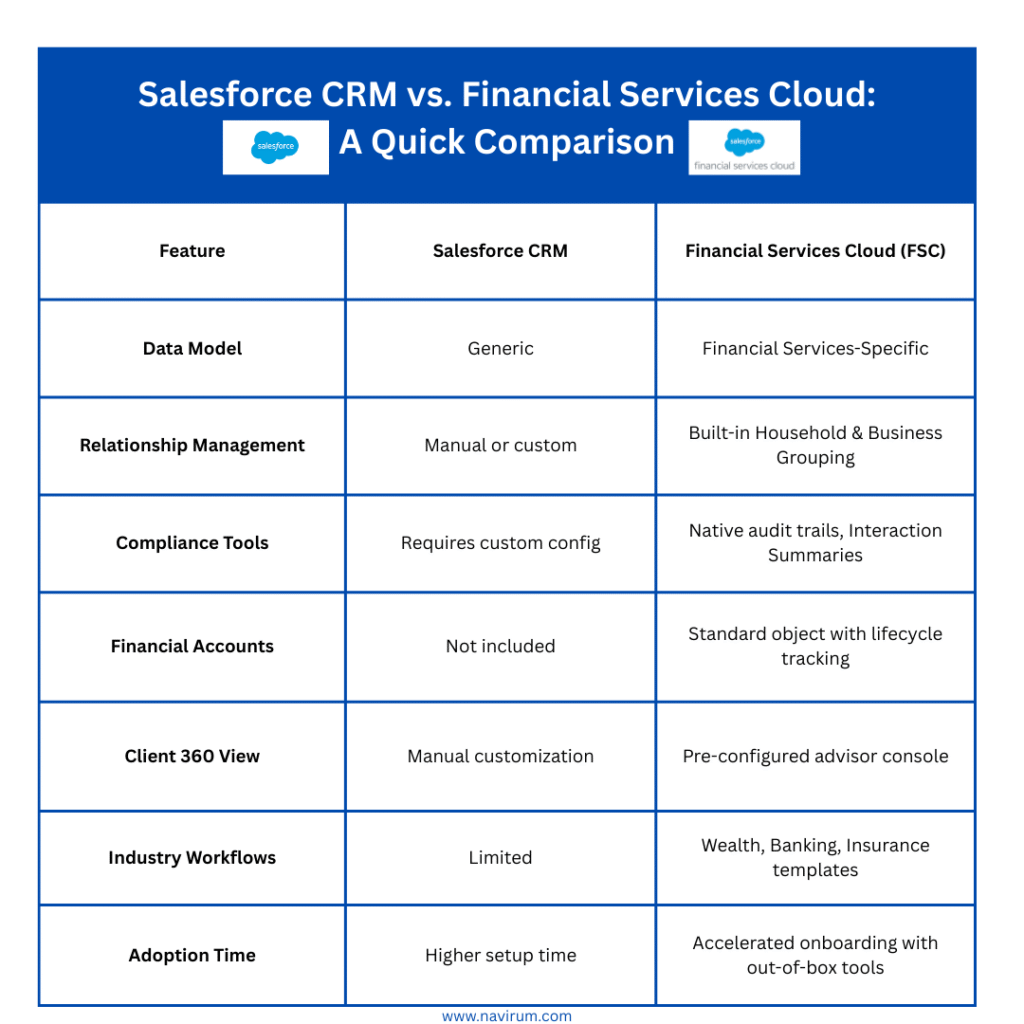
Financial Services Cloud is purpose-built for the financial sector – whether you’re in wealth management, retail banking, commercial banking, insurance, or mortgage services. Unlike the general Salesforce Sales Cloud or Service Cloud, FSC offers:
Pre-built financial data models
Household and relationship management
Client-centric dashboards and analytics
Industry-specific workflows and automation
Tools to enhance compliance and data visibility
🔍 Bottom line: FSC enables your advisors, bankers, and agents to deliver highly personalized service while staying compliant and scalable.
Key Tips for a Successful Migration from Salesforce CRM to FSC
Evaluate Your Current Salesforce Architecture
Start by assessing your current Salesforce environment:
What standard/custom objects are used?
How is your automation configured?
What’s your current data quality level?
🛠 Pro Tip: A full gap analysis will help uncover what’s reusable, what’s redundant, and where FSC can streamline operations.
Map Your Data to FSC’s Financial Data Model
FSC includes unique objects like:
Financial Accounts
Assets & Liabilities
Goals
Person Accounts
Relationships & Affiliations
📊 Best Practice: Test your data mappings in a sandbox before executing a full migration. Use tools like Data Loader, MuleSoft, or third-party ETL solutions.
Optimize Household and Client Management
FSC provides native tools to manage:
Client Households
Related Business Groups
Referrals and Partners
💡 Migration is the ideal time to clean and consolidate duplicate client records for a stronger “single source of truth.”
Plan for Security, Compliance, and Auditing Enhancements
FSC includes:
Interaction Summaries
Field Audit Trail
Shield Platform Encryption (optional)
Train and Support Your Teams for Success
Transitioning to FSC introduces new page layouts, objects, and dashboards. Your users need training that’s role-specific:
Advisors
Operations staff
IT/Admins
👥 Change Management Tip:Identify internal champions, offer sandbox access early, and host regular training touchpoints to reinforce adoption.
Discovery & Assessment : Review current org, data, business needs.
Data Mapping & Architecture Design: Align data models with FSC’s schema
Sandbox Build & Testing: Migrate a sample dataset and configure FSC features.
Training & Change Management: Educate users and admins.
Production Launch & Post-Go-Live Support: Go live with minimal disruption and continuous monitoring.
📌 Pro Tip: Don’t skip UAT (User Acceptance Testing) and back-up protocols.
📥 Book Consultation Below 📥
Migrating to Salesforce Financial Services Cloud is more than a tech upgrade – it’s a strategic leap forward for how you serve clients and grow revenue.
No, not if the data is properly mapped and migrated using sandbox testing and back-ups.
Can we roll out FSC in phases?
Absolutely. Many clients start with one business unit or advisory team and scale.
What’s the licensing difference between CRM and FSC?
FSC licenses are industry-specific and include additional objects and features. We’ll help assess your cost-benefit.
Do we need to build from scratch?
No. FSC comes with pre-configured templates, but we customize based on your business model.
How long does a typical FSC migration take?
Timelines vary based on data complexity, integrations, and customization needs. On average, migrations take 8–12 weeks from discovery to go-live, including testing and user training.
Will our existing Salesforce integrations still work after migrating to FSC?
In most cases, yes. Existing integrations can be maintained or optimized during migration. Our team reviews your connected apps and APIs to ensure compatibility and minimize disruption.
Zoho to Salesforce Migration for Smarter, Scalable CRM
Overview
Our client, whose identity has been anonymized to respect confidentiality, is an independent and award-winning financial advisory firm brings decades of advisory expertise, with roots dating back to the 1970s. The firm is recognized for delivering comprehensive, multi-advisor solutions and specializes in strategic wealth management, multigenerational wealth transfer, estate and corporate planning, as well as employee benefit services.
As client base and service offerings grew, their existing Zoho CRM became insufficient to manage complex client relationships, streamline operations, and provide advanced reporting. Recognizing Salesforce as the industry-standard CRM for financial services, our client partnered with Navirum to lead a seamless migration that enhanced data integrity, operational efficiency, and user adoption, while supporting future growth.
Key Steps & Phases
Discovery & Planning
Navirum partnered with company’s leadership to understand their workflows, business processes, and reporting requirements. A detailed data mapping sheet was developed to align every Zoho field with its Salesforce counterpart, ensuring no data was lost or misaligned.
Test Migration & Validation
A test import was executed in a Salesforce sandbox environment. Stonehaven’s team validated the data and provided feedback, allowing for adjustments before the full migration.
Full Migration & Integration
After validation, Navirum carried out the full migration to Salesforce. Post-migration testing ensured all records, accounts, and relationships were accurately transferred. Integrations and reporting tools were configured to support Stonehaven’s operational needs.
Training & Adoption
Navirum delivered hands-on training sessions for client’s staff, enabling them to leverage Salesforce’s advanced features from day one. Ongoing support ensured smooth adoption and optimized workflows.
Challenges
⚠️ Extensive and complex data in Zoho, including Person Accounts, Business Accounts, and Household Accounts ⚠️ High need for data integrity during migration ⚠️ Minimal disruption to daily operations and client service ⚠️ Ensuring full user adoption of the new Salesforce environment ⚠️ Tailoring Salesforce to align with Stonehaven’s unique business model
Solutions
🛠️ Comprehensive discovery and planning to map all Zoho fields to Salesforce equivalents 🛠️ Phased migration approach with sandbox testing and validation to eliminate errors 🛠️ Rigorous data integrity checks and post-migration validation 🛠️ Targeted training and ongoing Orbit support to ensure staff confidence and adoption
Results
✅ Migration completed on time with zero data loss or integrity issues ✅ Enhanced data accessibility and advanced reporting capabilities ✅ Streamlined client management and improved operational efficiency ✅ Quick user adoption thanks to hands-on training and support ✅ Improved compliance tracking and scalable CRM platform for future growth
Our client now operates on a robust Salesforce platform that supports their growth strategy, enhances client service, and provides a foundation for long-term success.
Testimonial
Navirum’s expertise and attention to detail made our migration seamless. We now have a CRM that truly supports our business growth and client service goals. - Management
Conclusion
This successful migration from Zoho to Salesforce demonstrates the importance of expert planning, phased execution, and user-focused support. With Navirum’s guidance, the firm is positioned for continued growth and long-term value, operational excellence, and a more strategic approach to client management.
How To Boost Operational Efficiency for LPL Advisors with a Smooth Salesforce Migration
Overview
In a rapidly evolving financial services environment, technology can either streamline growth—or slow it down. For Berry Wealth , an independent advisory firm from Oregon, serving a diverse client base, outdated CRM systems were creating operational bottlenecks and limiting scalability.
Their primary challenge: migrate from a legacy LPL Salesforce platform to a modern, fully integrated Salesforce environment—without risking data integrity, disrupting advisor workflows, or compromising client service.
Key Steps & Phases
#1Discovery & Planning. Navirum began with an in-depth discovery phase, mapping Berry Wealth’s workflows, compliance requirements, and strategic goals. This ensured that all stakeholders were aligned and that the migration process would support every critical business function.
#2 Data Assessment & Preparation. A full audit of the legacy LPL Salesforce instance enabled our team to identify risks, remove duplicates, and prepare a clean data foundation. A secure, step-by-step migration plan was developed to protect sensitive client information throughout the transition.
#3Migration & Integration. With a clear roadmap in place, Navirum seamlessly migrated Berry Wealth to a new Salesforce instance. Integrations with ClientWorks and other core systems were implemented with minimal downtime, ensuring uninterrupted advisor productivity.
#4 Training & Adoption. To guarantee long-term success, Navirum delivered hands-on training for advisors and staff. This tailored approach drove rapid adoption and empowered users to take full advantage of Salesforce’s enhanced capabilities from day one.
Challenges
⚠️ High risk of data loss or corruption during migration ⚠️ Potential service disruptions impacting client experience ⚠️ Compliance concerns related to sensitive financial data ⚠️ Internal resistance to adopting new processes and tools
Solutions
🛠️ Phased, risk-managed migration strategy designed to maintain business continuity 🛠️ Secure data audit, cleanup, and validation process to ensure 100% integrity 🛠️ Custom Salesforce configuration aligned with industry regulations and firm workflows 🛠️ Structured training program to accelerate adoption and ensure advisor confidence
Results
✅ Migration completed on time with zero data loss ✅ Advisors now operate on an integrated, modern CRM platform ✅ Dramatically improved operational efficiency and compliance readiness ✅ Stronger foundation for long-term scale and client service excellence
Berry Wealth can now rely on a streamlined Salesforce ecosystem that supports their growth strategy and delivers a more personalized, efficient client experience.
Why LPL Advisors Trust Navirum
Navirum has extensive experience working with LPL advisors and legacy LPL Salesforce systems, giving us a unique understanding of the workflows, compliance requirements, and operational challenges that advisory firms face.
Deep LPL Expertise: We’ve successfully migrated multiple advisors from legacy LPL Salesforce platforms without disrupting client service or compromising data integrity.
Seamless Integration: Our solutions integrate smoothly with ClientWorks and other LPL tools, ensuring advisors can continue their daily operations without interruption.
Advisor-Centric Approach: We focus on reducing manual tasks, streamlining workflows, and empowering advisors to deliver a superior client experience.
Compliance-First Mindset: Every migration and customization is aligned with regulatory standards, giving advisors peace of mind.
By partnering with Navirum, LPL advisors gain a trusted, knowledgeable ally that understands their unique needs and helps them leverage Salesforce to grow their business confidently. That is the same partnership model behind Orbit’s ongoing managed services.
Discover the Strategy Behind Berry Wealth’s Salesforce Success
Complete the form below to receive the full success story and learn how Berry Wealth improved efficiency, streamlined workflows, and created a stronger foundation for growth with Salesforce.
Book Your LPL Salesforce Migration Consultation | Navirum
Ecosystem Transition Audit
Ready to Migrate? Book Your LPL Salesforce Migration Consultation Now
Accelerate your firm’s growth by moving your operations seamlessly from LPL platforms to Salesforce Financial Services Cloud. Speak with our certified financial technology architects to scope your transition roadmap, audit data dependencies, and secure a seamless integration.
It offers a 360-degree view of customers, streamlining relationship management and driving personalized engagement.
FSC automates key processes, improves operational efficiency, and provides data-driven insights for better decision-making.
The solution ensures regulatory compliance while offering scalability and flexibility for institutions of all sizes.
Navirum specializes in helping organizations maximize the value of Salesforce FSC for digital transformation.
Discover how leading firms boost efficiency, strengthen client relationships, and stay future-ready with Salesforce.
In today’s hyper-competitive financial landscape, staying ahead means more than keeping pace – it means transforming how you operate. As customer expectations surge and margins tighten, leading financial institutions are turning to Salesforce Financial Services Cloud (FSC) to deliver personalized, compliant, and scalable client experiences.
At Navirum, we specialize in helping banks, wealth managers, and insurers unlock the full value of Salesforce FSC. Our deep financial services expertise, combined with a proven methodology refined across hundreds of Salesforce implementations, makes us a trusted partner for digital transformation in financial services. Explore our FSC consulting services here.
360-Degree View of Customers: FSC provides a comprehensive view of each customer’s financial profile, interactions, and preferences, enabling personalized engagement at every touchpoint. By consolidating customer data from disparate sources into a single platform, financial institutions can gain deeper insights into customer needs and preferences, driving more targeted sales and service interactions.
Enhanced Relationship Management: Building and nurturing strong customer relationships is at the heart of success in the financial services industry. FSC’s robust relationship management capabilities empower financial advisors and relationship managers to deliver personalized advice and solutions tailored to each client’s financial goals and objectives. By fostering stronger client relationships, financial institutions can increase loyalty, retention, and lifetime customer value.
Streamlined Operations: FSC streamlines and automates key operational processes, such as client onboarding, account servicing, and compliance management, driving operational efficiency and productivity. With built-in workflow automation and process orchestration capabilities, financial institutions can reduce manual effort, minimize errors, and accelerate time-to-market for new products and services.
Data-Driven Insights: Leveraging advanced analytics and AI-driven insights, FSC enables financial institutions to unlock the full potential of their data. By analyzing customer behaviors, market trends, and performance metrics, organizations can identify growth opportunities, mitigate risks, and make data-driven decisions that drive business outcomes.
Regulatory Compliance: Staying compliant with evolving regulatory requirements is a top priority for financial institutions. FSC provides built-in compliance features and tools that help organizations maintain regulatory compliance while streamlining compliance monitoring, reporting, and audit processes. By automating compliance tasks and ensuring data integrity, FSC helps mitigate compliance risks and enhance regulatory oversight.
Scalability and Flexibility: As financial institutions grow and evolve, scalability and flexibility become essential requirements for technology solutions. FSC’s cloud-based architecture offers scalability and flexibility to support organizations of all sizes, from small community banks to global financial conglomerates. With seamless integration capabilities and an extensive ecosystem of third-party apps and services, FSC adapts to evolving business needs and scales with your organization.
Future-Proofing: In an era of rapid technological change, future-proofing your technology infrastructure is critical for long-term success. By migrating to FSC, financial institutions gain access to Salesforce’s ongoing innovation and platform updates, ensuring they stay ahead of the curve and remain competitive in a rapidly evolving market.
As financial institutions navigate the challenges and opportunities of digital transformation, migrating to Salesforce Financial Services Cloud is a strategic move to boost growth, improve customer experiences, and streamline operations.
Unlock the full value of Salesforce Financial Services Cloud with Navirum’s expert consulting and advisory services. Our team helps banks, insurers, and wealth managers implement scalable, future-ready solutions that deliver measurable business results.
Contact us today to schedule your consultation and learn how Salesforce Financial Services Cloud can transform your operations and accelerate success.
Request Your Salesforce Readiness Assessment | Navirum
Integration Assessment
Request Your Salesforce Readiness Assessment
Not sure if your tech stack is integration-ready? We’ll assess your current setup in one conversation. Designed exclusively for financial services firms.
Discover real-world outcomes, learn about our collaborative company culture, and meet the financial technology specialists leading your digital transformation.
Proven Results & Impact
Explore Our Success Stories
See how we help financial institutions, wealth managers, and fintechs turn Salesforce and AI into measurable business outcomes and operational growth.
In today’s rapidly evolving financial landscape, staying ahead requires more than just keeping pace with technology — it demands leveraging it effectively. For financial institutions seeking to streamline operations, enhance customer experiences, and drive growth, migrating to Salesforce Financial Services Cloud (FSC) represents a significant opportunity. However, embarking on this journey requires meticulous planning and execution to ensure a smooth transition.
Define Clear Objectives: Begin by outlining your organization’s specific goals and objectives for migrating to FSC. Whether it’s improving customer engagement, enhancing data visibility, or streamlining internal processes, having a clear understanding of what you aim to achieve will guide your migration strategy.
Assess Data Readiness: Data is the lifeblood of any financial institution, and ensuring its accuracy and integrity is paramount during a migration. Conduct a thorough assessment of your existing data, identifying any inconsistencies or discrepancies that need to be addressed prior to migration. Consider implementing data cleansing and enrichment processes to optimize data quality.
Engage Stakeholders Early: Effective stakeholder engagement is essential for garnering support and buy-in throughout the migration process. Involve key stakeholders from various departments, including IT, sales, marketing, and customer service, to ensure alignment with business objectives and requirements.
Customization vs. Out-of-the-Box: Evaluate the extent of customization required to meet your organization’s unique needs against leveraging out-of-the-box functionalities offered by FSC. While customization can provide tailored solutions, it may also increase complexity and maintenance efforts. Striking the right balance is crucial for optimizing system performance and scalability.
Invest in User Training: A successful migration hinges on user adoption, and investing in comprehensive training programs is essential to empower users with the knowledge and skills to leverage FSC effectively. Provide hands-on training sessions, user guides, and ongoing support to ensure a smooth transition and maximize productivity.
Implement Change Management: Change can be disruptive, but effective change management practices can mitigate resistance and facilitate a smoother transition. Communicate openly with employees about the migration process, addressing any concerns and highlighting the benefits of the new system. Encourage feedback and actively involve employees in the change process to foster a culture of continuous improvement.
Monitor and Iterate: Migration to FSC is not a one-time event but an ongoing journey of optimization and refinement. Establish key performance indicators (KPIs) to measure the success of your migration efforts and regularly monitor system performance and user feedback. Iterate based on insights gathered to continuously enhance the value delivered by FSC.
As you prepare to embark on your migration journey to Salesforce Financial Services Cloud, remember that success lies in meticulous planning, strategic execution, and ongoing optimization. At Navirum, we specialize in guiding organizations through every stage of the migration process, leveraging our expertise and industry insights to drive meaningful outcomes.
Ready to unlock the full potential of Salesforce Financial Services Cloud? Contact us today to learn more about our comprehensive consulting and advisory services and take the first step toward a seamless migration.
Contact us now to schedule a consultation and discover how we can help transform your business with Salesforce Financial Services Cloud. With Navirum, the future of finance is within reach.
How to Ensure a Smooth Migration from Zendesk to Salesforce: A Step-by-Step Guide
Migrating from Zendesk to Salesforceis a strategic move that can unlock powerful CRM capabilities, streamline operations, and improve customer support. But without careful planning, it can also lead to delays, data issues, and user frustration. To help you avoid common pitfalls, our Salesforce experts have created a step-by-step migration guide that covers everything from data mapping to user adoption, ensuring a smooth, stress-free transition.
Start with a Thorough Assessment
Before you begin, take a close look at your current Zendesk setup:
Analyze existing data structures, custom fields, automations, and integrations.
Identify stakeholders across departments who should be involved in the migration.
Define clear goals and success metrics for the project.
Create a comprehensive migration plan with timelines, roles, and milestones.
💡 Pro Tip: Having a dedicated project manager or migration lead ensures accountability and keeps things on track.
Map and Transform Your Data
Next, plan how your Zendesk data will move into Salesforce:
Map each Zendesk field to its corresponding field in Salesforce.
Identify where data transformations are needed (e.g., status values, date formats).
Use data migration tools or scripts to automate the transformation process and reduce manual work.
🛠️ Tools like Salesforce Data Loader, MuleSoft, or third-party migration tools can simplify this process significantly.
Clean and Validate Your Data
Clean data is key to a successful migration:
Remove duplicates, outdated records, and incomplete entries in Zendesk.
Run data validation checks to ensure accuracy before migration.
Establish ongoing data governance policies to maintain quality after the switch.
⚠️ Skipping this step can result in poor CRM performance and user frustration post-migration.
Make Your Zendesk to Salesforce Migration a Success
The steps above will get you migrated. What separates a good migration from a great one, especially for financial services and other regulated firms, is what happens around the migration: compliance, security, and how well your team adopts the new system.
Compliance and security: implement role-based access, encrypt sensitive customer data, and maintain full audit trails. Non-negotiable for regulated industries.
Process redesign: use the migration to rebuild Zendesk workflows with Salesforce automation, not copy them one-to-one.
Continuous optimization: testing and go-live are the starting line, not the finish line. Budget time for iteration after launch.
Get these fundamentals right alongside the eight steps above, and your Zendesk to Salesforce migration will do more than move data: it will set your team up to grow into the platform for years to come.
At Navirum, we specialize in helping financial service companies and other organizations seamlessly transition to Salesforce. Whether you need help with migration strategy, customization, or post-launch optimization, we’re here to guide you every step of the way.
Ready to Migrate to Salesforce?
Contact Navirum for a free consultation and discover how we can help you unlock the full potential of Salesforce.
How long does a typical migration from Zendesk to Salesforce take?
The timeline varies depending on data complexity, customizations, and integrations. A straightforward migration may take 4–6 weeks, while more complex projects with heavy customization or legacy systems may take 8–12 weeks. Navirum can provide a detailed timeline after a discovery session.
Will we lose any data during the migration process?
No, if done correctly. With proper data mapping, cleansing, and validation, you can migrate all relevant data securely. Our consultants use proven tools and methodologies to preserve data integrity throughout the transition.
Can we migrate historical tickets and customer interactions from Zendesk to Salesforce?
Yes. You can migrate historical tickets, notes, attachments, and customer interactions into Salesforce. We work with you to define what data is critical and ensure it’s accurately migrated and accessible in your new system.
What Salesforce product should we migrate to: Service Cloud or another edition?
If you’re using Zendesk for customer support, Salesforce Service Cloud is the ideal replacement. For more industry-specific use cases (like financial services), we may recommend Financial Services Cloud or other tailored solutions. We’ll help you choose the right one based on your business needs.
Will our agents need a lot of training to switch from Zendesk to Salesforce?
Salesforce has a different interface, but with proper training and onboarding, most users transition smoothly. We provide role-based training, documentation, and live support to help your team get comfortable and productive quickly.
Can we keep our Zendesk workflows and automations in Salesforce?
In most cases, yes. We replicate and often enhance your Zendesk workflows using Salesforce automation tools like Flows, Process Builder, or custom Apex code when necessary.
What tools do you use for the migration?
Depending on your setup, we use tools like: * Salesforce Data Loader * MuleSoft or other iPaaS solutions * Custom scripts or APIs * Third-party tools like Skyvia, Talend, or DBSync We choose the right toolset based on your data volume, complexity, and integration needs.
Is it possible to run Zendesk and Salesforce in parallel during the transition?
Yes, many firms opt for a staged rollout. This allows teams to test Salesforce while Zendesk is still operational. However, we recommend limiting the overlap period to reduce confusion and ensure data consistency.
What are the most common migration risks, and how do you mitigate them?
Common risks include: * Data loss or corruption * Poor user adoption * Workflow misalignment * Integration failures Navirum mitigates these risks with thorough planning, testing, user training, and post-migration support.
What post-migration support do you offer?
We offer full post-migration support, including: * Bug fixes * Workflow optimization * User training * Data quality checks * Ongoing admin support Our goal is not just to get you live on Salesforce, but to ensure you get long-term value from the platform.
Zendesk to Salesforce migration has become the most popular path for companies seeking a more powerful CRM alternative. With Zendesk Sell being discontinued, many organizations are re-evaluating their tech stack and choosing to migrate to Salesforce for its unified sales, service, and automation capabilities. While Salesforce integration with Zendesk remains an option for those not ready to make the full leap, migration delivers greater long-term flexibility, scalability, and control. The transition, however, can be complex – the two systems don’t map 1:1, and rushing it risks losing deal and ticket history, breaking SLAs, and confusing users. Below, we unpack the key challenges businesses face during a Zendesk to Salesforce migration – and how to overcome them effectively.
Getting through the migration is one project. Keeping the new Salesforce environment optimized afterward is an ongoing one, which is where Salesforce managed services fits in for most financial services firms.
Migrating from Zendesk to Salesforce can be a complex process, and several challenges may arise during the migration. Some of the major issues encountered include:
#1 – Data Mapping and Mapping Complexity
Mapping data from Zendesk to Salesforce can be challenging due to differences in data structure, field names, and formats between the two platforms. Ensuring accurate mapping while preserving data integrity is crucial but can be time-consuming. This process has to be done properly or forget the rest!
#2 – Customization and Configuration
Zendesk and Salesforce have different customization options and configurations. Translating custom fields, workflows, automations, and business processes from Zendesk to Salesforce requires careful planning and may encounter challenges, especially if the configurations are complex or highly customized. As well as Salesforce you may require other apps to complement old ZenDesk functionality like Intercom, which integrates seamlessly with Salesforce
#3 – Data Cleansing and Quality
Migrating clean and accurate data is essential for a successful migration. However, data in Zendesk may contain inconsistencies, duplicates, or outdated information. Data cleansing efforts, such as deduplication, normalization, and data validation, may be necessary to ensure data quality before migrating to Salesforce. This can be mitigated with solutions like DataGroomr once in Salesforce itself
#4 – Integration with Other Systems
If Zendesk is integrated with other systems or third-party applications, such as CRMs, ERP systems, or ticketing systems, migrating to Salesforce may disrupt these integrations. Ensuring seamless integration and data flow between Salesforce and other systems is critical to maintain business continuity. It may make sense to integrate those systems to Salesforce with 3rd party apps like Jitterbitto enhance cost and efficiency.
Salesforce is a different platform with its own interface, navigation, and features compared to Zendesk. User training and adoption may be a significant blocker, especially if users are accustomed to Zendesk’s interface and workflows. Providing comprehensive training and support resources can help mitigate this challenge.
#6 – Change Management
Migrating from one platform to another requires organizational change management to address resistance to change, align stakeholders, and manage expectations. Lack of buy-in from key stakeholders or resistance from users can impede the migration process.
Migrating data and transitioning to Salesforce may require downtime or disruptions to normal business operations, which can impact productivity, customer service, and revenue generation. Minimizing downtime and mitigating the potential business impact is essential during the migration process. Having a firm communication plan with project stakeholders to keep them updated is essential.
In Summary….
Addressing these challenges requires careful planning, collaboration between stakeholders, and leveraging expertise in both Zendesk and Salesforce platforms. As well as the insights above, our experienced migration consultants can help you navigate these blockers and ensure a smooth transition from Zendesk to Salesforce.
Need Help? Book a Free Consultation Below
Navirum Client Success Stories
Zendesk to Salesforce Data Migration FAQ
What data can be migrated from Zendesk to Salesforce?
* We can migrate a wide range of data including: * Tickets (including custom fields, tags, comments, attachments) * Users and Organizations * Knowledge Base articles * Macros and ticket history (if required) Custom objects and workflows may require additional configuration during the migration process.
Will we lose any data during the migration?
No, our goal is a 100% data integrity migration. Before we begin, we run a test migration in a sandbox to ensure everything transfers correctly. After migration, we also perform validation and provide a report for verification.
How long does the data migration process take?
The timeline depends on: * The amount of data in your Zendesk instance * The complexity of your Salesforce setup * API rate limits For most projects, the process takes from a few days to 2 weeks, including testing and validation phases
Will there be any downtime during the migration?
No, there is no downtime required. Your Zendesk and Salesforce instances remain live and usable throughout the migration. However, we recommend choosing a cutover time (often over a weekend or off-hours) for the final sync to minimize any potential disruption.
Do you offer support after the migration is completed?
Yes. We offer post-migration support to help with: * Data verification * Troubleshooting issues * Adjustments or re-migration (if needed) * Basic training or documentation You’ll also receive a post-migration checklist to help ensure everything is working smoothly.
Navirum is a certified Salesforce partner with deep expertise in delivering integrated digital workflow solutions. We specialize in streamlining service operations for financial services and other industries. Our team ensures a seamless migration from Zendesk to Salesforce, aligning the process with your business goals to maximize long-term value from your Salesforce investment.
A Summary of How This Migration Will Change You Business.
In today’s fast-moving business landscape, strategic planning is essential to long-term success. As you define your goals for the years ahead, maximizing the potential of your CRM system becomes more critical than ever.
ACT!, first launched in 1987 by Pat Sullivan and Mike Muhney, holds a proud place in software history – standing alongside early pioneers like Siebel, SAP, and even the era of mainframes and punch cards 🙂
But the world has changed. AI is reshaping how businesses operate, and legacy systems can’t keep up. If you’re still running ACT! in 2025, it’s time to move on – before you’re left behind completely.
Heres Some Quick Tips to Accelerate Your ACT! to Salesforce Migration Today!
Quick Tip 1: Define Your Business Goals:
Begin by clearly outlining your business objectives for the upcoming years. Whether it’s improving profitability, retaining more customers, enhancing the client experience, or increasing sales, having well-defined goals sets the direction for your CRM strategy.
Back To The Future.. The ACT! Time Machine
Quick Tip 2:Conduct an ACT! Healthcheck:
Perform a thorough audit of your ACT! CRM system to ensure it’s configured to meet your specific needs. Check critical aspects such as email syncing, version updates, backup protocols, and security settings to guarantee smooth operation and data integrity.
What is Salesforce Anyway?
Quick Tip 3: Gather User Feedback:
Engage with your staff to understand any challenges or barriers they face while using ACT! CRM. Addressing their concerns and incorporating their feedback into your CRM strategy fosters better user adoption and overall satisfaction.
Quick Tip 4: Create a Roadmap:
Develop a Salesfore roadmap that aligns with your business goals and incorporates necessary improvements. Whether your focus is on short-term profitability or long-term growth, your roadmap should serve as a guide towards achieving your objectives.
Quick Tip 5: Consider Migration Options:
Depending on your business trajectory and goals, evaluate the feasibility of Migration de ACT ! vers Salesforce . If your aim is to scale your business, enhance customer experience, and leverage advanced technologies such as AI, a migration may be the strategic move forward. Some tips blow
Aligning your system with your business goals is critical in today’s fast paced business world, and that alignment has to keep evolving after launch — see how a full-lifecycle Salesforce partnership keeps paying off. If you need help with making this decision, please contact us below.
Lavinia PicuMigrating from ACT to Salesforce in 2025 – 5 Quick Tips You Need Now