In today’s competitive financial landscape, building strong client relationships is paramount to success. At Navirum, we understand the significance of harnessing data-driven insights to enhance client experiences and drive business growth. One critical aspect of achieving this is integrating Salesforce with investment data, enabling financial advisors to gain a comprehensive understanding of their clients and deliver personalized services tailored to their unique needs and preferences.
360 Degree View of the Client: Integrating Salesforce with investment data provides financial advisors with a holistic view of their clients’ financial profiles, including investment portfolios, asset allocation, and performance metrics. This 360-degree view enables advisors to better understand their clients’ financial goals, risk tolerance, and investment preferences, empowering them to provide more personalized and targeted advice.
Improved Reporting and Insights: By consolidating investment data within Salesforce, advisors can generate customized reports and analytics to track portfolio performance, identify trends, and assess client progress towards their financial objectives. These insights not only facilitate more informed decision-making but also enable advisors to proactively anticipate and address their clients’ evolving needs and goals.
AI-Powered Recommendations: Integrating investment data with Salesforce opens the door to leveraging artificial intelligence (AI) algorithms to analyze client data and generate personalized recommendations. AI-driven insights can help advisors identify opportunities for portfolio optimization, risk mitigation, and investment strategy refinement, ultimately enhancing client outcomes and satisfaction.
Streamlined Productivity with Salesforce Flows: Integrating investment data into Salesforce flows enables advisors to streamline their workflows and boost productivity. For example, advisors can set up automated processes to receive alerts when a client’s portfolio experiences significant changes or drops in value, prompting them to take proactive action such as reallocating assets or scheduling a client review. Additionally, advisors can use Salesforce flows to seamlessly transition clients to a new tier in their service model based on predefined criteria such as portfolio size or investment performance.
Ready to unlock the full potential of Salesforce integration with investment data? Our team of experts is here to help you streamline your operations, enhance client experiences, and drive business growth. Contact us today to learn more about how we can tailor Salesforce solutions to meet your specific needs and objectives. Let’s work together to elevate your client relationships to new heights!
Lavinia PicuWhy integrating Salesforce with investment data is essential?
In the realm of wealth management and financial advice, the quest for delivering unparalleled client experiences has never been more crucial. Embracing the digital age, wealth managers are turning to innovative solutions like Salesforce to redefine client engagement and satisfaction.
Salesforce, renowned for its prowess in customer relationship management, emerges as a transformative force empowering wealth managers to sculpt personalized financial journeys for their clientele, offering:
Client-Centric Insights. Salesforce serves as the ultimate repository, offering wealth managers a panoramic view of each client’s financial landscape. With Salesforce’s robust data aggregation capabilities, wealth managers gain invaluable insights into clients’ investment portfolios, risk appetites, and aspirations. Armed with this holistic understanding, wealth managers can tailor their services to align with clients’ unique needs and objectives.
Tailored Engagement Strategies. The hallmark of Salesforce lies in its ability to foster personalized and meaningful interactions between wealth managers and their clients. Through Salesforce’s suite of communication tools, including email campaigns and social media integration, wealth managers can cultivate deeper client relationships by delivering relevant content and timely market insights. This bespoke approach cultivates trust and loyalty, laying the foundation for enduring client partnerships.
Redefined Efficiency. Salesforce streamlines the wealth management process by automating mundane tasks and optimizing workflows. From client onboarding to portfolio management, Salesforce equips wealth managers with the tools to enhance operational efficiency and focus on value-added activities. Moreover, Salesforce’s mobile functionality ensures seamless collaboration and accessibility, empowering wealth managers to serve clients anytime, anywhere.
Insights-driven Decision Making. Salesforce’s analytics prowess empowers wealth managers to glean actionable insights from client data and market trends. By harnessing Salesforce’s analytical capabilities, wealth managers can fine-tune investment strategies, mitigate risks, and drive superior investment outcomes. These data-driven decisions enable wealth managers to provide informed guidance and steer clients towards financial success.
Compliance and Security. In an era fraught with regulatory complexities, Salesforce stands as a bastion of compliance and security. With robust features such as audit trails and data encryption, Salesforce ensures the confidentiality and integrity of client information, safeguarding against regulatory pitfalls. By embracing Salesforce’s compliance capabilities, wealth managers can navigate regulatory landscapes with confidence and peace of mind.
Salesforce empowers wealth managers to craft personalized financial journeys that resonate with clients’ aspirations. Navirum can help you unlock the full potential of Salesforce, driving transformative change and ushering in a new era of wealth management excellence.
Book a free 30 minutes consultation with one of our specialists and start the journey towards client-centric innovation and success!
Discover how leading wealth management practices partnered with Navirum to implement Financial Services Cloud, streamline advisor operations, and accelerate growth.
Whether you are getting to know our team, evaluating our Salesforce and AI offerings, or ready to discuss your firm's growth goals, we are here to guide your journey.
About Navirum
Discover our story, mission, and the experienced financial technology specialists guiding your digital transformation.
Don’t worry, you’re not alone. Many organizations face challenges with their Salesforce implementations, but with the right approach, you can get back on track and unlock the full potential of your Salesforce investment. Our Salesforce consultants have outlined a five-step guide to help you revitalize your Salesforce program and drive success.
Identify Your Business Goals. The first step in revitalizing your Salesforce program is to identify your business goals. What are you trying to achieve with Salesforce? Whether it’s increasing sales productivity, improving customer satisfaction, or streamlining operations, clearly defining your objectives will provide the foundation for your Salesforce strategy.
Define Your Business Processes. Once you’ve identified your business goals, the next step is to define your business processes. Map out the key steps and workflows that drive your business operations, from lead generation and sales pipeline management to customer support and service delivery. Understanding your processes is essential for aligning Salesforce with your business needs.
Align Processes with Salesforce and Identify Gaps. With your business processes defined, it’s time to assess how well Salesforce aligns with your workflows and identify any gaps in functionality. Determine which Salesforce features and capabilities are supporting your processes effectively and where improvements are needed. This gap analysis will inform the roadmap for enhancing your Salesforce program.
Build a Roadmap of Improvements. Based on your gap analysis, develop a roadmap of improvements to address the identified gaps and optimize your Salesforce program. Prioritize enhancements based on business impact and feasibility, considering factors such as resource availability, budget constraints, and timeline considerations. Your roadmap should outline specific initiatives, timelines, and success criteria for each improvement.
Make Regular Improvements and Measure Impact. Once you’ve implemented your roadmap of improvements, the work doesn’t stop there. Continuously monitor and evaluate the impact of the changes you’ve made to your Salesforce program. Track key performance metrics, such as user adoption, productivity gains, customer satisfaction, and revenue growth, to measure the effectiveness of your efforts. Regularly review your Salesforce program and make iterative improvements to ensure ongoing success.
Revitalizing your Salesforce program requires a systematic approach that starts with aligning your Salesforce strategy with your business goals and processes. By following this five-step guide and continuously iterating on your Salesforce program, you can overcome challenges, drive success, and maximize the value of your Salesforce investment.
If you need assistance with your Salesforce program, our team of experienced consultants is here to help. Contact us today to learn more about our Salesforce consulting and advisory services.
Book a Consultation
Lavinia PicuIs your Salesforce program in a rut in 2025? Dont Give Up!
Migrating from HubSpot to Salesforce presents challenges like data mapping, customization, integration dependencies, and data quality assurance.
Organizations need to plan for user training and address change management to ensure successful adoption of Salesforce.
A clear understanding of business objectives and proper evaluation of existing processes are crucial for a successful hubspot salesforce migration challenges.
Best practices include avoiding unnecessary data migration, preserving record relationships, and planning for post-migration support.
Thorough testing, validation, and a structured approach reduce risks and help manage the complexities of the migration process.
Navigating the migration journey from HubSpot to Salesforce can be a complex endeavor, fraught with challenges and potential pitfalls. From reconciling disparate data structures to reconfiguring custom workflows and integrations, each step demands meticulous planning and execution.
Discover the 10 Major Challenges encountered during the Migration from HubSpot to Salesforce!
Our Salesforce experts have compiled a list of the major problems encountered during a migration from HubSpot to Salesforce, offering insights and strategies to overcome these hurdles and ensure a successful transition. Whether you’re embarking on this migration journey or seeking to optimize your existing migration plan, this comprehensive overview will provide valuable guidance to navigate the intricacies of the process.
Migrating from HubSpot to Salesforce can present several challenges, including:
#1 – Data Mapping and Conversion: HubSpot and Salesforce have different data structures and objects. Mapping HubSpot data fields to their corresponding fields in Salesforce requires careful planning to ensure data integrity and accuracy during the migration process.
#2 – Customization and Configuration: Recreating custom fields, workflows, and automations in Salesforce that were previously set up in HubSpot can be time-consuming and complex. Configuring Salesforce to match specific business processes and requirements may require extensive customization.
#3 – Integration Dependencies: HubSpot is often integrated with other systems such as marketing automation tools, email marketing platforms, and customer service software. Disentangling and re-establishing these integrations with Salesforce while ensuring seamless data flow can be challenging.
#4 – Data Cleansing and Quality Assurance: Data in HubSpot may contain inconsistencies, duplicates, or outdated information. Cleaning and deduplicating data before migrating to Salesforce is crucial to maintain data integrity and prevent issues post-migration.
#5 – User Training and Adoption: Transitioning users from HubSpot to Salesforce requires comprehensive training and support to familiarize them with the new platform’s interface, navigation, and features. Ensuring user adoption and minimizing disruption to daily operations is essential for a successful migration.
#6 – Reporting and Analytics: HubSpot’s reporting metrics and analytics may differ from Salesforce’s reporting capabilities. Mapping HubSpot’s reporting data to Salesforce’s reporting structure requires careful consideration to ensure data consistency and accuracy for decision-making.
#7 – Change Management: Managing resistance to change among users accustomed to HubSpot’s interface and workflows requires effective change management strategies and communication. Engaging stakeholders and addressing concerns promptly can help mitigate resistance and facilitate a smoother transition.
#8 – API Limitations: HubSpot’s API limitations may impact the speed and efficiency of data migration and integration with Salesforce. Ensuring compatibility and optimizing API usage can help overcome potential performance issues during the migration process.
#9 – Post-Migration Support: Providing ongoing support and troubleshooting post-migration issues is essential to ensure a successful transition and user satisfaction. Addressing user feedback and addressing any lingering issues promptly can help maintain productivity and momentum post-migration.
#10 – Testing and Validation: Thoroughly testing the migrated data, workflows, automations, and integrations in a sandbox environment before going live is critical to identify and address any discrepancies or errors. Validation by key stakeholders and subject matter experts helps ensure the accuracy and functionality of the migrated data and configurations.
Addressing these challenges requires careful planning, collaboration between stakeholders, and leveraging expertise in both HubSpot and Salesforce platforms. Engaging with our experienced migration consultants or partners can help navigate these challenges and ensure a smooth transition from HubSpot to Salesforce.
What to Consider Before Migrating from HubSpot to Salesforce
Before starting a migration from HubSpot to Salesforce, organizations should evaluate their existing CRM environment, business processes, and long-term objectives. A successful migration involves more than transferring contact records. It is an opportunity to improve data quality, streamline workflows, and build a CRM foundation that supports future growth.
Consider the following questions before beginning the migration:
What are your business objectives? Define what you want to achieve with Salesforce, whether that means improving sales visibility, strengthening customer relationships, connecting marketing and sales data, or supporting more complex business processes.
Which data needs to be migrated? Identify the contacts, companies, deals, activities, marketing information, and historical records that must be preserved.
Which processes should be redesigned? Rather than recreating every HubSpot workflow, determine which processes should be retained, simplified, or replaced with Salesforce automation.
Which integrations are essential? Document the systems that depend on HubSpot data and determine how they will connect to Salesforce.
Who needs to be involved? Include representatives from sales, marketing, operations, IT, and leadership to ensure that the new CRM meets the needs of different teams.
Answering these questions early helps establish a clear migration scope, realistic timeline, and measurable definition of success.
HubSpot vs. Salesforce: Understanding the Key Differences
HubSpot and Salesforce both support customer relationship management, but they approach CRM functionality, customization, and automation differently. Understanding these differences is essential when planning a migration.
Area
HubSpot
Salesforce
Data model
Uses contacts, companies, deals, and other CRM records
Uses standard objects and supports custom objects and relationships
Customization
Provides configurable properties, pipelines, and workflows
Offers extensive customization of objects, fields, record relationships, and business logic
Automation
Uses workflows and automation tools based on the subscription and configuration
Supports Flow and other automation capabilities, depending on the use case
Reporting
Provides dashboards and reports across supported marketing, sales, and service data
Supports configurable reports, dashboards, and more complex cross-object reporting
Integrations
Connects with a broad ecosystem of business applications
Offers a broad integration ecosystem, APIs, and platform-based integration options
Scalability
Supports businesses across a range of sizes and needs
Supports complex enterprise requirements, subject to appropriate architecture and licensing
Neither platform is universally better for every organization. The right choice depends on business requirements, operational complexity, existing technology, and the level of customization needed.
The objective of a migration should be to take advantage of Salesforce’s capabilities while ensuring that the resulting environment remains practical, maintainable, and aligned with business goals.
A Step-by-Step Approach to HubSpot-to-Salesforce Migration
A structured migration methodology helps reduce risk and makes it easier to identify problems before they affect business operations.
Step 1: Audit Your Existing HubSpot Environment
Review the data, properties, pipelines, workflows, reports, integrations, and user permissions currently in use. Identify obsolete fields, redundant automation, and processes that no longer support business objectives.
Step 2: Define the Salesforce Data Model
Map HubSpot records and properties to the appropriate Salesforce objects and fields. Establish how contacts, companies, deals, activities, and associated records will be represented in Salesforce.
Pay particular attention to record relationships, unique identifiers, ownership, and custom data structures.
Step 3: Clean and Prepare the Data
Remove duplicates, standardize inconsistent values, validate essential fields, and determine how incomplete or outdated records should be handled. Establish backup and reconciliation procedures before migrating production data.
Step 4: Rebuild Workflows and Integrations
Determine which HubSpot workflows should be recreated in Salesforce Flow, which processes require redesign, and which functions should remain in external systems. Validate how information will move between Salesforce and connected applications.
Step 5: Test the Migration
Run a pilot migration using a representative sample of records. Validate record counts, field mappings, relationships, automation, permissions, and reporting. Use a Salesforce sandbox where appropriate to test configurations before deployment.
Step 6: Train Users and Prepare for Go-Live
Provide role-specific training, document new processes, communicate upcoming changes, and establish a support process for questions and issues.
Step 7: Monitor and Optimize
After go-live, review migration results, user feedback, automation performance, and report accuracy. Resolve outstanding issues and prioritize improvements based on business impact.
Best Practices for a Successful Migration
A successful HubSpot-to-Salesforce migration requires both technical execution and organizational preparation. The following practices can help reduce risk and improve long-term results.
Establish clear ownership. Assign responsibility for data quality, field mapping, testing, and business approvals.
Avoid migrating unnecessary data. Determine which historical records and properties are still relevant, taking retention obligations into account.
Preserve record relationships. Ensure that contacts, companies, deals, activities, and associated records remain connected correctly.
Document automation logic. Record the purpose, triggers, conditions, and outcomes of existing workflows before rebuilding them.
Validate critical integrations. Test data synchronization, authentication, error handling, and duplicate prevention.
Plan for business continuity. Define a migration window, communicate any temporary restrictions, and prepare a rollback or recovery plan.
Measure success. Track data accuracy, migration completeness, user adoption, reporting reliability, and process performance.
Plan for continuous improvement. Treat go-live as the beginning of optimization rather than the end of the migration project.
These practices help ensure that Salesforce supports business operations effectively after the transition.
EXECUTION ROADMAP
HubSpot-to-Salesforce Migration Checklist
Use this checklist to organize and execute key activities across every phase of your CRM transition.
Phase 01
Before Migration
Define migration objectives and success criteria.
Audit HubSpot data, workflows, reports, and integrations.
Confirm Salesforce licensing, permissions, and environment readiness.
Complete data mapping and identify custom requirements.
Clean and back up the source data.
Establish the project timeline and stakeholder responsibilities.
Phase 02
During Migration
Migrate a representative sample of records.
Validate field mappings and record relationships.
Rebuild and test workflows and automations.
Configure and test required integrations.
Validate reports, dashboards, and user permissions.
Obtain business stakeholder approval.
Phase 03
After Migration
Reconcile source and destination record counts.
Confirm data integrity and identify failed records.
Train users and provide documentation.
Monitor integrations and automation.
Resolve post-migration issues.
Review adoption and performance against success criteria.
Structured Governance
Executing a phased migration methodology minimizes business disruption, ensures strict data continuity, and drives rapid user adoption across teams.
Common Mistakes to Avoid During Migration
Even a well-planned migration can encounter problems when important details are overlooked. Avoid these common mistakes:
1. Treating migration as a simple data transfer. Data migration is only one part of the project. Workflows, integrations, reporting, permissions, and user processes must also be addressed.
2. Recreating every existing workflow without review. Duplicating outdated or inefficient automation can carry existing problems into Salesforce. Evaluate each workflow before deciding whether to retain, redesign, or retire it.
3. Overlooking historical activities and relationships. Migrating contacts and deals without preserving relevant activities, associations, and ownership can leave users with incomplete customer histories.
4. Underestimating testing requirements. A successful record import does not guarantee that the CRM functions correctly. Test end-to-end business processes, including integrations and reporting.
5. Neglecting user adoption. Without sufficient training and communication, users may struggle with the new system or maintain workarounds outside Salesforce.
6. Failing to plan post-migration support. Assign clear ownership for resolving issues, monitoring data quality, and optimizing the environment after launch.
Avoiding these mistakes helps reduce disruption and makes it easier to realize the intended benefits of the migration.
Frequently Asked Questions About HubSpot-to-Salesforce Migration
Why migrate from HubSpot to Salesforce?
Organizations may migrate to Salesforce when they need more advanced customization, complex data relationships, extensive automation, enterprise reporting, or closer alignment with a broader technology ecosystem. The decision should be based on specific business requirements rather than platform capabilities alone.
How long does a HubSpot-to-Salesforce migration take?
The timeline depends on data volume, the complexity of existing workflows, integrations, customization requirements, and testing needs. A relatively straightforward migration may take several weeks, while a complex enterprise project can take several months or longer. A discovery and assessment phase helps establish a realistic timeline.
How much does it cost to migrate from HubSpot to Salesforce?
Costs vary depending on project scope, data quality, implementation complexity, integration requirements, Salesforce licensing, and training. Additional expenses may arise from third-party tools, custom development, or ongoing support. A detailed assessment is the best way to establish a reliable budget.
Can all HubSpot data be migrated to Salesforce?
Not necessarily through a direct, one-to-one transfer. Many records and properties can be migrated, but their destination depends on Salesforce’s data model and the migration approach. Historical activities, marketing engagement data, custom objects, associations, and certain platform-specific features may require additional tools or specialized handling. Each data category should be assessed before migration.
Will we lose our historical data during migration?
Historical data can often be preserved, but its retention depends on what is exported, what Salesforce can accommodate, and how the migration is configured. Teams should explicitly plan for activities, notes, email history, campaign information, associations, timestamps, and ownership. Record reconciliation and testing help identify missing information before go-live.
Can HubSpot workflows be transferred directly to Salesforce?
HubSpot workflows generally need to be recreated or redesigned using Salesforce automation tools, such as Flow, or other appropriate solutions. The two platforms have different automation models, so triggers, conditions, dependencies, and actions must be reviewed individually. This is also an opportunity to simplify existing processes and remove redundant automation.
What happens to our HubSpot integrations after migration?
Integrations do not automatically become Salesforce integrations. Each connected application must be assessed to determine whether a Salesforce connector, API integration, middleware solution, or replacement tool is required. Teams should test authentication, data synchronization, error handling, and duplicate prevention before switching production processes.
7. What happens to our HubSpot integrations after migration?
Integrations do not automatically become Salesforce integrations. Each connected application must be assessed to determine whether a Salesforce connector, API integration, middleware solution, or replacement tool is required. Teams should test authentication, data synchronization, error handling, and duplicate prevention before switching production processes.
Will our reporting and dashboards transfer to Salesforce?
Reports and dashboards usually require review and reconstruction because the platforms use different reporting structures, data models, and metrics. Before migration, identify the reports that support important business decisions, document their calculations and filters, and validate their Salesforce equivalents against trusted source data.
How can we minimize disruption during the migration?
Minimize disruption by planning the migration in phases, cleaning data beforehand, testing with representative records, preparing users for changes, and scheduling the final cutover carefully. Establish clear communication channels, a recovery plan, and post-launch support. Where appropriate, pilot the new environment with a smaller group before rolling it out more broadly.
Should we hire a Salesforce migration partner?
A migration partner can be particularly valuable when the project involves complex data relationships, custom workflows, multiple integrations, extensive reporting, or strict business continuity requirements. An experienced partner can help assess the current environment, design the target architecture, manage testing, and support adoption. For smaller migrations, an internal team may be sufficient if it has the necessary Salesforce and data migration expertise.
Make Your HubSpot-to-Salesforce Migration a Strategic Investment
Migrating from HubSpot to Salesforce is an opportunity to do more than move data between platforms. With the right planning, organizations can improve data quality, streamline business processes, strengthen reporting, and create a CRM environment that is better aligned with their long-term goals.
The key is to approach migration as a business transformation initiative rather than a technical transfer. Clear requirements, thoughtful data mapping, comprehensive testing, and effective change management all contribute to a smoother transition.
Planning a move from HubSpot to Salesforce?
Navirum helps organizations assess their Salesforce requirements, design CRM solutions, optimize workflows, and connect business systems. Our team can help identify migration risks, prioritize improvements, and build a Salesforce environment that supports your operational needs.
Navirum helps organizations assess their Salesforce requirements, design CRM solutions, optimize workflows, and connect business systems. Our team can help identify migration risks, prioritize improvements, and build a Salesforce environment that supports your operational needs.
1. Requirement Assessment
Evaluate existing Hubspot data models and define target Salesforce architecture.
2. Solution Design
Design tailored CRM workflows and structure custom object mappings.
3. System Connectivity
Integrate marketing, sales, and financial systems seamlessly into Salesforce.
4. Operational Scale
Optimize automated workflows and empower user adoption across teams.
Discover real-world outcomes, learn about our collaborative company culture, and meet the financial technology specialists leading your digital transformation.
Proven Results & Impact
Explore Our Success Stories
See how we help financial institutions, wealth managers, and fintechs turn Salesforce and AI into measurable business outcomes and operational growth.
The range of CRMs is broad and depends on the type of company you run and where you want to go. Adaptable, lightweight tools like Monday.com work well for fast-moving, collaborative teams that need to get things done quickly. At the other end, enterprise platforms like Salesforce shine in more established businesses looking to scale processes and people in a structured way. Both are excellent choices – it all comes down to where you are in your journey
👀 WHAT TO LOOK OUT FOR 👀
When small to midsize businesses in the financial services sector are shopping for their first CRM software, several key considerations can guide their decision-making process:
Compliance and Security: Small businesses in financial services must prioritize compliance with industry regulations such as GDPR, HIPAA, or PCI-DSS. Therefore, they should ensure that the CRM software they choose offers robust security features, data encryption, and compliance tools to protect sensitive client information.
CRM 101: What is Salesforce?
Community and Ecosystem:Being part of a thriving community of users, developers, and partners can provide small businesses with valuable resources, networking opportunities, and access to third-party apps and integrations. For example, Salesforce has a vibrant ecosystem offers a vast marketplace of pre-built apps, industry-specific solutions, and a supportive community to help small businesses succeed. Apps range from data companies like Zoominfo, to e-signature and document management tools like PandaDoc, to popular process and SOP documentation tools like Process Street, to project management tools like ClickUp to digital marketing solutions like Dealfront, Brevo…. the list is endless. Find out more about Salesforce here
Scalability and Growth: As small businesses expand their client base and services, they need a CRM solution that can scale with their growth. Opting for a scalable CRM like Salesforce ensures that the software can accommodate increasing data volume, users, and business complexity over time without requiring a costly migration to a new platform.
Customization and Flexibility: Financial services firms have unique workflows, processes, and client interactions. Therefore, they should look for a CRM software that offers extensive customization options and flexibility to tailor the system to their specific business needs. Salesforce’s highly customizable platform allows businesses to create custom objects, fields, workflows, and reports to reflect their unique business requirements.
Integration Capabilities: Integrating the CRM software with existing systems and tools is crucial for streamlining operations and maximizing efficiency. Small businesses in financial services should choose a CRM solution like Salesforce that offers robust integration capabilities, allowing seamless connectivity with accounting software, email marketing platforms, financial planning tools, and other essential systems.
Data Analytics and Insights:Access to actionable insights and analytics is essential for making informed business decisions and identifying growth opportunities. Salesforce’s advanced analytics capabilities, including customizable dashboards, reporting tools, and AI-powered analytics, empower small businesses to gain valuable insights into client behavior, sales performance, and market trends.
Mobile Accessibility: In today’s digital age, mobile accessibility is paramount for on-the-go professionals in the financial services industry. Small businesses should opt for a CRM software like Salesforce that offers mobile apps and responsive design, enabling users to access client information, manage tasks, and collaborate with team members from any device, anywhere.
Training and Support: Comprehensive training and ongoing support are essential for ensuring successful adoption and utilization of the CRM software. Small businesses should choose a CRM provider that offers extensive training resources, user guides, and customer support to help them maximize the value of the software and overcome any challenges they may encounter.
Opting for Salesforce as their first CRM software offers small businesses in the financial services sector numerous benefits, including compliance capabilities, scalability, customization, integration capabilities, data analytics, mobile accessibility, training and support, and access to a vibrant ecosystem. By choosing Salesforce, small businesses can empower their teams, streamline operations, and drive growth in a competitive market landscape. Contact one of our consultants today and see how Salesforce could help you reach your goals and transform your business!
Main Navigation CTA Showcase | Navirum
Next Steps & Impact
Explore Navirum Success, Culture & Team
Discover real-world outcomes, learn about our collaborative company culture, and meet the financial technology specialists leading your digital transformation.
Proven Results & Impact
Explore Our Success Stories
See how we help financial institutions, wealth managers, and fintechs turn Salesforce and AI into measurable business outcomes and operational growth.
Discover the secret to implementing Salesforce successfully
Are you considering implementing Salesforce within your organization? Perhaps you’ve already embarked on this journey but are encountering roadblocks along the way. Fear not! Implementing Salesforce successfully is not just a dream; it’s an achievable reality.
Our experts unveil the secret behind a successful Salesforce implementation in five simple, yet powerful steps:
Start Simple. One of the most common mistakes organizations make when implementing Salesforce is trying to do too much, too soon. Complexity breeds confusion, which can lead to resistance from your team and ultimately derail the entire implementation process. Instead, start simple. Begin by identifying your core business needs and the specific problems you aim to solve with Salesforce. Focus on the essential functionalities that will provide immediate value to your organization. By starting small, you can minimize disruptions, gain quick wins, and build momentum for future enhancements.
Educate Your Staff on Salesforce. Successful Salesforce implementation goes beyond just installing the software; it requires buy-in and adoption from your entire team. Education is key to ensuring that your staff understands the benefits of Salesforce and how it can streamline their workflows and improve productivity. Invest in comprehensive training programs tailored to the needs of different user groups within your organization. Provide hands-on workshops, online tutorials, and ongoing support to empower your staff to leverage Salesforce effectively. Remember, a well-trained team is more likely to embrace change and maximize the potential of the platform.
Customize for Your Unique Needs. While Salesforce offers a plethora of out-of-the-box features, every organization has its own unique requirements and processes. To truly harness the power of Salesforce, customization is crucial. Work closely with experienced Salesforce consultants to tailor the platform to suit your specific business needs. From customizing fields and workflows to integrating with third-party applications, ensure that Salesforce aligns seamlessly with your existing systems and processes. This personalized approach will maximize efficiency and drive long-term success.
Plan for an Ambitious Future. Successful Salesforce implementation is not just about meeting your current needs; it’s about laying the foundation for future growth and innovation. As your business evolves, so too should your Salesforce implementation. Take a proactive approach to planning for scalability and flexibility. Anticipate future challenges and opportunities, and design your Salesforce solution with growth in mind. Leverage Salesforce’s extensibility and scalability features to adapt to changing business requirements and stay ahead of the curve.
Continuously Monitor and Improve. The journey to Salesforce success doesn’t end with implementation; it’s an ongoing process of optimization and improvement. Regularly monitor key metrics and performance indicators to identify areas for enhancement. Encourage feedback from your users and stakeholders to gain insights into their experiences with Salesforce. Use this feedback to drive continuous improvement initiatives, whether it’s refining processes, introducing new features, or providing additional training.
A successful implementation requires careful planning, strategic execution, and ongoing commitment. By following these five steps—starting simple, educating your staff, customizing for your unique needs, planning for an ambitious future, and continuously monitoring and improving—you can unlock the full potential of Salesforce and drive transformative results for your organization.
Are you ready to unleash the power of Salesforce? Contact us today to learn how our experienced Salesforce consultants can help you achieve your goals.
Book Strategy Session
Schedule Your Session
Let’s find a time to chat about your Salesforce strategy and AUM growth.
Build the Future of Trust Services with Confidence | Navirum
Ecosystem Modernization
Build the Future of Trust Services with Confidence
The most successful trust companies are not simply upgrading technology—they are creating connected, client-centric organizations equipped for the next generation of wealth management. With Salesforce Financial Services Cloud, you can unify client relationships, streamline operations, unlock AI-driven productivity, and position your firm for long-term growth.
Navirum helps trust companies navigate every stage of the transformation journey, from strategy and platform selection to implementation, integration, and adoption.
Let’s explore what’s possible for your organization.
Embarking on a migration journey from Pipedrive to Salesforce can be a significant step for your organization, promising enhanced capabilities and scalability. However, proper preparation is key to ensuring a smooth transition and maximizing the benefits of Salesforce. Here are the four essential steps to help you prepare for your Pipedrive to Salesforce migration.
Key Steps for Your Pipedrive to Salesforce Migration
1 – Assess Your Current Data
Before initiating the migration process, it’s crucial to conduct a thorough assessment of your existing data in Pipedrive. Identify the types of data stored, such as leads, contacts, accounts, opportunities, and activities. Evaluate the quality and consistency of the data, identifying any duplicates, inaccuracies, or missing information. This assessment will serve as the foundation for mapping your data to Salesforce fields and ensuring a seamless transition.
Export Pipedrive data
2 – Define Your Salesforce Requirements
Next, clearly define your organization’s requirements and objectives for Salesforce. Identify the key functionalities and features that are essential for your business processes and workflows. Consider factors such as sales pipeline management, lead generation, opportunity tracking, reporting and analytics, and integration with other systems. Collaborate with stakeholders across departments to ensure alignment and gather input on customization needs and preferences.
Salesforce Requirements definition
3- Plan Your Data Migration Strategy
Based on your assessment and requirements, develop a comprehensive data migration strategy that outlines the migration approach, timeline, and resources required. Determine the method of migration, whether it’s manual data entry, CSV file import, or leveraging migration tools and third-party services. Establish data mapping rules to ensure that data from Pipedrive accurately aligns with Salesforce fields and objects. Additionally, consider conducting a data cleanup process to eliminate duplicates and standardize data formats before migration.
Pipedrive to Salesforce field mapping – Sample
4 – Engage with Salesforce Experts
Finally, engage with a certified and experience Salesforce consulting experts who specialize in migrations and have experience with Pipedrive to Salesforce transitions. Collaborate with them to validate your migration strategy, address any technical challenges or complexities, and leverage best practices for a successful migration. Work with the consulting team to configure Salesforce according to your requirements, customize workflows, and train users to ensure a smooth adoption post-migration. Leverage their expertise to optimize Salesforce for your organization’s unique needs and maximize ROI.
Preparing for a Pipedrive to Salesforce migration requires careful planning, assessment, and collaboration with experienced Salesforce consultants. By following these four essential steps—assessing your current data, defining Salesforce requirements, planning your migration strategy, and engaging with Salesforce experts—you can set your organization up for a successful transition.
Navirum, as a leading Salesforce consulting and advisory firm, specializes in guiding organizations through seamless migrations and maximizing the value of Salesforce. Contact us today to learn more about how we can support your migration journey and help you achieve your business goals.
Ready to Move? Book a Consultation With Navirum
Pipedrive to Salesforce Migration – FAQs
Why should my organization migrate from Pipedrive to Salesforce?
Salesforce delivers scalability, advanced reporting, stronger integrations, and industry-specific features. It helps streamline processes and supports long-term growth in ways Pipedrive cannot.
What data can be migrated from Pipedrive to Salesforce?
Core objects such as Leads, Contacts, Accounts, Opportunities (Deals), Emails, and Activities can all be migrated. Field mapping ensures your business history is preserved and accessible in Salesforce.
How long does a Pipedrive to Salesforce migration take?
Timelines vary depending on complexity, data volume, and customization requirements. Typically, a migration can take anywhere from 6 weeks to 6 months.
How difficult is the migration?
The migration is relatively straightforward – comparable to migrating from Microsoft Dynamics or HubSpot. It’s far less complex than legacy systems like GoldMine, which often require extensive cleanup and customization.
Should I work with a Salesforce consulting partner for my migration?
Yes. Experienced Salesforce consultants bring expertise in field mapping, data cleanup, configuration, and user training. Partnering with experts minimizes risks and ensures Salesforce is set up for your business success.
Thinking to migrate from EquiSoft to Salesforce? Migrating from one software platform to another is rarely a plug-and-play experience—especially when it involves two robust systems like EquiSoft and Salesforce. Whether you’re seeking better CRM functionality, more powerful analytics, or improved integration with other tools in your tech stack, making the switch to Salesforce can be a game-changer for your organization. But let’s be honest: without a solid plan, the migration process can feel overwhelming.ration process with ease.
5 Useful Migration Tips
EquiSoft has served many financial services organizations well, but as your business evolves, so should your technology. Salesforce offers unmatched flexibility, scalability, and a vast ecosystem of tools that can elevate how you manage data, engage with customers, and make strategic decisions. However, to unlock these benefits without unnecessary stress, a thoughtful and well-executed migration strategy is key.
In this article, we’ll walk you through the essential steps to reduce friction, avoid costly mistakes, and set your organization up for long-term success in Salesforce. Whether you’re still evaluating your options or already preparing for the transition, these best practices will help you approach your migration with clarity and confidence.
# 1 Conduct a Comprehensive Assessment
Before initiating any data migration project, it’s critical to understand exactly what you’re working with. EquiSoft systems often involve complex configurations, custom reports, embedded workflows, and large volumes of client data. Begin by performing a full audit of your current system. This includes:
Data Structure: Catalog all data objects, fields, and relationships in EquiSoft. Understand how this data is organized and how it connects across different departments (e.g., sales, operations, compliance).
Custom Workflows and Integrations: Identify any customized business processes or third-party tools currently integrated with EquiSoft. These could include automated emails, document generation tools, or compliance-related workflows.
Usage Patterns: Analyze how your users are interacting with the platform. Which features are essential? Which ones are underused? This helps determine what’s worth replicating or improving in Salesforce.
Data Quality: Flag issues like duplicate records, outdated contact info, missing fields, or inconsistent formatting. Clean, accurate data will make the transition much smoother and reduce post-migration issues.
This phase sets the foundation for a successful migration by ensuring you’re not simply transferring data blindly but rather designing your Salesforce setup to be more efficient and scalable.
Rather than replicating your EquiSoft environment in Salesforce, take the opportunity to rethink how your CRM should support your business goals. Ask yourself and your stakeholders the following:
What are we trying to achieve with Salesforce? This could range from improving sales pipeline visibility, to enabling more detailed performance reporting, to enhancing client communication workflows.
Which business units will use Salesforce? Sales, marketing, operations, service teams—all may have different needs and expectations from the system.
What are the KPIs or metrics we want to improve? Are you trying to reduce sales cycle length? Increase client retention? Enhance customer segmentation?
By clearly outlining your objectives, you can prioritize Salesforce features that align with those goals, avoid unnecessary customizations, and drive faster ROI.
# 3 Plan Your Migration Strategy
A successful migration hinges on a well-structured plan. Here’s what to include in your strategy:
Migration Method: Choose the best approach—manual entry for small datasets, CSV import for medium complexity, or automated migration tools (like MuleSoft or Dataloader.io) for large-scale migrations. APIs may also be used for more technical, ongoing data syncing.
Data Mapping: Define how fields in EquiSoft will map to fields in Salesforce. This includes handling data types (e.g., picklists vs. text fields), object relationships, and ensuring that no critical data is lost in translation.
Timeline & Phases: Break the migration down into manageable phases—discovery, development, testing, go-live, and post-launch support. Consider using a sandbox environment in Salesforce to test migrations without affecting live data.
Data Cleansing: This is a prime opportunity to clean up your records. Remove duplicates, standardize naming conventions, and archive obsolete data. Clean data ensures better reporting, automation, and user adoption.
Risk Management: Anticipate potential challenges—data loss, user resistance, downtime—and put mitigation plans in place.
Migrating from EquiSoft to Salesforce isn’t just a technical project—it’s a transformation. Having the right expertise on your side can make or break the experience. Here’s why working with certified Salesforce consultants or implementation partners is a smart investment:
Experience Matters: Experts with hands-on experience in both EquiSoft and Salesforce understand the nuances of data structures, regulatory requirements, and workflow logic specific to your industry.
Customization Support: Salesforce is highly customizable, but it’s easy to overdo it. An expert can help you strike the right balance—tailoring Salesforce to your processes without creating a maintenance nightmare.
User Training & Change Management: A well-implemented system is only useful if your team knows how to use it. Consultants often provide training resources, documentation, and change management support to drive adoption.
Integration Assistance: If your business relies on integrations with tools like DocuSign, Outlook, or financial platforms, a partner can ensure smooth and secure connections with Salesforce.
Post-Go-Live Support: Ongoing optimization is critical. Having expert support means you can continuously improve your Salesforce environment as your needs evolve.
Think of this as building a long-term relationship, not just hiring someone to “lift and shift” your data.
#5 Continuously Optimize and Iterate
The work doesn’t stop after your data is in Salesforce. In fact, the real benefits start to emerge once your team begins using the system day-to-day. To ensure long-term success, adopt a culture of continuous improvement:
User Feedback Loops: Set up regular check-ins with users to understand what’s working, what’s not, and what can be improved. Use surveys, user interviews, or feedback channels in Slack or Teams.
Reporting & Dashboards: Monitor key business metrics to see if Salesforce is delivering the expected value. Are deals closing faster? Is client communication improving? Are compliance workflows more efficient?
Feature Adoption: Keep an eye on new Salesforce releases and apps. The Salesforce ecosystem is vast, and there may be tools or features (like Einstein AI, Flow automation, or industry clouds) that can further improve operations.
Training & Enablement: Keep your team sharp with ongoing training. Consider creating internal “power users” who can champion Salesforce best practices and help onboard new team members.
Iterative Development: Use agile methods to roll out small enhancements, gather feedback, and refine your setup continuously. This prevents stagnation and ensures Salesforce evolves with your business.
Treat Salesforce not as a static system, but as a living, breathing platform that grows with you.
Ready to make the move from EquiSoft to Salesforce?
Our experienced consultants specialize in helping organizations transition seamlessly from legacy systems like EquiSoft to Salesforce—without the stress. From initial planning to post-migration optimization, we guide you every step of the way.
Contact us today to schedule your free consultation and start your Salesforce journey with clarity and confidence.
Salesforce offers greater flexibility, customization, and scalability compared to EquiSoft. If your organization is looking to streamline CRM operations, improve data reporting, integrate with other business tools, or enable more automation, Salesforce is a more future-proof platform. It’s also widely supported and constantly evolving with new features.
How long does a typical EquiSoft to Salesforce migration take?
The timeline varies depending on data volume, system complexity, and the level of customization required. For smaller organizations, a migration can take 4–6 weeks. For larger enterprises with significant data and workflow complexity, expect a timeframe of 2–3 months or more. A well-defined project plan is key to staying on track.
Will we lose any data during the migration?
Not if the migration is done correctly. With a thorough data assessment, careful mapping, and validation processes in place, data loss can be avoided. Backup procedures and test migrations (in a sandbox environment) are also important to ensure accuracy before going live.
What are the biggest risks during the migration?
Common risks include:
User resistance due to lack of training
These risks can be minimized with proper planning, expert guidance, and ongoing testing throughout the process.
Data mismatches or corruption during transfer
Incomplete mapping of custom fields or objects
Integration failures with third-party tools
Can I migrate custom workflows and automation from EquiSoft to Salesforce?
Yes, but it’s rarely a direct 1:1 transfer. EquiSoft workflows will need to be analyzed and rebuilt in Salesforce using tools like Flow, Process Builder, or Apex (for more complex logic). This is often a good time to streamline or improve those workflows based on Salesforce’s enhanced capabilities.
How much does a migration like this typically cost?
Costs vary depending on the scope, data volume, complexity of customizations, and whether you’re using in-house resources or external consultants. A basic migration could cost a few thousand dollars, while enterprise-level migrations involving integrations and custom development can reach tens of thousands. However, the long-term ROI of a properly implemented Salesforce system often outweighs the upfront investment.
What support is available after the migration?
Post-migration support can include:
Ongoing user training and enablement
Technical support for bugs or issues
Optimization of workflows and reports
Regular system reviews and enhancements
If you work with a Salesforce partner (like us), you’ll have access to ongoing advisory and technical support tailored to your evolving needs.
Do I need a Salesforce partner to do this migration?
While it’s technically possible to perform a migration in-house, working with a certified Salesforce partner greatly reduces risk and accelerates the process. A partner brings experience, best practices, and tools that help ensure a smoother and more strategic transition—especially for organizations with complex systems or limited internal bandwidth.
Can I integrate Salesforce with the tools I currently use with EquiSoft?
Most likely, yes. Salesforce integrates with thousands of third-party applications, including document management systems, marketing platforms, financial tools, and more. If your existing tools have APIs or connectors, integration can usually be achieved with minimal disruption.
How do I get started with the migration process?
Start by conducting a system audit and defining your business goals for Salesforce. From there, engage a migration expert or Salesforce partner to assess your current setup and develop a custom migration plan. If you’re unsure where to begin, we offer a free consultation to help you understand your options.
Contact us today to start your migration journey with confidence.
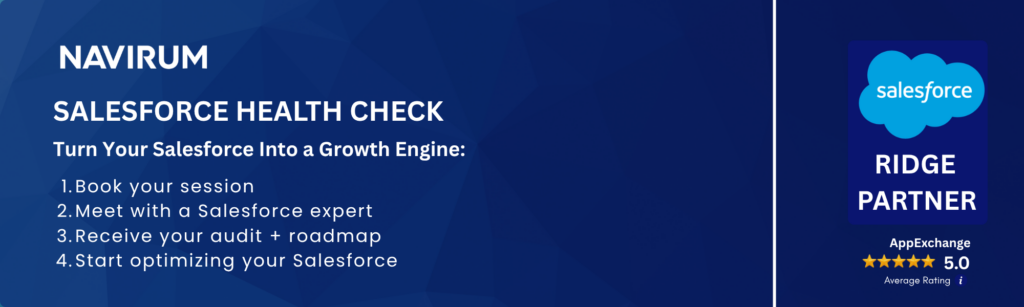
A Salesforce Health Check is a structured audit of your Salesforce org — covering data quality, security, integrations, and AI readiness — delivered by certified consultants. Navirum’s complimentary Health Check is purpose-built for financial services firms including RIAs, broker-dealers, and wealth management companies, and delivers a prioritised roadmap to make Salesforce scalable and Agentforce-ready.
If your Salesforce CRM is messy today, AI and Agentforce won’t fix it, they’ll make it worse.
According to Rory Galvin, CEO of Navirum:
We’ve delivered thousands of successful Salesforce projects. The winners are always those with strong business goal alignment and an internal champion driving change.
Your Salesforce Is Costing You More Than You Think
Identify risks, reduce costs, and get a clear roadmap to make your CRM scalable—and AI-ready.
You’ve invested in Salesforce. Added integrations. Rolled out new tools like a financial planning software, a Redtail → Salesforce migration, or connecting Salesforce with Schwab or Fidelity.
But instead of improving efficiency… you’re seeing more manual work, fragmented data, and rising costs.
And with AI and Agentforce on the horizon, these issues don’t disappear—they multiply.
Why Most Salesforce Initiatives Fall Short
On paper, everything looks right: new integrations, financial planning tools, CRM migrations, custodian connections (Schwab, Fidelity, etc.)
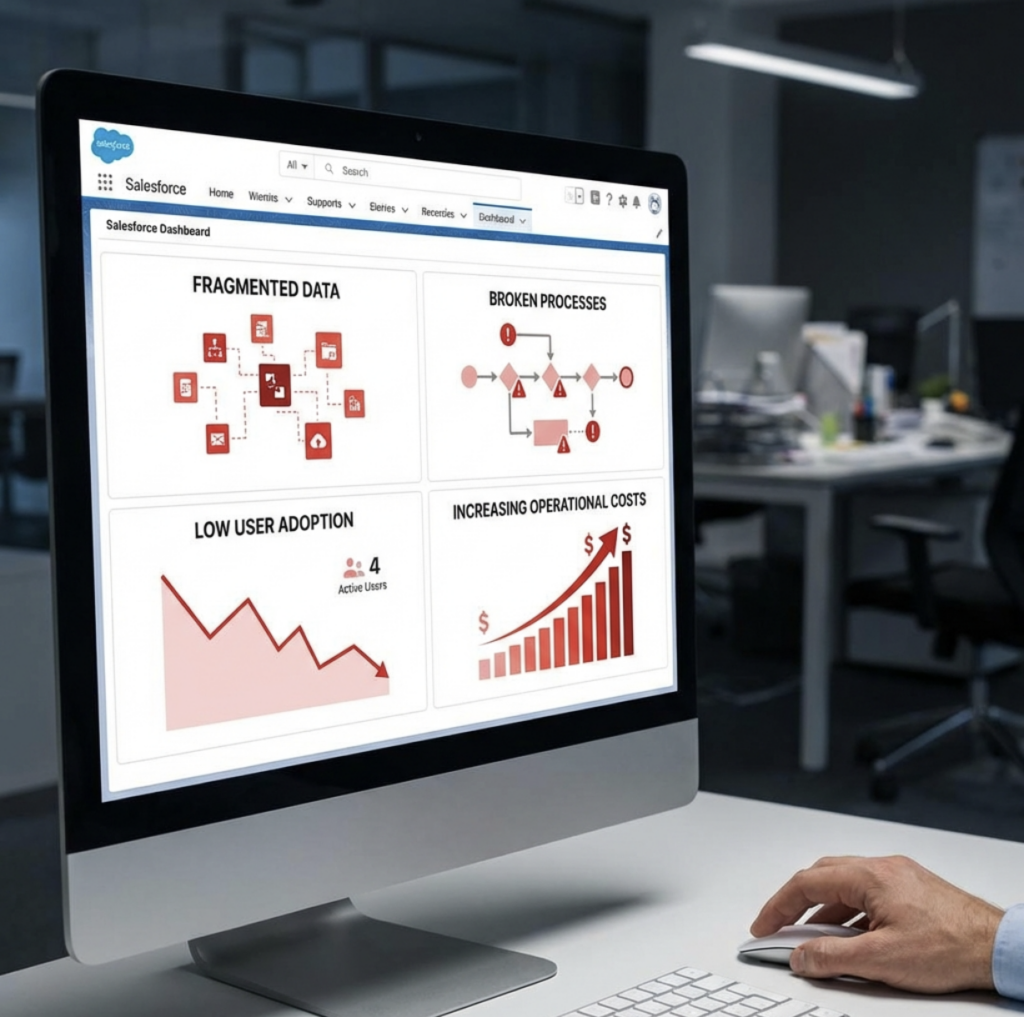
But without the right foundation, they lead to: increasing operational costs, fragmented data, broken processes and low user adoption.
Most Salesforce programs don’t fail because of the technology—they fail because of misalignment. Common issues include:
Over-customization → poor usability + high maintenance
No strategic roadmap → low ROI
Lack of industry context → wrong implementation decisions
The #1 issue: Salesforce not aligned to business objectives.
AI Won’t Fix a Broken Foundation
Agentforce represents the future of Salesforce: autonomous agents, less manual work, smarter workflows.
But most firms aren’t ready. So instead of reducing work… AI amplifies the chaos and leads to:
Compliance risks increase
Data isn’t structured
Integrations aren’t stable
Processes aren’t scalable
How Does A health Check Work?
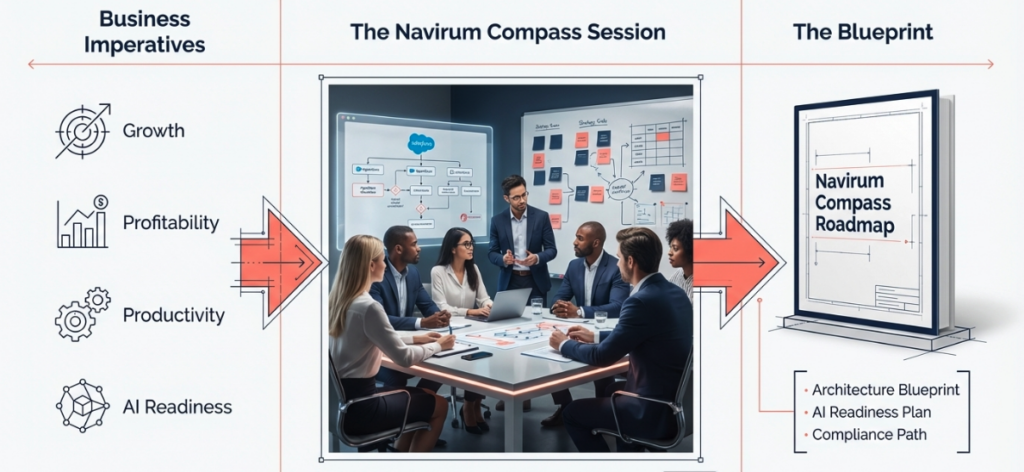
Our certified Salesforce experts perform a comprehensive review of your entire Salesforce org and help you turn your current Salesforce environment into a scalable, high-performing, AI-ready platform.
We assess your entire ecosystem—data, integrations, workflows, and architecture—and give you a clear path forward.
What You Get
Every Health Check delivers clear, actionable outcomes:
✅ Cost reduction + efficiency opportunities
✅ 30-minute 1:1 session with a Salesforce expert
✅ Detailed audit report
✅ Key risks identified + how to fix them
✅ Prioritized roadmap aligned to your business goals
Our Health Checks are complimentary and no-obligation. If you choose to move forward, Navirum can help you implement the recommendations and transform your Salesforce environment into a scalable, high-performing, AI-ready platform.
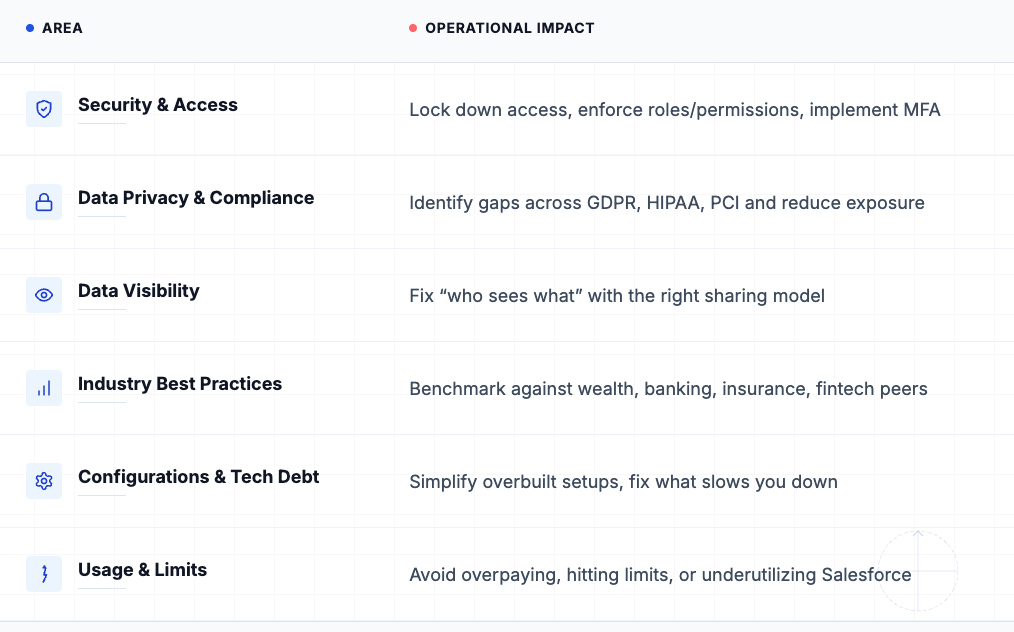
What Your Salesforce Health Check Covers?
Security, Compliance, Costs, and AI Readiness
What Are The Outputs From Each Salesforce Health Check?
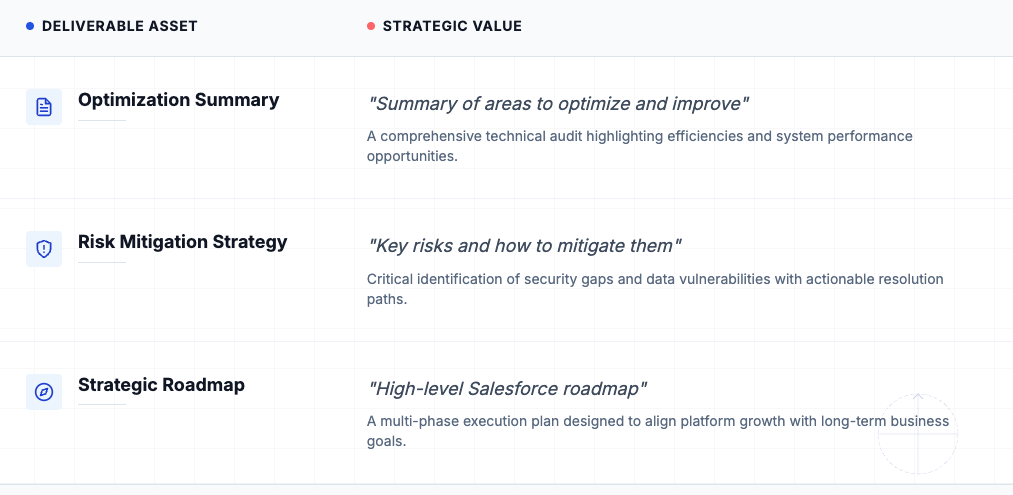
As part of our Salesforce Health Check we deliver the following valuable assets, which can be used to guide the direction of your Salesforce journey.
How Navirum Gets It Right
We take your existing Salesforce environment — integrations, data, workflows — and turn it into an AI-ready platform where Agentforce can actually deliver value:
Based on Navirum’s analysis of Salesforce implementations across financial services, misalignment with business objectives accounts for the majority of underperforming CRM programs – not technical failure.
What is The Value From A Salesforce Health Check?
Worth $500, in each health check, we look at how you can realign Salesforce with your original business goals and get you back on the path to success. As well as the strategic perspective, we check your Salesforce org security for vulnerabilities, financial industry best practices, ways to cut costs, improve user adoption levels, and much more!
With each free Navirum Salesforce health check, you will get a report including:
✅ 30 minute 1:1 session with a highly experienced Salesforce Consultant
✅ Opportunities for improvement report to share with your colleagues
✅ A road map for Salesforce Success aligning with your business goals
All of our Salesforce health checks are performed by highly experienced consultants who have worked on hundreds of projects in their career.
Salesforce Health Check Services are an Ideal Solution for…
Organizations looking to optimize their existing Salesforce implementation.
Organizations concerned about the security and integrity of their Salesforce data.
Organizations preparing to transition from Salesforce Classic to Lightning.
Teams experiencing low user adoption or looking to implement the latest Salesforce features.
Organizations looking to implement Agentforce or AI solutions
How To Book Your Free Salesforce Health Check?
Get clarity on what’s slowing you down—and exactly how to fix it. Click on any of the Book Your Free Salesforce Health Check buttons, or fill out the form below to begin scheduling your free health check. We look forward to hearing from you.
The Navirum team holds over 50 Salesforce certifications, making it one of the most credentialed Salesforce consulting firms specialising in financial services in North America.
Navirum has delivered thousands of Salesforce projects across complex, highly regulated financial environments. This depth of experience allows us to quickly diagnose issues that others miss—from technical debt and over-customization to compliance gaps and data fragmentation.
We embed this expertise into every Health Check, delivering not just insights—but a clear, strategic path forward based on what has consistently driven success across our clients.
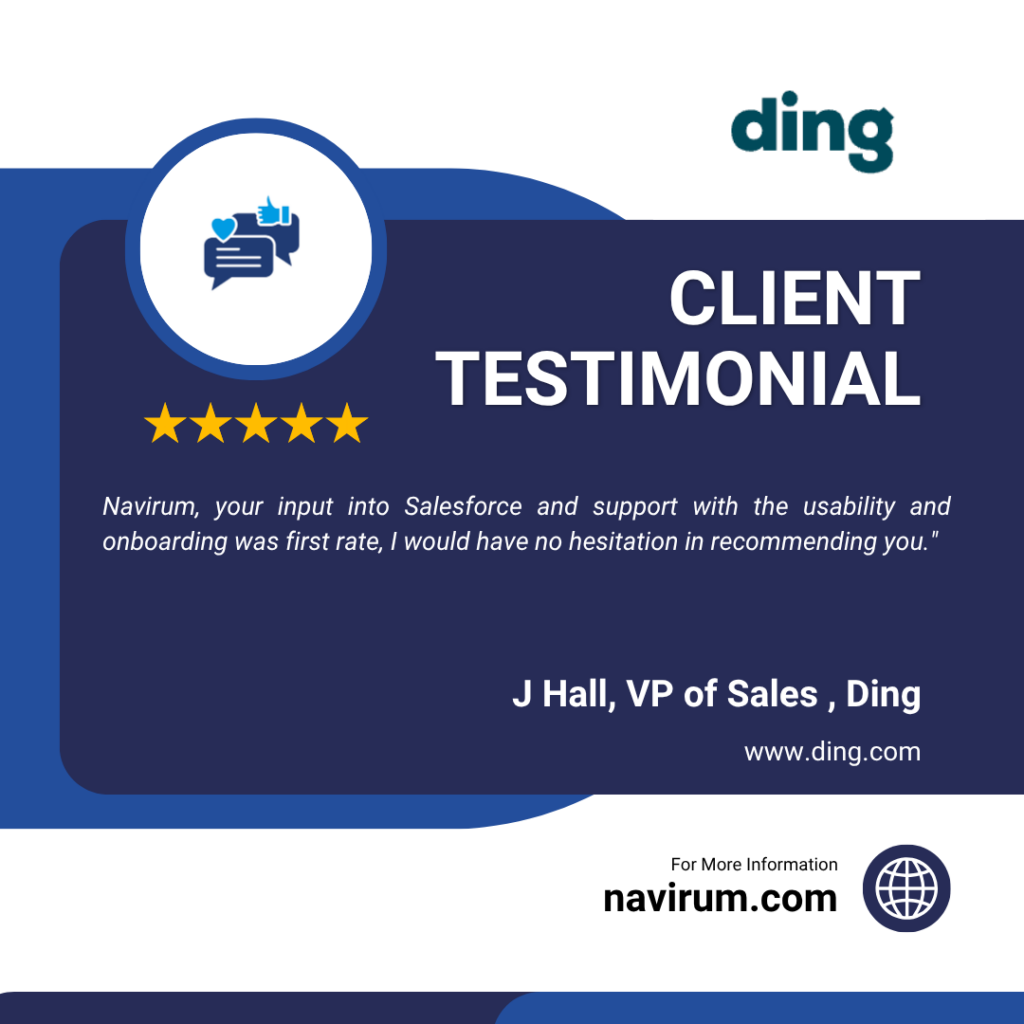
Navirum, your input into Salesforce and support with the usability and onboarding was first rate, I would have no hesitation in recommending you.
– J. Hall, VP of Sales, DING
Navirum was very professional and enjoyable to work with during our build out of Salesforce. They were knowledgeable and helped Sterling navigate the process in an efficient manner.
– Erica Chaffee, President and CFO, Sterling Management
I would highly recommend that organized and focused project managers work with Navirum for their CRM transition projects.
-Shelby Murphy, Head of Marketing, Main Management
Salesforce implementations go off track for many reasons, including:
Over-customization of Salesforce leads to poor usability and high maintenance costs.
No plan or strategic roadmap leads to poor value creation over the long term
Gaps in industry knowledge to understand the real needs of the business
Yet, the #1 reason programs veer off course is due to a lack of alignment with the company’s overarching business objectives. This is especially true for financial institutions, which often have distinctive strategic goals. Whether it’s managing suitability obligations for Broker-Dealers, deal pipeline management for Private Equity firms, or efficient client onboarding for Financial Advisors.
Sounds familiar? Some businesses are super successful with Salesforce? Even a smaller company like PenFed Credit Union
How do we get it right? Well is starts with the right foundation… 👇
Get a Free Salesforce Health Check from Certified Experts
Do you need to run a health check for your Salesforce org? Get expert guidance from Navirum.
The certified health-check experts conduct a detailed gap analysis and recommend a roadmap to higher performance and a robust Salesforce ecosystem.
A Salesforce Health Check is a comprehensive review of your org’s data quality, system performance, security settings, integrations, and overall configuration. It identifies inefficiencies, risks, and missed opportunities. You’ll receive clear, prioritized recommendations to improve usability, scalability, and ROI.
How long does a Salesforce Health Check take?
Most health checks are completed within 1–2 weeks, depending on the complexity of your Salesforce environment. This includes analysis, stakeholder input, and a final review session. We focus on delivering actionable insights quickly, without disrupting your operations.
Is a Salesforce Health Check really free?
Yes, the health check is completely free and comes with no obligation. It’s designed to provide immediate value by highlighting areas for improvement. If you choose to move forward with recommendations, that’s entirely up to you.
What is the difference between a Health Check and a full Salesforce audit?
A health check is a high-impact, fast assessment focused on identifying key issues and quick wins. A full audit is more in-depth, involving detailed documentation, process mapping, and long-term transformation planning. Think of a health check as a diagnostic, and an audit as a full overhaul strategy.
How do I know if my Salesforce org is AI-ready?
Your org is AI-ready if your data is clean, structured, and consistently used across processes. You also need well-defined workflows, strong governance, and integrated systems. If these foundations aren’t in place, AI tools like Agentforce can amplify inefficiencies instead of solving them.
What makes Navirum different from other Salesforce consultants?
Navirum combines deep Salesforce expertise with real-world financial services experience, ensuring solutions are both technically sound and business-relevant. We focus on outcomes—efficiency, scalability, and growth—not just implementation. Our approach is practical, senior-led, and built on delivering measurable results, not just recommendations.
RoryWhy Your Salesforce Is Quietly Costing You Time and Money
At Navirum, we are specialists in helping broker-dealers implement Salesforce. Navigating regulatory compliance and growing a business is a challenge. Here are 3 ways Salesforce can help broker deals to streamline and grow without compliance headaches. We’ve included a common FAQs for broker dealers and Salesforce at the end. Enjoy!
#1 Suitability & Segmentation with Broker-Dealer CRM
A modern broker dealer CRM built on Salesforce allows firms to create detailed client profiles based on financial goals, risk tolerance, investment preferences, and regulatory needs. This level of segmentation ensures that every recommendation is suitable and tailored, improving both compliance and client satisfaction.
Unmatched segmentation and suitability
#2 Compliance CRM for Regulatory Confidence
An integrated compliance CRM enables broker-dealers and financial institutions to track disclosures, risk assessments, and suitability documentation. Back office and portfolio management (PMS) systems integrations are possible including multi-custodial integrations (see more here) helping create a 360 degree client view. Salesforce workflows automate compliance checks, making it easier to align product recommendations with FINRA, SEC, and other regulatory requirements.
Massive compliance efficiencies
#3 AI-Enabled CRM for Smarter Recommendations
With an AI enabled CRM, financial advisors and broker-dealers can leverage predictive analytics to recommend products that best align with client objectives. AI-driven alerts and portfolio monitoring ensure that product suitability is continuously reviewed and updated.
AI enabled recommendations
Business Impact
Ensure every financial recommendation is suitable and compliant
Automate compliance workflows and reduce manual risk
Use AI-enabled CRM features to personalize client interactions
Strengthen trust with a single source of truth for compliance and client data
Bottom line: By combining Salesforce with an AI enabled, compliance-focused, financial services CRM, broker-dealers gain the tools to stay compliant, strengthen client relationships, and grow their business confidently.
Are you broker dealer needing Salesforce help? Help is a click away …
How does Salesforce help broker-dealers with regulatory compliance?
Salesforce provides compliance-focused workflows that track disclosures, risk assessments, and suitability documentation. This ensures broker-dealers meet FINRA, SEC, and other regulatory requirements while reducing manual risk.
What is suitability and segmentation in a broker-dealer CRM
Suitability and segmentation allow firms to create detailed client profiles based on goals, risk tolerance, and investment preferences. Salesforce makes it easier to recommend the right products and demonstrate compliance with suitability standards.
Can Salesforce automate compliance workflows for broker-dealers
Yes. Salesforce automates critical compliance steps, such as documentation, product approvals, and portfolio reviews, saving time and minimizing errors.
How does AI improve Salesforce for broker-dealers?
AI-enabled Salesforce features provide predictive analytics and real-time alerts, helping advisors recommend suitable products and continuously monitor client portfolios for compliance.
Why should broker-dealers choose Salesforce over other CRMs?
Salesforce is a trusted financial services CRM that combines compliance tools, AI-powered recommendations, and a single source of truth for client data—helping firms grow while staying compliant.
What business impact can broker-dealers expect from using Salesforce?
Broker-dealers can expect streamlined compliance, reduced operational risk, personalized client interactions, and stronger client trust—all driving sustainable business growth.
How do custodial integrations like Schwab, Pershing, Fidelity, and Raymond James work with Salesforce?
Custodian integrations – such as Schwab Advisor Center, Pershing, Fidelity Wealthscape, and Raymond James—connect account-level data directly into Salesforce Financial Services Cloud. These integrations bring in balances, transactions, positions, RMDs, and alerts, giving broker-dealers and advisors a 360° client view inside their CRM.
Schwab Advisor Center → Daily sync of account balances, positions, RMD history, and money movement with single sign-on. (Schwab Integration Overview) Fidelity Wealthscape → Allows advisors to view and manage brokerage accounts within Salesforce, streamlining suitability checks and digital workflows. (Fidelity Newsroom Release) Pershing X (Wove) → Deep integration with Salesforce FS Cloud for onboarding, data sharing, and engagement workflows. (Salesforce + Pershing X Announcement) Raymond James → Similar to others, Raymond James offers Salesforce API connectivity to sync custodial data, enabling advisors to see real-time account updates and compliance records.
These custodial integrations transform Salesforce into the single source of truth for client financial data – streamlining suitability reviews, reducing compliance risk, and giving advisors more time to focus on clients.
How do Portfolio Management Systems like Addepar, Orion, Black Diamond, Advent/APX, and Tamarac integrate with Salesforce?
Portfolio Management Systems (PMS)- such as Addepar, Orion Advisor Tech, Black Diamond, SS&C Advent/APX, and Envestnet Tamarac—can be integrated with Salesforce to give advisors a real-time view of portfolio performance, holdings, transactions, and reporting directly inside their CRM. This means advisors no longer need to toggle between systems—they can see investment data in the same place they manage client relationships.
Addepar → Integrates with Salesforce to surface performance reporting, portfolio breakdowns, and client-level analytics. (Addepar Salesforce Integration) Orion Advisor Tech → Pushes household performance, account balances, and fee billing data into Salesforce, enhancing client review workflows. (Orion + Salesforce Integration) Black Diamond (SS&C) → Connects portfolio reporting, account aggregation, and client dashboards into Salesforce, providing a unified advisor workspace. (Black Diamond Wealth Platform) SS&C Advent/APX → Delivers institutional-grade portfolio and accounting data into Salesforce for compliance, reporting, and investment analysis. (SS&C Advent APX) Envestnet Tamarac → Links Salesforce with portfolio rebalancing, performance reports, and client portals, streamlining advisor-client interactions. (Envestnet Tamarac Integration)
So PMS integrations ensure Salesforce becomes the hub for both client engagement and investment intelligence, enabling advisors to deliver more personalized service while maintaining compliance and operational efficiency.