The Agentforce World Tour in New York highlights how Salesforce Data 360 and Agentforce are transforming marketing from campaigns into real-time, personalized conversations. Data 360 enables marketers to activate structured and unstructured data, bridging context gaps, while Clean Rooms allow secure, privacy-compliant collaboration with partners to create high-value audience segments.
AI-powered Agents act as lead nurturers, handling personalized interactions, automating follow-ups, and ensuring no opportunity is overlooked—turning traditional funnels into dynamic, automated dialogues. For wealth managers and financial institutions, integrating these tools with Salesforce Financial Services Cloud enables intelligent, hyper-personalized client engagement, driving loyalty, operational efficiency, and data-driven growth.
How Data 360 and Agents are Rewriting the Marketing Playbook
In our recent analysis, we explored how Salesforce Marketing Cloud and Agentforce are converging to redefine customer loyalty. The Agentforce World Tour in New York has provided us with a tactical playbook to elaborate upon the overarching strategy.
The headline from NYC isn’t just about “better bots”—it’s about a fundamental shift in how customer data is activated. With the introduction of Data 360 (the evolution of Data Cloud) and live examples from Salesforce customers, we now have a clearer picture of how marketers can move from “campaigns” to “conversations.”
Here is your update on what Agentforce means for the future of marketing, based on the latest reveals from New York.
1. Data 360: The New Engine for Marketing Cloud
The biggest branding shift in New York was the evolution of Data Cloud into Data 360. While the core “Zero Copy” architecture remains—allowing you to access data in Snowflake or Databricks without moving it—the focus has shifted aggressively toward activation.
For marketers, this solves the “context gap.” As Salesforce’s Paul Cordasco noted, “If you don’t provide the right data, the prompts aren’t going to get you there”. AI needs trusted data to ground its queries so responses are appropriate and free of hallucinations.
Why this matters for CX: You can now bring in unstructured data—like product manuals or PDFs—using Intelligent Context. This means your marketing and service agents can “read” complex documents (preserving charts and tables) to answer detailed customer questions instantly, ensuring your brand voice is consistent and accurate.
2. The Loyalty Game-Changer: Data 360 Clean Rooms
In our previous article, we discussed loyalty ecosystems. The New York event showcased the ultimate tool for this: Data 360 Clean Rooms.
Imagine a wealth manager wanting to partner with an accounting firm to target high-value customers. Historically, sharing lists was a privacy nightmare. With Clean Rooms, these brands can now collaborate in a secure “vault” where data is encrypted and Personal Identifiable Information (PII) is never shared.
The process involves both parties agreeing on data segments for exchange, followed by the system querying to find the overlapping audience. The outcome is a highly precise, jointly branded audience segment ready for immediate marketing activation, ensuring optimized spending by targeting only relevant travelers.
For Navirum clients looking to expand loyalty partnerships, this feature allows you to unlock second-party data insights without risk.
Perhaps the most striking example of “Agentic Marketing” came from PepsiCo. They are using Agentforce not just for support, but to ensure “no lead is left behind”.
In a typical B2B scenario, sales teams ignore smaller leads to focus on big accounts. PepsiCo is flipping this by having AI agents handle the initial nurturing.
Beyond Templates: These agents aren’t just sending canned emails. They are crafting personalized messages based on the prospect’s intent, business size, and region.
Two-Way Conversations: The agent engages in a back-and-forth conversation. It only hands off to a human seller when the lead is qualified and ready to book a meeting, complete with a prepared briefing for the sales rep.
This blurs the line between Marketing Cloud and Sales Cloud, turning the “funnel” into an active, automated dialogue.
Furthermore, a great example of hyper-personalization across channels came from Williams-Sonoma. If a customer buys a Dutch oven, their agent, “Olive” remembers this and later recommends recipes tailored for that specific pot. Agentforce Voice ensures agents retain complete customer history and context. This capability facilitates a smooth transition to a human designer when addressing more complex inquiries.
The Takeaway
The Agentforce World Tour in NYC confirmed that the tools to build a “Customer Company” are ready today.
Unify your data with Data 360.
Collaborate securely with partners using Clean Rooms.
Automate the conversation with Agents that act as an extension of your marketing team.
Want to activate Data 360 in your marketing strategy? Contact Navirum today.
The Navirum Advantage: Powering the Agentic Financial Enterprise
Since 2018, Navirum has been delivering outstanding customer satisfaction, resulting in repeat business and accelerated success for our clients.
At Navirum, we specialize in helping wealth managers and banks activate their data and modernize client engagement. Our founders bring deep experience from investment firms and Salesforce’s Financial Services team to help you navigate the shift to the Agentic Enterprise. On every project, we engage our:
Strategic Consulting – Align Salesforce to your business goals, compliance needs, and Data 360 activation strategies to drive client loyalty.
Technical Implementation – Deep expertise in FSC, Marketing Cloud, and Agentforce setup, ensuring your AI agents are grounded in trusted data and integrated with banking admin systems.
Managed Services – Continuous optimization and adoption support to ensure your agents perform effectively and your data remains actionable.
Contact us for an initial consultation to explore the ways Navirum can help your organization reach new heights with the combined power of Data 360, Agentforce, and Salesforce Financial Services Cloud.
The theme of the NYC event was clear: moving from “visionary demos” to “practical reality” For wealth management firms and financial institutions grappling with the “overwhelming sea of AI options”, Salesforce demonstrated that the Agentic Enterprise is not a future state—it is happening now.
Here is what the Navirum community needs to know about the latest updates from New York, and how they apply to the wealth management mega-trends we are seeing in the market.
1. The End of “Black Box” AI: Predictability and Compliance
One of the most significant barriers to AI adoption in Canadian and US financial sectors is the fear of the “hallucinating” bot. Financial services require deterministic outcomes, not probabilistic guesses.
At the NYC event, Salesforce tackled this head-on with the introduction of Agentforce Script and the Process Compliance Navigator.
Agentforce Script: This allows firms to configure deterministic rules directly into the agent. Instead of relying solely on an LLM to “figure it out,” you can code specific guardrails. This ensures that when an agent interacts with a client, it follows business processes to the letter of the law.
Process Compliance Navigator: This innovation maps regulations directly to the workflows they impact. The goal is to “flip the script” from reactive risk assurance (cleaning up spills) to proactive risk avoidance (preventing spills entirely).
Auditability: As mentioned by different experts at the event, regulators want a “glass box,” not a black box. The new tools provide audit trails for agent actions, allowing firms to prove compliance with detailed records of every transaction.
For wealth firms, this answers the critical question: How can we automate without compromising our regulatory standing?
2. Real-World Success: The Hybrid Workforce
We have previously written aboutuse cases for the agentic firm, such as client onboarding and meeting prep. The NYC event showcased live examples of this “hybrid workforce” in action.
Baxter Credit Union (BCU) shared how they deployed “Frida,” a financial freedom agent. Unlike legacy chatbots that hit dead ends with complex questions, Frida uses contextual knowledge to answer member questions about nuances like Power of Attorney requirements.
The Result: BCU saw a 10-15% improvement in human escalation rates (meaning the bot solved the issue without human help).
Lead Nurturing: BCU is also building agents to handle the “middle of the pack” leads that loan officers don’t have time to call. The agent nurtures the lead via email and text, and only loops in the human officer when the client is ready to book a meeting.
CMG Financial highlighted how agents are reducing the “manufacturing cost” of loans. Their goal isn’t to replace Loan Officers, but to make them “omnipresent” by automating rote tasks so they can focus on high-value advisory work.
3. Data is the Fuel: The “Data 360” Advantage
A recurring theme in our analysis ofSalesforce FSC for Canadian firms is the importance of unified data. In NYC, Salesforce doubled down on this with Agentforce 360 and the integration of Informatica.
Agents are only as good as the data they can access. The new Intelligent Context capabilities allow agents to ingest unstructured data—like PDF product manuals or regulatory documents—without losing the meaning of charts, tables, and headers.
For a wealth firm, this means an agent could theoretically read a complex PDF of a new investment product and accurately answer advisor questions about it immediately, without manual data entry. With the Informatica partnership, Salesforce is ensuring that this data is governed, traced, and trusted.
4. Accelerating Deployment with “Agentforce Vibes”
Speed to market is critical. Salesforce introduced Agentforce Vibes, a tool that allows developers and admins to conversationally build prototypes in minutes.
Instead of writing code from scratch, teams can upload a Product Requirements Document (PRD), and the agent helps generate the necessary code, metadata, and dashboards grounded in the firm’s actual schema.
This significantly lowers the barrier to entry for firms looking to test AI concepts before a full rollout.
The Agentforce World Tour in New York confirmed the rapid pace of industry change. As Matthew McConaughey’s voice suggests, the central question has evolved from speculating on “What if?” to determining “How soon?”
However, the event also reinforced that data maturity and governance are prerequisites for success. As Salesforce noted, legacy technology and fragmented data are merely “fodder” for this new agentic capability.
For our clients, the path forward involves three steps:
Unify Your Data: Leverage Data Cloud (Data 360) to ensure your agents have a “Golden Record” of the client.
Define Your Guardrails: Use Agentforce Script to ensure your agents stay within compliance boundaries.
Start Small, Scale Fast: Like BCU, which started with 5% of interactions and grew to 50%, pick a high-impact use case (like lead nurturing or meeting prep) and iterate.
The Agentic Enterprise is open for business. Are you ready to build?
Ready to explore how Agentforce can transform your firm? Contact Navirum today.
The Navirum Advantage: Expertise that achieves results
Since 2018, Navirum has been delivering outstanding customer satisfaction, resulting in repeat business and accelerated success for our clients.
At Navirum, we specialize in implementing and optimizing Salesforce FSC for wealth managers and banks. Our founders bring deep experience from investment firms, and Salesforce’s Financial Services team. On every project, we engage our:
Strategic Consulting – Align Salesforce to your business goals, compliance needs, and client engagement strategy.
Technical Implementation – Expertise in FSC setup, AI, automation, and integrations with banking admin systems.
Managed Services – Continuous optimization and adoption support to maximize your Salesforce ROI.
Contact us for an initial consultation to explore the ways Navirum can help your organization reach new heights, with the combined power of Salesforce Financial Services Cloud and Agentforce.
Modernizing Canadian Finance: Leveraging Salesforce Marketing Cloud and Agentforce for Customer Experience and Loyalty
The Canadian financial services sector, much like its global counterparts, is facing intense competition and higher customer demands for interactions that are personalized, relevant, and secure. As the hurdles to switching financial institutions decrease, clients are more willing to seek out alternatives that offer a superior customer experience.
To foster loyalty and build trust, Canadian financial institutions must bridge the gap between their traditionally strong internal systems for capital and risk management and the evolving digital demands of today’s consumers. The key to this transformation is the strategic integration of Salesforce Marketing Cloud (SFMC), Financial Services Cloud (FSC), and sophisticated AI solutions such as Einstein and Agentforce.
Here are the three great uses for a financial services firm leveraging these technologies to drive growth, compliance, and loyalty.
#1 The Trust-Building Onboarding Journey
First impressions are always important, and a dry “thank you” email is no longer sufficient when competing with agile fintech challengers. A very effective use of SFMC is to automate smart onboarding journeys that educate rather than just confirm.
Using Journey Builder, banks can trigger multi-step flows the moment a new account is opened. Instead of a generic blast, the system delivers educational content tailored to the customer’s specific product usage—such as setting up auto-transfers for a new savings account or explaining treasury services to a new business client.
The AI & Agentforce Edge: This process is accelerated by Agentforce for Financial Services, which is designed to streamline banking and wealth management operations. By integrating Agentforce, banks can deploy autonomous agents to handle routine inquiries during the onboarding phase, while Einstein AI analyzes engagement in real-time. If a high-value client stops engaging with the onboarding emails, the system can automatically pivot to other touchpoints that the advisor decides, such as an SMS with a personal callback offer or an invitation to connect with the advisor.
#2 The Hyper-Relevant Cross-Sell with Lifecycle Logic
Cross-selling is often viewed as intrusive because it is frequently mistimed. A customer who just paid off a student loan does not want another loan promo; they are more likely to need investment advice. SFMC transforms cross-selling by using lifecycle awareness to ensure offers are relevant and timed correctly.
Through Customer 360 Integration, banks can unify data from website interactions, mobile app usage, and transaction history to see the full context of a client’s financial life. This enables precise segmentation, moving beyond broad demographics (e.g., “Millennials”) to behavioural segments (e.g., “Active mobile users who viewed mortgage rates this week”),.
The AI & Agentforce Edge: This is where Data Cloud and Einstein Analytics become essential. They move marketing from “reactive” to “predictive.” Einstein can identify customers likely to respond to specific offers and recommend the “next best action” instantly,. Furthermore, Agentforce solutions can be employed to autonomously draft personalized outreach for advisors based on these predictive insights, ensuring the communication feels human and contextually aware.
#3 Proactive Churn Prevention and Retention
In the competitive Canadian market, insights and proactive actions can help identify and retain disengaged customers. SFMC allows banks to set up retention workflows that detect early warning signs, such as low interaction with emails, websites and apps. If a previously active user hasn’t logged in for 45 days, the system can automatically trigger a re-engagement path, starting with a gentle check-in email and escalating to a tailored incentive, such as a waived fee.
The AI & Agentforce Edge: By utilizing Agentforce, financial institutions can automate the remediation of these at-risk accounts more efficiently. For instance, Agentforce agents can independently manage service inquiries or navigate complex data strategies to uncover why churn is happening, allowing the company to implement effective measures to retain their clients.
The Bottom Line for Canadian Financial Institutions
Implementing this integrated solution is like moving from a generic loudspeaker announcement to giving every client a personal concierge who knows their destination, taps them only when relevant, and hands them exactly the right ticket.
Partner with Navirum to Activate Your Intelligence Strategy
The integration of Salesforce Marketing Cloud, Financial Services Cloud, Einstein AI, and Agentforce is more than just a technological upgrade and Navirum is your specialized partner, ready to help you convert these powerful innovations into real, measurable business value.
Contact Navirum today for an initial consultation. Let us explore how we can architect a personalized, intelligent, and scalable client experience strategy that drives loyalty and positions your organization for sustained growth.
Three High-Impact Use Cases for the Agentic Wealth Management Firm
Introduction: The Agentic Vision Realized
Last month we witnessed how Salesforce is further refining its AI-tools to boost adoption of Agentforce in the Financial Services industry. This revolutionary platform is already helping companies shift from conceptual blueprints to operational imperatives where humans can be removed from certain simple tasks and agents become the new operational backbone of the enterprise. This is the promise of Agentforce 360: a seamless, trusted layer of AI agents embedded directly within your Salesforce Environment.
Our previous articleestablished the wireframes of the agentic enterprise, and in this one we demonstrate the material value it can bring to your wealth management firm: scaling personalization and advice quality while mitigating the mounting burdens of administrative overhead and regulatory risk.
The Agentforce Advantage: Scaling the Human Touch
The core problem for advisors remains a persistent and costly one: they spend over 70% of their time on administrative tasks—from meeting prep to compliance documentation— or repetitive ones —drafting a marketing campaign for their clients and high-value contacts— rather than on client relationships or growth activities. Here’s where Agentforce directly addresses this productivity gap, by operating within the Einstein Trust Layer and grounded in Data 360 for unified client context with pre-built, role-based agents that amplify the human potential.
Three High-Impact Agentforce Use Cases in Wealth Management
Use Case 1: Hyper-Personalized Client Meeting Automation with a Prep Agent.
For an important meeting with a top client, an advisor traditionally spends hours synthesizing data from various systems: CRM, portfolio management, trust documents, and service history.
The Prep Agent automates this. Hours before a meeting, the agent accesses the unified client record (Data 360), processes all structured and unstructured data, and delivers a 360-Degree Briefing to the advisor’s workspace. This is not just a summary—it’s a prioritized, synthesized agenda that can highlight:
A suggested Next Best Action (e.g., “Propose RESP plan setup based on upcoming birth record in household.”)
Crucially, after the meeting’s happened, an agent will automatically draft the call report and follow-up tasks from the meeting transcript, logging them instantly in the client record in FSC and the advisor’s dashboard.
The result: Automating manual tasks such as research, meeting preparation, and account updates with industry-trained digital assistants boosts advisor productivity. This allows advisors to focus on clients and cultivate deeper, more strategic relationships by providing them with real-time insights and more time for what truly matters.
Use Case 2: Real-Time Suitability Assurance with a Compliance Agent
In a highly regulated environment, Salesforce offers the right to tools to ensure Compliance is an automated guardrail and not a manual bottleneck. A Compliance Oversight Agent can facilitate that every action is auditable and within policy.
For example, when an advisor suggests a new product or trade, this agent operates as a real-time risk filter, instantly verifying the recommendation against the client’s documented risk profile, liquidity needs, and long-term financial goals.
If the agent detects an exception (e.g., recommending a high-risk product to a conservative client), it proactively flags the discrepancy and triggers a clear, human-in-the-loop review process via Process Compliance Navigator.
Every agent action, every check, and every human override is logged in a secure, immutable audit trail—guaranteed by the Einstein Trust Layer.
The result: Seamless, embedded compliance that shifts the firm from reactive auditing to proactive, auditable risk mitigation. Deliver tailored advice at every touchpoint. By leveraging AI to surface timely insights and recommendations, while staying compliant in every step of the process.
Use Case 3: Next-Gen Client Service with Relationship Nurturing Agent
The goal of this Client Service Triage Agent is to scale service excellence without increasing human administrative load. Routine client requests can be addressed by automated processes that maintain the service quality and deliver the necessary information faster than what it would take the advisors to extract it from the right document or dashboard.
The Triage Agent can handle these requests 24/7 via chat, voice, or email. It uses pre-approved knowledge and actions to resolve up to 80% of routine inquiries independently.
For more complex requests, the agent will generate and escalate the ticket without mishandling the communication with the client. It packages the full conversational context, relevant account data, and proposed resolution path, and routes the case to the appropriate human specialist. The human adviser receives the ticket with the adequate contextual information, enabling a fast and informed resolution.
The result: Seamless client experiences, data-driven growth, and reduced costs, ultimately resulting in faster resolutions and increased client satisfaction. Unified data and AI are used to predict client needs, enabling optimal actions and integrated operations to scale high-touch service.
The New Operating Model: The Agentic Enterprise is here
Agentforce 360 allows wealth management firms to direct the human advisor toward high-judgment, high-empathy tasks that drive decisive growth. By deploying autonomous agents for prep, compliance, and routine service, firms can avoid spending capital on repetitive processes and instead invest in the exponential capacity of their superhuman teams.
The work of Navirum is to connect the Agentforce architecture to your firm’s unique business logic, moving you from AI ambition to quantifiable, trusted business transformation.
Agentforce is Salesforce’s new autonomous AI platform, designed to help organizations deploy trusted AI agents directly within the Salesforce ecosystem. For wealth management firms, that means virtual agents can now analyze portfolios, surface client insights, automate service requests, and even support advisors in real time — all while staying compliant and secure within your Salesforce environment.
Our consulting team helps firms design Agentforce agents that align with their client engagement strategy, data governance requirements, and compliance standards.
How does Agentforce work?
At its core, Agentforce combines Salesforce’s Atlas Reasoning Engine, Agent Builder, and Einstein Trust Layer. Together, they let firms build intelligent agents that understand client intent, pull relevant CRM and financial data, execute actions, and hand off to human advisors when needed.
We help clients configure Agent Builder to handle tasks such as lead qualification, account servicing, and personalized reporting — all integrated with your existing Salesforce Financial Services Cloud setup.
What are the key use cases for wealth management?
Agentforce opens up high-impact opportunities across the client lifecycle:
Operations: Streamline reporting and internal approvals through autonomous workflows.
Client onboarding: Automate KYC data collection and initial portfolio setup.
Every Salesforce customer can start experimenting with Agentforce for free under the Salesforce Foundations offering. Beyond that, pricing scales with usage — typically based on the number of AI interactions or data actions processed. Deployment follows Salesforce’s standard model, allowing firms to launch pilot agents within their existing org and expand incrementally.
Our consultants guide clients through sandbox testing, governance setup, and user adoption planning to ensure smooth rollouts.
What should wealth management firms consider before implementing Agentforce?
Data readiness: Ensure clean, accessible client and product data within Salesforce.
Compliance and guardrails: Define what agents can and cannot say or do.
Integration: Align Agentforce with financial planning tools, custodial platforms, and internal data systems.
Change management: Prepare advisors and support teams for new workflows and AI collaboration.
Our team specializes in financial services implementations, helping firms establish the right governance and security frameworks from day one.
Ready to Build Your Agentic Firm?
Agentforce represents a pivotal shift in how wealth management firms can scale personalized service, streamline advisor operations, and stay compliant in an AI-driven world.
Contact our Salesforce consulting team to explore an Agentforce readiness assessment or a tailored pilot project for your firm.
In today’s fast-paced world, productivity hinges on seamless collaboration. That’s why more and more financial services firms and enterprises are turning to Salesforce Slack integration.
By connecting Salesforce and Slack, teams can share data, automate workflows, and make faster decisions without switching between platforms.
Whether you call it Slack and Salesforce integration, Salesforce to Slack integration, or simply Salesforce integration Slack, the result is the same: less friction, more focus, and better outcomes.
When you integrate Slack with Salesforce, updates on new leads, opportunity stage changes, or deal approvals show up instantly in Slack channels. Instead of refreshing dashboards, sales teams respond in real time—shortening the path from prospect to closed deal.
#2 – Streamlined Collaboration Across Teams
With Slack and Salesforce connected, every account, opportunity, or case can have its own dedicated Slack channel. This keeps conversations, files, and context together. Whether you’re in sales, service, or marketing, the integration eliminates silos and helps everyone stay aligned.
What is Slack Anyway?
#3 – Automated Workflows That Save Time
The Salesforce app for Slack allows you to automate routine tasks—such as escalating cases, reminding reps of follow-ups, or assigning handoffs. Notifications arrive directly in Slack, ensuring that nothing slips through the cracks.
#4 – Smarter Decisions with Data on Demand
Leaders no longer have to wait for weekly reports. With sales force and Slack connected, pipeline metrics, forecasts, and service dashboards can be pulled into Slack with a quick command. This provides decision-makers with live data to act faster.
#5 – Enhanced Customer Support
Service Cloud users can set up Salesforce to Slack integration so high-priority cases trigger immediate alerts. Support teams can then swarm the issue in Slack, loop in subject matter experts, and resolve it quickly—boosting customer satisfaction.
#6 – A Unified Platform for Growth
From slack sales force notifications to executive-level snapshots, the integration brings CRM data into Slack where people are already working. The connect Slack to Salesforce setup creates transparency, accountability, and better alignment across the business.
Salesforce Slack Demo (Credits to Salesforce Ben)
No Slacking, The Summary
Investing in Salesforce Slack integration is more than just a technical upgrade. It’s about creating a unified digital workspace where deals move faster, support becomes proactive, and teams stay aligned.
With Salesforce continuing to enhance its ecosystem – including the fast-growing Salesforce app for Slack – organizations that adopt early gain a competitive edge.
Contact Us for Salesforce Slack Integration Consultation Today
For a Salesforce professional, about 2-4 hours with testing. This doesn’t include template design, workflows, approvals. A proper implementation can be any from 20 to 50 hours so the RoI needs to start up!
What is a Salesforce partner?
A Salesforce partner is a company or organization that has been officially recognized by Salesforce for its expertise in delivering Salesforce-related services, solutions, or products. Salesforce partners may provide consulting, implementation, customization, integration, or third-party applications (AppExchange apps) to help clients maximize the value of the Salesforce platform. They are part of the Salesforce Partner Program, have access to specialized training and resources, and are recognized for meeting Salesforce’s standards for quality, technical capability, and customer success. Navirum is a certified Salesforce partner.
How do financial advisors use Slack within Salesforce?
Financial advisors use Slack integrated with Salesforce to collaborate in real time, coordinate client tasks across teams, and receive automated updates on deals and accounts. This streamlines workflows, reduces email traffic, and ensures faster, more efficient client service by keeping conversations and Salesforce data in one place.
How does the integration improve compliance?
The integration provides automated audit trails, status tracking, and secure storage of signed documents within Salesforce, ensuring that regulatory requirements are consistently met and easily verifiable.3
Navirum is a certified Salesforce and Slack partner, specializing in delivering integrated solutions that streamline digital workflows for financial services and other industries. With deep expertise in both platforms, Navirum helps clients automate processes, accelerate agreements, and maximize value from their Salesforce and Slack investments.
The Salesforce DocuSign Integration streamlines document processes, allowing financial services firms to send, sign, track, and manage client documents directly within Salesforce.
It simplifies workflows by connecting electronic signature functionalities with client records, reducing manual processing steps significantly.
Typical implementation takes 1–3 weeks for basic setups, while complex configurations may take 4–8 weeks or longer.
This integration enhances visibility into document signature status and improves client onboarding experiences through automation.
Firms must evaluate their document volume and complexity to determine if they need DocuSign eSignature or the more comprehensive DocuSign CLM.
Integrating DocuSign with Salesforce allows financial services firms to send, sign, track, and manage client documents directly from Salesforce.
Instead of downloading documents, sending emails, tracking signatures manually, and updating Salesforce records afterward, firms can connect the signature process to their existing CRM workflows.
For financial advisors, RIAs, wealth management firms, banks, insurance companies, and other regulated organizations, this can simplify processes such as client onboarding, advisory agreements, account applications, disclosures, and compliance documentation.
A straightforward DocuSign eSignature implementation may take approximately 1–3 weeks, while more complex implementations involving DocuSign CLM, custom automation, multiple document types, or integrations with other financial systems can require 4–8 weeks or longer.
Setup, Benefits, Costs & Best Practices
This guide explains how DocuSign Salesforce integration works, what it can be used for, how DocuSign eSignature compares with DocuSign CLM, what implementation involves, potential costs, and what financial services firms should consider before getting started.
Question
Answer
What does the integration do?
Connects DocuSign electronic signature workflows with Salesforce records and processes.
Who uses it?
Financial advisors, RIAs, wealth managers, banks, insurance firms, and other organizations using Salesforce.
What documents can be supported?
Client agreements, onboarding documents, applications, disclosures, compliance forms, and other documents requiring signatures.
Can Salesforce data populate documents?
Yes, depending on the configuration and document workflow.
Can Salesforce trigger signature requests?
Yes. Workflows and automation can be configured to initiate document processes.
How long does implementation take?
Approximately 1–3 weeks for straightforward implementations; complex projects may take 4–8 weeks or longer.
Do you need DocuSign CLM?
Not necessarily. eSignature is generally sufficient for straightforward signature workflows, while CLM is designed for more complex contract lifecycle requirements.
Can it support financial-services workflows?
Yes, although the exact configuration depends on the firm’s Salesforce architecture, document requirements, compliance processes, and other systems.
What Is DocuSign Salesforce Integration?
DocuSign Salesforce integration connects electronic signature functionality with Salesforce so users can initiate and monitor document workflows from their CRM.
Without an integration, an advisor or operations employee may need to:
Find the client in Salesforce.
Download or prepare a document.
Open DocuSign separately.
Upload the document.
Enter recipient information.
Send the document.
Monitor the signature separately.
Download the completed document.
Update Salesforce manually.
An integrated workflow can reduce many of these manual steps.
For example, an advisor could open a client record in Salesforce, initiate the appropriate document process, send the document for electronic signature, and then track the status from the CRM.
This creates a connection between the client record, document, signature process, and subsequent Salesforce workflow.
How Does DocuSign Integrate With Salesforce?
A typical Salesforce and DocuSign workflow can look like this:
Salesforce client record → document/template → DocuSign envelope → client signature → status returned to Salesforce → signed document associated with the record → next Salesforce workflow
The exact process depends on how the integration is configured.
A financial services firm might configure a workflow such as:
A new client or household is created in Salesforce.
Required onboarding information is entered.
Salesforce identifies the documents that need to be completed.
A document template is populated with available Salesforce information.
The documents are sent through DocuSign.
The client receives and signs the documents electronically.
DocuSign returns the signature status to Salesforce.
The completed documents and relevant information are associated with the appropriate Salesforce record.
Salesforce automation creates the next task or moves the onboarding process forward.
The goal is not simply to replace a paper signature with an electronic signature. The larger opportunity is to connect document completion with the firm’s broader CRM workflow.
How Financial Services Firms Use DocuSign With Salesforce
Digital Agreement Workflows
How Financial Services Firms Use DocuSign With Salesforce
Document workflows are particularly important in financial services because client onboarding and account servicing often require multiple forms, approvals, disclosures, and signatures.
DocuSign and Salesforce can be used together to support several common financial processes—reducing manual coordination for advisors and operations teams while reinforcing compliance.
Workflow 1 • Automated Onboarding
Client Onboarding
New-client onboarding often involves multiple documents and multiple participants. Connecting DocuSign and Salesforce streamlines required paperwork and reduces manual coordination.
💡 Operational Value: Significantly reduces advisor and operations workload while giving clients a modern, digital onboarding experience.
Workflow 2 • Wealth Management
Advisory Agreements
RIAs and wealth management firms can use electronic signature workflows for advisory agreements and related documentation, replacing slow email attachment exchanges.
Connect to Salesforce Client Record Track Signature Status Real-Time Eliminate Email Attachments Seamless Advisor Onboarding Flow
💡 Operational Value: Links agreement execution directly to the client relationship history in Salesforce for total visibility.
Workflow 3 • Account Servicing
Account Applications & Paperwork
Depending on technology architecture and custodian processes, Salesforce and DocuSign manage a wide range of account servicing and client paperwork.
Account Applications Client Agreements Regulatory Disclosures Authorization Forms Beneficiary Designation Investment Management Forms
💡 Operational Value: Tailors document generation and signing directly to regulatory, operational, and custodian requirements.
Workflow 4 • Governance & Audit
Compliance Documentation
Financial organizations must maintain reliable audit trails. Connecting document flows with Salesforce creates a consistent, verifiable tracking system.
Document Dispatch Timestamps Recipient Open Verification Signature Status & Complete Logs Client & Account Binding
💡 Operational Value: Supports the firm’s broader recordkeeping and regulatory compliance framework through automated audit trails.
1
Client Onboarding
Automate required forms, signatures & CRM tasks.
2
Advisory Agreements
Connect RIA agreement flows to client accounts.
3
Account Applications
Streamline disclosures, beneficiaries & forms.
4
Compliance Records
Maintain consistent audit trails for sent/signed docs.
Connecting Salesforce Financial Services Cloud with DocuSign automates client creation, template generation, e-signatures, real-time status tracking, and downstream operational tasks—eliminating printing and manual paper chasing.
Phase 1 • Initial Entry
Step 1: Create the Client in Salesforce
The advisor creates the client or household record in Salesforce Financial Services Cloud and enters all required personal, financial, and account information.
Primary System: Salesforce FSC
💡 Advisor Benefit: Establishes the single source of truth for household data before generating formal legal documentation.
Phase 2 • Package Selection
Step 2: Determine Required Documents
Based on the client’s specific situation, investment strategy, and account type, the firm identifies the exact set of required advisory agreements, custodian applications, disclosures, and authorizations.
Action: Automated Document Checklist
💡 Advisor Benefit: Prevents missing disclosures or wrong application forms by matching document requirements to account criteria.
Phase 3 • Auto-Population
Step 3: Generate the Documents
Relevant client information stored in Salesforce is automatically mapped to populate configured document templates—eliminating repetitive re-keying and manual data entry errors.
Integration: Salesforce Field Mapping
💡 Advisor Benefit: Ensures complete accuracy across complex onboarding packages with zero manual typing on PDF forms.
Phase 4 • Secure Dispatch
Step 4: Send Documents Through DocuSign
The populated documents are bundled into a secure electronic signature envelope and dispatched to the client and any co-signers with configured signing orders and roles.
Execution: DocuSign eSignature Engine
💡 Advisor Benefit: Dispatches multi-party packages in one click without leaving the Salesforce client page.
Phase 5 • Client Execution
Step 5: Client Signs Electronically
The client receives the secure envelope on any mobile or desktop device and completes the intuitive signing process without printing, scanning, or mailing physical paper.
Client Experience: Mobile-Friendly E-Sign
💡 Advisor Benefit: Delivers a seamless, modern experience that accelerates turnaround time from days to minutes.
Phase 6 • Real-Time Tracking
Step 6: Salesforce Receives the Status
Envelope status updates flow back into Salesforce automatically. Advisors and operations teams monitor whether packages are sent, viewed, signed, or requiring attention.
Sync: Automated Status Write-Back
💡 Advisor Benefit: Gives ops teams complete visibility into outstanding paperwork with full audit trails.
Phase 7 • Automated Completion
Step 7: Complete the Onboarding Workflow
Once all required documents are signed, Salesforce automatically attaches completed PDFs to the record and triggers downstream tasks, custodian notifications, or billing setup.
Automation: Salesforce Flow Triggers
💡 Advisor Benefit: Moves new accounts smoothly from agreement signing directly into active portfolio servicing.
1
Create Client
Enter client details into Salesforce FSC.
2
Required Docs
Identify required forms & disclosures.
3
Generate Docs
Auto-populate templates using CRM data.
4
Send via DocuSign
Package & dispatch envelope to signers.
5
Client Signs
Client completes e-signature digitally.
6
Status Update
Salesforce tracks envelope progress.
7
Complete Flow
Trigger follow-up tasks & ops setup.
Key Benefits of Salesforce and DocuSign Integration
1. Reduce Manual Document Processing
Integrating DocuSign with Salesforce can eliminate many repetitive steps associated with printing, scanning, uploading, emailing, and manually updating records.
Instead of moving information between separate systems, users can manage more of the process from the CRM.
2. Connect Documents to Client Records
When document workflows are connected to Salesforce records, advisors and operations teams can more easily understand the status of client documentation without searching through email threads or separate systems.
3. Improve Visibility Into Signature Status
A connected workflow can provide visibility into whether documents are:
Draft
Sent
Viewed
Signed
Completed
Declined
Waiting for another recipient
This can help teams identify outstanding documents and follow up more efficiently.
4. Accelerate Client Onboarding
Electronic signatures can reduce the delays associated with paper-based processes.
When combined with Salesforce automation, firms can create a more continuous onboarding experience instead of treating document signing as a separate administrative process.
5. Create More Consistent Processes
Reusable templates, standardized workflows, permissions, and automation can help firms reduce variation between employees and departments.
This is particularly important for organizations with defined onboarding and compliance procedures.
6. Support Remote Client Interactions
Clients can generally complete electronic signature workflows without being physically present in an office.
For financial advisors working with geographically distributed clients, this can make onboarding and document completion easier.
Discover The Power of Salesforce Integration with DocuSign!
Are you evaluating the best way to streamline your organization’s document workflows? Here’s why choosing Salesforce and DocuSign integration stands out among leading document management solutions:
Salesforce DocuSign Integration – Credits to Salesforce Ben
1. Superior Efficiency Compared to Manual or Other Tools
Integrating DocuSign with Salesforce eliminates the need to print, sign, scan, or email documents back and forth. Unlike standalone e-signature tools or traditional methods, this integration lets users send, sign, and manage documents entirely within Salesforce. The result: shorter turnaround times and major productivity gains versus competing processes.
2. Best-In-Class Collaboration and User Experience
Salesforce and DocuSign enable multiple stakeholders (sales, legal, operations) to review, edit, and sign contracts or NDAs right from your CRM. This is much more efficient than file-based approaches or endless email threads. With real-time notifications and activity tracking, everyone stays aligned and projects move forward faster.
3. Unmatched Visibility and Real-Time Document Tracking
Unlike generic document platforms, DocuSign Salesforce integration gives users full transparency: track every document’s status (sent, signed, returned) directly in Salesforce. This live dashboard approach helps you spot delays, identify bottlenecks, and keep deals on track, advantages you won’t find in disconnected tools.
4. Enterprise-Grade Compliance and Security
DocuSign’s industry-leading security and compliance solutions (including robust audit trails and encryption) are embedded right into Salesforce workflows. This reduces risk compared to less-secure signing tools and supports regulatory requirements in finance, insurance, and other regulated sectors.
5. Seamless Digital Customer Journey
Customers today expect fast, hassle-free digital interactions. Salesforce and DocuSign deliver a seamless, branded experience (whether for onboarding, contracts, or order processing), improving satisfaction and giving your business a competitive edge over slower, less integrated processes.
DocuSign eSignature vs. DocuSign CLM: Which Do You Need?
Not every Salesforce-DocuSign integration is the same, and picking the wrong one is a common mistake for financial services firms. Standard DocuSign eSignature connects Salesforce records to a simple send-for-signature workflow, ideal for routine forms like account applications or basic client agreements.
DocuSign CLM (Contract Lifecycle Management) goes further: it manages the entire contract process inside Salesforce, from clause-level templates and approval routing to obligation tracking after signature, which matters for RIAs and broker-dealers managing advisory agreements, IPS documents, or custodial paperwork with recurring compliance requirements.
For most independent advisory firms and RIAs, standard eSignature inside Salesforce covers client onboarding and routine paperwork. Firms with more complex approval chains, custodial relationships (for example with LPL Financial or Fidelity), or heavier compliance documentation typically get more value from CLM’s workflow automation and audit trail depth. Navirum can help you evaluate which tier fits your firm’s actual document volume and compliance profile before you commit to a licensing tier.
One of the most important decisions when planning a Salesforce and DocuSign implementation is determining whether standard DocuSign eSignature is sufficient or whether the organization needs DocuSign CLM.
These products address related but different requirements.
Capability
DocuSign eSignature
DocuSign CLM
Electronic signatures
✓
✓
Send documents for signature
✓
✓
Reusable templates
✓
✓
Basic document workflows
✓
✓
Salesforce integration
✓
✓
Complex contract workflows
Limited
✓
Contract lifecycle management
—
✓
Clause management
—
✓
Advanced approval processes
Limited
✓
Post-signature contract management
Limited
✓
Best suited for
Routine signature workflows
Complex contract processes
When Is DocuSign eSignature Enough?
Standard eSignature is often appropriate when the firm’s primary requirement is to:
Send documents for signature.
Collect electronic signatures.
Track signature status.
Use repeatable templates.
Associate completed documents with Salesforce records.
Automate straightforward processes.
For many RIAs and advisory firms, this may be sufficient for routine client onboarding and document workflows.
When Should You Consider DocuSign CLM?
DocuSign CLM becomes more relevant when an organization needs to manage the broader contract lifecycle, rather than simply obtain a signature.
For example, a larger organization may need:
Complex approval chains
Contract authoring
Clause management
Version control
Contract repositories
Obligation tracking
More sophisticated lifecycle workflows
Greater control over contract processes
In these situations, CLM may provide capabilities beyond a standard eSignature implementation.
The right choice depends on the firm’s document volume, contract complexity, approval requirements, compliance processes, and existing technology architecture.
How Much Does DocuSign Salesforce Integration Cost?
The total cost of a Salesforce and DocuSign implementation depends on more than the integration itself.
Potential cost components include:
DocuSign licensing
Salesforce licensing
Integration configuration
Salesforce configuration
Document template development
Workflow automation
Custom development
Testing
User training
Ongoing administration
DocuSign CLM licensing, if required
Integration with other systems
A simple implementation involving a limited number of users and document types can require substantially less effort than a large financial-services deployment involving multiple workflows, approval paths, and external systems.
For this reason, firms should evaluate total implementation scope rather than focusing only on the software license price.
A useful first step is to document:
Number of document types
Number of Salesforce objects involved
Number of users
Number of signature recipients
Required approval paths
Required automation
Storage requirements
Compliance and audit requirements
Other systems that must participate in the workflow
This provides a better basis for estimating implementation effort.
How Long Does DocuSign Salesforce Integration Take to Set Up?
Industry benchmarks put a straightforward AppExchange install, managed package, envelope templates, field mapping, at roughly 1-3 weeks. This applies broadly across Salesforce implementations for financial services firms, from RIAs to broker-dealers.
Firms adding custom workflow automation, CLM, or integrations with a broker-dealer’s existing tech stack more commonly see 4-8 weeks, depending on the number of document types and approval paths involved. Treat these as planning ranges, not guarantees; actual timelines depend on your Salesforce org’s complexity and existing document workflows.
Working with a certified DocuSign implementation partner generally shortens this timeline and reduces rework. For firms layering AI-driven workflows on top of Salesforce, Navirum’s Agentforce consulting practice can extend DocuSign-triggered processes into agentic automation.
Typical Implementation Activities | Navirum
Professional Delivery Roadmap
Typical Implementation Activities
A professional can install and configure a basic integration relatively quickly. However, installation is not the same as implementation.
Template development, workflow design, automation, testing, and governance represent the majority of project effort required to deliver true operational value.
Activity 1 • Scope & Discovery
1. Requirements Discovery
The implementation team collaborates with business stakeholders to thoroughly map out technical boundaries, user roles, and compliance expectations before building components.
🎯 Phase Goal: Build a clear functional blueprint aligning legal compliance, CRM architecture, and end-user requirements.
Activity 2 • Environment Setup
2. Salesforce & DocuSign Configuration
The technical team installs, provisions, and configures the appropriate Salesforce packages and DocuSign admin settings tailored to the firm’s specific security and operational model.
🎯 Phase Goal: Establish a robust, secure technical connection between Salesforce FSC and DocuSign engines.
Activity 3 • Template Engineering
3. Template Development
Standardized, reusable document templates are engineered and mapped directly to Salesforce fields for seamless automated population.
Reusable Template Creation Dynamic Salesforce Data Mapping Anchor Tags & Field Positioning Conditional Logic & Dynamic Form Clauses
🎯 Phase Goal: Eliminate double data entry by auto-generating client documents instantly from CRM data.
Activity 4 • Routing Design
4. Workflow Configuration
The project team establishes precise rules dictating when documents are created, recipient routing order, conditional signers, and post-signing actions.
🎯 Phase Goal: Turn signature completion into automated operational progress across your CRM.
Activity 6 • Quality Assurance
6. Testing
Rigorous end-to-end testing across diverse user profiles, document edge-cases, recipient roles, and permissions in a Salesforce Sandbox.
Multi-User Role Validation Complex Signature Scenarios Field Level Security & Sharing Rules Exception & Rejection Case Handling
🎯 Phase Goal: Guarantee zero technical or compliance glitches before exposing workflows to clients.
Activity 7 • Enablement & Go-Live
7. Training and Deployment
End-users and operations personnel receive hands-on role-based training and documentation prior to production rollout to ensure high adoption.
Role-Based User Enablement Operations & Admin Playbooks Production Migration & Go-Live Post-Launch Hypercare Support
🎯 Phase Goal: Empower team members to confidently execute digital document packages from day one.
1
Requirements
Map docs, objects, roles & compliance scope.
2
Configuration
Setup Salesforce & DocuSign environment settings.
3
Templates
Develop reusable templates & field mapping.
4
Workflows
Establish generation, routing & completion rules.
5
Automation
Configure Salesforce Flow for background tasks.
6
Testing
Validate across users, permissions & edge cases.
7
Deployment
Train users & rollout production environment.
How Does Salesforce + DocuSign Stack Up?
When compared to alternative document management strategies, Salesforce and DocuSign integration consistently delivers:
Faster document turnaround and approval cycles
Centralized tracking and transparency
Higher security and compliance (vs. email or simple e-signature apps)
Improved collaboration across teams and with clients
Ready to see how this integration outperforms other options for your organization? Here below are a few things to keep in mind!
DocuSign Salesforce Integration: Implementation Challenges to Consider
Risk & Process Governance
DocuSign Salesforce Integration: Implementation Challenges to Consider
Connecting two applications is usually easier than designing a reliable business process around them.
Financial services firms should proactively plan for document variations, multi-party routing, data hygiene, security models, and edge-case exceptions before configuration begins.
Challenge 1 • Scope & Variability
Document Complexity
A firm with five standard documents has a very different implementation requirement from one with dozens of documents and numerous conditional variations.
💡 Mitigation Insight: Build automated alerts and clear operational procedures to resolve stuck or voided envelopes instantly.
Can DocuSign Salesforce Integration Support Financial Services Cloud?
Salesforce Financial Services Cloud Compatibility
Can DocuSign Salesforce Integration Support Financial Services Cloud?
Yes, DocuSign workflows can be incorporated into Salesforce environments used by financial services organizations, including implementations built around Salesforce Financial Services Cloud (FSC).
However, the exact solution depends on how the firm’s Salesforce org is configured. A financial-services-specific architecture influences how the DocuSign workflow should be designed.
FSC Core Structure
Person Accounts & Households
Financial Services Cloud heavily utilizes Person Accounts and Household groupings. DocuSign workflows must be engineered to correctly map signer details across individual clients and household entities.
💡 Architectural Note: Ensures e-signatures are bound accurately to both individual Person Account records and overall Household rollup summaries in FSC.
FSC Data Model
Financial Accounts & Custom Objects
FSC tracks specialized Financial Accounts (e.g., investment, banking, trust accounts) and Relationships. Document generation must pull dynamic data from standard and custom objects seamlessly.
💡 Architectural Note: Connects DocuSign envelopes directly to financial account opening and servicing objects within your CRM schema.
FSC Automation Engine
Salesforce Flow & Existing Integrations
Orchestrate automated document generation and dispatch using native Salesforce Flow, seamlessly connecting DocuSign status updates with custodian and back-office platforms.
💡 Architectural Note: Triggers follow-up actions and updates back-office financial platforms instantly upon document execution.
FSC Lifecycle & Governance
Client Lifecycle & Security Architecture
Rather than treating DocuSign as a standalone add-on, integrate e-signatures directly into client lifecycle stages, compliance protocols, and strict FSC permission models.
Embed e-signatures into CRM data models & FSC security.
DocuSign, Salesforce, and Custodian Workflows
Multi-System Integration Architecture
DocuSign, Salesforce, and Custodian Workflows
Financial advisors use Salesforce alongside custodial and portfolio technology (e.g., LPL Financial, Fidelity), creating multi-platform operational ecosystems.
In these environments, DocuSign should not be evaluated in isolation. Implementation teams must map the end-to-end flow of data and agreements across all platforms.
End-to-End Client & Account Integration Lifecycle
STEP 1Prospect
→
STEP 2Salesforce
→
STEP 3Documents & Sign
→
STEP 4Custodian Sync
→
STEP 5Account Service
Stage 1 • Lead Capture
1. Prospect Identification
Initial prospect engagement begins in marketing or referral channels before structured onboarding starts. Intake details are gathered to evaluate account readiness.
Stage 2 • CRM Record & Data Prep
2. Salesforce Household Creation
Advisors establish Person Accounts or Household records in Salesforce FSC, populating client details that serve as the primary source of truth for all paperwork.
Stage 3 • Generation & E-Signature
3. Document Package & DocuSign Signature
Salesforce auto-populates required account packages and dispatches DocuSign envelopes. Clients sign digitally, and completion status updates write back into Salesforce automatically.
Stage 4 • Platform Syndication
4. Custodian Platform Integration
Executed agreements and validated client attributes are transmitted from Salesforce into custodial systems (e.g., LPL Financial, Fidelity) to trigger formal account opening.
Stage 5 • Lifecycle Management
5. Account Opening & Ongoing Service
The account becomes active for trading and portfolio management. Ongoing service requests, maintenance forms, and disclosures continue through connected Salesforce + DocuSign flows.
❌ The Narrow Question
“Can DocuSign integrate with Salesforce?”
✅ The Strategic Question
“How should document signing fit into our complete client and account workflow?”
How Does Salesforce + DocuSign Compare With Manual Processes?
The biggest difference is connectivity.
With a manual process, document activity may be distributed across email, shared drives, DocuSign, spreadsheets, and Salesforce.
With an integrated approach, more of the process can be connected to the CRM.
Manual approach
Salesforce + DocuSign
Email documents manually
Initiate structured document workflows
Track signatures in email
Track status through the CRM workflow
Update Salesforce manually
Return relevant status information to Salesforce
Search for completed documents
Associate documents with client records
Follow up manually
Automate reminders and subsequent tasks
Manage separate processes
Connect document completion to client workflows
The objective is not simply to eliminate paper.
It is to reduce disconnected work and make document activity part of the firm’s broader client lifecycle.
Where Can You Get the DocuSign Salesforce Integration?
The DocuSign solution is available through Salesforce’s AppExchange, although the specific package and product requirements should be confirmed before implementation.
An AppExchange installation, however, should not be confused with a complete implementation. Organizations with complex document workflows may need additional Salesforce configuration, template development, automation, testing, and training.
Do You Need a DocuSign Implementation Partner?
A DocuSign implementation partner is a consulting firm or service provider with expertise in deploying DocuSign solutions and integrating them with systems such as Salesforce.
A partner can help with:
Requirements analysis
Salesforce configuration
DocuSign configuration
Document templates
Workflow design
Automation
Security and permissions
Testing
User training
Deployment
Ongoing optimization
For a simple implementation, internal Salesforce expertise may be enough.
For a financial services organization with multiple document types, complex onboarding workflows, or several connected systems, experienced implementation support can reduce configuration errors and rework.
Is DocuSign Salesforce Integration Right for Your Organization?
Workflow Fit Assessment
Is DocuSign Salesforce Integration Right for Your Organization?
DocuSign and Salesforce form a powerful combination when electronic signatures are treated as part of a broader business workflow rather than a standalone document process.
For financial services firms, the biggest opportunity lies in connecting client data, documents, signatures, compliance, and CRM automation. Evaluate your readiness across these 10 core workflow dimensions.
0 / 10
Initial Assessment (0%)
Check off the workflow requirements your firm has resolved.
0 requirements resolved
|
Scope & Routing1. Which documents need signatures?
Scope & Routing2. How many document types are involved?
Scope & Routing3. Who needs to approve or sign each document?
CRM & Storage4. Which Salesforce records should be associated with documents?
CRM & Storage5. What should happen after a document is signed?
CRM & Storage6. How should signed documents be stored?
Ecosystem & Security7. Does the firm need eSignature or CLM?
Ecosystem & Security8. Are custodian or portfolio platforms part of the workflow?
Ecosystem & Security9. What security and compliance requirements apply?
Scope & Routing10. Which processes stay manual and which are automated?
Navirum Workflow Design Recommendations
Tailored next steps based on your current readiness score.
Recommendation 1
Map Document Types & Signers
Inventory your active forms (advisory agreements, account applications, disclosures) and define signing sequences (client, spouse, advisor, compliance) before configuring DocuSign templates.
Recommendation 2
Define CRM Object Relationships
Determine whether envelopes attach to Person Accounts, Financial Accounts, or Opportunities, and plan Salesforce Flow triggers to automate post-signing tasks and status updates.
Recommendation 3
Evaluate Custodian & CLM Fit
Assess whether standard eSignature handles your needs or if complex redlining requires DocuSign CLM. Map data handoffs between Salesforce, DocuSign, and custodial platforms (e.g., LPL, Fidelity).
Transform Your Company Now | Navirum, Salesforce & DocuSign Integration
Digital Workflow & Agreement Automation
Streamline Agreements with DocuSign & Salesforce
Navirum is a certified Salesforce and DocuSign partner, specializing in delivering integrated solutions that streamline digital workflows for financial services and other industries. With deep expertise in both platforms, Navirum helps clients automate processes, accelerate agreements, and maximize value from their Salesforce and DocuSign investments.
Transform manual signing flows into automated, secure, and compliance-ready digital experiences.
Automate Digital Processes
Trigger e-signatures directly from Salesforce FSC records and custom workflows.
Accelerate Agreement Cycles
Reduce document execution turnaround times from days to minutes.
Maximize CRM Investment
Ensure auditability, security, and full compliance for financial transactions.
Yes. DocuSign provides Salesforce integration capabilities that allow organizations to connect electronic signature workflows with Salesforce records and processes. The exact functionality available depends on the DocuSign products and Salesforce configuration being used.
How long does the integration take to setup?
For a Salesforce professional, about 2-4 hours with testing. This doesn't include template design, workflows, approvals. A proper implementation can be any from 20 to 50 hours so the RoI needs to start up!
Is the DocuSign Salesforce integration secure and compliant with regulatory requirements?
DocuSign provides robust security, encryption, and audit trails for all documents processed through its platform. The integration with Salesforce maintains these standards and helps you comply with industry regulations such as eIDAS, ESIGN Act, and GDPR, depending on your organizational needs.
Can Salesforce automatically send documents through DocuSign?
Yes, depending on the integration and configuration. Salesforce automation can be used to initiate document processes based on defined business events or workflow conditions.
What is a Salesforce partner?
A Salesforce partner is a company or organization that has been officially recognized by Salesforce for its expertise in delivering Salesforce-related services, solutions, or products. Salesforce partners may provide consulting, implementation, customization, integration, or third-party applications (AppExchange apps) to help clients maximize the value of the Salesforce platform. They are part of the Salesforce Partner Program, have access to specialized training and resources, and are recognized for meeting Salesforce’s standards for quality, technical capability, and customer success.
How do financial advisors use DocuSign within Salesforce?
Financial advisors send, track, and manage client agreements (such as onboarding forms, investment mandates, or compliance documents) for electronic signature directly from Salesforce, streamlining client interactions and accelerating paperwork.
How does the integration improve compliance?
The integration provides automated audit trails, status tracking, and secure storage of signed documents within Salesforce, ensuring that regulatory requirements are consistently met and easily verifiable.
Does the integration support mobile use for advisors and clients?
Absolutely. Both advisors and clients can initiate and complete signature processes from any device, providing the flexibility needed for remote or on-the-go client service.
Can DocuSign automatically populate documents using Salesforce data?
Salesforce data can be used to populate configured document templates and workflows, depending on the specific DocuSign solution and implementation. Firms should carefully define field mappings and data requirements before automating document generation.
Where are signed documents stored?
The exact document-storage architecture depends on the firm's DocuSign and Salesforce configuration. Organizations should define how completed documents, signature information, and related records should be stored and accessed as part of the implementation.
Is DocuSign Salesforce integration secure?
DocuSign provides security features including encryption and audit trails. However, overall security depends on the complete Salesforce and DocuSign configuration, including permissions, access controls, document storage, integrations, and organizational policies.
Is DocuSign eSignature or CLM better for an RIA?
There is no universal answer. An RIA primarily looking to send advisory agreements, onboarding documents, and other routine paperwork for signature may only need eSignature. Firms managing complex contracts, approvals, clauses, obligations, and contract lifecycles may benefit from CLM.
Can financial advisors use DocuSign with Salesforce for client onboarding?
Yes. A common use case is connecting client records and onboarding workflows in Salesforce with DocuSign signature processes. This can help advisors and operations teams send documents, track signature status, and connect completed documentation to the client's CRM workflow.
Can DocuSign work with Salesforce Financial Services Cloud?
DocuSign can be incorporated into Salesforce environments used by financial services organizations, but the implementation should account for the firm's Financial Services Cloud configuration, Salesforce data model, security requirements, workflows, and other integrations.
Main Navigation CTA Showcase | Navirum
Next Steps & Impact
Explore Navirum Success, Culture & Team
Discover real-world outcomes, learn about our collaborative company culture, and meet the financial technology specialists leading your digital transformation.
Proven Results & Impact
Explore Our Success Stories
See how we help financial institutions, wealth managers, and fintechs turn Salesforce and AI into measurable business outcomes and operational growth.
Subscribe to the Navirum Newsletter | Financial Services Tech Insights
Financial Tech Insights
Sign Up for the Navirum Newsletter
Get the latest perspectives on Salesforce Financial Services Cloud, Agentforce AI, data strategy, and compliance frameworks delivered directly to your inbox.
At Navirum, we’ve partnered with thousands of advisors across North America, and succession planning consistently stands out as the most important – and most difficult – initiative they face. Not because of markets or products, but because it’s about legacy, clients, and the business built over decades.
Yet, 60% of Financial Advisors have no succession plan, even when they’re within 10 years of retirement? [Ref 1, Ref 2]
Some thoughts on what Advisors can do…
The Strategic Approach
Succession works best when it’s treated as a strategic goal, not an afterthought. Advisors who set a clear retirement horizon and work backwards build firms that are fit for today and resilient for tomorrow. A practical rule of thumb: allow at least one month of preparation for every year your practice has been in business. If your systems and processes are solid, plan to reinvest 1-5% of annual revenue to get succession-ready.
The Personal Reality
At Navirum, we’ve seen how personal these projects are – particularly for advisors nearing retirement, knowing they may be engaging in the last major initiative of their careers. Wealth management is fundamentally a people business. Succession is about building a platform so those client relationships can live on beyond any one advisor. Even when legacy isn’t the stated goal, every step taken is building one. A clear reality check on what you want – whether a clean exit, phased transition, or lasting platform – should guide your priorities and investments.
Capturing Institutional Knowledge
Succession isn’t just about the founder’s expertise. Long-time staff and managers also hold critical knowledge that must be captured and built into a living knowledge base. In many firms, consolidating the founder’s institutional knowledge – along with decades of physical and digital information – is the largest task. But it’s equally important to document the insights of other senior team members. Succession is the opportunity to bring all that knowledge into one central place, integrating it into systems and processes. This is one of the most strategic steps in the entire project
The Valuation Impact
Finally, succession is about valuation. Firms with clean data, documented processes, and modern systems don’t just transition smoothly – they also command higher multiples when buyers step in. Below this article I’ve provided answers to 20 FAQs and common questions I success from Advisors on their succession journey
So succession isn’t about leaving. It’s about what you leave behind – and how strong a foundation you create for the next chapter.
– Rory, Navirum Founder and CEO
Interested in discussing solutions further we would be delighted to help
How should an RIA name successors and build a real bench?
Name a primary successor and 1 – 2 deputies by function (lead advisor, ops, compliance), then publish a simple RACI so Day-1 decisions are unambiguous. Example: “Prospects → A, Planning → B, Trading → C.” This clarity cuts execution risk and keeps the team focused.
How do we communicate the change internally without drama?
Write a one-page “why now / what changes / how we’ll win,” attach a timeline, and schedule short touchpoints. Use a lightweight change model (e.g., awareness → adoption → reinforcement). Consistent messaging kills rumors and accelerates adoption.
How should we segment clients by retention risk during succession?
Tier households by risk (e.g., AUM, complexity, multiple relationships) and set outreach cadence by tier. Example: Tier-1 monthly touches, Tier-2 bi-monthly. Proactive communication reduces churn at inflection points.
Why clean the CRM before any hand-off?
Standardize fields, dedupe records, and fix ownership now; publish data standards. Clean data drives adoption and enables automation. It also boosts firm valuation in diligence.
How do we capture “how we do things here”
Build a knowledge base. This is critical! Write short SOPs for onboarding, KYC, trading, billing, complaints, and store them in a searchable hub. Include links, forms, and owners. This preserves institutional memory beyond any single person. Develop playbooks that bring these SOPs and FAQs together into usable tools
What makes a playbook usable in real life?
Keep it to one page with triggers, steps, owners, and “if/then” branches. Add screenshots and the top 3 pitfalls. Short, contextual guidance gets used—long manuals don’t.
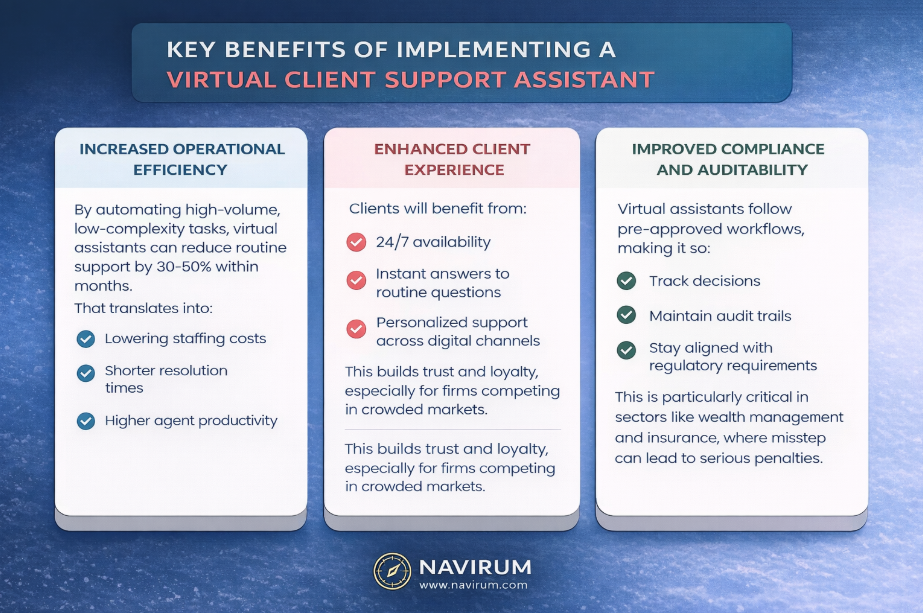
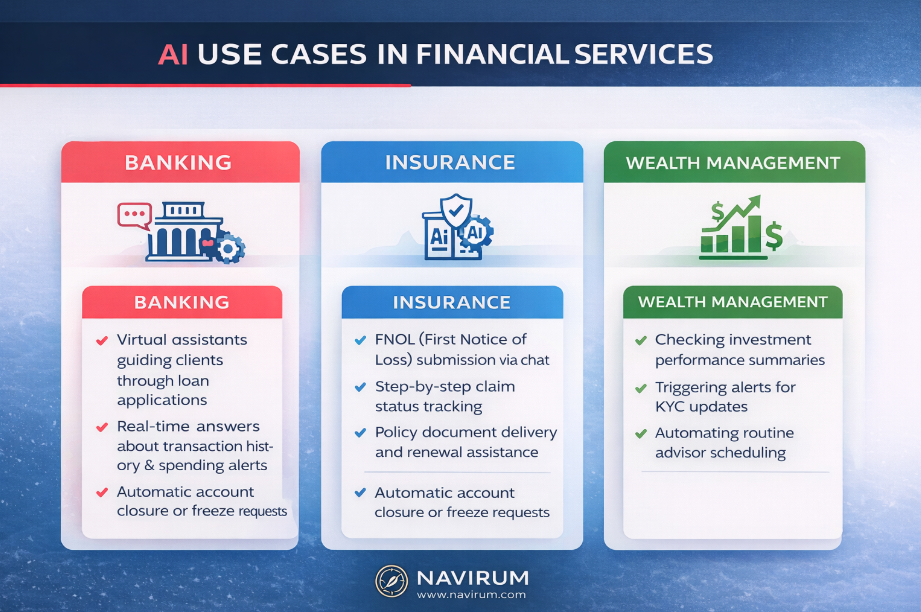
Building a virtual assistant with Salesforce Agentforce requires integrating Data Cloud for real-time grounding and Flow for action execution. By leveraging Navirum’s proven implementation framework, financial firms can automate up to 40% of routine client inquiries while maintaining strict compliance standards and data security
The solution? Intelligent virtual client support assistants powered by Agentforce and Salesforce technology.
Listen to our Deep Dive here:
Building AI Client Support with Agentforce, CRM, and Data Cloud
Why Financial Services Firms Need Virtual Client Assistants?
Clients no longer tolerate long wait times or generic responses. Whether they’re checking on a claim, updating an address, or asking about transaction limits, they want:
Meanwhile, support teams face growing caseloads and rising pressure to reduce operating costs without compromising service quality. AI-driven assistants solve both sides of this equation by delivering seamless, self-service support for routine inquiries—freeing up human agents for more complex, high-value interactions.
What is the integrated technology stack required for an autonomous Salesforce AI Agent?
To get started with Agentforce, you need a solid Salesforce CRM foundation, Data Cloud, which acts as your company’s ‘center of meaning’ and knowledge base, and the appropriate Agentforce licenses. While the benefits are transformative, navigating the Salesforce stack requires understanding how these layers connect
1. Why is Salesforce CRM the essential for Agentforce success?
At the heart of your virtual assistant is your Salesforce Customer Relationship Management (CRM) platform. This is where all your structured client data lives – accounts, service history, communication logs, case records, and more.
But the effectiveness of your assistant depends heavily on data quality. The CRM must be:
Well-organized: Clean field structures, accurate records, and no duplicates
Integrated: Connected to other enterprise systems like policy management, loan origination, or investment platforms
Actionable: Designed with automation and workflows in mind
For example, if a wealth management client contacts the assistant to check the status of a portfolio transfer, your Salesforce CRM must already have a standardized process in place—so the assistant can reference accurate case data and provide a real-time update.
Context-aware: They draw on CRM data to personalize every interaction
Process-oriented: Capable of managing multi-step service flows (e.g., onboarding, loan servicing, address updates)
Trainable: They learn from past interactions and continuously improve over time
For example, in an insurance context, an Agentforce-powered assistant could walk a client through a claims process by gathering documentation, submitting the claim, and updating the client on its progress – without a single phone call.
Agentforce also allows for omni-channel support – your assistant can interact via web chat, SMS, or in-app messaging, offering a consistent experience across platforms.
Agentforce Credit Union Success Story – PenFed Unlocks a Competitive Advantage with Agentforce
Salesforce Data Cloud brings intelligence and context to your virtual assistant by unifying data across systems in real time.
While Salesforce CRM holds structured client records, Data Cloud:
Ingests real-time data from core banking systems, marketing platforms, compliance tools, and third-party APIs
Creates unified client profiles using identity resolution and data harmonization
Enables intelligent automation by identifying triggers and behavioral patterns
This means your virtual assistant doesn’t just “respond”—it can predict, personalize, and proactively assist.
Imagine a client logging into your mobile banking app to ask about recent overdraft fees. Data Cloud can analyze their account behavior, detect an unusual pattern, and trigger a tailored response such as waiving the fee or offering a low-balance alert subscription—all before the client even finishes typing.
Agents and Agentforce – Key benefits
What Are The Steps To Build An Agent Solution?
Before diving in, we recommend financial services firms focus on three critical success factors:
1. Data Structure and Hygiene
Ensure your Salesforce CRM is clean, accurate, and integrated. Since poor data quality leads to incorrect responses and undermines user trust, a well-maintained CRM is your most critical asset. Success with Agentforce requires a foundation of enriched, up-to-date data that you can rely on; it isn’t just a preference – it is a prerequisite
Document your common support journeys to identify automation opportunities, human handoff points, and success metrics. Think of Agentforce agents as digital employees: to operate effectively, they must understand your company’s unique workflows. Defining these processes and making them accessible – whether through your Knowledge Base or AI policies – is a critical investment. These documented processes are the ‘roads’ your agents will travel to deliver consistent results
To ensure your AI operates within the bounds of GDPR, FINRA, and local banking standards, you need a proactive framework. Collaborate with legal teams and Agentforce specialists like Navirum to establish a comprehensive AI policy
Why Choose Navirum for Your Agentforce Implementation?
At Navirum, we don’t just implement Salesforce – we design intelligent, compliant, and future-ready Agentforce solutions tailored for the unique demands of financial services.
With deep expertise across banking, insurance, and investment management, we know how to translate your processes and regulations into scalable AI-powered workflows.
How do virtual client assistants built on Agentforce differ fundamentally from traditional chatbots?
Unlike rule-based chatbots, Agentforce-powered assistants are context-aware and process-driven. They can orchestrate multi-step workflows, reference structured client data from Salesforce Financial Services Cloud, and adapt interactions dynamically, delivering personalized guidance while adhering to regulatory compliance. This enables advisors to maintain high-touch relationships without sacrificing scalability.
In what ways does Salesforce CRM enable these virtual assistants to provide trusted financial guidance?
Salesforce CRM centralizes client profiles, account histories, and household relationships. Virtual assistants leverage this data to generate real-time responses, ensure consistency across channels, and escalate complex cases with complete context, thereby minimizing errors and reinforcing client trust.
How does Salesforce Data Cloud enhance predictive support capabilities?
Data Cloud unifies structured and unstructured client data from multiple sources, harmonizing it in real time. Its like giant knowledge base for your firm. It allows agents to understand the meaning of your firms data. This allows assistants to anticipate client needs, personalize recommendations, and trigger proactive alerts—transforming support interactions into predictive, high-value engagements rather than reactive responses.
How Do Wealth Manager Use Agentforce?
Advisor and wealth management use cases are unique. To find out more you can dive into these 5 scenarios here
Why is now the strategic moment for financial firms to invest in virtual client assistants?
Clients increasingly demand instant, 24/7, personalized service, while firms face operational cost pressures and compliance challenges. Virtual assistants offer a scalable solution, freeing human teams to focus on high-value advisory tasks while ensuring consistent, auditable support across touchpoints.
What are the critical data prerequisites for building a high-performing virtual assistant?
Success requires clean, normalized, and integrated CRM and external data. Redundant, incomplete, or siloed information can lead to incorrect guidance, compliance risk, and eroded client trust. Firms must also implement ongoing data quality monitoring and governance frameworks.
How should firms map workflows for automation without disrupting human-led processes?
Workflow mapping must identify end-to-end client journeys, pinpoint repetitive tasks, and define handoffs where human intervention is essential. This ensures the assistant augments rather than replaces human advisors, enabling efficiency gains without compromising service quality or regulatory adherence.
What governance and compliance measures are essential for AI-driven support in financial services?
Regulatory oversight includes role-based access control, logging every interaction, validating AI recommendations against compliance rules, and conducting periodic audits. Assistants should operate within defined limits to ensure risk exposure is controlled while maintaining a fully auditable trail.
How do virtual assistants contribute to advisor productivity and client retention?
By automating routine inquiries, scheduling, and alerts, assistants allow advisors to focus on strategic engagement. They can surface cross-sell or upsell opportunities based on predictive analytics and maintain proactive outreach, directly impacting client satisfaction and long-term retention.
Can these assistants support multi-channel, high-volume client interactions without losing personalization?
Yes. Agentforce-powered assistants integrate with email, chat, voice, and portal platforms while maintaining a unified client profile. They remember prior interactions, personalize content dynamically, and escalate only the complex or sensitive cases, preserving human attention where it matters most.
How can firms measure the ROI and effectiveness of a virtual client assistant?
Tracking these KPIs ensures firms optimize performance, refine workflows, and quantify the assistant’s strategic impact. Ongoing platform support is what keeps those KPIs trending the right direction.
Agentforce is Salesforce’s next-generation AI platform, seamlessly built into Financial Services Cloud. It empowers financial firms to reduce administrative work, boost productivity, and enhance client engagement across advisory, service, and operations teams. Whether you’re managing a book of business, handling service inquiries, or preparing for client meetings – Agentforce helps you do it faster and smarter.
Leading financial companies using Agentforce
With Agentforce, teams can generate instant client summaries, automate meeting notes, draft compliant follow-ups, and resolve service cases more efficiently. These features are already driving measurable results across the industry. Just ask Prudential, RBC Wealth, AAA and many more -by using Agentforce to streamline activity capture, they’re freeing up hours each week for more meaningful client interactions.
Industry leading actions transform the experience
Rolling out Agentforce is fast and simple. Within two weeks, most firms are live with core use cases like email drafting, workflow suggestions, and AI-generated meeting prep. With Salesforce’s newAgentforce 3 release, clients benefit from greater transparency, AI governance, and over 100 prebuilt financial services actions ready to use out of the box.
How to Use AI and Financial Services Cloud
At Navirum, we specialize in bringing AI to life within your Salesforce ecosystem. Our team combines deep industry and regulatory expertise with a practical, realistic approach to solution delivery. From boutique family offices to some of the world’s largest financial institutions, we’ve helped firms deploy Salesforce AI quickly and effectively—always with a strong focus on compliance, client value, and long-term ROI.
Scale your financial firm and reduce costs with Agentforce
Salesforce’s strategy has completely shifted over the past 18 months. The company now has its eyes fixed on a post-CRM world – one where smart agents, AI, and industry-specific solutions dominate the enterprise landscape. It’s a world where AI moves beyond insights to deliver real outcomes, and where software evolves into intelligent agents that drive entire business functions. This is the future, and it’s exactly what we’re passionate about at Navirum.
So if you’re considering a quickstart or a proof of concept for Agentforce, we’d love to talk. We recommend an education based approach – crawl, walk, run with this cutting edge technology. Whether it’s a small scoped pilot or a full multi-team rollout, Navirum has the methodology, Salesforce experience, and resources to help you succeed.
Agentforce Implementation FAQs
What is Agentforce and how does it relate to Salesforce Financial Services Cloud?
Agentforce is Salesforce’s next-generation AI platform, embedded directly into Financial Services Cloud. It helps firms reduce administrative tasks, increase productivity, and deliver smarter, compliant client service.
Is Salesforce new to AI?
No. Salesforce has been investing in AI for over 20 years – from early machine learning models to the first wave of large language models. Along the way, it has inspired entrepreneurs such as Bret Taylor (founder of Sierra)and the team behind You.com. Today, Salesforce remains at the forefront of the AI revolution, bringing trusted AI directly into Financial Services Cloud through Agentforce.
Is Agentforce actually popular?
Yes. Agentforce and Data Cloud are Salesforce’s fastest-growing product lines. According to Salesforce’s 2025 financial results, these AI and data-driven solutions delivered over 100% year -over-year growth in recurring revenue – proof that adoption is accelerating across industries and financial services firms in particular. Source: Salesforce Investor Relations
Does Agentforce integrate with other AI apps?
Yes. Salesforce Agentforce is designed as a building-block AI platform – a bit like how CRM became the foundation of client engagement in the past. Firms can integrate it with popular AI-powered tools such as Jump, Vinton, Otter, and Firefly. These integrations extend productivity and compliance use cases across meetings, note-taking, and collaboration. Learn more in our guide on AI meeting assistants for financial firms.
How quickly can my firm get started with Agentforce?
Most firms are live within two weeks on core use cases like automated meeting prep, compliant email drafting, workflow suggestions, and service case resolution. Navirum’s Quickstart makes adoption fast, practical, and compliant.
What types of teams benefit most from Agentforce?
Advisory, service, and operations teams all see measurable gains. Advisors save time on admin, service reps resolve cases faster, and operations staff automate repetitive work – freeing up hours every week for higher-value client interactions.
What are some real-world results from firms using Agentforce?
Financial leaders such as Prudential, RBC Wealth, and AAA report that automating summaries, notes, and follow-ups with Agentforce frees up significant time each week – time that can be reinvested into growing relationships and client value.
How does Agentforce ensure compliance in financial services?
Agentforce 3 provides AI governance, transparency, and over100 prebuilt financial services actions designed with compliance in mind. Navirum also tailors deployments to meet industry-specific regulatory requirements.
Does Navirum offer a pilot or proof of concept before a full rollout?
Yes. We recommend a phased “crawl, walk, run” approach – starting with a scoped pilotto prove value, then expanding to a full rollout as confidence and ROI build.
How does Navirum’s Quickstart differ from going direct with Salesforce?
Navirum combines Salesforce expertise with deep financial services and regulatory knowledge. We focus on delivering compliant, high-value solutions aligned with your firm’s unique workflows, not just technology deployment. See how that same ongoing-partnership philosophy plays out on the Orbit managed services page.
What specific tasks can Agentforce automate today?
Key use cases include instant client summaries, automated meeting notes, compliant follow-ups, AI-powered meeting prep, workflow recommendations, and faster service case resolution.
How is Salesforce’s strategy shifting with Agentforce?
Salesforce is moving beyond traditional CRM into an AI-powered, agent-driven future. Agentforce represents this shift – where intelligent software doesn’t just provide insights but delivers real business outcomes at scale. Salesforce is being rolled out heavily in Salesforce. Founder and CEO Marc Benioff announced 5000 jobs were cutin 2025 using the technology
“I would highly recommend that organized and focused project managers work with Navirum for their CRM transition projects.” – Shelby Murphy, Chief Marketing Officer, Main Management
Agentforce Is Changing the Game for Wealth Managers
In today’s fast-evolving wealth management industry, efficiency, personalization, and trust are essential. Salesforce’s Agentforce, now supercharged by Google Gemini, is helping wealth management firms scale like never before by automating manual work, improving advisor productivity, and delivering smarter, AI-powered client interactions.
With the recent expansion of Salesforce’s partnership with Google, Agentforce now integrates real-time capabilities, generative AI, and multi-cloud deployment that elevate both performance and trust. The partnership gives wealth managers access to advanced, secure, and customizable tools to support an “agentic strategy”- one built around openness, trust, and choice.
Let’s explore five key ways wealth managers can use Agentforce to scale their business in this new AI-powered era.
Automate Repetitive Tasks and Free Up Advisor Time
Agentforce is already helping firms eliminate repetitive, entry-level tasks like:
Data entry
Word processing
Paperwork creation
Scheduling
By automating these functions, wealth management advisors can shift focus from admin-heavy routines to high-value client engagement. This operational efficiency leads to better service and increased scalability—without needing to grow headcount proportionally.
Real-Time Decision-Making with Google Search + Agentforce
With real-time access to Google Search embedded into Agentforce, wealth managers can now deliver answers, insights, and recommendations on the fly – directly within the Salesforce experience.
For wealth management firms, this means:
Instantly retrieving market or compliance information during client calls
Making better-informed investment decisions in real-time
Speeding up research time for advisors
In an industry where timing and accuracy matter, this integration allows for proactive decision-making at scale.
Leverage Gemini AI for Personalized Client Experiences
Salesforce + Google’s Gemini integration unlocks greater flexibility and personalization within Agentforce. With Gemini 1.5 Pro and future Gemini models, wealth managers can harness next-generation AI to:
Analyze vast client data sets to surface insights
Generate personalized recommendations and action plans
Power sophisticated client engagement workflows
This is the power of AI choice and openness. Businesses can integrate Gemini into Salesforce workflows and use multiple AI models simultaneously—including open-source options—to craft a unique strategy that reflects their brand, values, and client service model.
What is Agentforce Anyway?
Build a Trust-First AI Strategy on Google Cloud
Trust remains the cornerstone of financial services. That’s why Salesforce has deployed its Salesforce Platform, including Agentforce, on Google Cloud. For wealth management firms, this means:
World-class security and compliance
Multi-cloud flexibility
Data residency options to meet global regulations
Integrated governance tools for responsible AI use
Lastly, an incredible eco-system of AI ready apps to integrate with Agentforce. Check out this popular intelligent app comparison – Jump, Vinton, Zocks, Otter Pilot and others here.
The most forward-thinking wealth managers aren’t just using AI – they’re building agentic strategies. These strategies are defined by:
Openness – Integrating tools and models that suit your business needs
Trust – Securing customer data, ensuring privacy, and using AI responsibly
Choice – Giving firms the flexibility to pick the right AI models and platforms
Agentforce, enhanced by Gemini, allows firms to develop this kind of strategy today. Whether it’s through custom copilots for advisors or real-time workflow automation, Agentforce is the springboard to scalable, intelligent, and compliant growth.
The Future of Wealth Management Is Agentic
Agentforce, fueled by Salesforce and Google’s Gemini, is not just a productivity tool – it’s the backbone of an intelligent, scalable, and trustworthy wealth management operation. Whether your firm is looking to reduce costs, improve client satisfaction, or enable hyper-personalized advice at scale, now is the time to explore what Agentforce can do.
“Agentic” refers to software agents that can act on behalf of humans, not just analyze or predict. Unlike traditional automation (which follows predefined rules), agentic systems use AI to understand intent, reason through options, take actions, and continuously improve. In short: agentic = autonomous, context-aware, action-oriented.
What is an agent?
An agent is an AI-powered digital worker that can perform tasks, interact with systems, and make decisions without constant human input. In Salesforce’s context, agents run securely on the Einstein 1 platform, connecting to CRM data and business processes. They don’t just answer questions – they can update records, trigger workflows, and handle complex, multi-step tasks. Example: An agent could automatically onboard a new wealth-management client by collecting KYC documents, opening accounts, setting up compliance checks, and notifying the advisor when everything is ready.
How long has Salesforce been investing in AI?
Salesforce has been building toward AI for over a decade: 2014 – Initial investments in predictive analytics. 2016 – Launch of Einstein AI, embedded into CRM. 2023 – Introduction of Einstein GPT, bringing generative AI into workflows. 2024 – Rollout of Agentforce, expanding Salesforce AI from insights → conversation → autonomous action.
This long runway means Agentforce isn’t a bolt-on product – it’s the next stage of Salesforce’s AI journey.
What’s happening with Salesforce Einstein now that Agentforce is here?
Einstein isn’t going away — it’s evolving: – Einstein AI = predictive analytics inside Salesforce. – Einstein GPT = generative AI layer for natural conversations. – Agentforce = autonomous agents that act across Salesforce and external systems. Think of it as a stack: – Einstein AI predicts → Einstein GPT explains → Agentforce executes. – Together, they form Salesforce’s AI ecosystem for the next decade.
Why is it different for financial services firms using Agentforce
Because of compliance, security, and complexity. Agents must respect regulations (CIRO, OSFI, SEC, FINRA), protect sensitive data, and integrate across multiple custodians, portfolio systems, and feeds – all while maintaining client trust.
Why is it different for financial services firms using Agentforce
Because of compliance, security, and complexity. Agents must respect regulations (CIRO, OSFI, SEC, FINRA), protect sensitive data, and integrate across multiple custodians, portfolio systems, and feeds – all while maintaining client trust.
Will Agentforce replace the traditional Salesforce CRM?
No – Agentforce will not replace Salesforce CRM. Here’s the distinction: –Salesforce CRM is still the core system of record – where customer, financial, and compliance data lives. A fancy database basically! –Agentforce is a new layer on top of CRM that acts on that data. Agents automate tasks, follow workflows, and interact with clients or systems, but the CRM remains the foundation. – Think of it this way: CRM is the cockpit; Agentforce is the co-pilot that handles routine operations while you stay in control.
For financial services firms, this means your CRM remains central for governance, compliance, and audit trails, while Agentforce accelerates productivity and scale.
Keeping that governance layer solid over time is exactly what Orbit’s managed services are built for.
Whats the best approach to implement Agentforce in 2025, 26?
A proof of concept (POC) for Agentforce is a smart step way to begin. A POC is basically an Agentforce Quickstart with a bigger focus on strategic guidance and Agentforce education throughout. It validates business value, ensures compliance, tests integrations, and builds team trust & understanding before scaling. Start small with a high-impact workflow, define success metrics, and run 6–8 weeks to de-risk and prove measurable outcomes. Costs range from $5k to $150k for a POC depending on requirements.
I’m an asset manager, an ETF wholesaler, How can it help me?
Salesforce AI (Einstein and Agentforce) shifts asset management from reactive reporting to proactive targeting. Automated behavior mapping identifies sales opportunities and “Redemption Risk” alerts, enabling wholesalers to prevent outflows. To find out more, visit